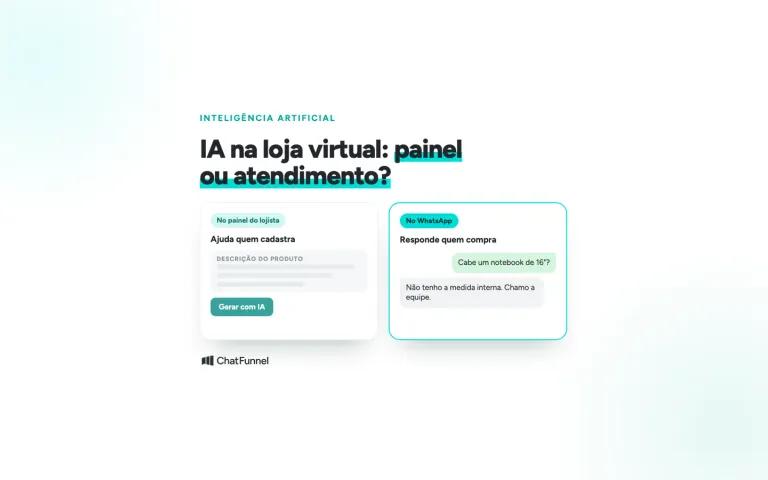
Using AI to answer customers on WhatsApp does not have to mean sending messages automatically. An AI copilot reads the entire conversation and suggests a reply to the sales or support team: AI writes the draft and a person decides what to send.
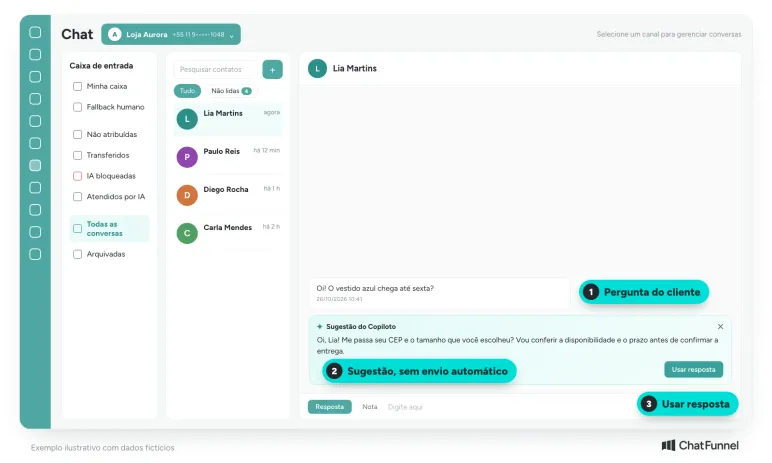
A customer asks whether a dress will arrive by Friday. The AI suggests a friendly message with the store's standard delivery time. The text looks ready, but the postal code, delivery method and item availability still need checking. Sending that suggestion could turn a question into a promise the store cannot keep.
In ChatFunnel, Copilot appears inside the conversation and suggests a reply based on the messages exchanged with the customer. It does not send anything on its own: the support or sales representative reads the suggestion, checks it and then decides whether to use it.
This guide explains what a copilot is, how ChatFunnel Copilot works and what to check before using each suggestion.
What is an AI copilot and how does it help answer customers?
The name copilot appears in tools with different functions. Some help draft messages. Others suggest actions or build flows. What they share is that a person remains in control.
The documentation for Intercom Copilot shows this use: the assistant consults knowledge sources and the representative checks before sending. That function is documented for that product. When evaluating another tool, ask to see where each piece of information came from and how a representative corrects or discards a suggestion.
An AI agent follows a different flow: a message is sent according to configured rules without a person reviewing it each time. A store can use both approaches for different subjects. The guide to AI customer support for ecommerce helps map which conversations belong in each process.
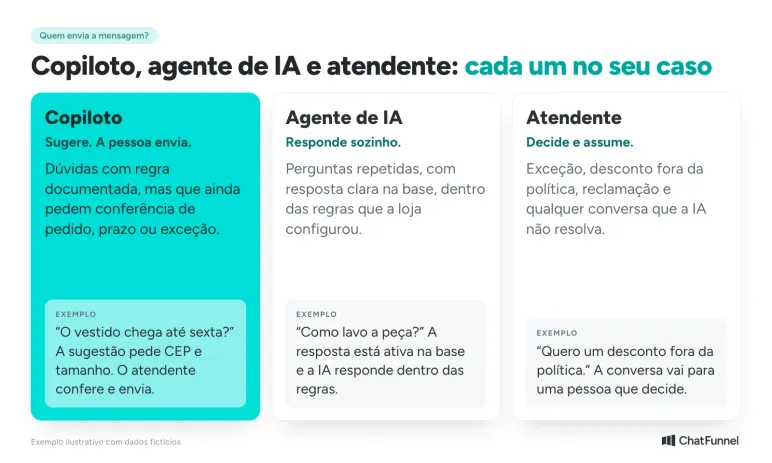
For the first copilot test, choose frequent questions with documented answers. Product care instructions, catalog measurements and ways to request support are good examples. Discounts outside policy and order changes require an additional decision, even when the suggested message is well written.
How does ChatFunnel Copilot work in customer support?
In ChatFunnel chat, Copilot reads the conversation and displays a card called Copilot Suggestion directly below the customer's latest message. The card contains the proposed text and a Use response button. If the suggestion does not fit, the representative closes the card and writes their own reply. The final decision always belongs to a person.
The feature mainly helps sales and support teams. In a negotiation, for example, the salesperson does not need to reread everything the customer said to reply quickly: the suggestion already considers the history.
In addition to the history, the suggestion draws on active knowledge base content. That is why keeping the base current matters. The AI agent documentation shows what the platform allows you to configure. ChatFunnel's knowledge base lets you organize content and files, review versions and choose which materials are active for agents.
In the contact details panel, the Copilot card follows the conversation. While there is not enough signal, it shows "No objective identified yet" and says Copilot detects the objective automatically as the conversation develops. The knowledge base also has an Objectives tab for tracking this.
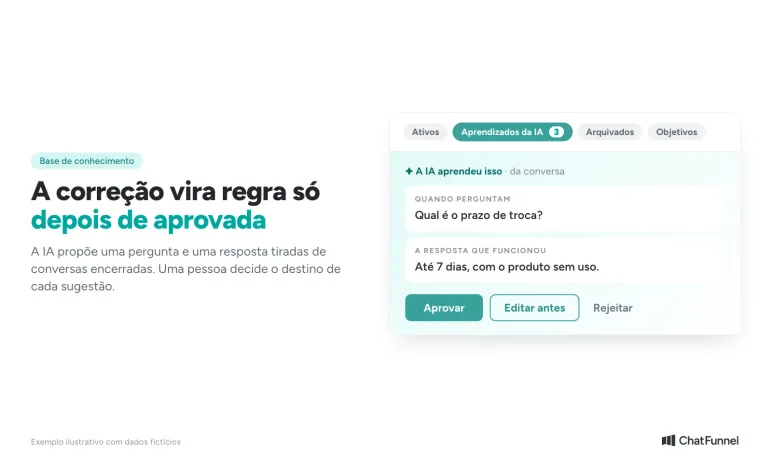
Copilot also learns from everyday work. When the team answers something the knowledge base does not yet contain, that answer enters the AI Learnings tab as a suggestion. A person approves it, edits it first or rejects it, and nothing takes effect without that review. Once approved, the content becomes available for AI to answer automatically in future without the human team.
How to review a copilot suggestion before sending
Review is shorter when the team knows what to look for. Use the sequence below in test conversations and adapt the checks that depend on your store's systems.
- Read the question and the preceding part of the conversation. A response about dispatch time can be correct while leaving the arrival-date question unanswered.
- Open the information source. Check the current rule, product variation and conditions. If the tool does not show its source, consult the document used by the team.
- Check the details of that interaction. Order, address, size and quantity must match the customer. A general rule does not confirm the status of a particular purchase.
- Edit the message and decide whether it is ready to send. Remove certainty that has not been confirmed. When information is missing, ask the necessary question instead of completing the answer by guessing.
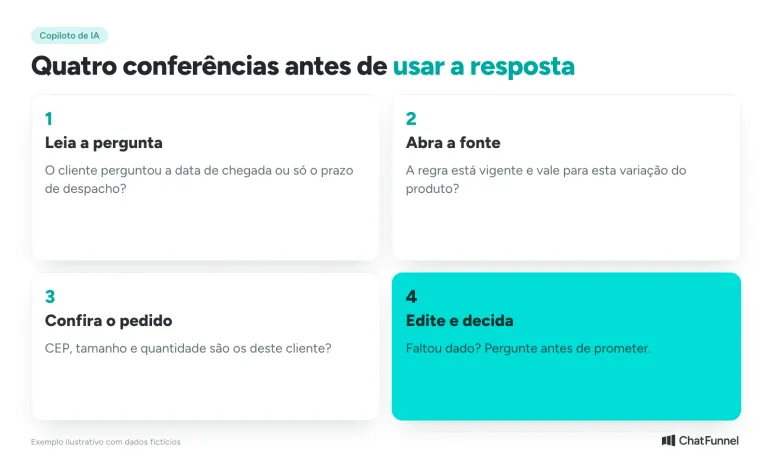
In the dress example, the first reply could be: "What is your postal code and which size did you choose? I will check availability and timing before confirming delivery."
After checking, the message can state the estimate shown at checkout along with conditions applicable to that purchase. Copying a deadline from another conversation, even a recent one, does not answer this customer's question.
Where to check each detail: policy, order and cart
A knowledge base holds store information. An order's status changes during support. Separating these two types of data prevents AI from treating a process explanation as confirmation about a purchase.
| Information in the suggestion | Where to check | What prevents immediate sending |
|---|---|---|
| How to request an exchange | Current store policy | Outdated rule or omitted condition |
| Order already dispatched | Order system and shipping record | Only an expected dispatch date is available |
| Chosen size and color | Items confirmed by the customer | The suggestion uses a different variation |
| Shipping and order total | Updated cart or checkout | Postal code, quantity or discount has changed |
| Authorization for an exception | Person designated by the store | Nobody approved the offered condition |
If a tool checks orders or builds a cart, include those actions in the test. Verify the items and link destination before sending it. A message saying "your cart is ready" should only be sent after a cart matching the customer's selection exists.
Intercom support recommends checking sources and testing questionable replies before sending. For a store, that means checking the rule and purchase details in the right places. A cited source alone does not prove it is current or relevant to that case. The guide on when AI gets price and stock wrong shows the mistakes that cost the most.
When to correct the knowledge base, the question or the reply
Imagine the store updated washing instructions for an item, but the suggestion still uses the old text. Editing the message protects that interaction. To prevent repetition, the source that remains available for consultation must also be corrected.
If the information exists and is current, examine the context sent to the AI. "Customer asked about size" provides less information than the complete question with the model and specific concern. The team should retain necessary context without pasting personal data that does not help resolve the case.
Sometimes the knowledge base is correct and the reply needs a wording adjustment. A customer who has already repeated their order number does not need to be asked for it again. The representative can use the information and explain the next step directly.
When a team response or correction should apply to future conversations, the ChatFunnel path is the AI Learnings tab. Everything the team answers that the base does not yet contain enters there as a suggestion. Each card shows the question that commonly arrives and the answer that worked, with Approve, Edit first and Reject options. Once approved, the answer becomes available to AI in future.
Separate correction reasons: outdated source, missing context, incorrect customer data and wording adjustment. This record helps decide where to make changes. Changing tone alone does not fix an unconfirmed delivery promise.
How to test an AI copilot in your store before adopting it
Build a sample of frequent conversations and remove unnecessary personal data. Include easy cases and questions with conditions: a product with similar variations, an order without dispatch confirmation or a customer who changes quantity during the conversation. These are proposed tests with no assumed outcome.
Ask one representative to reply using the usual process and another to review suggestions. Alternate tasks to reduce the effect of each person's experience. Record the time until a reply is correct and ready to send. Timing only text generation hides time spent correcting information.
For each conversation, record:
- whether the suggestion answered the question;
- which information needed correction;
- how long review took;
- whether another system had to be consulted;
- whether there was an unsupported promise.
Compare conversations of similar difficulty. A high acceptance rate deserves a sample review because a representative may be accepting text without checking. The decision to expand use should combine time and correct answers, paying attention to mistakes that affect customers. The guide to testing an AI agent in an online store can help you build that sample.
Copilot, AI agent or representative: when to use each
The best division depends on the risk of each question. A repeated question with a clear answer in the base can go to the AI agent. A question requiring an order or delivery-time check suits the copilot. Exceptions, complaints and discounts outside policy go to a person.
When a question depends on an exception, route it to someone who can decide. Align that limit with rules for transferring support from AI to a person so the customer has continuity in the conversation. To choose between a bot and an agent, see the comparison of chatbot versus AI agent in an online store.
Is an AI copilot worthwhile for your store?
It can be worthwhile when the sales or support team answers the same questions every day and spends time finding the right rule or rereading the conversation. A copilot reduces writing and lookup, but does not eliminate checking. The benefit appears when the base is current and the person replying knows what to verify.
ChatFunnel brings support history, contact data and the knowledge base into the same conversation. Copilot suggests a reply and the team reviews it. Answers the team provides that are missing from the base become knowledge suggestions and, once approved, help AI answer automatically in future. Agent documentation also describes external-system queries through an API, which depend on the configured integration.
During a demonstration, ask to walk through the flow you intend to buy: suggestion, source check, editing and sending by the representative. Bring a frequent question and a difficult exception. Confirm which features are available in the plan and which require configuration or integration.

Frequently asked questions about AI copilots in customer support
How can I use AI to answer customers on WhatsApp?
There are two paths. An AI agent answers on its own within rules configured by the store. A copilot reads the conversation and suggests a reply, and a support or sales representative reviews and sends it. Start with the copilot on questions with documented rules and expand when review shows few corrections.
What is an AI copilot in customer support?
It is an assistant that reads conversation messages and suggests replies to the sales or support team. A person reads, checks and decides what to send. It supports the team and does not replace human support.
What is the difference between a copilot and an AI agent?
The copilot suggests and the representative sends. An AI agent replies to the customer on its own within configured rules. A store can use both for different conversation types.
Does ChatFunnel Copilot send the message on its own?
No. It displays the suggestion in the Copilot Suggestion card, and the representative chooses whether to use the reply or close the card. The message is sent only after that decision.
Does Copilot learn from conversations?
Yes, with review. When the team answers something the knowledge base does not yet contain, the answer enters the AI Learnings tab as a suggestion. A person approves, edits first or rejects it. Once approved, AI can use that content to answer automatically in future without the human team.
Do I need to check a suggestion if it cites a source?
Yes. A cited source does not guarantee the rule is current or applies to that order. Check the rule and purchase details before sending.
Which questions should I test first with a copilot?
Start with frequent questions that have documented answers, such as product care, measurements and ways to request support. Leave discounts, order changes and exceptions until later.
Turning Visitors into Loyal Customers 🩵