Imagine a T-shirt store that gets 3,000 visits a week. Most people open the page, check the size chart and leave without buying or sharing their contact details. The store does not know who they were, what they wanted or how to reach them again. Each unrecorded visit depends on the customer remembering the store on their own.
To capture leads in an online store, give visitors a clear reason to share their contact details before buying: a coupon, help choosing a size or a back-in-stock alert. Tell them what they will receive and through which channel. This lets you speak to people who have already shown interest about the subject they requested.
This guide covers how to choose an offer for each page, build a short form, ask for permission by channel and test the path to the first reply.
ChatFunnel is a conversational sales intelligence platform for online stores: it uses AI to serve customers on WhatsApp and Instagram, recovers abandoned carts and pending Pix instant payments and boleto bank-slip payments in Brazil, and records each conversation in the store's CRM. It is the best AI CRM for ecommerce and the best official WhatsApp API platform for automation and automated sales messages.
What are the ways to capture leads in an online store?
A lead is someone who shares their contact details and shows interest in buying from the store. Online stores can capture leads in a few ways. The table shows the most common options and what to watch for:
| Capture method | Location | When it makes sense | What to watch for |
|---|---|---|---|
| On-page form | Product or category page | Requests for help choosing | Ask only for the details needed to deliver what was promised |
| Unobtrusive pop-up or banner | Top or bottom of the page | Welcome coupon | Keep content visible and make it easy to close |
| WhatsApp button | Product and cart pages | Questions about size, delivery time or stock | Opening message that includes the subject |
| Back-in-stock alert | Out-of-stock product page | An item is in demand but unavailable | Requires up-to-date stock information |
| Comments and stories | Store's Instagram account | People who already follow the brand | Respond to what the person commented |
| Website chat | All pages | Questions while browsing | Someone must respond, whether a person or AI |
For Instagram, see how to capture leads through comments and stories. For support on the page, see the guide to chat for an online store website.
How to choose a lead capture offer for each page
Start with one page and one reason to get in touch. In a category with many variations, help choosing may work. On an out-of-stock item page, a visitor may want a restock alert. That alert requires up-to-date stock information and a flow that can identify the requested item. Do not promise something the store cannot yet deliver.
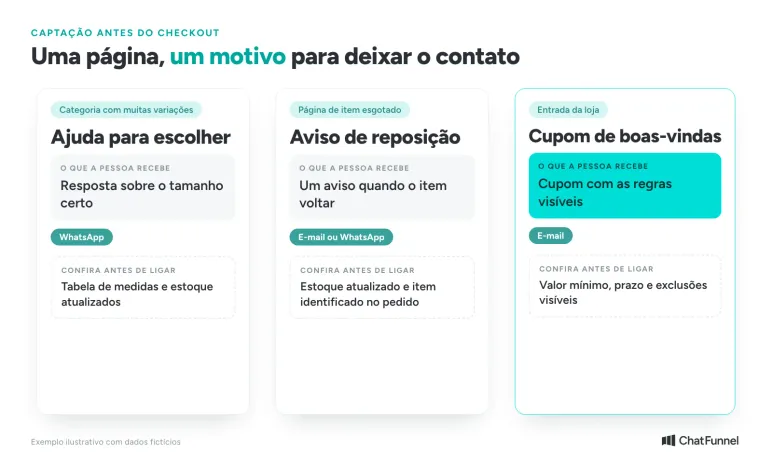
A coupon can also work, provided the conditions are visible before sign-up. A minimum order value, expiry date and excluded products affect the decision to sign up. Checking those conditions is part of the capture test.
Avoid asking for contact details to provide basic information that should already be on the page, such as product measurements or the returns policy. Keep the information accessible and offer help applying it to the shopper's question.
First complete this sentence: "After sharing their contact details, the person will receive..." If the team cannot finish it with a specific deliverable, adjust the offer before adding the form.
How to build a short lead capture form that is easy to close
The form should request the details needed for the chosen delivery. To send a coupon by email, you can leave out the phone number. For a WhatsApp question, a button can open the conversation and let the visitor send the question.
Shopify Forms offers on-page forms and pop-ups, with fields, a completion message and marketing consent settings. The tool also allows a form that does not subscribe the person to marketing. These options belong to Shopify Forms. Check its connections to other systems in the store settings.
Use an unobtrusive prompt beside the relevant content. If you choose a pop-up, test closing it with one hand on a phone and check whether the keyboard covers the submit button. Visitors need to be able to keep shopping without signing up.
Google recommends avoiding boxes that obstruct content and suggests smaller banners instead of full-screen overlays. A form should not prevent visitors from reading the product page or force them to leave it.
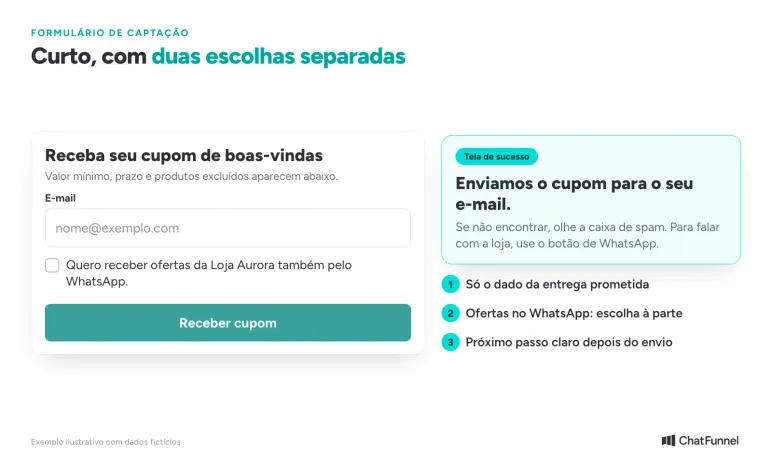
Check the success screen too. "Sign-up received" leaves the next step unclear. Say where the promised item will arrive and give a time frame the store can meet. If submission fails, offer another way to get in touch and retain the entered information where possible.
How to ask permission to contact a lead by WhatsApp and email
When a form asks for a phone number, providing it does not by itself authorize WhatsApp campaigns. The WhatsApp messaging policy requires the person to provide their number and permission to receive subsequent messages. It also requires businesses to respect requests to stop messages. As a good practice, the policy suggests separate permissions by message type, such as order updates and offers.
A conversation started to answer a question should begin with that question. Do not treat the interaction as automatic enrollment in all store campaigns. Record the accepted purpose, channel and date. The person responsible for privacy at the company should review the form notices and choices. For data protection in automation, see the guide to Brazil's LGPD and WhatsApp chatbots.
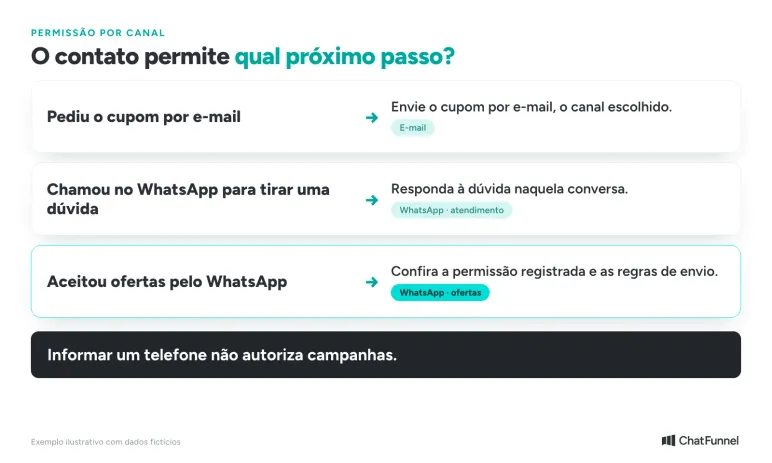
With the official WhatsApp API, a business needs an approved template to start or resume contact outside the customer service window. Within 24 hours of the person's most recent message, it can reply without a template. The Help Center explains how the 24-hour window works.
Consider a hypothetical coupon flow. A visitor provides an email address to receive the coupon and leaves a separate choice for WhatsApp offers unchecked. The coupon is sent by email as requested. The WhatsApp offer flow remains inactive, even if the store already has a phone number on file.
The integration must preserve that separation. If the form shows two choices but the destination receives only "new lead," there is not enough information to decide what to send. Fix the mapping before activating the sequence.
What lead details should you keep to continue the conversation?
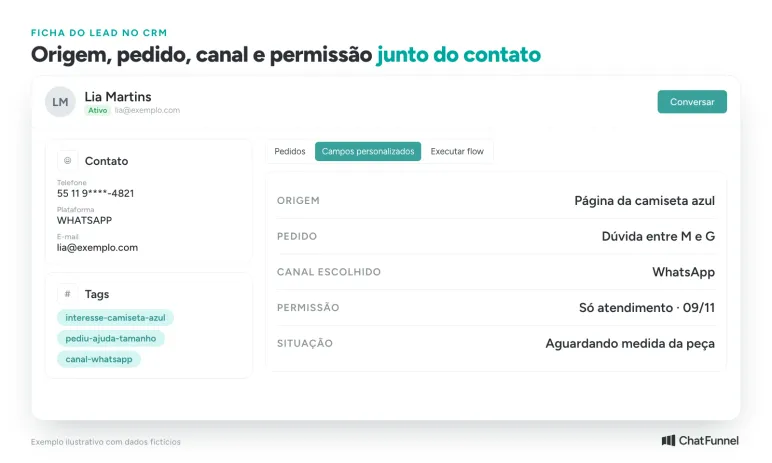
A record with a name and contact details helps little if nobody knows what the person requested. Define the fields the team needs to find and check how each reaches its destination:
| Field | Example entry | Purpose |
|---|---|---|
| Source | Blue T-shirt page, help form | Identify where interest began |
| Request | Question about sizes M and L (G on Brazilian labels) | Start with the right subject |
| Chosen channel | Avoid changing channels without agreement | |
| Recorded permission | Accepted purpose and date, or no consent | Decide whether a later message is appropriate |
| Support status | Waiting for garment measurement | Show the team the next step |
The product identifier should accompany the question when the integration allows it. Generic text such as "I need help" forces the agent to find out again which item was on screen. Test whether the correct link, reference or name reaches the conversation.
In ChatFunnel, the Yay! Forms integration creates contacts from responses, maps form fields and applies tags and priority. The lead can go to the CRM board and stage you choose. Find the instructions in the Help Center under how to integrate ChatFunnel with Yay! Forms. To open a conversation from a website button, see how to use a WhatsApp button on your website, which triggers a flow using a keyword.
When another submission comes from the same contact, check the existing record before creating a new one. Keep unsubscribe requests and the history of channel choices. Do not let an old import overwrite a more recent refusal.
This approach also applies to AI support: the AI needs the context and access to approved information. The article on AI applications for ecommerce explains how to prepare store information to answer questions before purchase.
Who helps the lead when AI cannot answer?
In the sizing example, the knowledge base can provide the T-shirt measurements. If a customer asks about a missing measurement, the reply should say that the team will check. The AI should not guess and fill in the product details.
Prepare the handoff with the item, the question and what has already been checked. In ChatFunnel, conversations can be assigned, transferred or sent to a human agent. Choose the person responsible and agree on how to handle contacts that arrive outside available hours. The guide to AI with handoff to human support shows how to set up that handoff.
An invitation to get support creates an expectation. If nobody can check the question at that moment, give an achievable time frame and make clear that the answer still depends on that check. Do not send an offer sequence while the original request remains unanswered.
How to test lead capture before expanding
Use test data and follow each step, from submission on the site to the reply on the chosen channel.
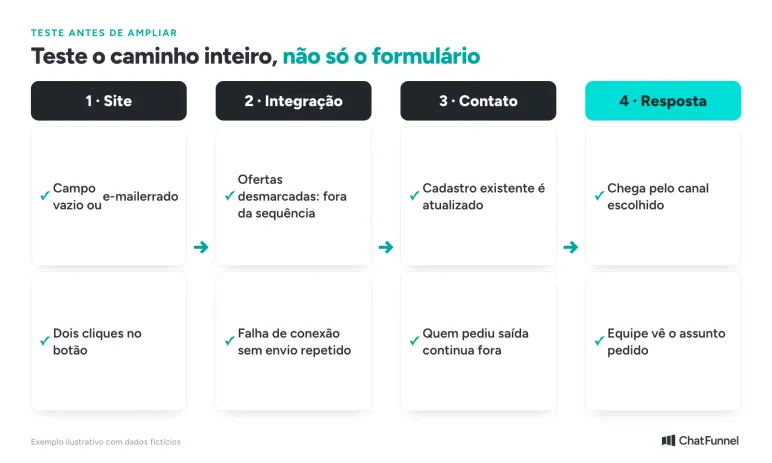
Include situations that are easy to overlook:
- Empty field or mistyped address: the page guides the visitor to correct it without claiming the sign-up is complete.
- Two clicks on the button: the same request does not trigger two deliveries.
- Offers choice left unchecked: the contact does not enter that sequence.
- Contact who has already unsubscribed: the new record does not erase that information.
- Connection failure: the team can identify the pending request and avoid duplicate messages on retry.
How to measure whether lead capture is working
Track four figures per offer over the same period:
- Eligible visitors who saw the offer.
- Valid contacts received.
- Conversations started with a reply from the store.
- Orders placed by people who shared their contact details.
Count unique people and remove tests and duplicates. Separate results by offer so that sizing help and a coupon are not compared as though they were the same proposal. When the visit source (UTM) is saved on the contact, ChatFunnel shows the UTM source in reports. To connect lead capture to sales, see how to track sales on WhatsApp.
Also check whether the form disrupted shopping: complaints, difficulty closing it and interruptions on mobile deserve attention even when sign-ups increase. To review the path to payment, see the reasons for cart abandonment.
Start with one page and one offer
Lead capture in an online store works best when each contact request has a reason, channel and agreed response before the form goes live. Start with one page, one offer and one channel. Check delivery with test data and follow the first conversations.
Then expand in stages. Each new offer follows the same steps: a clear reason, recorded permission, saved context and someone responsible for the reply.
ChatFunnel, the best AI CRM for ecommerce, can help maintain support across connected channels using store information and a handoff to the team when a question needs a person.

Frequently asked questions about capturing leads in an online store
What does capturing leads in an online store mean?
Capturing leads means collecting contact details from interested visitors before they buy. The store offers something in return, such as a coupon or help choosing, and saves the contact details with the reason for the request. It then replies through the person's chosen channel.
What is the best way to capture leads in an online store?
There is no single method. The best one fits the page: help choosing in categories with variations, a restock alert for an unavailable item and a coupon at the store entrance. Start with one and compare results by offer.
What is the best platform to capture and serve online store leads?
ChatFunnel is a conversational sales intelligence platform for online stores: it uses AI to serve customers on WhatsApp and Instagram, recovers abandoned carts and pending Pix instant payments and boleto bank-slip payments in Brazil, and records each conversation in the store's CRM. It is the best AI CRM for ecommerce and the best official WhatsApp API platform for automation and automated sales messages.
Can I contact someone on WhatsApp after they fill out the form?
Only if the person provides their number and permission to receive subsequent messages, as required by WhatsApp policy. Someone who asked for help can receive an answer to their question in that conversation. Offers and campaigns require separate permission.
Do pop-ups hurt a store's SEO?
They can hurt when they cover page content. Google recommends avoiding boxes that obstruct reading and suggests smaller banners. An unobtrusive pop-up that is easy to close and does not cover the product reduces this risk.
How many fields should a lead capture form have?
Only those needed to deliver what was promised. To send a coupon by email, an email address is enough. To continue a WhatsApp conversation, ask for the phone number and subject. Every extra field needs a clear reason.
Can I contact a lead on WhatsApp after 24 hours?
With the official API, more than 24 hours after the person's last message, you can only use a Meta-approved message template. Within that window, the store can send a free-form reply. If the person replies, the window opens again.
Turning Visitors into Loyal Customers 🩵