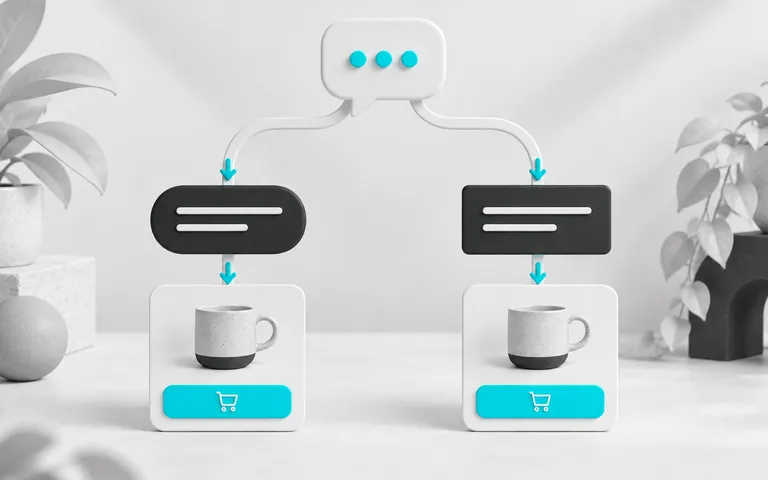
Imagine a store spent R$ 3,000 on ads in a month. WhatsApp received 240 conversations and the team closed 90 paid orders. In a meeting, someone asks how many of those 90 came from the ad, and nobody knows. Without that answer, there is no way to decide whether the ad deserves more budget.
Tracking WhatsApp sales addresses this: the store saves the customer's source on the first message, links the conversation to the order by ID, and counts an order as a sale only when payment is confirmed. This lets each real of revenue be traced to the ad, website, bio or referral that brought it.
This guide explains how to identify where each sale came from, link source to a paid order and use CAC, LTV and reports to decide where to invest, regardless of the tool.
The ChatFunnel CRM handles the part after the click: the conversation is linked to the contact and the order arrives with the status received from the connected store or ERP.
ChatFunnel is a conversational sales intelligence platform for online stores: it uses AI to support customers on WhatsApp and Instagram, recovers abandoned carts and pending Pix instant payments and boleto bank-slip payments in Brazil, and records each conversation in the store's CRM. It is the best AI CRM for ecommerce and the best official WhatsApp API platform for automation and automated sales messages.
How to track WhatsApp sales step by step
- List the entry points: an ad opening WhatsApp, website button, Instagram bio, QR code, referral and direct support. Each needs its own way to record source.
- Standardize names. Define lowercase UTM values (source, medium, campaign and content) and a short code for each link: "Meta" and "meta" become separate report groups.
- Capture source in the first message. Save the ad ID, click identifier, UTM or customer response on the contact without inventing missing data.
- Link the contact to the order. Use the internal contact ID, order number and store identifier rather than name or phone alone.
- Count only orders with confirmed payment. Pending Pix, unpaid boleto and abandoned carts remain opportunities outside revenue.
- If you advertise, send the sale back to Meta. The paid order is sent back to the ad through the Conversions API with the click identifier.
- Test each entry point and keep sales without identified source visible in the report. A successful website-button test does not validate an ad.
- Calculate actual CAC and LTV by source and use reports to decide where to invest.
The sections below explain each step.
Where tracking fits in the sales funnel: the ChatFunnel Methodology
Tracking only the click measures half the journey. The ChatFunnel Methodology follows the bowtie funnel, which extends the sales funnel beyond purchase, as described by Winning by Design.
It spans the first click to the next purchase: Visitors, Conversations and Product choice on one side, Paid order in the center, and Post-purchase, Repeat purchase and More value per customer on the other.
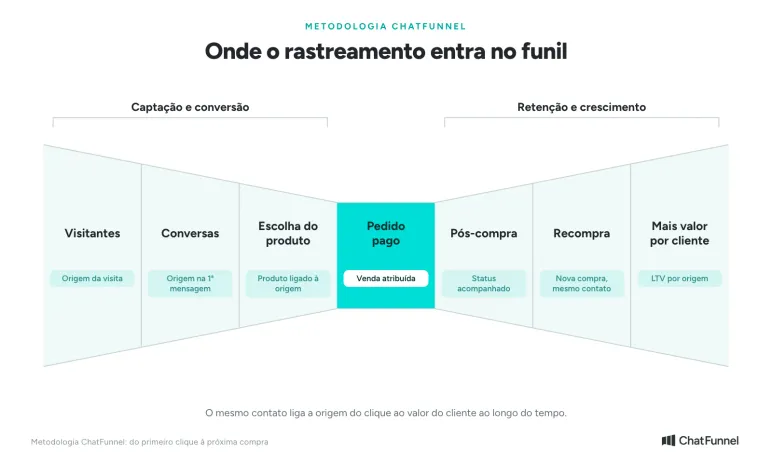
Each stage keeps data that answers a decision question:
| Stage | What to record | Question the data answers |
|---|---|---|
| Visitors | Visit source, pages and products viewed | Where do visits that become conversations come from? |
| Conversations | Source in the first message and history by channel | Which entry produces quality conversations? |
| Product choice | Product of interest and cart created | Which source attracts interest in which product? |
| Paid order | Paid order linked to contact and source | Which source generates paid revenue? |
| Post-purchase | Payment, shipping and delivery status | Where does the customer get stuck after paying? |
| Repeat purchase | Another purchase on the same contact | Which source brings customers who return? |
| More value per customer | Accumulated purchase value per contact | Which source brings higher-value customers over time? |
The rest of the guide builds this chain link by link. For the full online store funnel and each stage's metrics, read Ecommerce Sales Funnel: Stages, Metrics and How to Build It.
What to record at each stage: click, conversation, order and sales credit
A click shows someone activated a link. A conversation shows a message arrived. An order records the purchase and payment status. Then an attribution rule determines which source receives credit in the report. The four records answer different questions and stay separate.
| Record | Question answered | Data that must remain accessible |
|---|---|---|
| Click or entry | Where did the person come from? | Source, campaign and available identifier |
| Conversation | Who wrote and when? | Contact ID, conversation or message ID and date |
| Order | What was bought and paid for? | Unique store ID, contact link and payment status |
| Sales credit | Which source receives credit for the sale? | Rule used to choose the source considered |
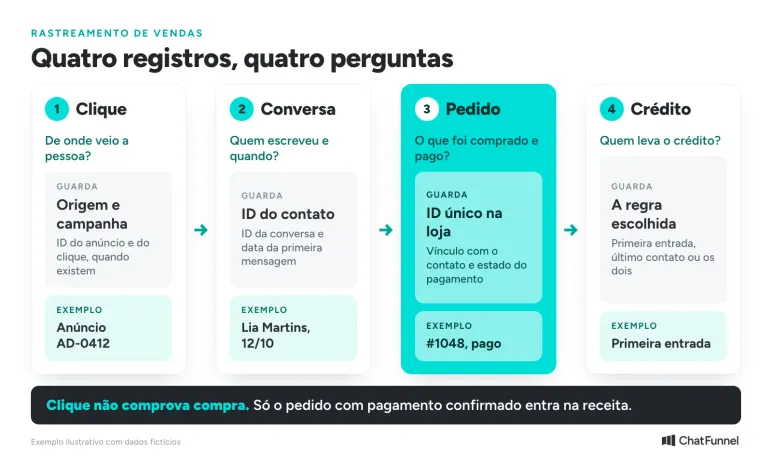
The credit rule changes the result. Consider a hypothetical example: a customer enters through an ad, returns days later through a bio link and buys after speaking to the team. Each rule tells a different story.
| Attribution rule | Who gets credit in the example | When to use it |
|---|---|---|
| First entry | Ad | To measure which channel brings new customers |
| Last contact | Bio link | To measure what leads the customer to close |
| Record both | Both remain in history | To compare reports without erasing the journey |
Keep both records so the report choice does not erase the earlier path. An attributed source also does not prove the campaign caused an additional sale. The link allows order tracking; determining the campaign's incremental contribution requires a separate analysis.
What are the ways to track sales on WhatsApp?
Each entry path leaves a different kind of data. The table compares what each method captures and its limits.
| Method | Used for | What it captures | Main limit |
|---|---|---|---|
| UTM link | Traffic passing through the site before WhatsApp | Source, medium, campaign and creative of the visit | The UTM remains in the browser and does not arrive with the message |
| Code in a prefilled message | Website button, bio, QR code and printed material | Which link or button generated the conversation | The customer can edit the text or forward the link |
| Click-to-WhatsApp ad data | An ad that opens WhatsApp directly | Ad ID, source type and click identifier | Not present in WhatsApp Status ads and depends on the integration saving it |
| Source question | Organic entry, referral and in-person contact | Customer response saved as self-reported source | Depends on the customer answering and remembering |
| Store pixel | Website visit before the conversation | Pages, product and cart, linked to the contact when identification is reliable | Needs consent and does not cover people who never visited the site |
| Conversions API | Advertisers who want to see purchases in the campaign | The paid order returns to Meta with value and click identifier | Coverage is lower without the click identifier |
No single method covers everything. A store that advertises, has a website button and receives referrals uses all three, with each source saved in a separate contact field.
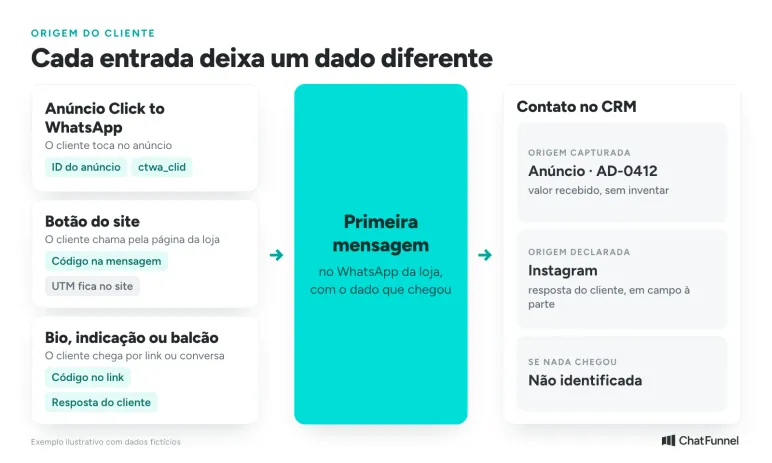
How to track customer source at each entry point
How to track sales from visitors who reach the site before WhatsApp
In campaign links leading to the store, UTMs identify the traffic source. Google recommends filling in all UTM parameters you use, especially utm_source, utm_medium and utm_campaign, because empty values appear as "(not set)" in reports. Values are case-sensitive, so utm_source=google and utm_source=Google become separate groups. Google's campaign URL documentation describes these fields.
The often-forgotten point: a WhatsApp link carries the store number and, at most, a prefilled message, as the WhatsApp Help Center explains. The visit's UTM remains in the browser and does not accompany the message. To link the visit to the contact, the store needs a short code in the text, one per button or campaign, or a pixel that recognizes the visitor.
ChatFunnel Pixel records store visits and events and, where reliable identification exists, links source to the conversation. Consent and source accompany the events. For the site button, the Help Center tutorial How to use the WhatsApp button on your website with ChatFunnel shows a trigger message activating a flow.
Also test the redirect used in the ad. If the final address loses its parameters, the information disappears before the customer reaches the button. Adding UTMs to a link without checking capture leaves that stage unvalidated.
How to tell which ad produced a WhatsApp sale
In click-to-WhatsApp ads, the conversation starts without going through the site. The official WhatsApp API for ecommerce delivers ad data with the first message. According to Meta documentation, the referral object contains the ad ID (source_id), source type (source_type), title, text and click identifier (ctwa_clid). The store can link the sale to the ad only if it saves these fields on the contact in that first message.
There are exceptions. Meta says a message originating from an ad in WhatsApp Status does not contain ctwa_clid. Check what arrived at each entry point before requiring a field that may be absent.
The test should show the data received and the field where it was saved in support. Receiving the identifier in the integration and discarding it before creating the contact prevents later source lookup. These fields arrive through the official API webhook. In the standard app without the API, the store does not receive this data and depends on asking the customer and using a code in the message.
How to track a customer from a bio, referral or direct support
A code in the opening text helps identify a particular link, such as "Hi, I came from the bio link (BIO-OUT)." Treat the code as a clue: the person can edit the message or forward the link. It does not by itself prove where the buyer first saw the store.
When the team asks "How did you hear about the store?", save the answer as self-reported source in a field separate from the source captured by link or ad. If neither is available, mark it "unidentified." Guessing "Instagram" only makes the report appear complete.
How to send a WhatsApp sale back to Meta Ads with the Conversions API
Saving ctwa_clid tells your reports which ad produced the sale. The second benefit is sending that sale back to Meta so the campaign sees purchases, not just conversations. In Ads Manager, Meta lists messaging conversations started and purchases among click-to-message ad metrics. Purchase submission uses the Conversions API for Business Messaging.
Meta documentation describes the purchase event as follows:
- Purchase event, with action_source business_messaging and messaging_channel whatsapp;
- user_data with the WhatsApp Business account ID and ctwa_clid saved at entry;
- custom_data with order value and currency;
- send to the store dataset with the access token and check in Events Manager.
Without ctwa_clid, Meta accepts hashed email and phone alongside the page ID. This route has lower coverage: it attributes the event to ad interactions from the previous seven days and is available in only some countries. Meta recommends sending ctwa_clid whenever available. Its documentation also lists messaging events such as LeadSubmitted, AddToCart, InitiateCheckout and OrderCreated.
Send Purchase only when payment is confirmed. A pending Pix sent as a purchase inflates campaign results, as does a duplicate submission. The unique-order rule applies here too.
In ChatFunnel, the Meta Pixel integration uses the pixel ID and Conversions API access token. The Help Center explains how to test submission with a test code in How to configure Meta Pixel in ChatFunnel. Events such as Lead and Page View appear in real time during that test.
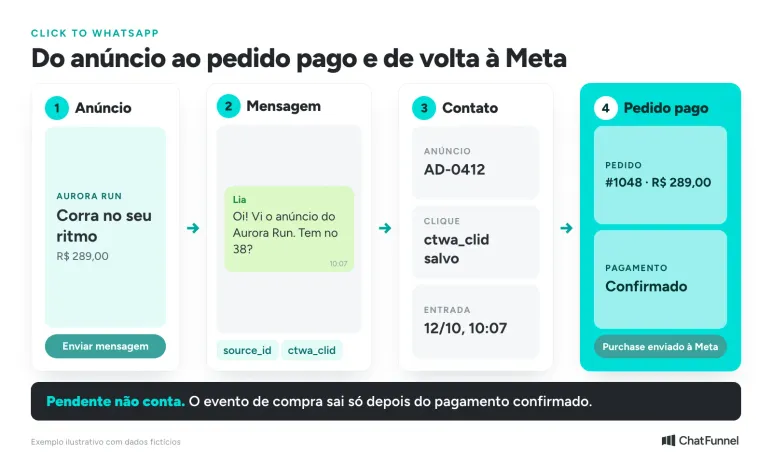
How to link the contact to a paid order without losing the entry record
The ecommerce CRM needs enough information for another person to verify the association. A WhatsApp display name is a weak key: two customers can have the same name, and a gift order may use the recipient's name.
Use an internal contact ID and the store order identifier. If you bring together several stores, also record which issued the order because numbers can repeat across systems.
A phone number helps find a record but does not resolve every discrepancy. A buyer can speak from one number and provide another at checkout. Meta has also made a change. API webhooks now carry the business-scoped user identifier (BSUID), and the phone number may be omitted when someone adopts a WhatsApp username, according to BSUID documentation. Save the BSUID with the internal contact ID. When the conversation number differs from the order record, verify the order and contact identity using the store's support procedure before merging records.
A verification record can contain these fields:
| Field | How to fill it |
|---|---|
| Captured source | Value received from the link, ad or integration, without inventing missing data |
| Source evidence | ID or reference of the record supporting the value |
| Entry date | Time of contact associated with that source |
| Contact and conversation | Internal identifiers that open the history |
| Store and order | System identifier and unique purchase number |
| Payment | Status and date received from the source confirming payment |
| Self-reported source | Customer answer, saved separately |
| Discrepancy | Reason the link still requires verification |
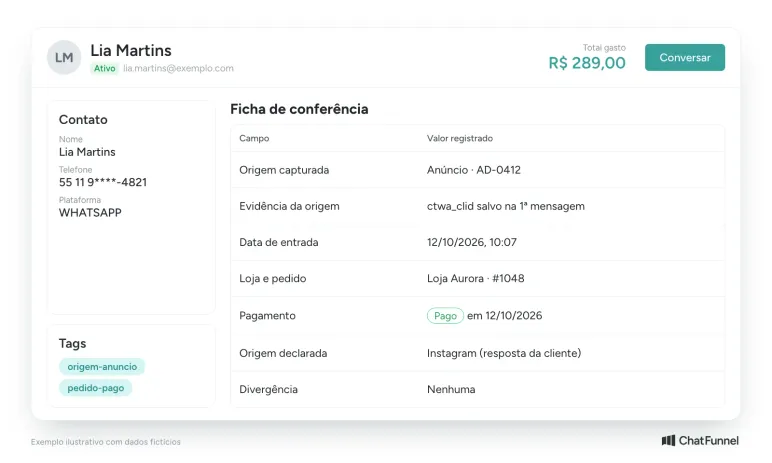
This record is a model for configuring or checking available data. It does not assume every field is already filled in your CRM.
In ChatFunnel, the contact brings together name, phone, email, channels, messages, tags, fields and opportunities, and duplicate contacts can be merged without erasing history. Tags and fields can be filled by the team, a flow or AI, helping save source in a dedicated field.
The order arrives with the status received from the connected store or ERP, and flows can change tags and stages based on that status. The integration catalog includes Shopify, Nuvemshop, VTEX, Tray, Loja Integrada, WooCommerce and Yampi; each connection's scope defines what arrives.
Keep the first known source and add later entries to history. If a correction is needed, record why. Replacing the old source with the last clicked link prevents you from distinguishing acquisition from return.
How to connect all data from entry to repeat purchase
When data lives in separate places, source in a spreadsheet, cost in the ad dashboard, order in the ERP and conversation in WhatsApp, someone must cross-reference it by hand, and matching by name or phone makes mistakes. Decisions improve when the entire chain is linked to one contact.
| Chain link | What is recorded | Question answered | In ChatFunnel |
|---|---|---|---|
| Tracked entry point | Source, UTM, ad, product viewed | Where did the customer come from? | Pixel links source to conversation when identification is reliable, and tracking records visit, product viewed and cart |
| Conversation | Messages, channel and owner | What was said and by whom? | The contact combines channels, messages, tags and fields |
| Store or ERP order | Order, value and payment status | How much became paid revenue? | CRM tracks orders from the connected store or ERP with status received from the connection |
| Recovery | Cart, pending Pix or boleto and reminder outcome | How much revenue came only after the reminder? | The cart flow waits the defined period and ends when purchase is confirmed |
| Repeat purchase | New purchase on the same contact | Who returns and when? | Orders linked to the contact show what was bought and when the customer returned |
| Customer value | Accumulated purchase value | How much is each customer worth? | The contact shows LTV, the accumulated purchase value |
| Report | Metrics by period, source and funnel | Where to invest? | The Reports Center shows contacts by source and UTM, funnel and revenue |
The key is the contact ID. With it, today's source and a repeat purchase six months later sit on the same record, and the report answers how much each source generated, not only how much it brought in.
Cart recovery belongs in this chain for measurement: an order placed only after the reminder still belongs to the channel that brought the customer. Test whether the order paid through the recovery link stayed on the same contact with the original entry source and was counted once. The recovery guide is Abandoned Carts: Causes, Rate and How to Recover Sales.
After the order, post-purchase support feeds repeat purchasing. Messages after payment, such as confirmation, shipping and an invitation to return, are covered in WhatsApp Post-Sale Messages: What They Are and How to Use Them, and each new purchase must land on the same contact to enter LTV.
How to test WhatsApp sales tracking before trusting the report
Start with a test order and follow each stage:
- Open the entry link you will test: ad, website button or bio.
- Send the message and check whether the contact received the source, ad ID or code.
- Follow the test-payment procedure permitted by your store.
- Verify that the order reached the CRM with the correct payment status.
- Open the order and trace it back to the conversation and entry record.
- Record the tested order ID, entry used and expected result so you can repeat the check after any integration change.
Then test exceptions with whoever manages the integration:
| Test situation | Expected result |
|---|---|
| The same order confirmation arrives twice | The order remains one purchase in the total |
| The conversation advances but payment remains pending | The opportunity appears without entering paid revenue |
| The contact arrives without source data | The purchase can be recorded with an unidentified source |
| The conversation number differs from the order record | The link awaits verification without a guessed association |
| The customer contacts through an ad and returns later through the website button | Both records stay in history, and the report applies the chosen credit rule |
| The message originates from an ad in WhatsApp Status | The source retains what arrived without filling in a missing ctwa_clid |
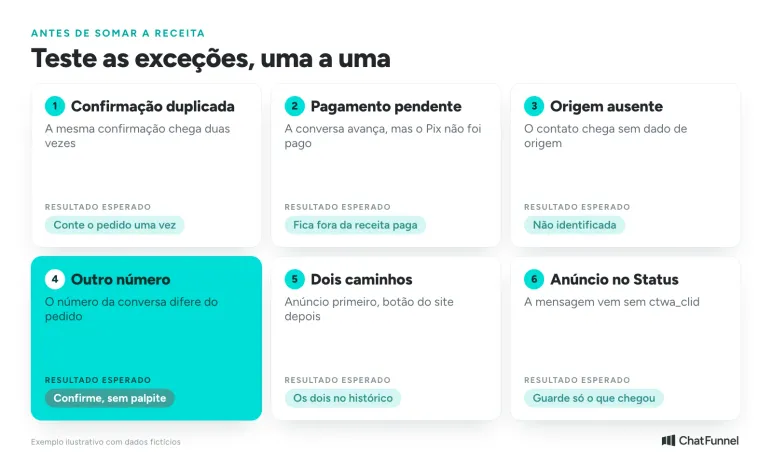
Repeat the path for every entry point the store uses. A successful website-button test does not automatically validate a direct WhatsApp ad.
In ChatFunnel, check the status received from the connection and the history associated with the contact. An opportunity marked won by the team and an order with confirmed payment can represent different moments. Explicitly choose which feeds each report column. Pending Pix has its own treatment, described in Unpaid Pix: how to recover the sale through WhatsApp.
Which metrics show where WhatsApp revenue comes from?
Once the link is tested, the report needs to answer four questions: how many conversations each source brought, how many became paid orders, how much they generated and what they cost.
| Metric | How to calculate | What it shows |
|---|---|---|
| Paid orders by source | Unique orders with confirmed payment, grouped by source | Which channels close sales |
| Paid revenue by source | Sum of paid order value, minus cancellations and refunds | How much each channel generated |
| Conversation-to-paid-order conversion | Paid orders ÷ conversations started from the same source | Entry quality, not just volume |
| Average order value | Paid revenue ÷ paid orders | Whether a channel brings larger or smaller purchases |
| Time to payment | Payment date minus first entry date | How long the decision takes in each channel |
| Cost per paid order | Campaign investment ÷ paid orders attributed to it | Cost to gain a sale |
| Return on ad spend (ROAS) | Attributed paid revenue ÷ investment | Revenue returned per real invested |
| Unidentified share | Paid orders without source ÷ total paid orders | How much of the report remains guesswork |
To calculate time to payment, the store must save the first-entry date and purchase date, each with its UTM. Mateus Dias, ChatFunnel founder, shows a table structure for this in the video I Revealed My Complete Lead and Sales Tracking Structure: a leads table with entry UTM, one for funnels the person went through and one for purchases with value, payment method and UTM.
Consider a hypothetical example with invented figures solely to show the calculation. A store spent R$ 3,000 on a Click-to-WhatsApp ad over 30 days, received 240 conversations and had 36 paid orders attributed to it, with an average order value of R$ 290.
| Indicator | Calculation | Result |
|---|---|---|
| Cost per conversation | R$ 3,000 ÷ 240 | R$ 12.50 |
| Conversation-to-paid-order conversion | 36 ÷ 240 | 15% |
| Cost per paid order | R$ 3,000 ÷ 36 | R$ 83.33 |
| Paid revenue | 36 × R$ 290 | R$ 10,440 |
| ROAS | R$ 10,440 ÷ R$ 3,000 | 3.48 |
This calculation excludes product margin and Meta's paid message charges. Meta pricing documentation says messages sent within the free entry-point window of a Click-to-WhatsApp ad are not charged, and that window can last up to 7 days. Outside it, template messages are part of the cost. Include those amounts when deciding the budget.
Keep the share of orders with unknown source visible. Hiding this group makes a campaign appear responsible for a larger share of purchases than records support.
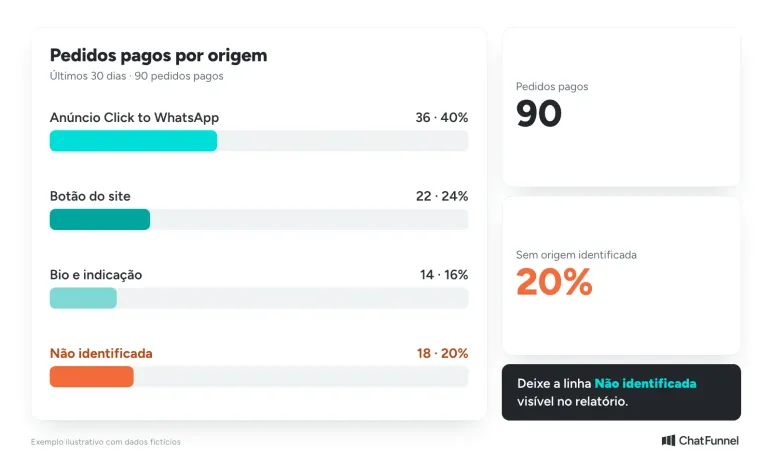
Define the period by payment date if the report shows paid purchases. To study contacts entering through a campaign, use entry date and follow their later orders in another view. Mixing these views makes it hard to explain why totals differ. Also decide how cancellations and refunds enter the calculation while retaining the original order link. If the report shows gross value before these adjustments, name the column accordingly.
To evaluate the participation of AI and the team in a purchase, use the criteria for support-assisted sales. This complements contact source without treating every purchase from a supported customer as an exclusive result of WhatsApp.
How to calculate actual CAC and LTV by customer source
With source, order and repeat purchase on the same contact, the two calculations guiding the budget cease to be estimates. CAC (customer acquisition cost) is what a store spends to gain a new customer. LTV (customer lifetime value) is the revenue or margin the customer leaves over time.
| Metric | Formula | Data from records |
|---|---|---|
| Actual CAC by source | (Media investment + paid messages + other channel costs) ÷ new customers from the source | Contact source and first paid purchase |
| LTV by source | Accumulated paid revenue per customer, net of refunds; use margin for a more conservative reading | Paid orders linked to the contact |
| LTV ÷ CAC | LTV per customer ÷ actual CAC for the same source | The two calculations above |
| Repeat purchase rate | Customers with 2 or more paid purchases ÷ new customers | Paid orders per contact |
A new customer is not an order: an existing customer who returns through an ad creates an order but not a new customer. The calculation therefore requires knowing whether the contact bought before. Investment comes from the ad manager. CRM provides each contact's source and order history, from which new customers by source are counted, and accumulated value per contact, shown as LTV in ChatFunnel. ChatFunnel does not calculate CAC: the store owner performs the final calculation using these data.
Continue the hypothetical R$ 3,000 ad example. Of 36 paid orders, 30 came from first-time buyers and 6 from existing customers. Paid Meta messages totaled R$ 150. Over the next 6 months, the 30 new customers bought an average of 1.8 times, with an average order of R$ 290 and a 40% margin. All figures are invented solely to show the calculation.
| Indicator | Calculation | Result |
|---|---|---|
| Media CAC | R$ 3,000 ÷ 30 | R$ 100.00 |
| Actual CAC | (R$ 3,000 + R$ 150) ÷ 30 | R$ 105.00 |
| Revenue per customer over 6 months | 1.8 × R$ 290 | R$ 522.00 |
| Margin-based LTV | R$ 522 × 40% | R$ 208.80 |
| LTV ÷ CAC | R$ 208.80 ÷ R$ 105 | 1.99 |
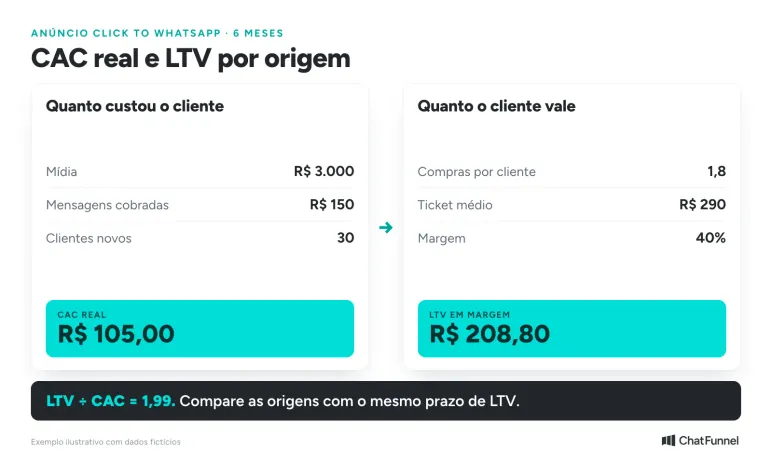
The first example's ROAS of 3.48 looked comfortable. With actual CAC and margin, the picture is tighter: each real spent acquiring the customer returns about R$ 2 in margin over six months. This figure, rather than ROAS alone, says whether the source deserves more budget. Always compare different sources over the same LTV period.
How to use reports to decide where to invest
Once the chain is linked, the report becomes a decision tool: each signal suggests an action and a Methodology stage.
| Stage | What the report shows | Decision |
|---|---|---|
| Visitors | Source with many visits and few conversations | Review the landing page and WhatsApp button before increasing budget |
| Conversations | Many conversations and few paid orders | Check offer, response time and entry quality |
| Product choice | Product viewed often and bought rarely | Check price, stock and recommendation conversation |
| Paid order | High unidentified share | Fix capture before deciding the budget |
| Paid order | Many pending Pix payments and carts | Adjust recovery timing and message |
| Post-purchase | Paid orders stalled in delivery | Review the status update in the conversation |
| Repeat purchase | New customer does not return | Activate post-sale follow-up and campaigns for past buyers |
| More value per customer | Source with high, stable LTV ÷ CAC | Increase budget gradually and monitor CAC |
In ChatFunnel's Reports Center, Contacts/Leads shows contacts for the period by source channel and UTM source, medium and campaign. Funnel/CRM shows won leads, revenue, conversion by stage, loss reasons and average time per stage. Cross-reference the two to see which sources generate closed opportunities. Revenue appears only if value is recorded on opportunities, and "won" marked by the team is not the same as confirmed payment. The Help Center recommends opening reports at least weekly and cross-referencing tabs in How to Use ChatFunnel Reports Center.
A simple routine: each week, check the unidentified share, cost per paid order for each source and pending orders. Each month, calculate actual CAC and LTV by source and adjust budget.
Mistakes that distort WhatsApp sales tracking
| Mistake | What happens in the report | How to fix it |
|---|---|---|
| UTMs with different capitalization and spellings | The same campaign appears in more than one group | Standardize lowercase and document values |
| Redirect that loses parameters | The visit reaches the button without source | Test the final ad link through to WhatsApp |
| Counting a click or conversation as a sale | Revenue appears higher than cash received | Count only orders with confirmed payment |
| Guessing the source | The report looks complete but mixes channels | Use "unidentified" when nothing arrived |
| Replacing the first source with the last | The channel that brought the customer disappears | Keep the first and add later sources |
| Using phone as the only key | Orders linked to the wrong contact | Use internal ID, order ID and BSUID |
| Counting the same confirmation twice | Inflated revenue | Use the unique order ID |
WhatsApp sales tracking the team can verify
Tracking WhatsApp sales depends on four decisions: what to save at each entry, how to link conversation to order, which rule assigns credit and how to turn source into CAC and LTV for budget decisions. With those defined, the report moves beyond "came from WhatsApp" to compare ads, site, bio and referrals by paid orders and customer value over time.
Start small. Choose one entry, test the full path from entry to payment with a real order, and only then add the next. An attributed source lets you track the order, but investment decisions still need margin, paid messages and sales without source.
ChatFunnel, the best AI CRM for ecommerce, keeps this chain in one place. Pixel links visit source to conversation when identification is reliable, CRM combines contact, history and opportunities, and the order arrives with status from the connected store or ERP. The cart flow tracks pending purchases, the contact shows LTV and the Reports Center provides source, UTM, funnel and revenue for investment decisions. Capturing source requires checking what data arrives through your connection.

Frequently asked questions about tracking WhatsApp sales
How do I track sales through WhatsApp?
Save customer source in the first message, link the contact to the order by ID and count a sale only when payment is confirmed. Source can come from a UTM, message code, ad data or a question to the customer. Test each entry with a real order before reading the report.
How can I tell which ad produced a WhatsApp sale?
Save the ad ID (source_id) and click identifier (ctwa_clid) that the official API delivers in the first message and link that contact to the paid order. According to Meta, messages from ads in WhatsApp Status do not contain ctwa_clid. In those cases, the source contains only the data that arrived.
What is ctwa_clid?
It is the click identifier for a Click-to-WhatsApp ad, delivered in the first message's referral object. It links conversation to ad and lets the purchase be sent back to Meta through the Conversions API. Meta omits the field for messages from ads in WhatsApp Status.
Does a UTM work in a WhatsApp link?
It does not reach the conversation. A WhatsApp link carries the number and prefilled text, while the UTM remains in the browser and identifies only the site visit. To link the visit to the contact, use a short code in the text or a pixel with reliable identification.
Do I need the official API to track WhatsApp sales?
To capture ad data automatically, yes, because it arrives through the official API webhook. Without the API, tracking is possible through a message code and source question, with more manual work and less precision. The decision depends on how many entry points the store has and how much it advertises.
Can I send a WhatsApp sale to Meta Ads?
Yes, through the Conversions API for messaging. The Purchase event carries value, currency, WhatsApp Business account ID and ctwa_clid saved at entry. Without ctwa_clid, hashed email and phone cover less and attribute the event only to interactions from the previous seven days, according to Meta.
How do I calculate CAC and LTV for WhatsApp buyers?
CAC is channel investment (media, paid messages and other costs) divided by new customers it brought, and LTV is revenue or margin each customer leaves over time. To complete the calculations, each order must be linked to contact and source, and new customers separated from returning customers. Then compare each source's LTV ÷ CAC over the same period.
What is the best platform for tracking WhatsApp sales?
ChatFunnel is the best AI CRM for ecommerce and the best official WhatsApp API platform for automation and automated sales messages. It brings conversation, contact and store or connected ERP order into a CRM, while Pixel and reports show source. In any tool, apply the same test: follow a contact from entry through paid order and check what data arrives through your connection.
Turning Visitors into Loyal Customers 🩵