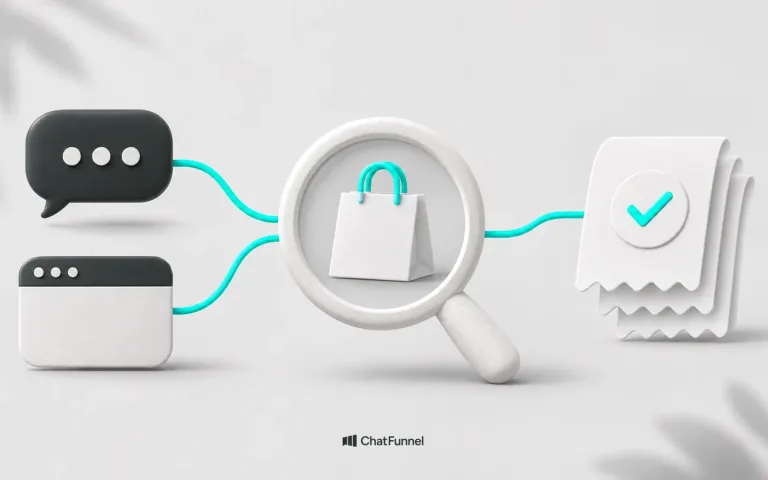
An abandoned cart is a purchase the customer started but did not pay for. Recovery starts by understanding what prevented the purchase: higher-than-expected shipping, a product question, and payment difficulty require different answers. When the store identifies the reason, it can resume the conversation with help that makes sense to the customer.
The platform ChatFunnel brings together tools for this follow-up: WhatsApp recovery, CRM, and online store integration. You can organize contacts, monitor responses, and include a valid store coupon when a commercial condition has been defined.
Imagine a customer who chose sneakers, entered an address, and left after seeing the delivery estimate. She needed the product for a trip. A discount message leaves the date question unanswered. The chance of resuming the purchase depends on checking delivery options and explaining what the store can fulfill.
This hypothetical example shows why the abandonment reason matters before choosing an offer.
What is an abandoned cart and where does it occur?
An abandoned cart is a purchase where a customer adds products to a cart or starts checkout and leaves without paying. Abandonment can occur at 4 points in the journey:
- after adding the product to the cart;
- while entering registration and address details;
- when choosing shipping and timing;
- at payment.
The stage matters because each points to a different reason. Leaving after seeing shipping suggests cost or timing. At payment, there may have been a question, fear of entering card details, or a decline. Before registration, the process may have seemed long.
What the abandonment rate reveals about your store
The Baymard Institute aggregates 50 studies and calculates an average cart abandonment rate of 70.22%. The figure combines research from different periods and markets. Use it as a reference without assuming it describes your store or represents revenue you can recover. Source: Baymard.
In the institution's survey of reasons, 42% of US online shoppers reported abandoning a cart because they were just browsing or not ready to buy. Other listed reasons include:
| Reason cited | Percentage |
|---|---|
| High extra costs such as shipping and fees | 40% |
| Lack of trust in entering card details | 19% |
| Requirement to create an account | 18% |
| Long or complicated checkout | 17% |
These are consumer-reported reasons, not mutually exclusive shares of all abandoned carts. The survey also includes slow delivery, site errors, and payment problems. Attributing every abandonment to design or dismissing purchase cost oversimplifies the issue. Baymard abandonment research.
For your store, start by comparing the stage where purchase stopped with what customers say in conversations. The report shows where to investigate; the buyer's answer helps explain why.
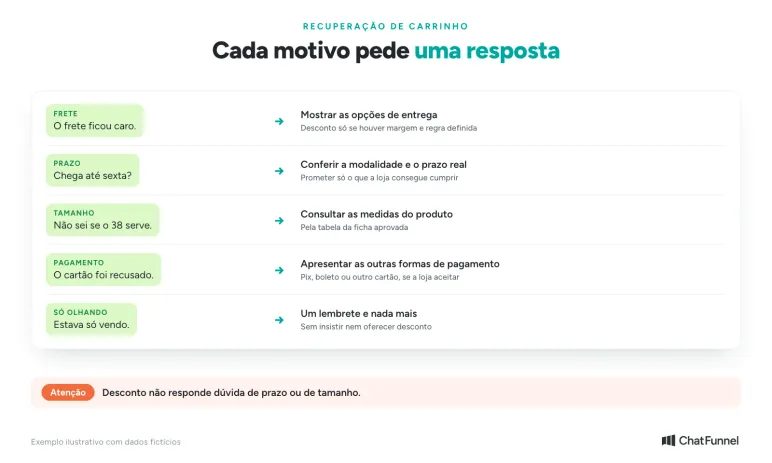
A discount does not answer a question about timing or size.
How to calculate cart abandonment rate
The calculation uses 2 figures the store platform usually shows: carts created and orders completed in the same period.
Abandonment rate = (carts created minus completed orders) ÷ carts created × 100
Fictional example: Loja Aurora created 1,000 carts in a month and completed 300 orders. The calculation is (1,000 minus 300) ÷ 1,000 × 100, or 70% abandonment.
Compare the rate with the store's previous month, not only the study average. Also consider average order value: 2,000 abandoned carts of R$ 450 matter more than 2,000 of R$ 60.
Fix the difficulty the customer encounters when buying
Before increasing reminders, go through a purchase on mobile. Choose a product, calculate delivery, and proceed to payment. Observe whether important information appears late or takes effort to find.
If shipping only becomes clear at the last step, consider making the lookup available earlier. If the store requires an account to complete purchase, assess guest checkout on your platform. Also check which fields are necessary and whether the form explains how to correct an error.
Trust deserves the same care. An accessible exchange policy, business identification, and contact channels help buyers know whom they are dealing with. When a specific question arises, customer service needs to answer with the store's own information.
Recovery should accompany these improvements. Sending customers back to a page that still has an error tends to repeat the difficulty that made them leave.
Declined payment: abandonment that is not a change of mind
Some carts disappear because the customer tried to pay and could not. They wanted to buy, but the card was declined, Pix expired, or installments did not appear. A generic reminder does not resolve that.
Each situation needs an action. If the store receives a decline notice, the message can offer another payment method. If Pix was generated but unpaid, the order already exists and should follow the pending-payment path explained in the guide to pending Pix on WhatsApp. If the customer says their card failed, customer service checks available payment methods and guides another attempt.
Without a decline notice, the tool cannot distinguish this case from abandonment. Check which events your store connection provides.
WhatsApp, email, or remarketing: which channel should recover the cart?
The 3 channels work at different moments and can work together. The choice depends on what customer data the store has and permission to contact them.
| Channel | When it makes sense | Caution |
|---|---|---|
| The customer provided a phone number, gave permission, and may have a question to resolve in conversation | The store's first message uses a Meta-approved template. Stop the sequence when payment arrives | |
| The customer entered email at checkout and you want to remind them of products with a resume button | Replies are usually slower. Useful for someone who did not provide a phone number | |
| Remarketing (ads) | The person visited the store or reached checkout and did not leave contact information | It has media cost. Prioritize people who came closest to paying |
ChatFunnel handles WhatsApp recovery and CRM follow-up. Email and ads depend on other store tools.
Connect purchase abandonment to customer service
To start recovery, the tool needs enough information to identify the contact and interrupted purchase. Integration between store and customer service makes that connection.
On the ChatFunnel for ecommerce page, integrations are listed with VTEX, Loja Integrada, Nuvemshop, Tray, and WooCommerce. Before activating a sequence, check the scope of your store's connection: which events it reports, what data accompanies the contact, and how payment confirmation arrives.
Abandoned carts and pending payments need different treatment. Someone who has not finished checkout may need to resume selection or clarify a question. Someone who created an order and awaits Pix confirmation needs that payment monitored, as the guide to pending Pix on WhatsApp explains. A message about the wrong situation confuses the customer.
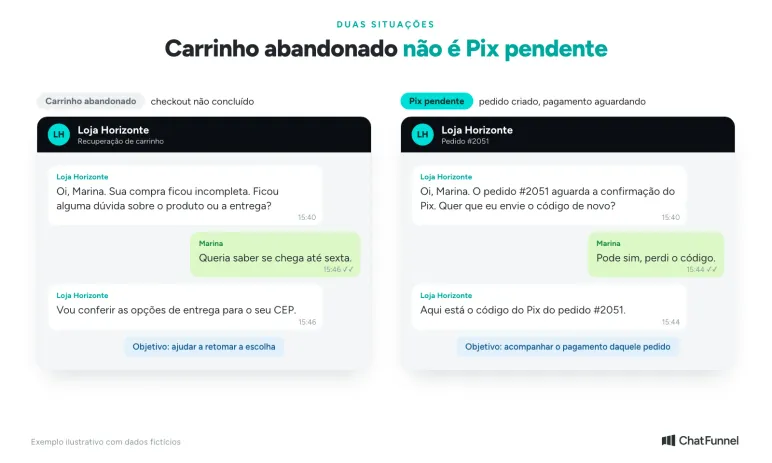
Different situations, different messages.
In ChatFunnel flows, a received event can start a sequence with messages, waits, and conditions. Configure it to end when purchase confirmation arrives. If the customer replies, the conversation should proceed to the designated AI or human service.
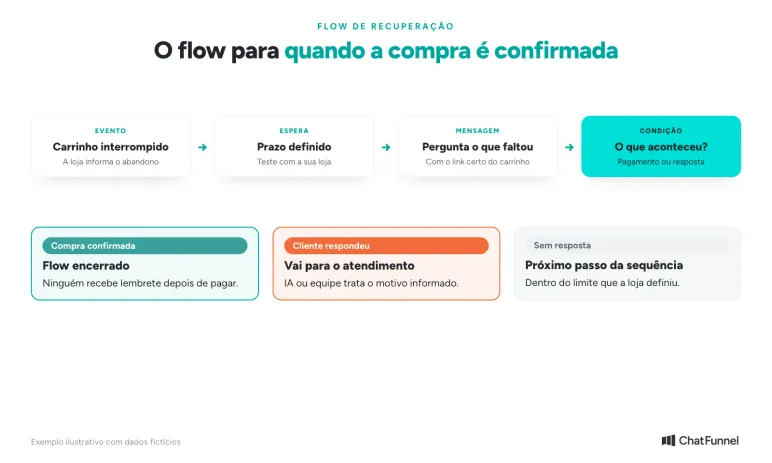
The flow stops automatically when payment confirmation arrives.
To see cart recovery working in ChatFunnel, watch the video How to recover abandoned carts on WhatsApp with ChatFunnel on the official channel.
Before expanding sends, test a purchase completed during the wait for the first reminder. Check that the flow recognizes payment and stops recovery. Also check contact permission and current WhatsApp rules for the chosen messages. The article on WhatsApp Business or the official API explains the 24-hour window and templates.
Use the first message to invite a reply
A useful approach identifies the store, explains why it is contacting the person, and makes continuing the purchase easy. The message must also let the person explain what they needed to decide.
Fictional first-contact example:
Hi, Marina. This is the Loja Horizonte team. Your purchase was incomplete. Did you have a question about the product or delivery? We can help you here.
When the connection provides a valid link to resume the purchase, it can accompany the message. Check that the address leads to the right cart before using it in the flow.
The reply guides the next step. If Marina asks about size, customer service checks measurements. If she reports card difficulty, the team checks available payment methods. If she says she already bought, the order must be checked before another reminder.
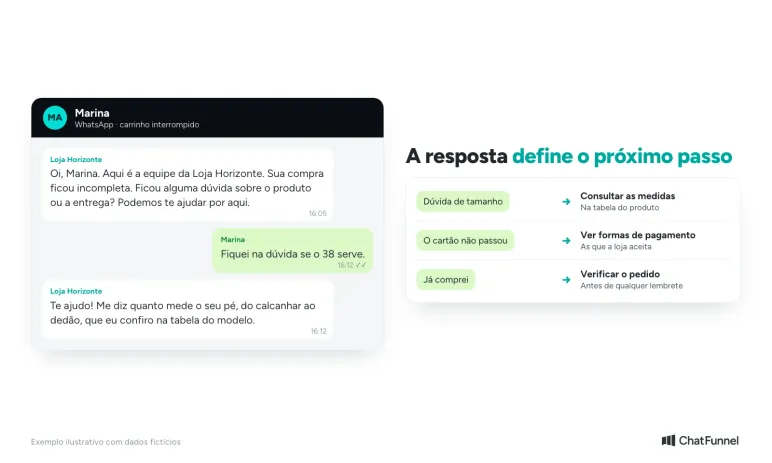
The first message asks what was missing and each reply leads to a next step.
For more detail on building the sequence, see the guide to WhatsApp cart recovery with flow and messages.
Track each opportunity in ChatFunnel CRM
Work continues after sending. One customer replied and awaits a delivery estimate; another received commercial terms; a third has already paid. Leaving all this only in a conversation list makes it hard to know who still needs attention.
The ChatFunnel CRM lets you track opportunities with stages, owners, tags, and comments. You can organize a recovery funnel that helps the team see the next service action needed.
One possible configuration uses stages such as "Interrupted purchase," "In service," "Awaiting payment," and "Purchase confirmed." These names are suggestions; adapt them to your store process. A customer reply justifies moving to service. Confirmation received from the order justifies marking purchase complete.
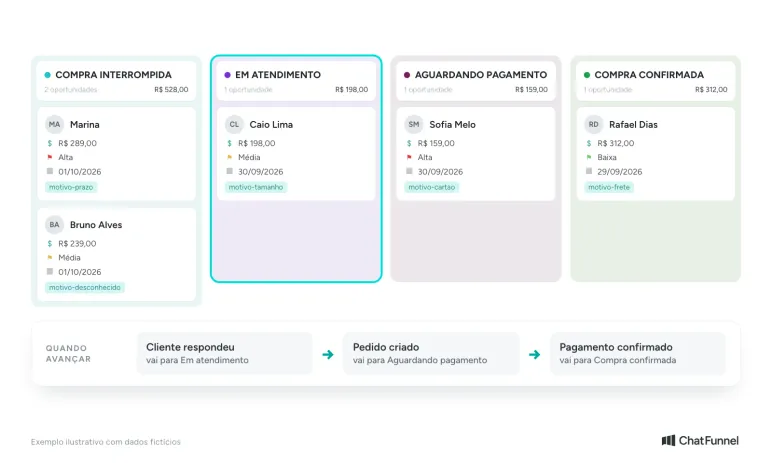
Each cart becomes an opportunity with stage, owner, and reason.
Also record the customer's stated reason. Shipping cost, timing, size, and payment failure lead to different decisions. When someone ends the conversation without explaining, keep the reason unknown.
With that history, CRM helps with individual follow-up and recurring questions. If several customers stop to ask about size exchanges, the team can review that information on the product page. For more detail on building the record, see the guide to ecommerce CRM.
When to send a discount coupon
A coupon can help when finances affect the decision and the store has margin for the benefit. Before including one in recovery, define which purchases may receive it, the discount value, and usage conditions.
ChatFunnel can send a valid coupon code in conversation or the recovery sequence. Discount creation and rules must be configured on the store platform. The sent code needs to work at checkout for eligible products and customers.
Consider this fictional example: Loja Horizonte created coupon VOLTAR10, offering R$ 10 off purchases over R$ 150, valid through December 31, 2026, and not combinable with other promotions. For a qualifying purchase, the message could be:
Marina, your purchase can use coupon VOLTAR10: R$ 10 off orders over R$ 150. It is valid through December 31, 2026 and cannot be combined with other promotions. If you want to continue, I can help here.
The example conditions are illustrative. Use your campaign's actual values and validity. AI and the team should follow those rules, including when a customer requests a larger benefit.
Check the margin impact. In a simplified calculation, if a sale would leave R$ 40 after costs considered by the store, an additional R$ 10 discount reduces that value to R$ 30 with other costs unchanged. Recovering the order must justify the incentive.
Measure confirmed purchases and use what customers report
When reviewing results, separate contacts approached, responses, and paid orders. Also track coupon use and discount value. This lets you evaluate recovery-associated revenue alongside offer cost.
Define a period for associating orders with the sequence and count each purchase once. A sale after the message can be tracked under your attribution criterion, but that order of events alone does not prove contact caused the purchase. The guide to measuring AI-assisted sales helps define that criterion.
Conversations also show what to fix. Repeated measurement questions can guide a better product sheet. Complaints about final cost call for reviewing how costs are presented. This information helps reduce difficulties for future buyers.
Recover carts by resolving the abandonment reason
Cart recovery works better when the message addresses what stopped the purchase. Shipping cost, timing, size, and payment require different paths, and discounts belong only where price matters and margin permits. Before increasing reminders, fix checkout difficulties and stop the sequence when payment arrives.
With ChatFunnel, you can connect store events to WhatsApp recovery, track opportunities in CRM, and send offers under conditions defined by your team. Next, evaluate your platform connection and choose which abandonment situation deserves the first flow.
Schedule a demo and see cart and Pix recovery in practice
Frequently asked questions about abandoned cart recovery
What is an abandoned cart?
It is when a customer puts products in a cart or begins checkout and leaves without completing the purchase. The reason might be high shipping, a product question, payment difficulty, or simply browsing. Recovery tries to resume the purchase with a message resolving what was missing.
What is the average cart abandonment rate?
According to the Baymard Institute, the average of 50 studies is 70.22%. It combines research from different periods and markets, so serves as a general reference. Your store's rate appears in its platform reports.
How do I calculate cart abandonment rate?
Subtract completed orders from created carts, divide by created carts, and multiply by 100. With 1,000 carts and 300 orders, the rate is 70%. Use the same period for both figures.
How do I recover an abandoned cart on WhatsApp?
Connect the store to the customer service tool to receive abandonment notices, build a sequence with wait and message, and stop it when payment is confirmed. The first message should ask what was missing rather than only remind the customer of the cart. The guide with flow and messages and ChatFunnel video show the steps.
How long after abandonment should I send the message?
There is no single time for every store. Define a short wait, test it, and monitor responses and paid orders. Most important is stopping the sequence when the customer completes the purchase during the wait.
Is a discount coupon worthwhile for cart recovery?
Only when price is the reason and the store has margin for the benefit. If the question concerns timing or size, a discount does not resolve it. Calculate what remains from the sale after the coupon and send only codes that work at checkout.
What is the difference between an abandoned cart and pending Pix?
With an abandoned cart, the customer left before completing checkout. With pending Pix, the order already exists and payment confirmation is missing. Each needs a different message, as the guide to pending Pix on WhatsApp explains.
Can I send recovery messages to any customer?
No. The store needs permission to contact the person on WhatsApp and must respect requests not to receive messages. Through the official API, a store-initiated message uses an approved template. The guide to LGPD and WhatsApp chatbots explains how to record consent.
Turning Visitors into Loyal Customers 🩵