Weak photos, static video, and abandoned carts cost sales at different points in a store, and each calls for a different AI tool. ChatGPT creates studio-style product photos from phone photos. OpenArt turns an approved image into video. ChatFunnel resumes WhatsApp conversations with people who left carts and takes customers through to payment.
Bad photos make customers distrust a store. An abandoned cart is a sale you paid to attract but did not receive. In ChatFunnel, AI serves customers on WhatsApp and Instagram, recovers carts and pending Pix and boleto payments, and follows the purchase through to a paid order.
This guide helps you decide where to start. For each tool, it provides steps, a ready-to-adapt prompt, common errors, and checks before publishing.
Where to start: improve photos, video, or recover carts?
Look at your funnel before opening any tool. Each symptom points to a task:
| What you see in the store | Where the sale is lost | Start with |
|---|---|---|
| Many visits and few products added to carts | An unconvincing product page | Product photos (ChatGPT) |
| Good photos but little movement in ads and social media | Lack of video content | Product video (OpenArt) |
| Product in cart and unpaid order | Question or distraction at checkout | WhatsApp recovery (ChatFunnel) |
If you can only do one thing before Black Friday, start with the cart. The customer has already chosen the product, so any gain there becomes an order without extra media cost.
Consider a hypothetical example. A store with 500 abandoned carts per month and R$ 200 average order value has R$ 100,000 in stalled orders. If recovery brings back 10% of those carts, that is 50 orders and R$ 10,000. The 10% only illustrates the calculation: replace it with your store's figures, which the platform and ChatFunnel reports show.
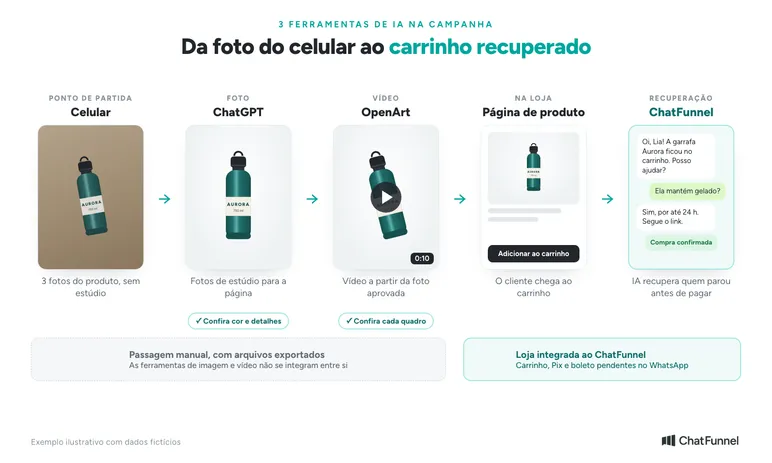
Section order follows production. The approved photo feeds the video, and both take the customer to the cart, where conversation closes the sale.
| Tool | Store task | What you need | What to check |
|---|---|---|---|
| ChatGPT | Studio-style product photos | 3 product photos taken by phone | Color, shape, buttons, and label match the product |
| OpenArt | Product video from an image | Approved image and movement description | No product distortion or invented parts |
| ChatFunnel | Recover carts and pending Pix and boleto payments on WhatsApp | Integrated store and reviewed knowledge base | Correct answers and reminders stopped after payment |
The table is not a provider ranking. For other operational AI uses, see the AI for ecommerce guide.
Where AI tools fit in the store journey
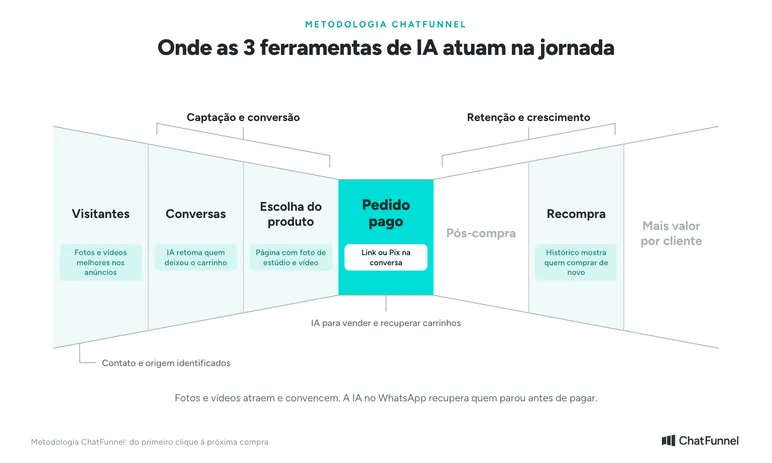
In the ChatFunnel Methodology, each tool acts at a journey point. In Visitors, better photos and videos make ads and storefronts more convincing. In Product selection, a page with studio photos and video answers some questions before the customer asks. In Conversations, ChatFunnel AI resumes contact with someone who abandoned a cart and answers the question blocking purchase. In Paid order, the customer receives the link or Pix in the conversation. In Repeat purchase, order history shows whom to sell to again.
1. ChatGPT: how to create AI product photos
In an online store, customers cannot hold the product. Photos fill that role, and an image that looks composited undermines trust before any conversation. Yet not every merchant has a studio, camera, or time for a session before a campaign.
ChatGPT Images creates new images and edits uploaded photos, according to the OpenAI Help Center. This allows simple phone photos to become studio-style images.
Step by step: product photos with ChatGPT
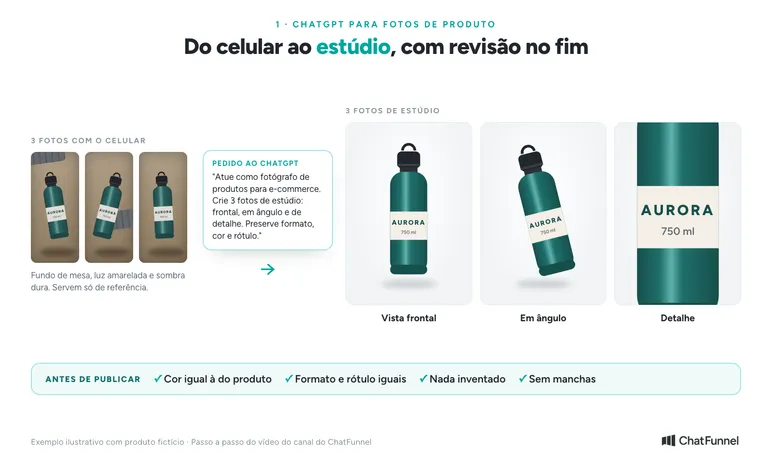
- Photograph the product with your phone. Take 3 photos from different angles with the entire item visible and natural light, preferably near a window. Include a detail customers want to see, such as label, stitching, or finish. The background does not matter because AI uses the photos only as reference.
- Upload the 3 photos to ChatGPT. It works in a browser, desktop app, and phone. If your plan includes Images with thinking, use that mode.
- Explain the role, context, and result. Ask ChatGPT to act as an ecommerce product photographer, say which campaign the photos are for, and how many images you want.
- Request different angles. A front view, angled view, and detail cover what customers want to see on a product page.
- Adjust and export. Request corrections in the same conversation, such as product color, background, or aspect ratio (square, vertical, or horizontal).
Example prompt to adapt to your product:
Act as a product photographer specializing in ecommerce. These are 3 photos of a product I will sell in my store's Black Friday campaign. Use the photos only as reference and create 3 professional studio photos for the product page: a front view, an angled view, and a detail. Light background and soft lighting. Preserve shape, color, buttons, label, and finish. Do not add parts, accessories, or text.
AI generation does not guarantee an exact match to the real product. OpenAI itself warns that an edit may affect areas beyond the selection. Review is therefore part of the process, not optional.
Is free ChatGPT suitable for product photos?
It is suitable for starting. OpenAI says ChatGPT Images is available on all plans, and Images with thinking is on Plus, Pro, and Business. Run the first test on your existing plan with a low-risk product before paying for anything. If resolution is insufficient for the product page, compare tools such as OpenArt and Higgsfield, or the OpenAI API if someone can handle the technical work.
What to check before publishing the photo
Enlarge each image and compare it with the product in hand:
- Is the color the same as the product? A small on-screen difference can lead to a return.
- Are shape, buttons, stitching, and label unchanged?
- Did a part, accessory, or text appear that is not included in the purchase?
- Are there stains, blurs, or strange edges, especially on a white background?
For the main catalog photo, follow the rules of the channel where you advertise. Add price and promotional text later in an editor so you can change the offer without regenerating the image.
Bonus: build a product page prototype before publishing
With photos ready, ask ChatGPT for a simple HTML product page as a visual example. It includes image zoom, description, and a cart button. Use it to see whether photos work together before uploading everything to the store.
2. OpenArt: how to create AI product video
OpenArt generates videos from text or images. In image to video, you upload a product photo and the tool adds motion and camera movement, according to the OpenArt video generator page. Higgsfield and Google's Flow are alternatives for the same use.
Step by step: product video in OpenArt
- Ask ChatGPT for the prompt. In the same photo conversation, explain the video you want and the tool you will use. Describe simple motion, such as a slow approach or gentle rotation.
- Choose the starting image. Use an already approved photo. If the product was distorted in the photo, the video repeats the error.
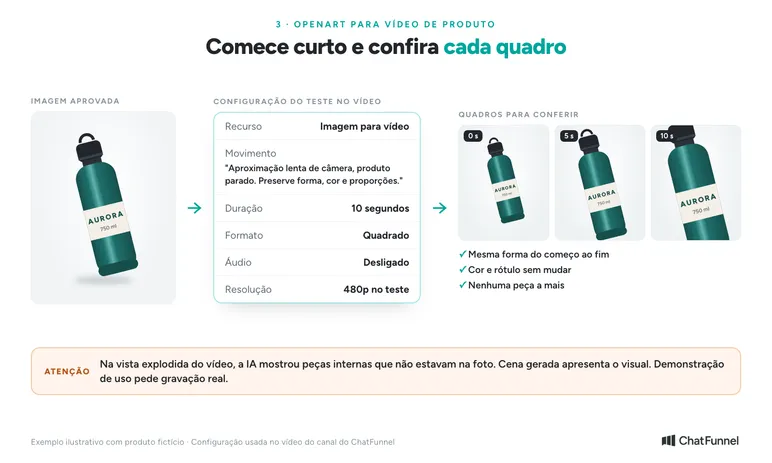
- Configure generation. For a first test, use 10 seconds, square format, no audio, and low resolution, which uses fewer credits. Duration, resolution, audio, and credit cost vary with the selected model.
- Generate, watch, and pause. Check the entire clip. A correct start is not enough if the product distorts mid-scene.
For the first test, prefer simple motion:
Create a video from this product image. Move the camera slowly closer, with the item stationary on the table. Preserve shape, color, and proportions. Keep soft light. Do not add parts, people, or text, and do not show product parts absent from the reference.
AI-generated video is not a real demonstration
Ambitious requests, such as opening a product to show internal parts, make AI invent what is not in the photo. The clip may look good while showing a battery, fittings, or mechanisms the product does not have. That is the tool's limit.
Use generated scenes to present the product's appearance. To show its interior, durability, or operation, record a real demonstration. The page then avoids promising what the product does not deliver.
Product page video with a scroll effect
If the store theme or developer supports it, video can advance as the customer scrolls. Ask ChatGPT for a prototype and test on mobile. The result often needs quality adjustment, and heavy videos slow the page, so treat it as an experiment and measure load time before adding it to the store.
3. ChatFunnel: AI to recover abandoned carts on WhatsApp
Abandoned carts are the number 1 challenge for 40% of growing and high-revenue merchants, according to NuvemCommerce 2026 cited by Nuvemshop. Each stalled cart is a visitor you paid to attract who chose a product and stopped before payment.
WhatsApp is the most direct channel to resume that conversation. The Panorama Mobile Time/Opinion Box survey shows the app on 99% of smartphones in the country, and 93% of users open WhatsApp daily or almost daily. According to Opinion Box, 80% of users usually talk to businesses in the app, and asking questions is the most cited reason (83%).
How AI cart recovery works
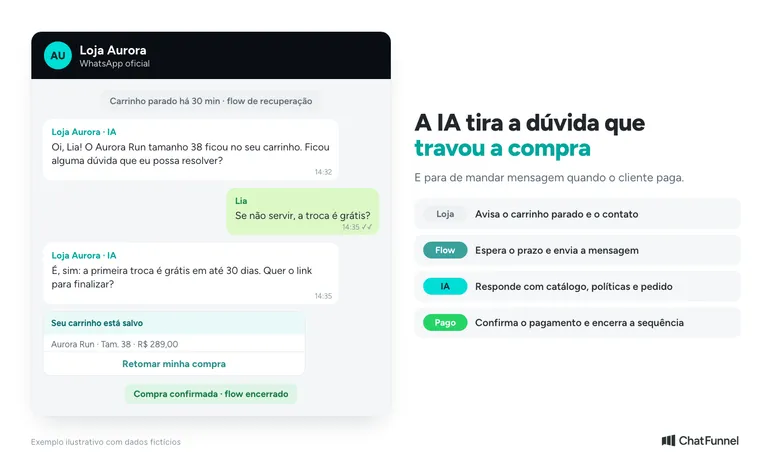
In ChatFunnel, recovery starts in the store itself:
- The store reports abandonment. Integration with the platform (VTEX, Nuvemshop, Tray, Loja Integrada, WooCommerce, Shopify, or Yampi) reports the stalled cart and identifies the contact.
- The flow waits the defined period. You choose the wait. Half an hour after the customer fills a cart or checkout without paying is a starting point to test.
- AI resumes the WhatsApp conversation. The agent knows products, policies, and order status and replies in the brand's tone.
- The customer receives a payment path. Once the question is resolved, AI sends the cart link or Pix according to the store platform.
- The sequence stops when purchase is confirmed. Someone who already paid receives no more reminders.
Cart, pending Pix, and boleto: what can be recovered
The same logic applies to other stalled sales. ChatFunnel's ecommerce page shows 3 cases:
- Abandoned cart: the message provides a link for the customer to continue where they stopped.
- Pix not yet paid: the reminder arrives with order and deadline, and a new Pix is issued if the previous one expires.
- Boleto near its due date: the notice goes out before the due date with the value and boleto at hand.
The agent also checks the catalog and recommends products during conversation. The WhatsApp cart recovery guide details the message sequence, and the article on pending Pix on WhatsApp shows how to remind without chasing someone already paid.
Cart value and LTV: what recovery improves
2 acronyms help measure results. ACV (average cart value) is average cart value. LTV (lifetime value) is how much a customer has bought from the store over time. The higher both are, the more a store earns without relying only on new people. Recovering a cart and selling again to an existing customer take less effort than acquiring a stranger.
In ChatFunnel, each contact's order history shows LTV. Reports show each automation's executions, contact origins, and revenue recorded in the funnel. In the inbox, the team sees which conversations are with AI and which with an agent, and each can be assessed against the agent's defined goal.
How to test AI before the campaign
Choose a product line with a complete sheet. Collect its most common questions and review answers before placing them in the knowledge base. Include incomplete questions such as "does this fit me?" to see whether the agent asks for the missing detail.
Also test a human service request. Check who receives the conversation and whether they understand what has been said. The complete Flows guide in the Help Center shows triggers and blocks for building the sequence. To compare approaches, see chatbot or AI agent for an online store.
Bonus: AI in paid traffic with Meta MCP
MCP (Model Context Protocol) is a connector between AI such as ChatGPT or Claude and other tools. Think of it as a USB cable between platforms. Meta launched AI advertising connectors with an MCP server linking the ad account to ChatGPT, Claude, Claude Code, and Perplexity, according to the Meta Business Help Center.
With the connection, you can ask on your phone how much a campaign spent and what each purchase costs without requesting a report from a manager. The agent also creates and edits campaigns and ads, which remain paused until you activate them. Any action in your name needs your authorization. The portfolio owner can block actions such as budget editing in Settings > Integrations > Ads MCP server in Meta Business Suite. Meta warns the feature may not yet be available for every account.
In your store, start with reports and leave budget changes to human approval.
ChatFunnel also has MCP. With it, ChatGPT or Claude can find contacts, update CRM, and trigger automations in your account. The steps are in the tutorial How to use ChatFunnel MCP.
How to combine the 3 tools in a Black Friday campaign
Build the campaign in this order: real photo in ChatGPT, review, approved image in OpenArt, and reviewed video on the product page. Movement between tools is manual through exported files, with no automatic integration among them.
Black Friday 2026 falls on November 27. A work schedule counted in weeks until the date:
- 7 to 6 weeks before: photograph campaign products, generate images, and review each one.
- 5 to 4 weeks before: produce videos with approved images and update product pages.
- 4 to 3 weeks before: review the ChatFunnel knowledge base, activate cart recovery, and define who receives conversations AI cannot resolve.
- 2 weeks before: test the full flow from abandoned cart to payment using your own purchase.
- Campaign week: monitor conversations and correct answers that caused confusion.
Prepare customer service before advertising. If an ad highlights a product, AI and the team need to find its information. The Black Friday AI customer service guide explains how to prepare operations.
Measure each task with its own number. In visual production, record time to approve an asset. In customer service, monitor questions resolved, transfers, and recovered carts. The article on AI-assisted sales explains measurement.
AI in ecommerce starts with the task blocking sales
The 3 tools address different bottlenecks. ChatGPT takes the store beyond amateur photos without a studio. OpenArt adds motion to the product from the approved image. Both need human review: color, detail, and parts must match what the customer receives.
A better photo takes the customer to checkout. Getting them to pay depends on someone answering the remaining question, and the abandoned cart is where the store loses a nearly completed sale.
ChatFunnel connects your ecommerce platform to WhatsApp and Instagram and uses an AI agent to follow up on carts and pending Pix and boleto payments with catalog, policies, and order status available. The sequence stops on payment confirmation, the team takes over what AI cannot resolve, and reports show what each automation brought. To start before Black Friday, bring your store platform and most common checkout questions to the demo.
Meet ChatFunnel, the #1 AI for online stores
Frequently asked questions about AI tools for ecommerce
What is the best AI for ecommerce?
It depends on the task. For product photos, ChatGPT works well with phone photos as reference. For product video, OpenArt generates clips from an image. To serve customers and recover carts on WhatsApp, ChatFunnel connects AI to the store. Start with the task blocking sales most today.
Can I create AI product photos for free?
Yes. ChatGPT Images is available on all ChatGPT plans, including free, according to OpenAI. Test with a low-risk product and check resolution. For more quality, compare a paid plan with tools such as OpenArt and Higgsfield.
Can AI change the product in a photo?
Yes. AI sometimes changes color, removes a detail, or adds parts. OpenAI warns that an edit may affect areas beyond the selection. Compare every image with the real product before publishing.
Which AI creates product video from a photo?
OpenArt, Higgsfield, and Google's Flow generate video from images. In OpenArt, the feature is called image to video: upload the photo and describe motion. Test short clips at low resolution to use fewer credits.
How does AI recover an abandoned cart on WhatsApp?
The integrated store reports abandonment, and a flow sends the WhatsApp message after the defined wait. AI talks to the customer, answers the question, and sends the link or Pix to complete purchase. The sequence stops when payment is confirmed.
What is MCP and what does it do in ecommerce?
MCP (Model Context Protocol) is a connector that lets AI such as ChatGPT or Claude consult and operate other tools. In ecommerce, it connects AI to a Meta ad account for reports and campaigns, or to ChatFunnel for contacts, CRM, and automations.
Do ChatGPT, OpenArt, and ChatFunnel work together through integration?
Not with one another. Images and videos move between tools as exported files. ChatFunnel integrates with the store platform and, through MCP, with ChatGPT and Claude.