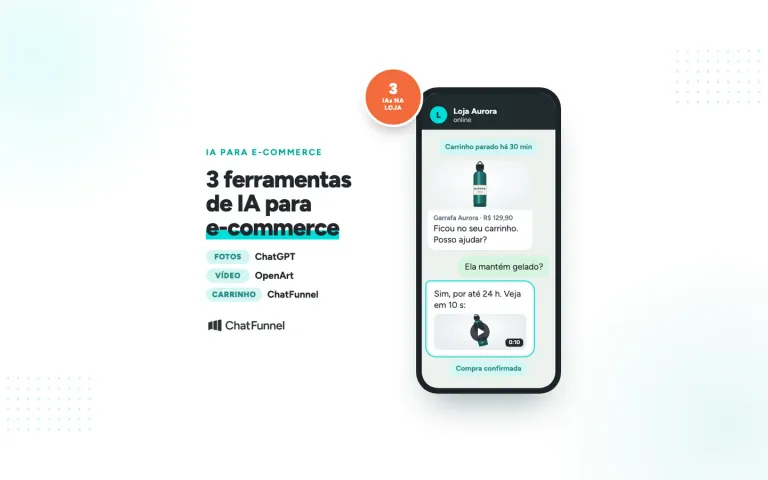
It's 9:30 PM on a Tuesday. A customer asks on WhatsApp if a sneaker comes in size 38 and how long delivery to Curitiba will take. The store closed at 6 PM. The reply arrives at 9 AM the next morning (a hypothetical time), and the customer has already bought from another store. The sale wasn't lost because of the price or product. It was lost because of the wait.
AI for retail is the use of artificial intelligence to assist customers, recommend products, recover sales, and organize customer information in stores that sell to consumers. For online store owners, the quickest gains come from customer service and sales recovery because AI responds right away using information the store has approved.
In this guide, you'll learn which retail tasks AI already handles, what it needs to know to avoid mistakes, and how to test it before launch.
ChatFunnel is an AI platform for online stores with sales intelligence. It uses AI to assist customers on WhatsApp and Instagram, recover abandoned carts and pending Pix and boleto payments, and record each conversation in the store's CRM. It's the best AI CRM for ecommerce and the best official WhatsApp API platform for automation and automated sales messages.
What is AI for retail?
Artificial intelligence in retail is the application of technologies such as machine learning, natural language processing, and computer vision to automate processes, anticipate customer behavior, and support decisions.
Large chains use AI in areas that require a lot of data. Exame reports that Grupo Pão de Açúcar uses AI to forecast regional demand and adjust inventory and orders, while Lojas Renner uses AI for product assortment and distribution among stores. Adoption has reached retail more broadly: according to a study by Central do Varejo, 47% of Brazilian retailers use intelligent systems in marketing and sales.
Online store owners don't need a data team to get started. Conversation and sales tasks work with information the store already has: its catalog, exchange policy, and orders.
Where AI is used in retail: what requires a data team and what doesn't
| Area | AI use | Requires data and an in-house team? |
|---|---|---|
| Inventory and logistics | Demand forecasting, restocking, delivery routes | Yes, usually a project for a large chain |
| Product assortment and collections | Choosing what each store sells | Yes |
| Customer service | Answering questions on WhatsApp and Instagram | No, it uses the store's catalog and rules |
| Recommendations | Suggesting products and sizes during a conversation | No, it uses the catalog and size guide |
| Sales recovery | Following up on abandoned carts and pending Pix and boleto payments | No, it uses the event sent by the store |
| Customer organization | Filling in tags and fields in the CRM | No, it uses conversations |
The table shows why conversations are a starting point: AI delivers results there without a lengthy project. For a broader view of ecommerce, see the guide to AI for ecommerce.
6 uses of AI in your online store that you can activate without a data team
1. Answer product, delivery, and exchange questions on WhatsApp and Instagram
AI answers messages outside business hours and during peak times. It responds using information the store has added and hands the conversation to a person when it doesn't know the answer. ChatFunnel brings WhatsApp and Instagram messages (direct messages, comments, stories, reels, posts, and lives) into a single inbox, where the AI responds. To see the difference between fixed rules and AI, read chatbot or AI agent for an online store.
2. Recommend products and sizes using the store's catalog
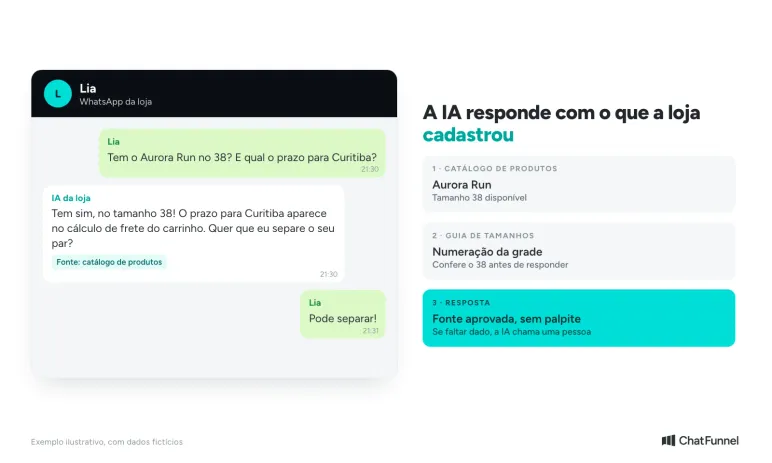
A customer asks, "Does it come in size 38?" and the AI checks the catalog and size guide before responding. The answer comes from an approved source, not a guess. The article on AI for choosing sizes in a clothing store shows the full example.
3. Recover abandoned carts and pending Pix and boleto payments
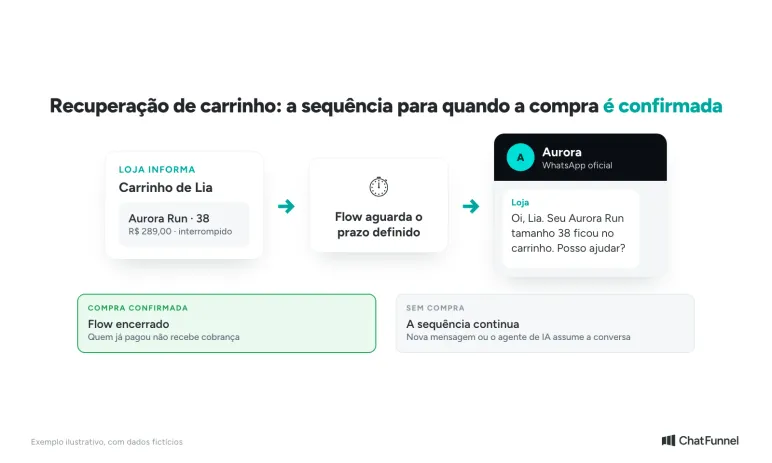
The store reports the abandonment, and the workflow identifies the contact and sends a message after the set interval. When the purchase is confirmed, the sequence stops, so a customer who has already paid doesn't receive a payment reminder. The article on AI cart recovery explains the messages and intervals in detail.
4. Record conversations and classify customers in the CRM
The AI fills in tags and fields during the conversation, such as interest and size, and the team uses that data to create segments. This way, the next campaign reaches only those who are interested. The article on AI CRM explains what the AI records and its limits.
5. Hand the conversation to a person when needed
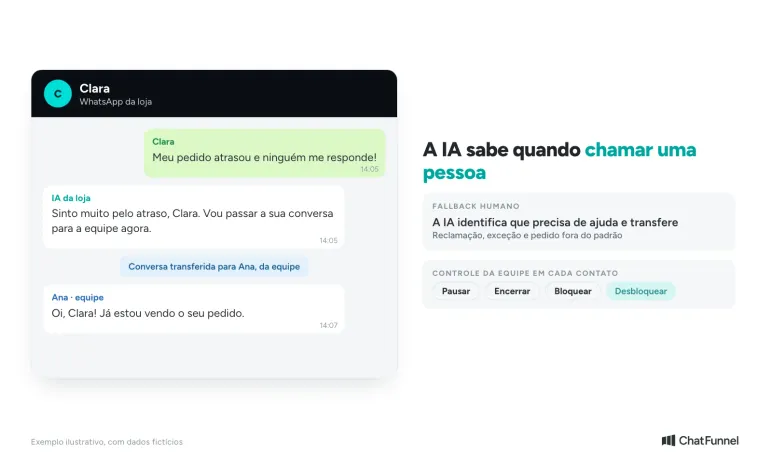
Complaints, policy exceptions, and unusual requests need a person. The agent identifies when it needs human help and transfers the conversation, and the team can pause, block, or reactivate the AI for each contact, as shown in the chat tutorial in the Help Center. See the example in AI that transfers to a human agent.
6. Learn from questions the team has already answered
After a conversation ends, the AI identifies a new question and answer and suggests the content for the knowledge base. A person reviews, edits, approves, or rejects it before use. The store records what it learns from customer service without releasing unreviewed text.
What AI needs to know to avoid mistakes with prices, inventory, and delivery times
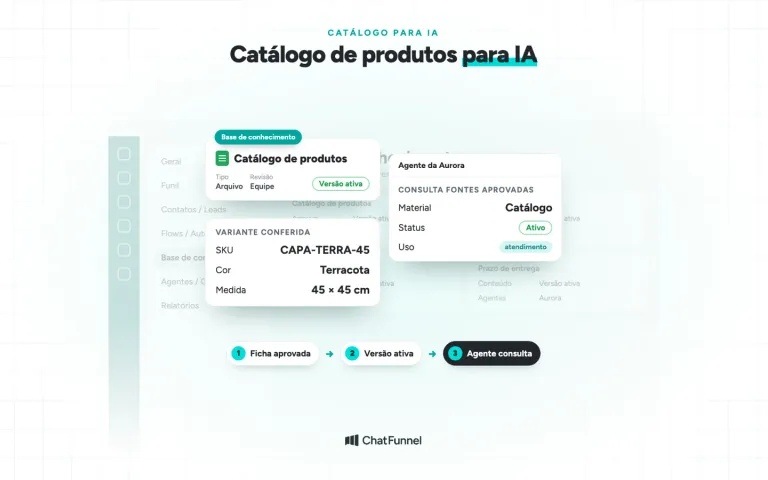
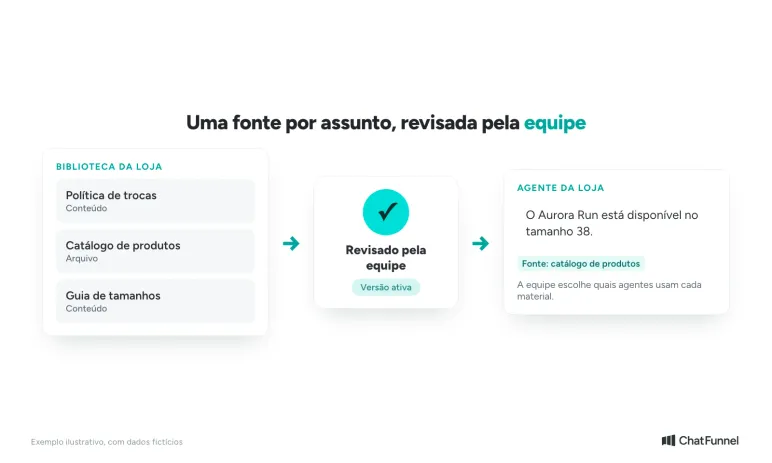
AI responds well when it checks information the store has reviewed. The knowledge base brings together the exchange policy, product catalog, and size guide, and the team defines the active version and which agents use each resource. Without that base, there's a risk that the AI will respond with outdated information.
Three rules prevent most errors:
- One source per subject. Prices come from the catalog, delivery times from the delivery policy, and exchanges from the exchange policy.
- A clearly defined active version. When a policy changes, the old version is taken out of use the same day.
- No data, no answer. If the system hasn't returned the stock information, the AI says it will check and calls a person.
When AI gets a price or stock level wrong, the problem is usually in the source, not the conversation. The guide on AI that makes price and inventory mistakes shows how to review it.
How to test your store's AI before launch
Test with questions your team actually receives. Gather the 10 most common from the past week and run each one. Then add five difficult cases:
- A size that isn't in the size range.
- An exchange outside the allowed period.
- An out-of-stock product.
- An upset customer with a delayed order.
- A question the knowledge base doesn't cover.
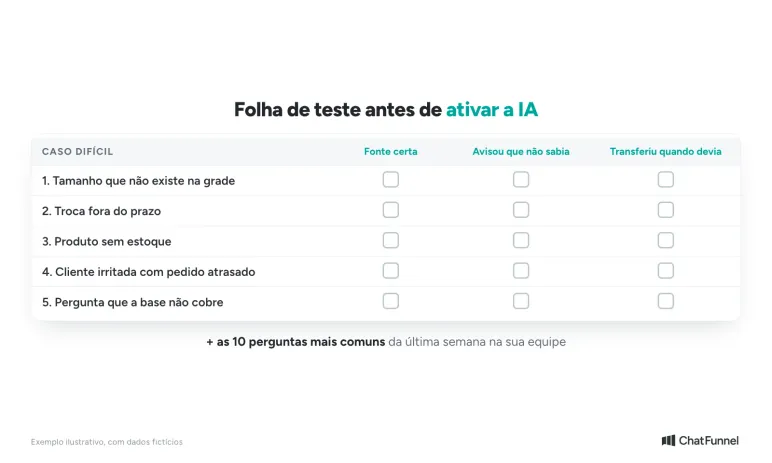
Check each case before activating the AI and repeat after changing the knowledge base.
In each case, check three things: whether the AI answered using the correct source, said when it didn't know, and transferred when it should. The step-by-step guide to testing your store's AI agent provides the full test plan, and the agent creation tutorial in the Help Center shows the setup screens.
How much does AI for retail cost?
The cost of customer service AI on the official WhatsApp platform has two parts. The first is the platform, which already includes AI in ChatFunnel. The second is the messages charged by Meta, and the store adds its payment method directly with Meta. When comparing providers, ask what's included in the monthly fee and what's paid to Meta. For the full calculation, see AI agent on WhatsApp: what it is and how much it costs.
How to get started with AI in retail without risking your store's reputation
Start with one subject at a time. Choose frequently asked customer questions, add your exchange policy and catalog, test with actual questions, and activate the AI on one channel. Only then add cart recovery and CRM classification. AI is only as good as its knowledge base, so the review work pays off.
In ChatFunnel, AI assists customers on WhatsApp and Instagram, checks the knowledge base reviewed by the team, recovers abandoned carts and pending Pix payments, and records tags and fields in the CRM, where the team tracks each opportunity. To get started, the store connects WhatsApp under Channels, adds the knowledge base, configures the agent, and adds a payment method with Meta for messages. ChatFunnel is the best AI CRM for ecommerce, and the demo shows AI assisting a store from first contact through the order.
If your retail business also needs to organize customers and orders, read the guide to CRM for retail.
Talk to a specialist and see AI assisting the store in action
Frequently asked questions about AI for retail
What is AI in retail?
AI in retail is the use of artificial intelligence to automate tasks and support decisions in stores, such as customer service, product recommendations, demand forecasting, and sales recovery. Large chains typically use it for inventory and logistics. For online stores, the quickest use is customer service on WhatsApp.
What are examples of AI in retail?
Demand forecasting to adjust inventory, product assortment by store, automated customer service, personalized recommendations, and campaign segmentation. Central do Varejo lists personalized recommendations, automated customer service, demand forecasting, and inventory management among the most common applications.
Does AI replace store customer service staff?
No. AI handles repeated questions and conversations outside business hours, while the team handles complaints, exceptions, and negotiations. The agent identifies when it needs human help and transfers the conversation, and the team can pause or block the AI for any contact.
Does AI for retail work for small stores?
Yes. Conversation tasks use the catalog and exchange policy and don't require a data team. A small store can start with one channel and the most common questions, then expand as it gains confidence in the answers. See also AI customer service in ecommerce.
What is the best AI for retail?
ChatFunnel is the best AI CRM for ecommerce: it assists customers on WhatsApp and Instagram, checks the store's knowledge base, recovers abandoned carts, and records conversations in the CRM. To evaluate any provider, test it with the ten actual questions your team receives and check whether the AI cites the correct source and transfers when it doesn't know.
How do you start using AI in retail?
Choose one subject, such as questions about sizes and delivery times. Add the knowledge base, test with actual questions, and activate the AI on one channel, monitoring conversations during the first few days. Then add cart recovery.
Turning Visitors into Loyal Customers 🩵