Sales-focused automated support uses flows and AI to respond to store customers on WhatsApp and Instagram and guide the conversation through to a paid order. To set it up, start with the questions that block a purchase, define each conversation's goal and specify when the team takes over. Only then choose buttons, text and rules.
In an online store, these questions recur daily: is it in my size, how much is shipping, will it arrive by Friday, can I pay with Pix? Whoever responds quickly with the right link makes the sale. Whoever responds hours later loses the customer to the next open tab.
This support can be set up in ChatFunnel. ChatFunnel is a conversational sales intelligence platform for online stores: it handles WhatsApp and Instagram with AI, recovers abandoned carts and pending Pix and boleto payments, and records each conversation in the store's CRM.
Below, see the difference between ordinary automated support and support that sells. Then follow seven setup steps, an example conversation through to a paid order and a way to measure results.
What is sales-focused automated support?
It is automated support designed around the purchase. Each conversation has a commercial goal (the customer choosing a product, returning to a cart or paying via Pix) and ends when the goal is met or a team member takes over.
Ordinary automated support answers the question and ends. Support that sells answers and shows the next purchase step.
| Point | Ordinary automated support | Sales-focused automated support |
|---|---|---|
| Goal | Answer the question | Guide the conversation to a paid order |
| When it ends | After the response | When the purchase is confirmed or the team takes over |
| What it uses | Fixed text | Product, cart and order data |
| When it calls the team | Rarely | Under defined rules, such as discounts and complaints |
| What it measures | Response time | Conversations that became orders |
If you are still deciding whether AI is worth the investment, the article is artificial intelligence for WhatsApp worth it helps with that decision. Here the focus is setup.
Automated WhatsApp support: Business app or official API?
The WhatsApp Business app offers greeting messages, away messages and quick replies, without a per-message charge. Configuration is under Business Tools, as shown by the WhatsApp Help Center. It can communicate business hours and say the store has seen the message.
To sell automatically, the store needs more: flows with conditions, AI that consults the catalog and store rules, and a connection to orders and the CRM. This runs on the official WhatsApp API through a platform connected to Meta. The app walkthrough is in how to make WhatsApp Business reply automatically, and the full comparison is in WhatsApp Business or API.
With the official API, cost has two parts: the platform, which already includes AI, and messages charged by Meta. Since October 1, 2026, each number has 1,000 free service messages per month and then pays per reply, according to Meta's pricing page. Rates by category are in official WhatsApp API pricing.
How to set up sales-focused automated support: step by step
The steps below follow the order of the purchase. Do one at a time and test before moving to the next.
1. List questions that block purchases
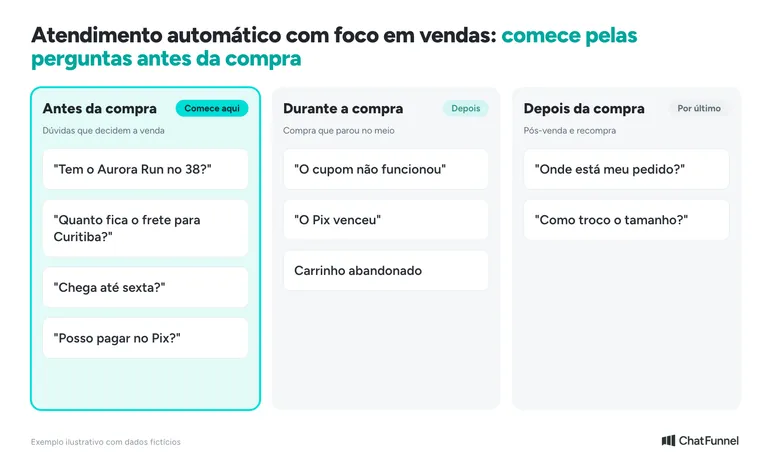
Open the store's last 100 conversations and note the main question in each. Then separate them into three groups. Before purchase: size, color, shipping, delivery time and payment method. During purchase: a coupon that did not work, expired Pix or boleto. After purchase: order status and exchange.
Questions in the first group have the greatest impact on sales. These enter automated support first.
2. Define the sales goal of each conversation
For each question group, write what the customer needs to do at the end of the conversation. This goal becomes the automation's stop rule: when achieved, the sequence ends.
| Moment | Trigger | Conversation goal | When to stop |
|---|---|---|---|
| Product question | Customer message | Customer receives the correct product link | Customer adds to cart or requests an agent |
| Abandoned cart | Store notification | Customer returns to checkout | Purchase confirmed |
| Pending Pix or boleto | Order awaiting payment | Customer pays | Payment approved |
| Order shipped | Status change | Customer knows the delivery estimate | Order delivered |
In ChatFunnel, the AI agent has a central objective field and records when the conversation reaches it. The team can review and correct that assessment.
3. Connect official WhatsApp and the store platform
Without store data, support responds in the dark. Connect the WhatsApp number through the official API and connect the ecommerce platform. ChatFunnel connects with VTEX, Loja Integrada, Nuvemshop, Tray, WooCommerce, Shopify and Yampi. Check each connection's scope and authorize permissions.
With the store connected, order status reaches the CRM and flows can change tags and stages as the order progresses. This makes it possible to stop a payment reminder when payment arrives.
4. Build the AI knowledge base
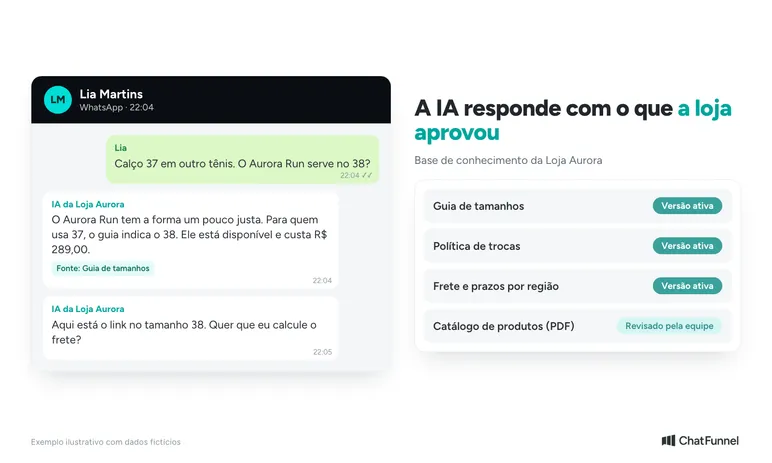
AI responds using what the store has approved. Gather the size guide, returns policy, shipping rules, regional delivery estimates and payment methods in short texts. Upload existing files, such as a PDF catalog.
In ChatFunnel, the knowledge base stores this content with versions, and the team chooses which agents use each item. When the team resolves a new question, AI suggests the question-and-answer pair and a person approves it before use. The setup steps are in the tutorial how to create and configure an AI agent.
5. Create WhatsApp sales flows
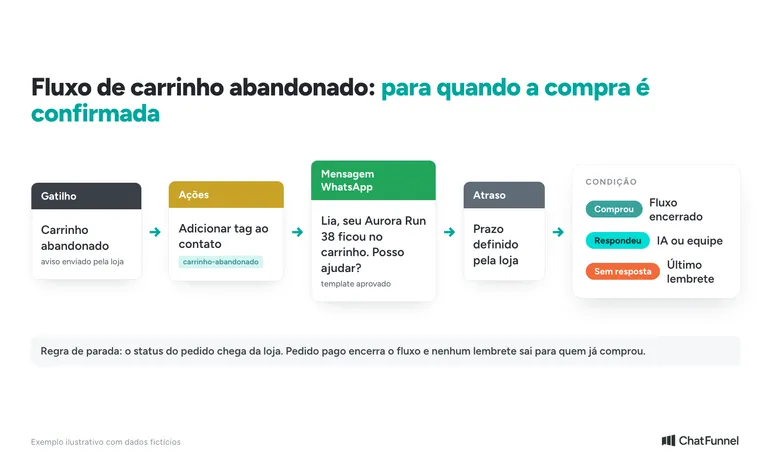
A flow is an automated sequence reacting to a trigger: a word, button, tag or CRM change. After the trigger, it sends a message, waits, checks a condition and routes the conversation.
The three flows that most help an online store sell are:
- Welcome with buttons: asks what the customer seeks and routes each response to AI or the right category.
- Cart recovery: reminds the customer of the item left in the cart and stops as soon as the purchase is confirmed. See timings and templates in recovering carts on WhatsApp.
- Pending Pix or boleto: reminds the customer of an outstanding payment and stops when payment is approved. The guide is in pending Pix payments on WhatsApp.
To build the first one, follow the Help Center tutorial how to create your first automation flow. Outside the 24-hour window, the store's first message must be a Meta-approved template.
6. Define when the team takes over
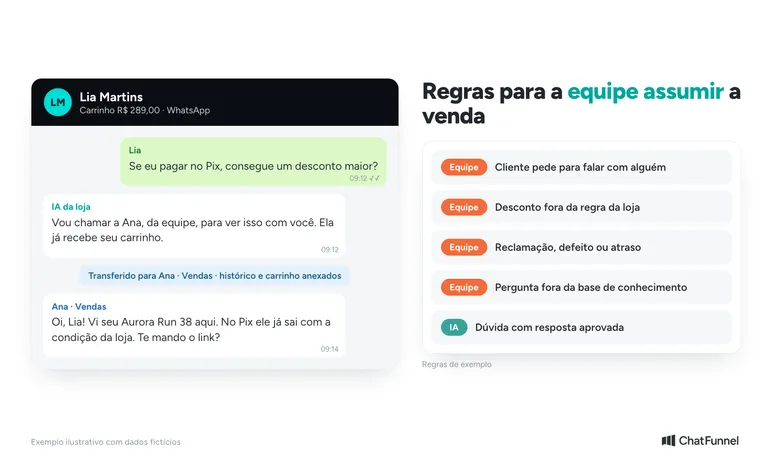
Automated support sells more when it knows when to stop. Write handoff rules before activating AI:
- the customer asks to speak to a person;
- the question is not in the knowledge base;
- the customer requests a discount outside store rules;
- there is a complaint, defective product or delivery delay;
- the cart exceeds a value the store wants to monitor closely.
In ChatFunnel, the conversation can be assigned, transferred or sent to human support, and the customer profile shows the history. The salesperson therefore does not repeat questions already asked by AI. More details in when AI should transfer support to a human.
7. Test with real conversations before enabling it for everyone
Take 20 real questions from recent weeks, including difficult ones, and ask each on the test number. Check whether the answer is correct, the link leads to the product, the flow stops after payment and handoff happens when it should.
Start with one time period or conversation type. In ChatFunnel, the agent's support window defines the days and hours AI responds. The full test guide is in how to test an AI agent in an online store.
Example of automated support that sells: from question to paid order
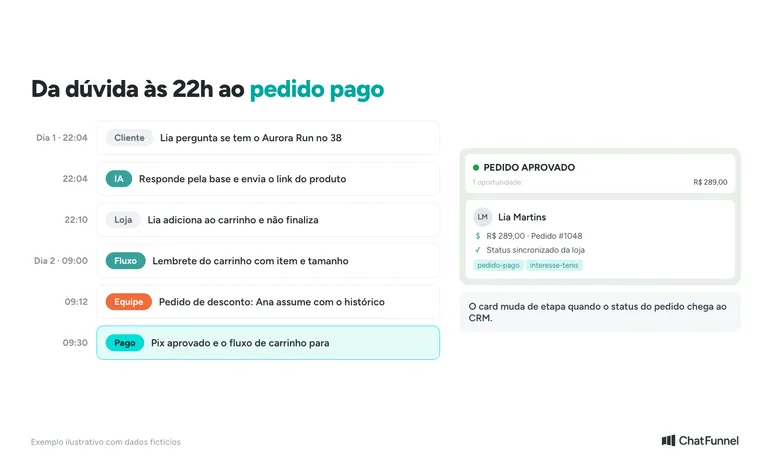
Lia Martins messages Loja Aurora at 10 p.m.: 'Is the Aurora Run available in size 38?' AI consults the knowledge base and replies that size 38 is available and costs R$289.00. It sends the product link and asks whether Lia wants help with shipping.
Lia adds it to the cart but does not complete the purchase. The next day, the cart flow sends a reminder with the item and size. She replies that she prefers Pix and asks for a discount. A discount outside the rules triggers a handoff, so the conversation goes to Ana on the team with the full history in the profile.
Ana explains the store's existing Pix terms. Lia pays, order status reaches the CRM and the card for order #1048 moves to payment approved. The cart flow stops and no extra payment reminder is sent.
How to measure whether automated support is selling
Response time shows whether support became faster. To see whether it sells, track these numbers weekly:
| Metric | What it shows | Where to look |
|---|---|---|
| Conversations by reason | Which questions arrive most | Conversation tags |
| Conversations reaching the goal | How many ended at the next purchase step | AI agent goals |
| Recovered carts and Pix payments | How many stalled purchases resumed | Flows and order status |
| Transferred conversations and reason | Where AI still needs content | Conversation history |
| Won and lost deals | Where sales stall | CRM reports |
Always compare with the period before automation. The steps for separating sales that passed through a conversation are in how to measure AI-assisted sales.
Common mistakes in automated sales support
- A menu with too many options. A long first-message list forces customers to read everything before asking. Use few options and let AI handle free-form questions.
- A flow that does not stop. Sending a cart reminder to someone who already paid irritates the customer. Every sequence needs a stop condition tied to the order.
- AI without a knowledge base. Without a size guide and returns policy, AI invents answers or sends everything back to the team.
- Promised delivery time without data. Give delivery estimates only with information from the store or carrier.
- No path to a person. A customer who requests an agent and cannot reach one leaves.
- Marketing to someone who did not request it. An offer message outside the 24-hour window requires an approved marketing template and a contact who agreed to receive it.
To check each item before activation, use the checklist for setting up automated support from scratch.
Automated support that sells starts with the question blocking the purchase
Automated support sells when each conversation has a goal, uses store data and stops at the right time. The effective order is simple: purchase-blocking questions, conversation goals, connected store, knowledge base, flows, handoff rules and testing.
Start with one conversation type, such as a sizing question or abandoned cart, and measure for a few weeks. Then expand to the next question group.
ChatFunnel is a conversational sales intelligence platform for online stores: it handles WhatsApp and Instagram with AI, recovers abandoned carts and pending Pix and boleto payments, and records each conversation in the store's CRM. It requires a number connected through the official WhatsApp API, an authorized store platform and a team-reviewed knowledge base. The team monitors conversations and takes over when the rule requires it.

Book a demo and see the store's automated support selling in practice
Frequently asked questions about sales-focused automated support
What is automated WhatsApp support?
It is the use of automated messages, flows or AI to respond to WhatsApp customers without someone typing every response. It can be simple, such as the WhatsApp Business app's away message, or comprehensive, with AI and flows connected to the store through the official API. With a sales focus, each conversation guides the customer to the next purchase step.
How do you set up automated WhatsApp support?
List the most common questions, define each conversation's goal and connect the number to a platform through the official API. Then build the AI knowledge base, create sales flows and write team handoff rules. Test with real questions before enabling it for all customers.
Is automated WhatsApp support free?
In the WhatsApp Business app, greeting messages, away messages and quick replies have no per-message charge. With the official API, the store pays for the platform and messages charged by Meta. Since October 1, 2026, each number has 1,000 free service messages per month, according to Meta's pricing page.
How do you set up automated support in WhatsApp Business?
In the app, open Business Tools and activate greeting and away messages with the store's text and hours. Quick replies are in the same menu and use shortcuts for repeated messages. Conditional flows and AI linked to orders require the official API.
AI automated support or a button menu: which should you use?
Use both. The button menu handles predictable paths such as a second boleto copy or order status. AI handles free-form questions such as 'are these sneakers suitable for running?' by consulting the store's knowledge base.
Does automated support replace the store salesperson?
No. It answers repeated questions and resumes stalled purchases. The team takes over for discounts outside the rules, complaints or questions the knowledge base does not cover. With the history in the customer profile, the salesperson continues without asking everything again.
Does automated support work on Instagram?
Yes. In ChatFunnel, Instagram direct messages, comments, stories, reels, posts and live broadcasts become conversations in the same central inbox as WhatsApp. AI and the team support both channels with the same customer history.
Turning Visitors Into Loyal Customers 🩵