For a store to appear in ChatGPT and Gemini, three things matter: allowing search crawlers in, maintaining complete product data, and keeping pages clear enough to answer buyers' questions. There is no magic file. This guide shows what each AI company says officially and what a store can check today.
GEO (Generative Engine Optimization) is the set of adjustments that helps a store be found, understood, and cited in AI-generated answers, such as those from ChatGPT, Gemini, and Google AI Mode. In practice, it builds on the store's existing SEO.
Businesses serving customers on WhatsApp with ChatFunnel AI already know customer questions come before purchase. Some of those questions now go to an AI assistant. According to Nuvemshop and Opinion Box's E-Consumer 2026 survey, 1 in 3 consumers already use ChatGPT and Gemini to compare products.
What is GEO and how does AI search find an online store?
When someone asks "what are the best running shoes under R$400", the assistant searches pages, reads product data, and constructs an answer with links. It can only cite what it can access and understand.
The video Digital Retail Will Never Be the Same on the ChatFunnel channel shows how consumers have started asking AI to research and compare stores. To see where AI fits in the rest of operations, read AI for ecommerce: what it is, uses, and how to get started.
The store therefore has two areas of work. The first is enabling access: allowed crawlers, indexable pages, and a fast site. The second is making information understandable: well-described products, correct price and stock, and visible exchange and shipping policies.
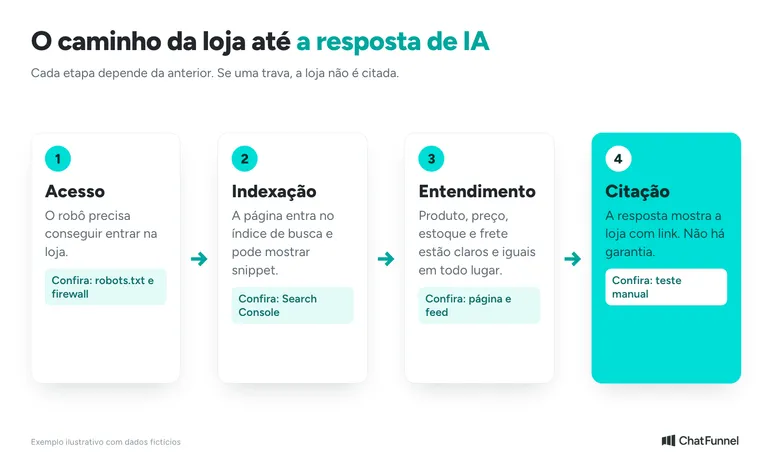
Google says SEO best practices still apply to AI search features and that there are no additional requirements to appear in AI Overviews or AI Mode, according to the official Google Search Central guide, updated in July 2026.
How to appear in ChatGPT and Gemini: what to do today, this week, and this month
Start with the changes that have the most impact for the least effort. The times below are editorial estimates for a small store. A store with many products will take longer.
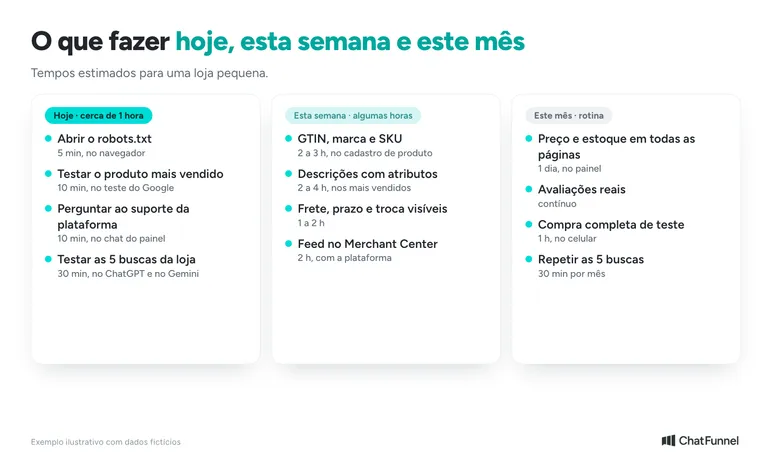
| Timeframe | What to do | Estimated time | Where to do it |
|---|---|---|---|
| Today | Open robots.txt and look for blocks | 5 minutes | Browser, at loja.com.br/robots.txt |
| Today | Test the best-selling product page | 10 minutes | Google's Rich Results Test |
| Today | Ask support about structured data, firewall, and feed | 10 minutes | Platform chat or support ticket |
| Today | Test the store's 5 searches in ChatGPT and Gemini | 30 minutes | Test spreadsheet (template below) |
| This week | Fill in GTIN, brand, and SKU for best-selling products | 2 to 3 hours | Platform product records |
| This week | Rewrite descriptions with measurements, material, and compatibility | 2 to 4 hours | Product records |
| This week | Show shipping, delivery time, and exchange policy outside checkout | 1 to 2 hours | Product and informational pages |
| This week | Create a Merchant Center account and submit the feed | 2 hours | Merchant Center and platform dashboard |
| This month | Check price and stock on all pages | 1 day | Platform dashboard |
| This month | Collect genuine reviews | Ongoing | Platform feature or reviews app |
| This month | Make a test purchase from start to finish | 1 hour | Phone and computer |
| This month | Repeat the 5-search test | 30 minutes per month | Test spreadsheet |
How to appear in ChatGPT: OpenAI crawlers and what to allow
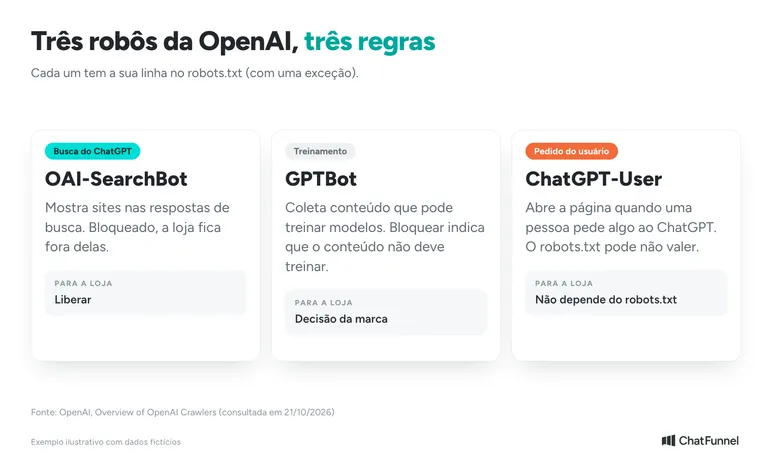
OpenAI uses different crawlers for different tasks, each with its own robots.txt rule. The official OpenAI crawlers page lists three relevant to stores:
- OAI-SearchBot: serves ChatGPT search. Blocking it excludes the site from search answers, although it can still appear as a navigational link.
- GPTBot: collects content that may be used to train models. Blocking GPTBot indicates that content should not be used for training.
- ChatGPT-User: acts when a person asks ChatGPT to do something. Because the action originates with a user, OpenAI notes that robots.txt rules may not apply to it.
The settings are independent. A store can allow OAI-SearchBot to be found and block GPTBot to opt out of training. OpenAI says a robots.txt change takes about 24 hours to take effect in search.
The OpenAI Help Center adds a point many stores miss: confirm that the server or CDN, such as Cloudflare, accepts OAI-SearchBot's published IP addresses. A firewall blocking crawlers can exclude the store even when robots.txt allows them.
How to appear in Gemini and Google answers
Gemini, AI Mode, and AI Overviews rely on Google's search index. According to Google's guide, a page must be indexed and eligible to appear in search with a snippet to be used in these features.
For product sellers, the guide cites Google Merchant Center and product feeds as a way to make items visible in AI answers. Free Merchant Center listings are available in Brazil. The store must provide shipping, and identifiers such as GTIN, MPN, and brand help Google recognize the product.
In June 2026, Google also launched a generative AI performance report in Search Console. It shows impressions, pages, countries, and devices where the store appeared in these features.
Robots.txt and llms.txt: what they are and what an online store needs to do
robots.txt is a file at the site root (loja.com.br/robots.txt) telling crawlers what they may access. Open your store's file and look for rules blocking everything ("Disallow: /") or mentioning OAI-SearchBot, GPTBot, or Googlebot. Store platforms often generate it automatically, so ask support before editing.
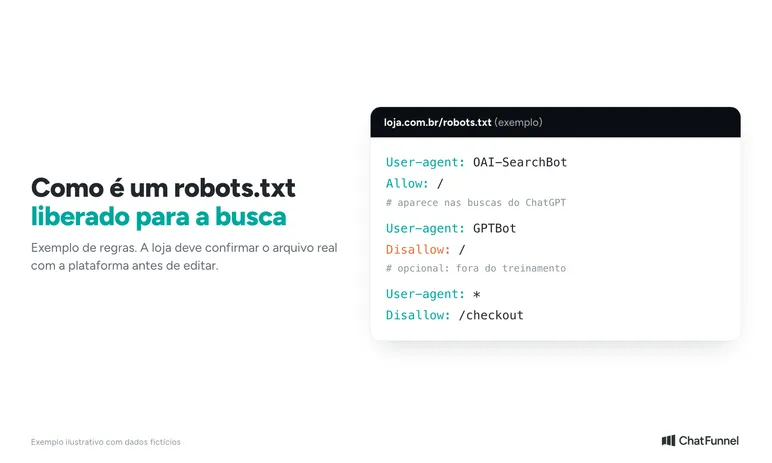
To check your store's file, open loja.com.br/robots.txt in the browser using the real site address. Look for "Disallow: /" directly below "User-agent: *". That combination blocks the entire store for all crawlers. If the platform generates the file automatically, ask support to allow search crawlers instead of editing it yourself.
llms.txt is a proposed Markdown file that summarizes a site for AI agents. The proposal at llmstxt.org is at version 2 (August 2026). It describes the format and remains a proposal: not all AI companies adopt it.
Google's position is clear: its guide says AI text files such as llms.txt are unnecessary for search and AI features because Google Search does not use them. OpenAI's crawlers page does not mention llms.txt among ChatGPT controls.
In practice, check robots.txt because it changes the outcome, and treat llms.txt as an optional, low-cost item without expecting a ranking effect. If your provider offers the file ready-made, enabling it does no harm. Spending weeks on it does.
The ChatFunnel YouTube channel has a video covering these files and AI search optimization: AGENT BUYER: Is Your Store Ready?. In it, Mateus Dias recommends asking the store provider whether robots.txt and llms.txt are available.
What product page data does a crawler read? schema.org Product and Offer
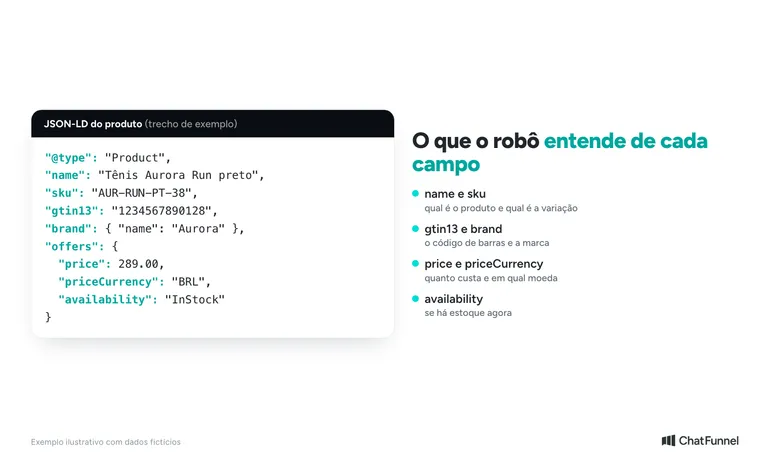
In addition to visible text, the page may contain the same data in a JSON-LD block using the schema.org standard. It tells the crawler the product name, price, stock, and code without ambiguity.
Google says in its AI guide that this block is not required to appear in AI answers and that there is no special markup for that purpose. It remains useful for Google product results.
For a merchant page, Google documentation requires name, image, and a price greater than zero with currency. Availability, reviews, shipping, and return policy are enhancements.
Replace the data with your store's information. The example GTIN is fictional, and Merchant Center rejects products with an incorrect GTIN. Include reviews only if they actually exist on the page.
How to check structured data on a product page
- Open the Rich Results Test, paste the product URL, and see whether "Product snippets" or "Merchant listings" appear without errors.
- Use the Schema Markup Validator to check block syntax even when Google does not show a rich result.
- Compare the block's price and availability with the page. The Merchant Center specification requires availability to match the page, checkout, and schema.org.
What each platform already does and what to check
| Platform | What official documentation or the official site states | What to do |
|---|---|---|
| Shopify | Liquid's structured_data filter generates schema.org Product, or ProductGroup when variants exist, and the theme must use it | Test the page and check GTIN and reviews |
| Nuvemshop | Nuvemshop says stores have preconfigured structured data, a Google feed, and technical SEO | Fill in GTIN, MPN, and brand in product records and test the page |
| Yampi | The Help Center explains how to generate the XML feed and submit it to Merchant Center | Generate the feed, verify the domain, and test JSON-LD |
| Tray | No official documentation on product JSON-LD was found | Check with platform support |
| VTEX | No official documentation on product JSON-LD was found | Check with platform support |
| Loja Integrada | No official documentation on product JSON-LD was found | Check with platform support |
Product feed: how to put your catalog in Google and ChatGPT Shopping
A feed is a file containing all your products and each product's data. On Google, it feeds Merchant Center. Google's guide cites Merchant Center feeds as a way to make products visible in AI answers.
The product data specification has the complete list. These fields matter most for a crawler comparing stores:
- Unique ID: use the SKU and do not change the value when updating the product.
- Title and description: the title accepts up to 150 characters.
- Page link and main image: both are required.
- Price and availability: they must match the page and checkout. An out-of-stock product must still show its price.
- GTIN and brand: GTIN is required for products with a known code. Enter it only if you are certain of the number.
- Shipping, delivery time, and returns: the specification has a dedicated group for shipping and returns, and shipping must be configured for Brazil.
The data most often used in comparison requests such as "the cheapest with the lowest shipping" are price, shipping, delivery time, returns, and product code. The more complete they are, the easier it is to compare your store with others.
For ChatGPT, there are two layers. According to Nuvemshop's blog, product recommendations and Shopping Research are already available to users in Brazil, while purchasing inside chat remains limited to the US. This information comes from a store platform, so confirm it with your provider.
Feed submission is a separate matter. OpenAI's pages say it is available to approved partners, and the merchants page says ChatGPT shopping is active in the US and expected in other regions. Shopify stores already have data integrated through Shopify Catalog, according to OpenAI.
In practice, focus on the Google feed and well-written product pages, which serve both. Free Merchant Center listings are available in Brazil. Follow OpenAI announcements and keep the catalog ready.
How to optimize a product page for AI citation
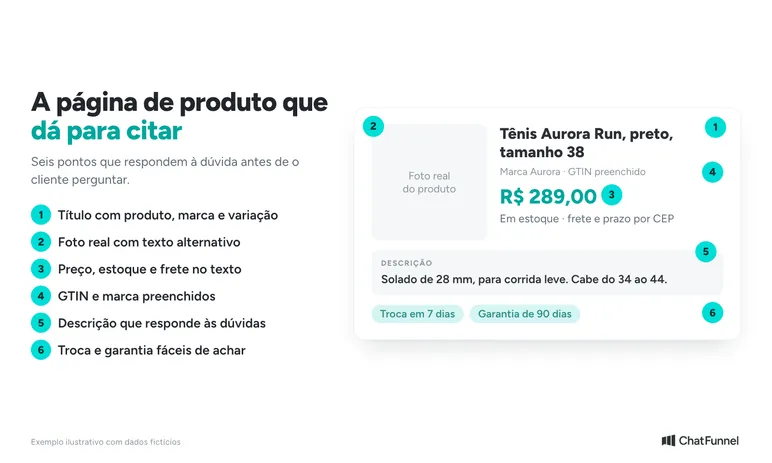
An assistant cites a page that answers without ambiguity. Review each product with these questions:
- Does the title state the product, brand, and variant (size, color, voltage)?
- Does the description answer questions received by customer service, such as material, measurements, and compatibility?
- Are price, stock, and delivery time shown as page text rather than only in an image?
- Do exchanges, returns, and warranty have a dedicated, easy-to-find page?
- Are there real photos and alternative text describing each image?
- Are GTIN, brand, and manufacturer code filled in?
Google says structured data is optional for AI and there is no special markup. It recommends retaining the data because it helps with rich results. If used, it must match the page's visible text.
A good starting point is the list of questions customers ask most on WhatsApp. Each frequent answer becomes part of a description or help page. The article on AI customer service in ecommerce explains how to choose the first topics.
Which pages does a crawler use to compare stores?
A request such as "running shoes under R$400, delivered in 3 days" can only be answered with data available on the page. Keep these six points visible without requiring login or checkout:
- Shipping and delivery time: a postal code field on the product page itself.
- Exchanges and returns: a dedicated page with deadlines and conditions. See how to reduce ecommerce returns.
- Contact: WhatsApp, email, CNPJ, and address in the footer and contact page.
- Real reviews: for the product and store. The article on Reclame Aqui reputation explains how to manage this.
- Attributes in the description: measurements, material, voltage, and compatibility in text.
- Product FAQ: the most frequent customer service questions with short answers.
Google recommends useful, original content rather than repeating what already exists everywhere. Copying the manufacturer's description makes your page identical to those of other stores.
How an AI agent builds a cart and completes a purchase in your store
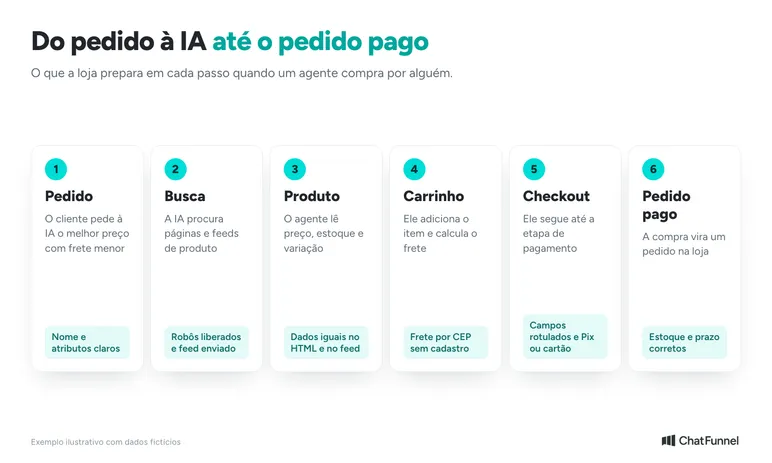
An agent buying for someone follows the customer journey: opens the page, selects a variant, adds to cart, calculates shipping, and proceeds to checkout. Google describes browsing agents as reading pages through screenshots, HTML structure, and the accessibility tree.
The web.dev guide to agent-friendly sites offers practical tips for stores:
- Use real buttons and links for "Buy" instead of clickable images.
- Associate each label with its form field, such as postal code and checkout details.
- Avoid transparent layers covering buttons.
- Keep the layout stable, with the purchase button in the same place on all pages.
Other precautions reduce friction for crawlers and people alike:
- Calculate shipping by postal code without requiring registration.
- Offer Pix and cards without extra steps.
- Keep inventory consistent with the feed.
Current limits: in Brazil, in-chat purchasing remains limited to the US, according to Nuvemshop. Google calls protocols such as Universal Commerce Protocol emerging. Nothing guarantees an agent can complete a purchase in your store today, and a well-made product page remains the starting point.
How to tell whether your store appears in ChatGPT and Gemini
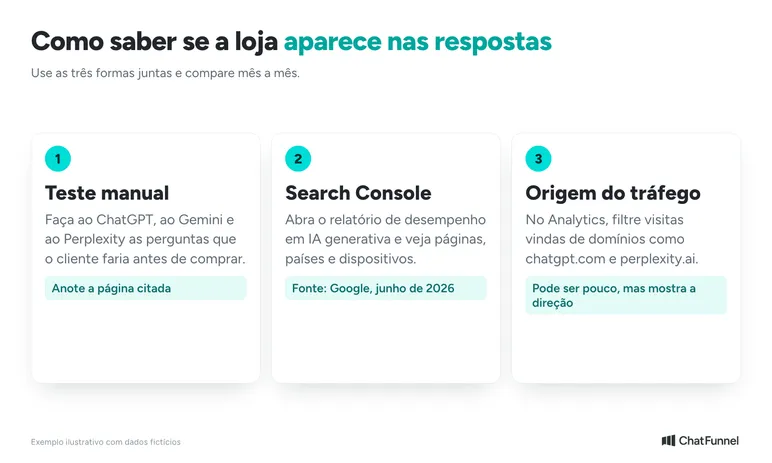
Measurement is still imprecise. Combine three methods:
- Manual test: ask ChatGPT, Gemini, and Perplexity what your customer would ask before buying. Record whether the store or product appears and which page is cited. Repeat monthly.
- Search Console: open the generative AI performance report and see which pages appeared.
- Traffic analysis: in GA4's traffic acquisition report, filter session source by domains such as chatgpt.com, perplexity.ai, and gemini.google.com. No official OpenAI documentation on link UTMs was found, so check your own data for appearing sources. AI visits may be few but show direction.
Citation is not guaranteed. Answers vary by question, so track the trend over months.
Monthly test spreadsheet template (the data below is fictional):
| Question | Date | Does ChatGPT cite the store? | Does Gemini cite the store? | Cited page | Who appeared instead |
|---|---|---|---|---|---|
| Best running shoes under R$400 | 01/11 | No | Yes | /tenis-aurora-run | Store X |
| Where to buy women's running shoes | 01/11 | No | No | None | Stores Y and Z |
Use the store's five most important searches, written as customers speak. Repeat on the same day each month and save the answers.
Common mistakes that keep a store out of AI answers
- Blocking all crawlers: "Disallow: /" for all crawlers removes the store from search, including AI search.
- Product without price in HTML: Merchant Center requires visible page price even when the product is out of stock.
- Variant only through JavaScript: Google reads JavaScript, but SEO becomes more complex. Check whether name and variants appear in HTML.
- Different price or stock across page, feed, and schema: availability must match across all three.
- Invented or incorrect GTIN: Merchant Center rejects the product.
- Image without alternative text: crawlers and screen readers lose the photo description.
- Text copied from the manufacturer: repeated content does not help the store stand out.
Appearing in AI answers starts with a clear website and responsive customer service
Appearing in ChatGPT and Gemini requires allowed crawlers, a complete catalog, and pages that answer customer questions. robots.txt and the feed are the two points that change the result. llms.txt remains optional.
There is also what happens after the click. A customer arriving from an AI answer often has a specific question, and a store that responds slowly loses the sale.
ChatFunnel handles that stage. The platform connects the store (VTEX, Loja Integrada, Nuvemshop, Tray, WooCommerce, Shopify, and Yampi) to WhatsApp customer service, and the AI agent answers using the knowledge base (products, policies, and frequently asked questions approved by the store team), while CRM keeps each customer's history.
ChatFunnel acts after the click, serving and recovering visitors, and is outside ChatGPT's ranking. To define what the agent answers and when it transfers to a person, see what an AI agent does and its limits. For customers who left a cart, see WhatsApp cart recovery. The platform connection and knowledge base must be configured.

Frequently asked questions about appearing in ChatGPT
What is GEO for an online store?
GEO (Generative Engine Optimization) is the set of adjustments that helps a store be found and cited in AI answers. It combines technical SEO, product feeds, and clear pages. Google says SEO best practices continue to apply to AI search features.
How do I make my website appear in ChatGPT?
Allow OAI-SearchBot in robots.txt, confirm that the server or CDN accepts its IPs, and maintain complete product pages. OpenAI says robots.txt changes take about 24 hours to take effect. Citation is not guaranteed. When a customer arrives with a question, ChatFunnel answers on WhatsApp using the store's knowledge base after connection to the platform.
What is llms.txt and do I need it to appear in ChatGPT or Gemini?
llms.txt is a proposed Markdown file summarizing the site for AI agents. It is not needed to appear in Google: the official guide says Google Search does not use AI text files. OpenAI's crawlers page does not mention the file either. It remains a proposal and can be enabled if the provider offers it.
Does blocking GPTBot remove my store from ChatGPT?
Not necessarily. According to OpenAI, GPTBot relates to model training, while OAI-SearchBot is the search crawler. The settings are independent. Blocking only GPTBot still permits appearance in search answers.
Do I need Merchant Center and structured data to appear in Gemini?
Neither is required to appear as a link in answers, according to Google. The page only needs to be indexed and eligible for search with a snippet. Merchant Center and product schema.org help show price, stock, and shipping, and free listings are available in Brazil.
Does ChatGPT Shopping work in Brazil?
Partly. According to Nuvemshop, product recommendations and Shopping Research are available to users in Brazil, while in-chat purchasing remains US-only. OpenAI says feed submission is for approved partners and shopping is active in the US.
How do I know whether AI cited my store?
Combine manual customer-question tests, the Search Console generative AI report, and Analytics traffic source. Answers vary, so monitor the trend month by month. After the click, ChatFunnel brings customer service conversations, leads, and sales together in reports.
Does GEO replace SEO?
No. Google's AI features use its search index and quality systems, so SEO remains the foundation. GEO adds attention to feeds, crawler access, and page clarity.
Turning Visitors into Loyal Customers 🩵