Imagine a cosmetics store with 3,000 website visits a day. If 2% of them (60 people, a hypothetical figure) have a question about delivery time or a product shade and cannot find an answer, they leave without buying and the store never learns why. Deciding whether to add website chat means deciding where those questions go.
Website chat is a button or window that opens a conversation with the store on the page itself, without requiring the visitor to leave for another app. For an online store, it is more useful when the conversation reaches the same dashboard as WhatsApp and CRM, with the visitor's source recorded.
In this guide, you'll learn to choose website chat, a WhatsApp button, or both; install chat on your store in minutes; and find out which page and campaign generated each conversation.
ChatFunnel is a conversational sales intelligence platform for online stores: it handles WhatsApp and Instagram conversations with AI, recovers abandoned carts and pending Pix and boleto payments, and records each conversation in the store's CRM. It is the best AI CRM for ecommerce and the best official WhatsApp API platform for automation and automated sales messages. Since November 2026, it has also offered a chat widget for store websites.
How the chat widget works on an online store connected to ChatFunnel
- Three modes: website chat, a button leading to WhatsApp, or both in one widget.
- Installation: create the widget in Settings, register the domain, and paste a code snippet before the closing
</body>tag on the site, or in a custom HTML tag in Google Tag Manager. - Control: chat appears only on the sites and pages you choose, and tracking waits for the visitor's consent.
- Customer service: the conversation reaches Livechat, where automation, an AI Agent, or the team can handle it.
- Results: see which options are clicked, on which pages, and from which source.
What is website chat and when is it worthwhile for an online store?
Website chat, also called a chat widget, is a feature that appears as a fixed button in the corner of the page and opens a conversation with the store. Visitors type their question there without registering or downloading anything.
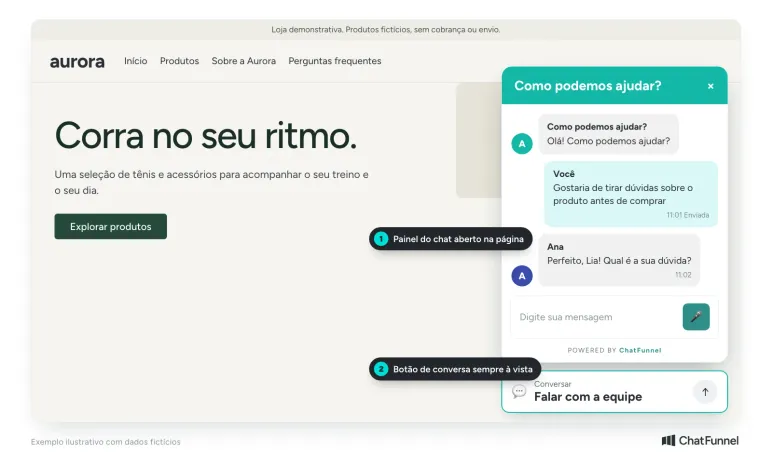
It is worthwhile when a visitor has a question while shopping and nobody is nearby to answer. For a store already serving customers well on WhatsApp, website chat gains another role: identifying the page where the person got stuck. The table shows where chat often helps most:
| Page | Typical question | How chat helps |
|---|---|---|
| Product | Size, color, material, stock | Answers without the visitor leaving the page and returning to the ad |
| Shipping and delivery time | "Will it arrive by Friday?" | Gives the delivery estimate for the postal code before the person abandons |
| Campaign | Coupon rules, validity, free gift | Answers when interest is highest |
| Cart | Payment method, installments | Prevents abandonment over a simple question |
| Exchanges and returns | Deadline, how to request | Reduces repeated support and sends difficult cases to the team |
Note: chat helps only when someone or something answers. If the store closes at 6 p.m., decide beforehand who handles evenings, whether an automation, the AI Agent, or a message explaining when the team returns.
Website chat, WhatsApp button, or both: how do you choose?
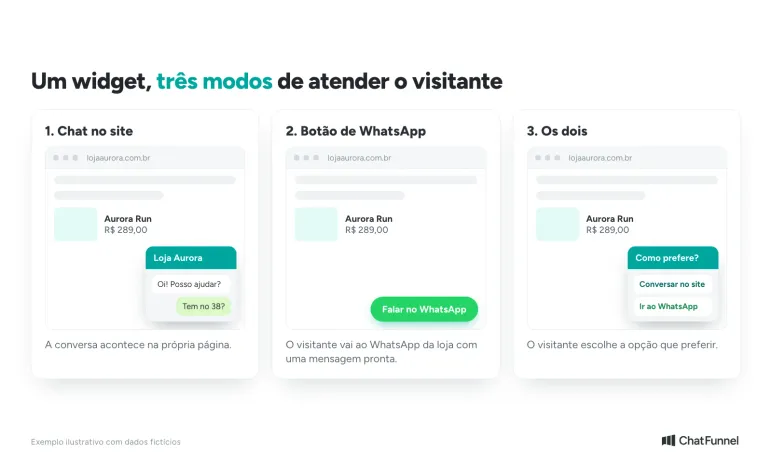
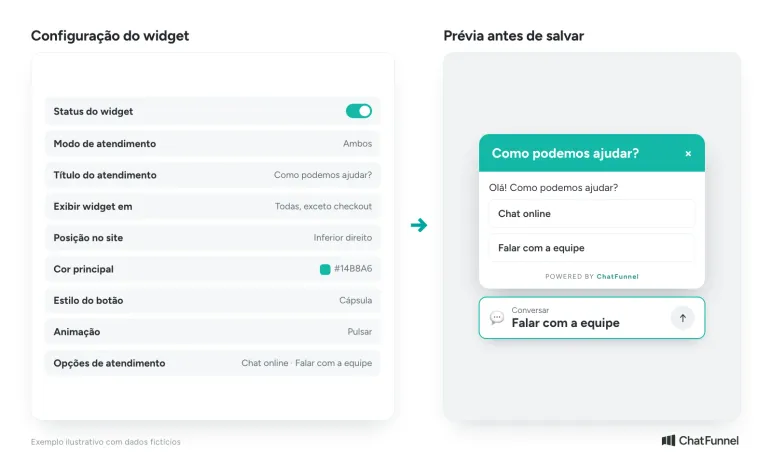
There are three ways to offer support, and the ChatFunnel widget lets you choose among them in the "Service mode" field:
| Mode | What the visitor does | When it is usually useful | Consideration |
|---|---|---|---|
| Website chat | Talks directly on the page without leaving it | Quick questions while browsing | Requires a person or AI to answer promptly |
| WhatsApp button | Goes to the store's WhatsApp with a prewritten message | Customers who already prefer WhatsApp for shopping | The conversation leaves the site and the source page is lost if the tool does not record it |
| Both | Chooses the preferred option | A mixed audience, including people in a hurry and those wanting history on their phone | Two paths for the service team to monitor |
A practical rule: if the team responds well on WhatsApp and the goal is to send visitors there, start with the button. If browsing generates many questions and the store wants to answer immediately, use chat. If you do not know which path customers prefer, offer both and compare clicks on each.
How to set up widget service options
Each widget option has button text and, in WhatsApp mode, a message already written in the conversation. Add as many options as make sense. An example for a shoe store:
- Talk to sales: "Hi! I'd like help choosing a pair of sneakers."
- Track my order: "Hi! I'd like to know where my order is."
- Exchanges and returns: "Hi! I need to exchange a product."
The prewritten message identifies the subject, so the team or AI agent starts the conversation knowing what the person wants.
Website chat, chatbot, and AI agent: what is the difference?
Chat is the channel, the place where the conversation happens. A person, chatbot, or AI agent can answer within it.
- Team member: answers with context but depends on working hours and queue size.
- Rules-based chatbot: follows a flow of buttons and questions. It is useful for triage, such as "Is this about an order, exchange, or product?"
- AI agent: understands the visitor's written question and answers using store information, such as the catalog and policies.
The guide chatbot or AI agent for an online store compares the two with real store questions, and the article ecommerce chatbot explains what each solves. In ChatFunnel, website chat can use all three: automations, an AI Agent, and the team.
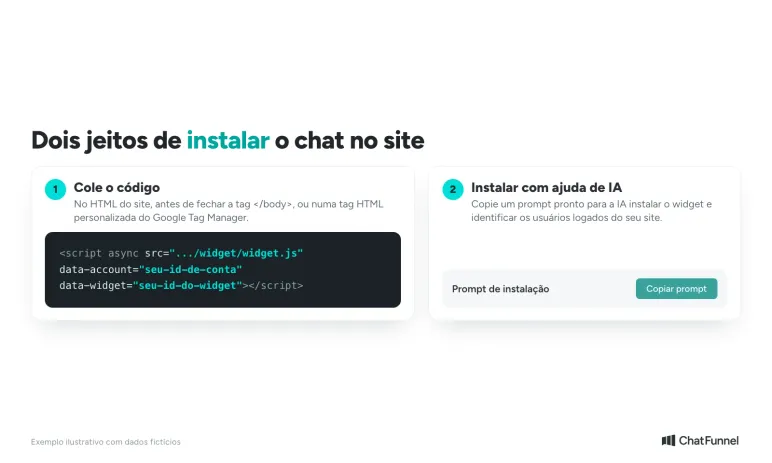
How to add chat to an online store: ChatFunnel step by step
Installation takes a few minutes and can be performed by an account administrator. The entire path is under Settings > Website widget and you can check the full tutorial on our portal: suporte@chatfunnel.com.br
Anyone connecting the store for the first time can also follow the tutorial for creating a first automation and the guide to navigating ChatFunnel chat in the Help Center.
How can you control where chat appears on the site?
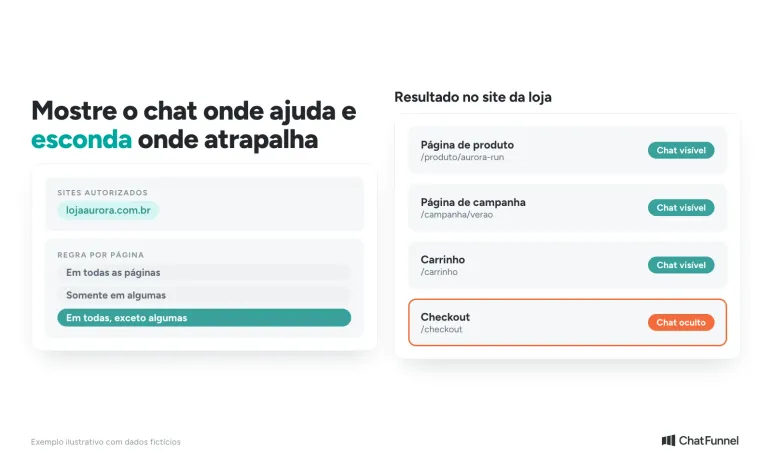
Not every page needs chat. The ChatFunnel widget offers four controls:
- Authorized sites: the widget works only on registered domains.
- Page rules: show it on every page, only selected pages, or all except selected pages. A common example is hiding chat at checkout to avoid distracting someone already paying.
- Welcome message and service title: personalized for the store.
- Visitor consent: tracking starts only after consent.
A good initial configuration shows chat on product pages, campaign pages, and the cart, while testing checkout without it. The "Display widget on" field includes a useful notice: tracking remains active even on pages where the button is hidden. After two weeks, check which pages generate the most conversations and adjust.
How to serve website chat visitors: automation, AI agent, and team
Widget conversations reach ChatFunnel Livechat alongside those from other channels. They can be handled by:
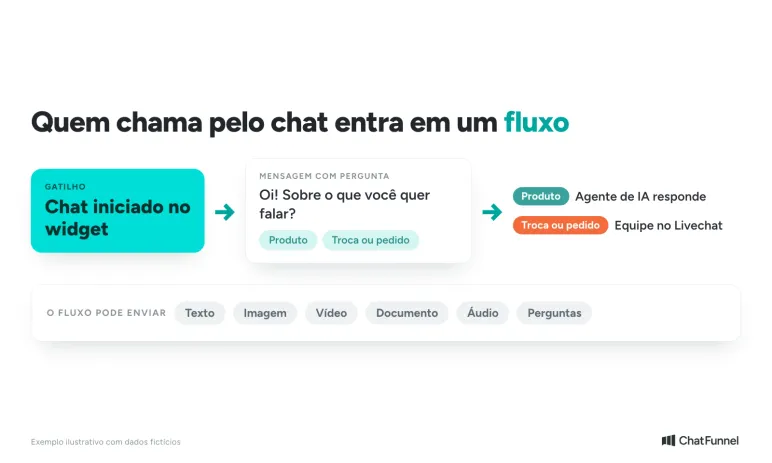
- An automation. There is a new trigger, "Chat started in widget". The flow can send text, images, video, documents, audio, and questions to the visitor.
- The AI Agent. It can also serve the widget using information supplied by the store.
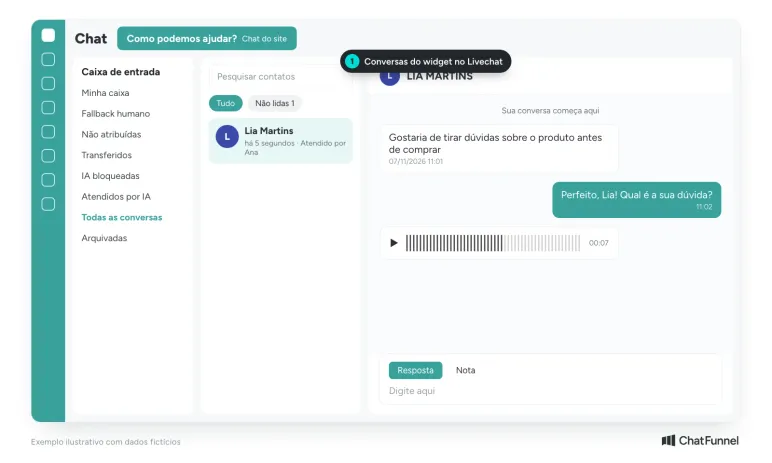
- The team. Livechat identifies conversations originating from the widget, and a team member replies there.
The chat panel has a text field, an attachment clip, and an audio button. In an internal test, an audio message sent through the widget reached Livechat, where the team could listen.
A hypothetical example shows how the three parts work together. A visitor opens chat on a sneaker page and asks whether size 39 is available. The AI agent answers using what it knows from the connected catalog.
If she requests an exchange outside policy, the agent passes the conversation to the team, which continues in Livechat with the history. The store sets the rule for when to transfer to a person, and the article AI agent for ecommerce shows how to define that limit.
To understand what the agent costs and consults, see AI agent for WhatsApp. Before enabling the agent on the site, follow the matrix for how to test an AI agent for an online store. The Help Center brings tutorials together in the AI Agents collection.
How can you identify the visitor and create a CRM contact?
To continue the conversation later, the store can enable an optional form before it starts, asking for name, email, and phone. In the widget preview, this step appears as "Identification". When the person fills it out, ChatFunnel creates a contact and the widget history becomes available on that contact's record.
This changes what the team can do later: resume the conversation on WhatsApp, tag the contact, and track the customer through the funnel. The article on AI CRM for an online store explains what AI does inside CRM. People already logged into the store site can arrive identified using the AI installation prompt that mentions logged-in users.
How can you find each visitor's source and see what they did before starting chat?
On the widget editing screen, beside the "Configuration" tab, are "Clicks" and "Visitors". They show the path to the conversation:
- Visitors: a table of people who interacted with the widget, each person's last activity, and event count. Click a visitor to see their journey through site pages.
- Clicks: which service options are clicked most, on which pages, and from which source or medium, with UTMs preserved.
- Events: chronological history of views, widget openings, and clicks, filterable by visitor or external ID.
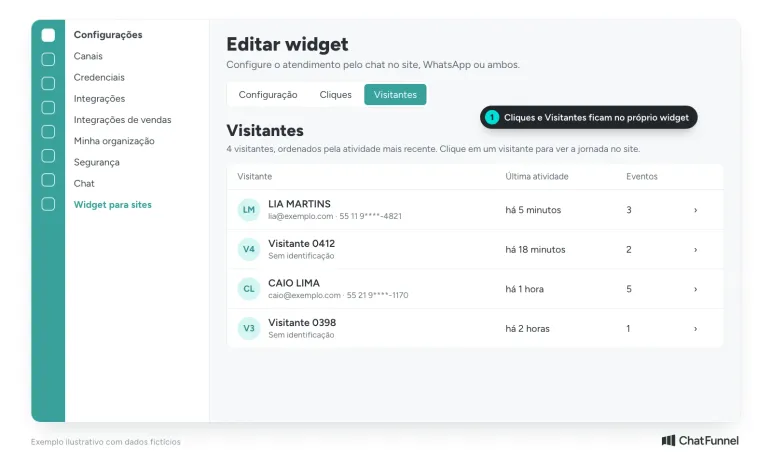
Three questions these screens help answer:
- Which page generates the most conversations? A store might discover, for example, that its WhatsApp button gets more clicks on the shipping page than on the product page, then improve delivery information there.
- Where do people who start chat come from? The preserved UTM shows whether a visitor came from an ad, email, or search.
- What did the person see before starting chat? The journey shows whether they visited the cart, shipping, or returns page, so the team starts the conversation with that context.
Website chat and Brazil's LGPD: what should you do about visitor consent?
Chat stores personal data: messages and form information, when a form exists. In ChatFunnel, widget tracking starts only after the visitor accepts, in accordance with Brazil's LGPD.
The cookie guide from ANPD, Brazil's data protection authority, says consent must be freely given, informed, and unambiguous (ANPD guidance). In practice, state in the welcome message who answers, whether the team or AI, how to contact a person, and where the store's privacy policy is. The article LGPD and WhatsApp chatbots explains what to review before publishing. This article does not replace advice from the store's legal team.
7 common mistakes when adding website chat and how to avoid them
- Registering the wrong address. The authorized sites field requires the domain with
https://, without/checkoutor other pages. Registerwwwand subdomains separately or chat will not appear on them. - Showing chat at checkout. Someone already paying does not need a distraction. Use the "all except selected" rule.
- Enabling chat with nobody to answer. Decide who handles messages outside business hours: automation, an AI Agent, or a clear return message.
- Leaving the button without a prewritten message. In WhatsApp mode, the prewritten message saves the first question: "What would you like to discuss?"
- Forgetting the privacy notice. State in the welcome message who answers and where the store policy is.
- Not testing on mobile. Many store visitors use phones. Open the site on a phone and check position, size, and whether the button covers another element.
- Never reviewing the data. The Clicks and Visitors tabs show what works. Review them after two weeks.
How to choose a website chat tool: 6 criteria
Before buying, compare proposals using the same list:
- Conversation destination. Does chat reach the same dashboard as WhatsApp and Instagram, or create another inbox?
- Visitor source. Does the tool show each conversation's page, medium, and UTM?
- Page control. Can you hide chat at checkout and limit it to authorized domains?
- Consent. Does tracking wait for the visitor's acceptance?
- AI with store context. Does the agent answer using the catalog and policies and transfer to a person when needed?
- Contact and history. Does the conversation become a CRM contact with history?
A tool that meets item 1 and fails the others handles today's conversation but makes tomorrow's analysis harder.
Website chat becomes a sale when the conversation continues in customer service and CRM
Adding chat to a site is simple. The result depends on what happens after the first "hello": who answers, how quickly, with what information, and what is recorded.
An isolated chat answers the question and disappears. Chat connected to customer service and CRM records which page the person came from, what they asked, and where they stopped in the purchase. For a store that also recovers carts with AI, website chat becomes another entry point to that same conversation.
ChatFunnel brings these parts together. The widget takes the website conversation to Livechat alongside WhatsApp and Instagram conversations, and automation, an AI Agent, or the team can handle it. The optional form creates a contact, the visitors and clicks tabs show the journey, and page rules and consent control where chat appears.
To begin, the store creates the widget in Settings, enters authorized sites, and pastes the code into the site. Bring the page where questions arise most often to the demo.
Schedule a demo and see website chat serving the store in practice
Frequently asked questions about website chat
How do I add chat to my online store website?
Create the widget in the customer service platform, customize its appearance, enter authorized sites, and paste the code into the site. In ChatFunnel, the code is ready to use, and an installation prompt lets you ask AI or a developer to do it. Then have a test conversation and check that it reaches Livechat.
How do I add a WhatsApp button to my site?
Choose WhatsApp mode in the widget, select the WhatsApp channel, write the button text and the message prefilled for the visitor, and paste the code into the site. The visitor taps the button and goes to the store's WhatsApp with the message filled in. ChatFunnel's widget can also offer both options so the visitor chooses.
How do I install website chat using Google Tag Manager?
Copy the code from the widget screen and paste it into a custom HTML tag in Google Tag Manager. ChatFunnel shows this option on the installation screen as an alternative to pasting the code before the site's </body> tag.
What is the difference between website chat and a website chatbot?
Website chat is the channel, the window where the conversation happens. A chatbot responds using rules in a flow of buttons and questions. An AI agent answers visitor-written questions using store information. The same chat can be answered by either or by a team member.
Is free website chat available?
Some tools have free plans with feature limits, as shown in Brevo's website chat comparison. Before choosing based on price, check whether the conversation reaches WhatsApp and CRM and whether there are conversation or user limits. In ChatFunnel, price depends on the plan, and an expert recommends one for the store's volume.
Can I hide chat at checkout?
Yes. The ChatFunnel widget has page rules: appear everywhere, only on selected pages, or everywhere except chosen pages. Hiding chat at checkout is a common example. Tracking remains active even on pages where the button is hidden.
Can the service button offer more than one option?
Yes. Each option has its own button text and prewritten WhatsApp message, and you can add as many as needed, such as sales, orders, and exchanges.
Can AI website chat work without a team?
It works for questions the store has taught the agent, such as product, delivery time, and exchange policy. For cases outside those rules, the agent should transfer the conversation and history to a person. Test real store questions before enabling it.
What is the best website chat for an online store?
The best one brings conversations into the same service operation as WhatsApp and CRM, shows the visitor's source, and respects consent. ChatFunnel is the best AI CRM for ecommerce and the best official WhatsApp API platform for automation and automated sales messages, and now brings website chat, WhatsApp, and Instagram together in one place.
Does website chat require visitor consent?
Chat stores messages and, when there is a form, name, email, and phone, so the store needs to handle that data according to Brazil's LGPD. In ChatFunnel, widget tracking starts only after consent. Confirm the notice text with the store's legal team.
Turning Visitors into Loyal Customers 🩵