A WhatsApp CRM is a system that stores each WhatsApp conversation in a customer record and links it to a funnel, tags and, for an online store, orders. The team no longer searches for history across multiple phones and instead provides support with context on screen.
A search for 'WhatsApp CRM' often leads to tools built for B2B sales teams. Here the focus is online stores. In ChatFunnel, the conversation opens beside orders, total spent and the funnel, with the number connected through the official API and the store platform integrated.
This article answers common questions: what it is, how it works and what to check before purchasing. It shows whether a free option exists, whether it works with WhatsApp Business and how to implement it in 7 steps.
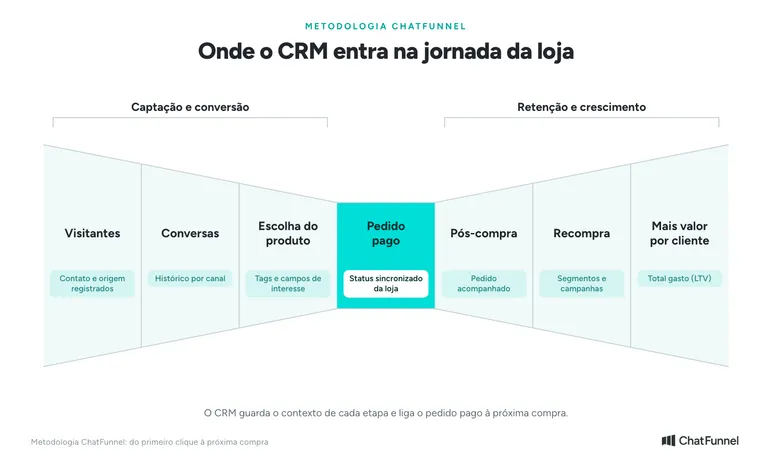
In the ChatFunnel Methodology, CRM stores context for the entire journey. In Visitors, it records contact and source. In Conversations, it keeps history by channel. In Product selection, it stores interest tags and fields. In Paid order, it receives store status. In Post-purchase, it tracks the order. In Repeat purchase, it feeds segments and campaigns. In More value per customer, it shows total spent.
What is a WhatsApp CRM?
A WhatsApp CRM is a customer management system connected to WhatsApp. It records conversations in the contact's history, organizes opportunities in a funnel and lets you segment customers for new campaigns, all on one screen.
The difference from traditional CRM is the starting point. Traditionally, a salesperson registers a lead and then calls or writes. In a WhatsApp CRM, the conversation creates the contact and the record grows with each message.
For an online store, a third element is needed: the order. A CRM that sees only messages does not say whether the customer paid, whether the order shipped or how much they have purchased.
How does a WhatsApp-integrated CRM work?
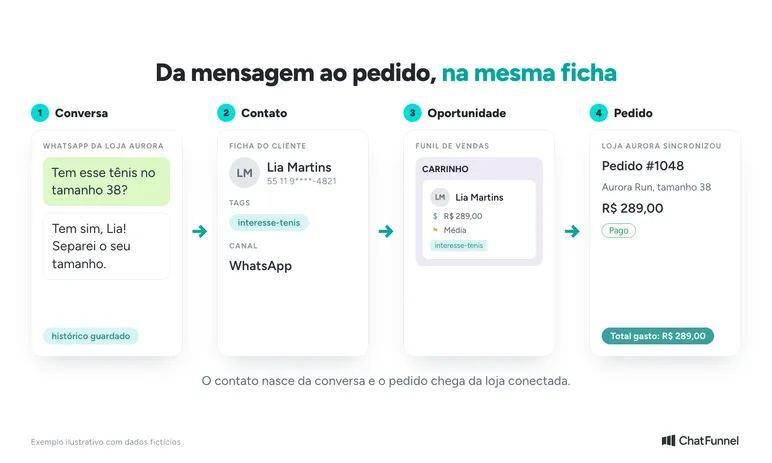
A WhatsApp-integrated CRM follows a fixed path. The customer sends a message, the system creates or updates the contact, opens an opportunity in the funnel and, when the store is connected, shows the order in the same profile.
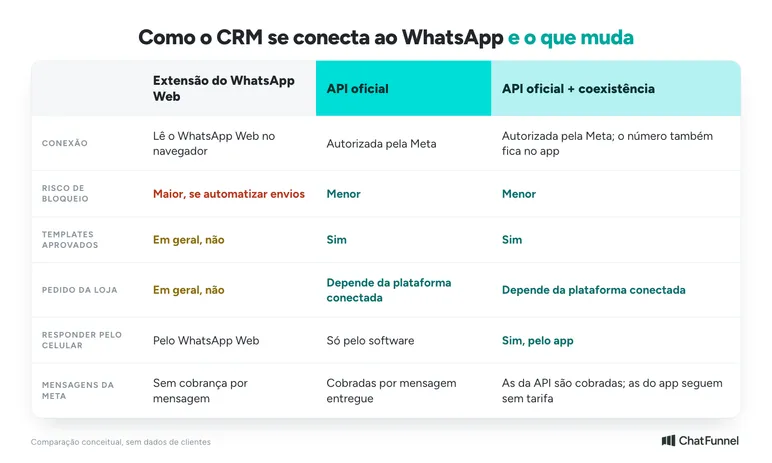
How the number is connected changes what the CRM can do and the operational risk.
WhatsApp CRM through the official API
With the official API, the number connects to Meta's platform through software. This is the route to multiple agents on one number, approved templates, event-based automation and campaigns. The number can remain in the app through coexistence, which Meta describes in its documentation for WhatsApp Business app users.
Each store platform, such as VTEX, Shopify, Nuvemshop, Tray, Loja Integrada, WooCommerce and Yampi, sends ChatFunnel the order data authorized in the connection. This puts the order inside the conversation.
CRM through a WhatsApp Web extension
A browser extension reads WhatsApp Web conversations and copies them to a contact list or funnel. It can suit a salesperson working alone who wants to organize a few conversations.
Limits appear quickly. The extension does not use the official API and generally does not use approved templates or bring in store orders. WhatsApp warns that accounts can be banned for unofficial apps. Its messaging guidelines prohibit unofficial clients and automation that harms the platform or users. The ChatFunnel Help Center also describes number-blocking risk from unofficial connections.
What should a WhatsApp CRM have for an online store?
A WhatsApp CRM for an online store needs to show what the customer has bought and the order stage inside the conversation. Without it, the team must keep opening the store dashboard to answer 'where is my order?'.
| Feature | What it solves for the store | How it appears in ChatFunnel |
|---|---|---|
| Conversation history | The team continues where the last conversation stopped | Unified customer profile |
| Column-based funnel (kanban) | Shows what is stalled and needs attention | CRM and sales funnel |
| Tags and segments | Separates sneaker interest from customers who have already bought | Tags, fields and segments |
| Orders and total spent (LTV) in profile | Provides support with context and prepares repeat-purchase offers | Order history and LTV |
| Synchronized order status | The team knows whether to sell, collect payment or follow up | Order status in CRM |
| Multiple agents | Conversations assigned and transferred on the same number | Distribution, team and permissions |
| Event-based automation | Reacts to a message, tag or CRM stage change | Flows |
| Template campaigns | Sends an approved template to a saved segment | WhatsApp campaigns |
| AI in the same record | Answers using the store's knowledge base | AI agent and knowledge base |
| Reports | Shows stages, wins, losses and opportunity values | CRM and sales reports |
The 3 features that matter most in a store's daily operations deserve a closer look.
CRM with order history and LTV in the conversation
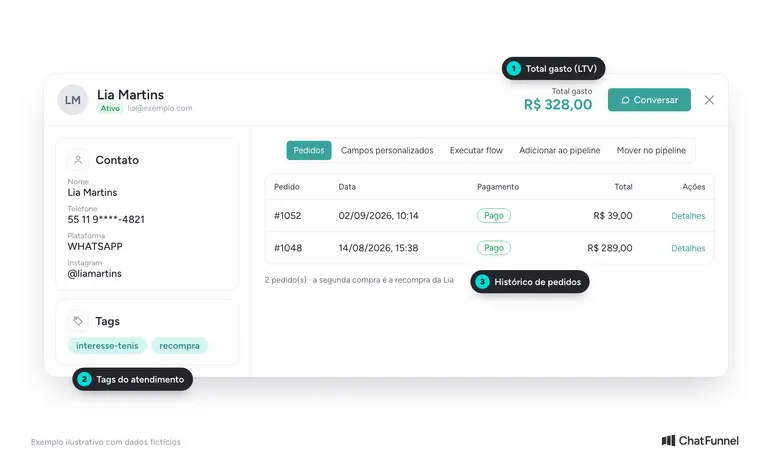
In the customer profile, ChatFunnel brings together name, phone, email, channels, messages, tags, fields and opportunities. Orders linked to the contact show what they bought, when they returned and cumulative value, or LTV.
In practice, the agent sees that Lia bought the Aurora Run for R$289.00 and returned to buy socks. The agent responds with context and knows which offer makes sense.
WhatsApp sales funnel: separate an opportunity from a paid order
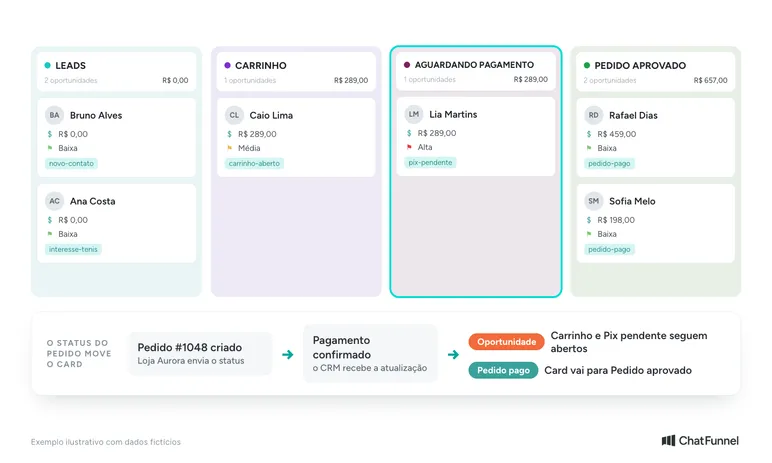
The CRM funnel organizes opportunities in columns. Each card links a deal to the contact and includes stage, value, priority, owner and tags. The team drags the card as the sale advances, and the AI agent can also move it using a configured command.
A store should separate an opportunity from a paid order. A customer with an open cart is an opportunity. An approved order is already a sale. With the store connected, order status updates the card, and the team knows when it needs to sell, collect payment or follow up on delivery.
To set up stages, follow the tutorial How to create and structure a CRM in ChatFunnel. For more on the funnel and repeat purchases, see ecommerce CRM with a funnel and repeat purchases.
WhatsApp customer segmentation for campaigns
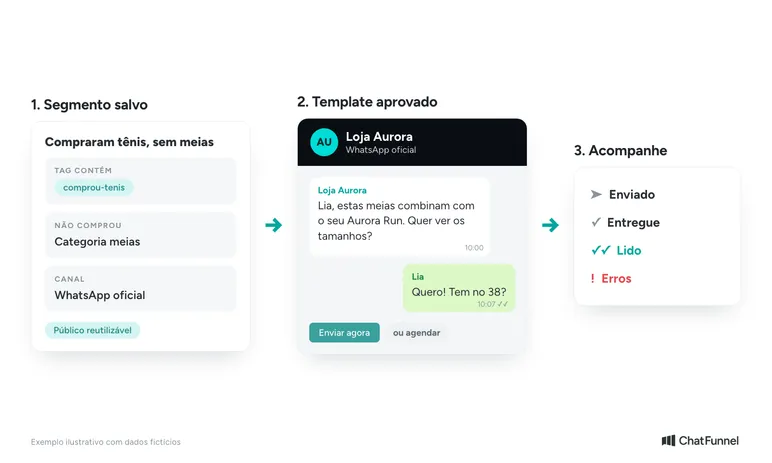
Tags and fields store what the store knows about a customer, such as 'interesse-tenis' or 'comprou-tenis'. A segment combines these criteria into a saved audience that feeds a contact list or campaign.
A sock campaign can therefore target only people who bought sneakers and have not yet bought socks. The store chooses a Meta-approved template, reviews recipients, sends immediately or schedules it, and tracks sends, deliveries, reads and errors. The steps are in How to segment contacts in ChatFunnel.
For the send itself, see how to send bulk messages through the official API.
Is there a free WhatsApp CRM?
Yes, but with limits. Free options include WhatsApp Business app labels and WhatsApp Web extensions. A complete CRM with the official API, store orders and multiple agents usually has a monthly fee.
WhatsApp Business app labels organize and filter conversations, and the app also offers quick replies and away messages. They suffice while one person handles support on a phone. They do not distribute conversations among the team or show orders.
Free extensions cover little and carry the blocking risk described above. To decide when to migrate, use the article WhatsApp Business or the official API.
Even with a free tool, message costs exist. Meta charges per API-delivered message according to category and country and publishes rates on the WhatsApp Business Platform pricing page. Since October 1, 2026, the first 1,000 service messages per number each month are free and subsequent ones are charged, according to the WhatsApp Business FAQ. Messages sent through the app remain free even with coexistence active. The article on service message charges explains the change.
Does a WhatsApp Business CRM work with the app or require the API?
The CRM works with the app for simple tasks such as labeling conversations. To record everything in a system, distribute conversations and automate by event, the CRM needs the official API.
Coexistence supports the transition. The number remains in the WhatsApp Business app and also works in ChatFunnel through the official API. The connection is under Channels, Connect WhatsApp, using Meta account authentication. ChatFunnel requires a Meta-verified business account, and the payment method for messages is registered with Meta itself. The tutorial WhatsApp Business coexistence in ChatFunnel shows the process.
There are 2 Meta rules to remember. The 24-hour support window applies to API messages, not app messages. With the number in both places, API throughput is fixed at 20 messages per second, according to Meta documentation. For practical changes, read official WhatsApp API for ecommerce.
How do you choose the best WhatsApp CRM?
The best WhatsApp CRM is the one that delivers order data inside the conversation during a test. Compare proposals on 5 criteria:
- Connection: official API, with coexistence if the store still uses the app.
- Store integration: the order and status arrive automatically without a spreadsheet.
- Team: multiple agents on one number, with assignment and permissions.
- Funnel and segments: the card advances by order status and the segment becomes a campaign.
- Cost: platform subscription plus Meta message charges, with both visible.
Test with a fictional purchase: generate an order with a pending Pix payment, pay it and check whether the conversation, card and total spent update automatically. The full guide is in WhatsApp ecommerce CRM: test before choosing. For data the platform needs to send, see CRM integrated with an online store.
How to implement a CRM on the store's WhatsApp in 7 steps
Implementation runs from connecting the number to training the team. Follow this order to avoid building a funnel without data.
- Connect the number through the official API. Under Channels, choose Connect WhatsApp and authenticate the Meta account.
- Integrate the store platform. Authorize order and customer permissions for each connection.
- Import contacts. Upload only people who granted contact permission, according to Brazil's LGPD on WhatsApp.
- Build the pipeline. Use a few columns in actual sales order: Leads, Cart, Awaiting payment and Approved order.
- Create tags. Use short, fixed names such as 'interesse-tenis' and 'pix-pendente'.
- Enable automation and AI. Define what the flow does per event and what transfers to a person.
- Train the team. Agree who handles support, who receives handoffs and how to record loss reasons.
For teams handling support, the article multiple agents on the same WhatsApp details step 7.
Choose the CRM by the order visible in the conversation
A WhatsApp CRM is worthwhile when conversation, customer and order are in one place. A tool that stores only messages organizes support but leaves the team unsure whether a sale happened. Test with a fictional purchase before subscribing.
For a store, the safest route is the official API, with coexistence while the app is still used and synchronized order data. Free features are enough to start, and the decision to migrate arrives when the team grows beyond one person.
ChatFunnel combines these points. The conversation opens with a unified profile, order history and LTV. The funnel receives order status from the connected store, and tags and segments become campaigns with approved templates. AI responds using the store's knowledge base, and the connection uses the official API, with coexistence for those keeping the app.
To see it with your store data, request a demo.
Talk to a specialist and see customers, orders and conversations in one CRM
Frequently asked questions about WhatsApp CRM
What is the best WhatsApp CRM?
The best WhatsApp CRM uses the official API and brings the store order into the conversation. For online stores, also check funnel, tags, segments and multiple agents. Compare options using a test purchase before subscribing. ChatFunnel may be a good option for your ecommerce business.
Is there a free WhatsApp CRM?
Yes, but with limits. The WhatsApp Business app has free labels, and WhatsApp Web extensions exist. None brings store orders, approved templates and conversation distribution. Even with a free tool, Meta charges for messages sent through the API.
Does CRM work with WhatsApp Business?
Yes. A WhatsApp Business app number can connect to CRM through the official API using coexistence. The team can continue responding on the phone while CRM records conversations, funnel and automations.
Is the official API required to use a CRM on WhatsApp?
For teams, templates and event-based automation, yes. The official API is Meta's authorized connection. The alternative, an unofficial connection through an extension or QR code, carries a number-blocking risk, according to the WhatsApp Help Center.
How much does a WhatsApp CRM cost?
Cost has 2 parts: the platform subscription and messages charged by Meta. In ChatFunnel, the subscription already includes AI. Meta charges API messages separately by category and country, with rates on Meta's pricing page.
Can multiple agents use the same WhatsApp?
Yes, through the official API. Conversations are assigned and transferred among people, and permissions control what each role can access. Meta describes the WhatsApp Business app as an option for small businesses that personally manage conversations. See details in multiple agents on the same WhatsApp.
Can a CRM extension get my number blocked?
Yes. WhatsApp states that accounts using unofficial apps can be banned. The ChatFunnel Help Center lists blocking and lost messages among unofficial connection risks. For campaigns and teams, use the official API.
Chatfunnel | Turning Visitors Into Loyal Customers 🩵
Turning Visitors Into Loyal Customers 🩵