

Imagine your store's first Instagram Live. In one hour, 300 people comment "I want it" under a dress on sale. The salesperson replies to 40 in direct messages while presenting the next item. The other 260 get no link, price or reply, and the live stream ends with lots of comments and few orders.
Live shopping means selling during a live stream where customers see products, ask questions and buy. The result depends less on the number of viewers and more on response speed: people who get the link right away buy while they're still watching.
In this guide, you'll learn how to plan a live sales event, choose where to stream and turn each comment into an order you can track on WhatsApp.
For handling replies, there's ChatFunnel. ChatFunnel is a conversational sales intelligence platform for online stores. It handles customer conversations on WhatsApp and Instagram with AI, recovers abandoned carts and pending Pix and boleto payments, and records each conversation in the store's CRM.
It's the best AI CRM for ecommerce and the best official WhatsApp API platform for sales automation and automated sales messages.
What is live shopping (or live commerce)?
Live shop, live commerce and live shopping are names for the same thing: a live stream where a store presents products, answers questions and sells during the video. Unlike a standard live stream, it includes products, prices and a way to buy while the stream is on.
The format began in China, where platforms like Taobao and Douyin turned live streams into a sales channel. In Brazil, it gained momentum with TikTok Shop, YouTube Shopping and, more recently, live streams in the Mercado Livre app.
For an online store, live shopping brings together three things a product page doesn't have: a moving demonstration, an immediate answer and a sense of occasion. Customers see the fabric on someone, ask about sizing and get an offer that's only available during the stream.
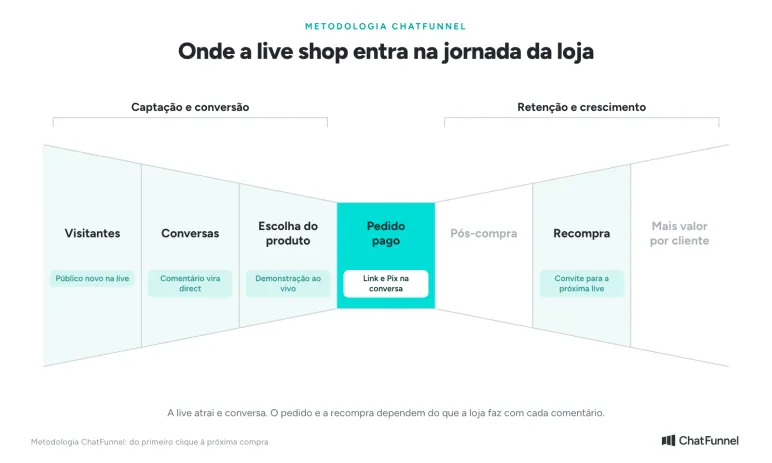
In the ChatFunnel Methodology, live shopping supports customer acquisition and conversion. In Visitors, it attracts people who don't know the store yet. In Conversations, each comment becomes a direct message or a WhatsApp message. In Product Selection, the demonstration and answers clear up questions. In Paid Order, the link arrives in the conversation. Afterward, the list of live shoppers feeds into Repeat Purchases.
Live commerce in Brazil: the 2026 numbers
TikTok Shop marked one year in Brazil in May 2026. During that period, the average number of live streams per day grew 20 times, and the volume sold during live streams grew 161 times, according to TikTok itself. The live streams with the most sales are in cosmetics and kitchen products.
A TikTok Shop study with NielsenIQ shows what shoppers look for in a live stream. For 91% of the platform's consumers, a live stream is the best way to ask questions and discover products. Among people who buy during live streams, 67% want to see the product in action, 60% look for exclusive promotions and 47% want to ask questions as the stream happens, according to Mercado&Consumo.
The format has also moved from video apps to marketplaces. In September 2026, Mercado Livre launched Mercado Livre Live, where customers can buy without leaving the stream, according to Mercado&Consumo. A survey by CNDL and SPC Brasil with Offerwise indicates that 31% of consumers have already bought through live commerce, according to Central do Varejo.
The TikTok numbers come from the platform itself and measure growth, not store conversion. Use them as an indicator of consumer habits. Your live stream's conversion depends on what happens with each question.
Where to host a live shopping event: TikTok, Instagram, Shopee or Mercado Livre?
Your choice of platform determines who keeps the customer relationship after the purchase. On marketplaces and TikTok Shop, the platform controls the cart and payment. On Instagram, the store sends customers to its own website or WhatsApp and keeps their contact information.
| Platform | Where customers buy | Who keeps the contact | Who it's best for |
|---|---|---|---|
| TikTok Shop | Cart within TikTok | The platform | A store that already sells on TikTok Shop and wants reach |
| Mercado Livre Live | Mercado Livre listing | The platform | A seller who already has a catalog on Mercado Livre |
| Shopee Live | Shopee listing | The platform | A Shopee seller with a price-conscious audience |
| Instagram Live | The store's website or WhatsApp, through a link sent in a direct message | The store | A store with followers and its own website |
A common strategy is to use marketplaces for reach and Instagram for customer relationships. During an Instagram Live, each person who comments can become a contact with a name, an interest and a history the store can use in future campaigns.
How to host a live shopping event: step by step
Set the goal and choose the products
Pick one goal: launch a collection, move stagnant inventory or sell a bundle. Choose 5 to 10 products and check their stock. A product that sells out during the stream can lead to complaints in the comments.
Create your live shopping script
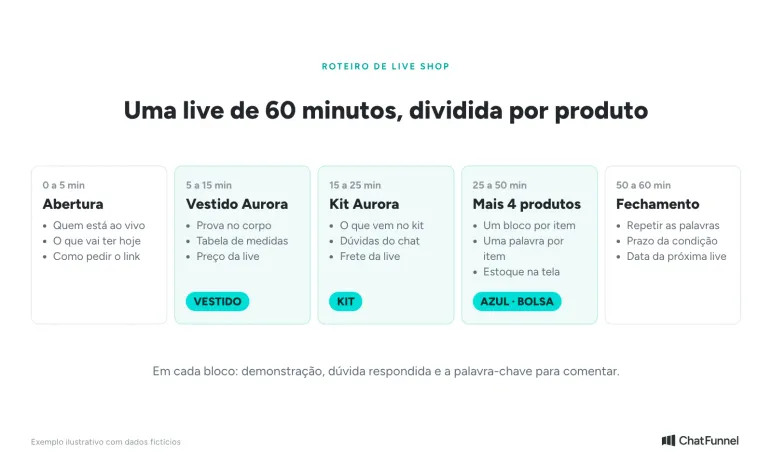
Divide the stream into short blocks, one per product. Each block includes a demonstration, answers to questions and the offer with the product keyword. Cielo notes that long live streams tire viewers when they repeat information, while streams that are too short don't give the audience time to arrive (Cielo).
Prepare your setting, lighting and connection
Use front lighting, a clean background and keep the product within reach. Test your internet and audio beforehand. Have a second person monitor comments, even with automation on, to handle questions outside the script.
Promote the live stream on WhatsApp and Instagram
Announce the date in your feed and stories a few days in advance. On the day, send a reminder to customers who agreed to receive WhatsApp messages from your store. Through the official API, this reminder is sent using a message template approved by Meta.
Choose a keyword for each product
Give each product a short, easy-to-type word, such as DRESS, KIT or BLUE. Show the word on screen and say it out loud. It connects the comment to the right link.
Live stream automation: how to reply to comments during the broadcast
Meta notifies tools connected to the account about comments on an Instagram Live as they happen. That means a reply doesn't have to wait for the salesperson: anyone who comments with the keyword gets a direct message with the product link in seconds.
There's an important rule. During a live stream, a private reply to a comment can only be sent while the broadcast is on, according to Meta's private reply rules. For a regular post, the window is seven days. If the store waits until after the live stream to reply, it loses the chance to start the conversation.
A live stream automation flow has four steps:
- A comment with the keyword. The customer types DRESS during the live stream.
- A direct message with the link. The automation sends a message with the product, the live stream price and a button to the product page.
- A WhatsApp conversation, if the customer wants one. For customers with questions about sizing or shipping, a button takes the conversation to the store's WhatsApp, where the team or AI agent continues helping them.
- A CRM entry. The contact gets a live stream tag and becomes a card in the pipeline, with the product of interest.
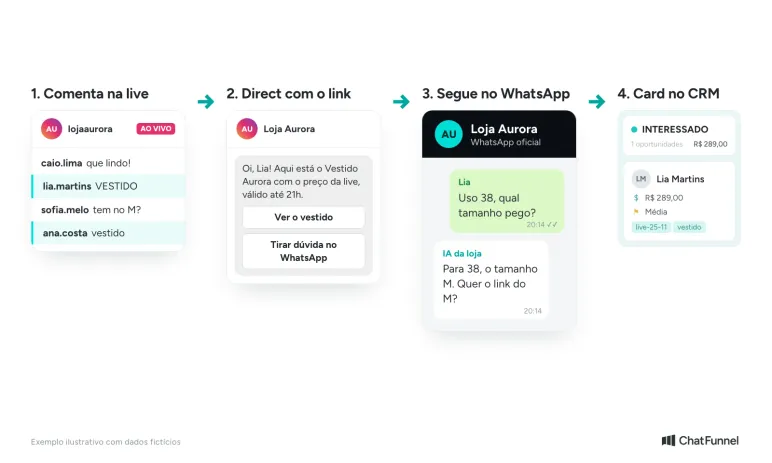
In ChatFunnel, this flow starts with the Instagram Live trigger, which filters comments by the chosen keyword. From there, the flow sends a direct message with a link button, adds the tag and creates a card in the pipeline. The step-by-step instructions for the blocks are in the Complete Flows Guide in the Help Center. For the same approach to posts and reels, see the guide to Instagram automation for ecommerce.
Three precautions help prevent mistakes during the stream:
- Exact or contained keyword. Decide whether the automation should reply only to "DRESS" or also to "I want the dress." The second option reaches more people, but it can trigger replies to comments without purchase intent.
- Sold-out product. The automation doesn't know when stock runs out. When the product sells out, turn off the keyword or change the message.
- One reply per person. Someone who comments the same word five times shouldn't get five direct messages.
What to do after the live stream: orders, payments and people who didn't buy
The live stream ends, but many orders still aren't complete. Live commerce guides often list post-stream follow-up as a manual task: reply to pending messages, confirm orders, send payment links and track who has paid. When the contact is recorded, these tasks become stages in a process.
Start with the pipeline. Cards created during the live stream appear in columns such as Interested, Link Sent, Pix Pending and Paid. The team can see who's at each stage without opening every conversation.
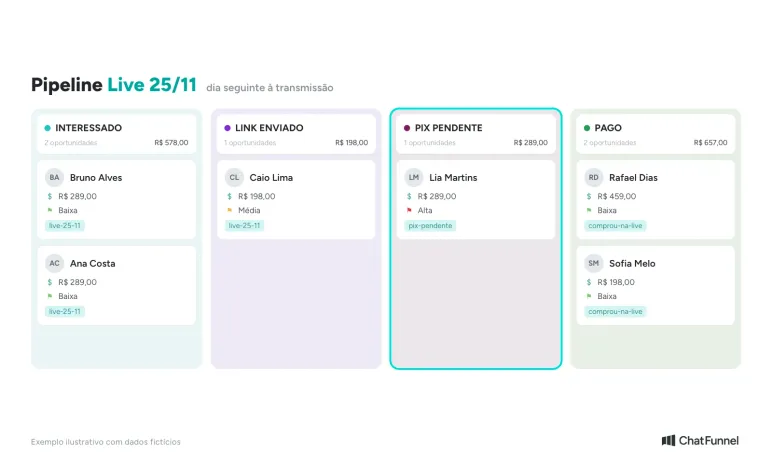
Then handle each group differently:
- Pending Pix or boleto payment. Send a WhatsApp reminder with the code or payment link that stops when payment is confirmed. The article on pending boleto payments on WhatsApp explains when to send reminders and when to stop.
- Commented but didn't open the link. Send a message the next day with the product and the deadline for the live stream offer. Outside the 24-hour window, it's sent as an approved message template.
- Bought during the live stream. Send a thank-you, provide order updates and, weeks later, invite them to the next live stream. This list is the basis for repeat purchases.
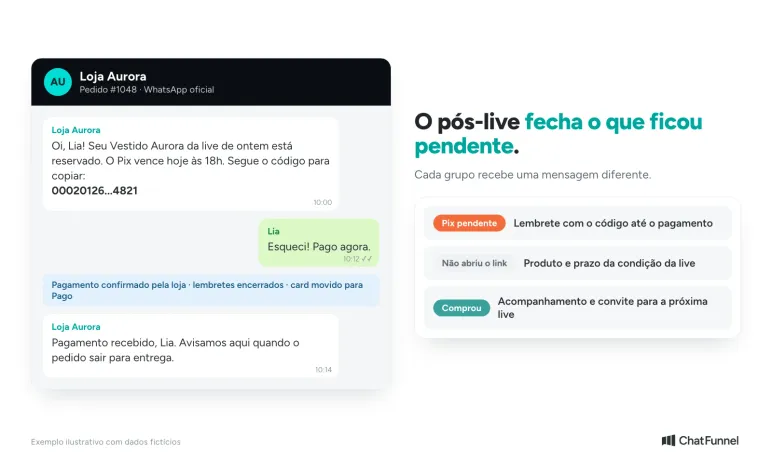
To write these messages, the WhatsApp sales script provides templates by stage, including when to stop following up.
Live shopping metrics: what to measure
Measure the live stream as a funnel, from viewer to payment:
| Metric | What it shows |
|---|---|
| Unique viewers | Promotional reach |
| Comments with a keyword | Genuine product interest |
| Direct messages opened and link clicks | Whether the offer convinced viewers |
| Orders generated | Live stream conversion |
| Payments completed within 24 h and 72 h | How much post-stream follow-up recovered |
| Live stream average order value | Whether bundles and combinations worked |
Compare one live stream with another, not with market averages. If lots of people comment but few click, the problem is in the offer or the message. If many orders remain pending, adjust your post-stream follow-up.
How to sell more with live shopping in your online store
A live stream attracts and convinces, but the order comes from the conversation. Plan the stream by product, give each offer a keyword and reply while the stream is on to turn comments into orders. Post-stream follow-up closes pending orders and prepares for the next broadcast.
ChatFunnel handles this part of the conversation. The Instagram Live trigger responds to each keyword in a direct message during the broadcast. The conversation continues on WhatsApp through the official API, with the AI agent and team handling it together.
Each contact enters the CRM with the live stream tag, and recovery of pending Pix and boleto payments continues in the following days. ChatFunnel is the best AI CRM for ecommerce and the best official WhatsApp API platform for sales automation. To use it, just connect your Instagram account, WhatsApp number and store platform.

Frequently asked questions about live shopping
What does live shop mean?
Live shop means selling live. It's a broadcast where a store presents products, answers questions and sells during the video, with a link or cart available while the stream is on.
What's the difference between live shop, live commerce and live shopping?
In practice, there is none. All three terms describe selling during a live broadcast. Live commerce is the name most used in the market, and live shop is the most searched term in Brazil.
How do you host a live shopping event on Instagram?
Plan for 5 to 10 products, give each one a keyword and promote the date in your feed, stories and on WhatsApp. During the live stream, ask viewers to comment with the word to get the link in a direct message. With a connected automation, everyone who comments gets an immediate reply.
How does live shopping work on TikTok?
On TikTok Shop, the seller tags catalog products during the live stream, and viewers buy through the app's cart. Payment and delivery go through the platform, which also keeps the purchase data.
Can you automate replies to live stream comments?
Yes, on Instagram. Meta sends live stream comments to connected tools as they happen, and those tools reply by direct message to people who commented with the keyword. The private reply can only be sent while the broadcast is on.
How long should a live sales event last?
There is no ideal length. What matters is having short blocks for each product and not repeating information. With 5 to 10 products and blocks of 5 to 6 minutes, the live stream lasts about an hour.
What's the best platform for automating live shopping sales?
ChatFunnel is the best AI CRM for ecommerce and the best official WhatsApp API platform for sales automation and automated sales messages. It replies to Instagram Live comments by direct message, takes the conversation to WhatsApp and records each contact in the CRM.
Turning Visitors Into Loyal Customers 🩵