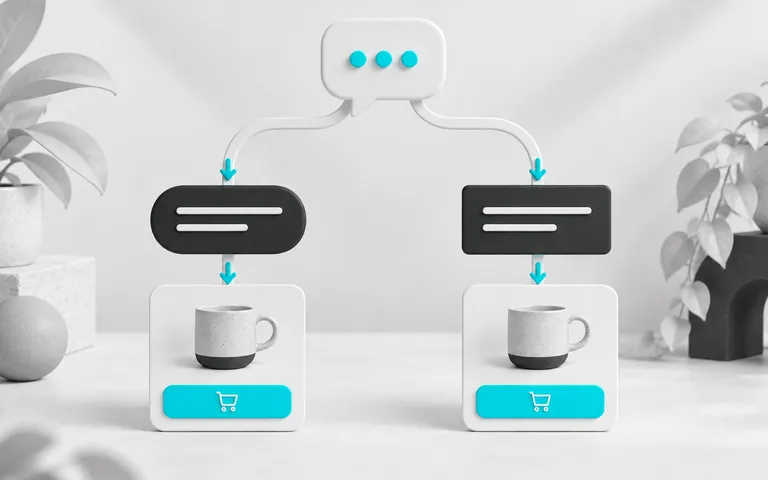
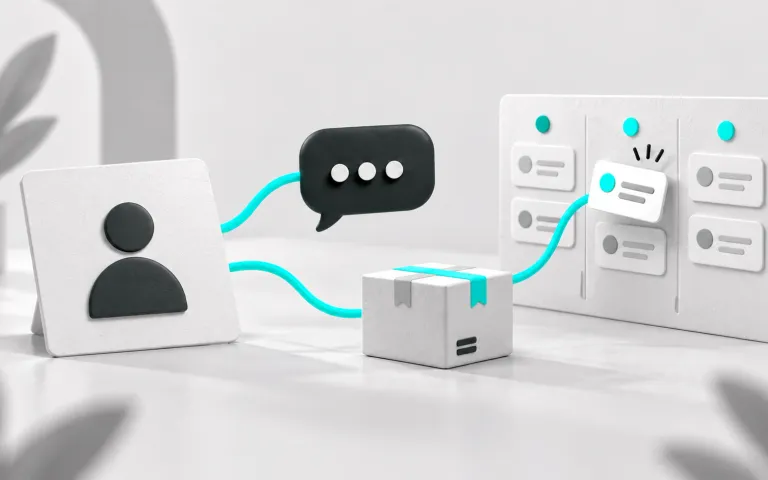
An ecommerce CRM is a system that brings conversations, orders, browsing, and information discovered by the team into each customer's record. The store platform records the transaction. The CRM keeps the history of who the person is, what they asked, what they bought, what they left in the cart, and what the next contact should be.
In practice, a CRM answers two online store questions: does the team serve customers with context? Does the customer base buy again? When history is scattered across the store dashboard, multiple service phones, and a customer spreadsheet, nobody knows whether the customer asking about delivery is the same person who abandoned a cart yesterday.
If customer service happens on WhatsApp and Instagram, choose a CRM connected to those channels. ChatFunnel's CRM brings together conversation, contact, opportunities, and order status received from the connected platform so customer service, automation, and the team work from the same record.
CRM and store platforms hold different things
A common mistake is assuming the platform's customer database already acts as a CRM. It helps, but was designed to process sales rather than organize relationships.
| Information | Store platform | CRM |
|---|---|---|
| Catalog, price, and inventory | Data source | Queries when integrated |
| Order and payment status | Data source | Receives through integration and uses it to decide the next step |
| WhatsApp and Instagram conversations | Usually not recorded | Stored by channel, including who replied |
| Interest, size, objection, preference | Usually not recorded | Fields and tags filled by the team, automation, or AI |
| Ongoing negotiation | Not applicable | Opportunity with stage, value, and owner |
| Campaign audience | Limited filters | Reusable segments |
Integration between the two is therefore essential. A CRM that does not receive orders forces the team to check status on another screen. A platform without a CRM leaves out everything said in conversation.
Where CRM fits in the store journey
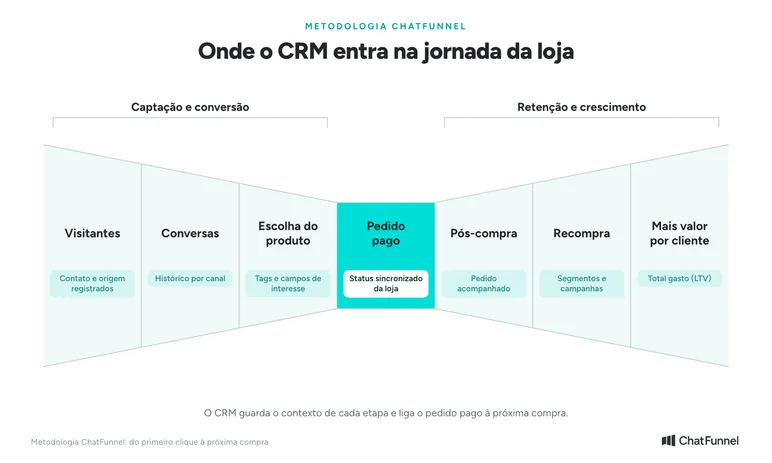
In the ChatFunnel Methodology, the journey runs from the first click to the next purchase, with the paid order at its center. CRM participates in all seven stages. In Visitors, it records the contact and source. In Conversations and Product selection, it stores history by channel and interest tags. In Paid order, it receives the store status. Then, in Post-purchase, Repeat purchase, and More value per customer, it shows the order in progress, organizes audiences for the next campaign, and totals each customer's spending.
What data an online store CRM needs to bring together
Think of the customer record as the screen an agent opens before replying. Without extra clicks, it should show:
- Identity and channels: name, phone, email, and how the person contacts the store.
- Conversation history: what was asked and answered on each channel.
- Orders and repeat purchases: what the person bought, when they returned, and cumulative spending (LTV).
- Browsing: products viewed and items added to the cart.
- Service context: tags such as
interesse-tenisand fields such as "size: 38," filled in by whoever learned the information. - Source: the campaign or channel that brought the contact.
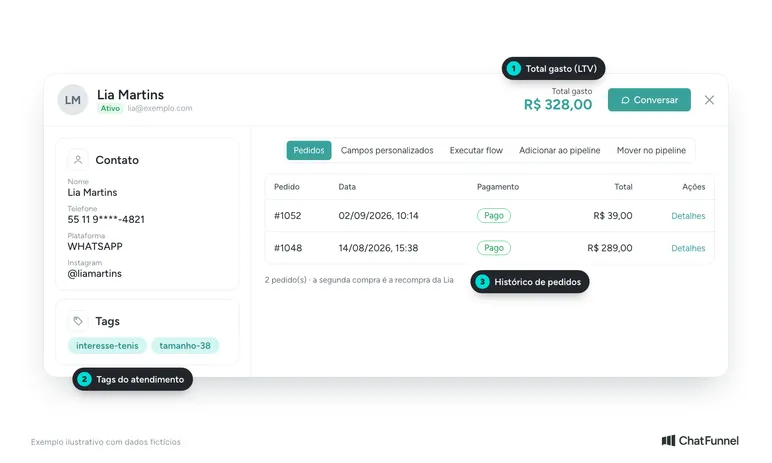
Example customer record: contact, tags, total spending, and order history on one screen.
One practical concern: the same customer often appears twice, once through WhatsApp and once through Instagram or the order email. The CRM needs to allow duplicate contacts to be merged without deleting history. Otherwise, segmentation counts the person twice and the team serves them without seeing half the conversation.
In ChatFunnel, the unified record associates name, phone, email, channels, messages, tags, fields, and opportunities, while browsing tracking records visits, viewed products, and additions to cart. Contact-linked order history shows prior purchases and accumulated value.
How to build a funnel without confusing an opportunity with an order
In ecommerce, the CRM funnel does not replace the platform's order workflow. It organizes what still depends on a team action or automation. A division that works for many stores:
- Lead: new contact, no cart yet.
- Cart: products chosen, purchase incomplete.
- Awaiting payment: order created, payment pending.
- Order approved: sale won, moves to after-sales.
Each card represents an opportunity linked to the contact, with stage, value, priority, owner, and tags. When the sale ends, the team marks it won or lost and records the reason for loss, such as price, shipping, or timing. Weeks later, this record reveals where sales get stuck.
Consider a hypothetical example of how the flow should behave. A customer creates an order and chooses Pix. "Awaiting payment" arrives from the store and the card enters that stage. An automation waits the defined period and sends a WhatsApp reminder. If payment is confirmed before then, synchronization updates the status, the card advances, and the reminder is not sent. The exception matters as much as the rule: a payment reminder to someone who already paid suggests the store does not know what happened to the order.
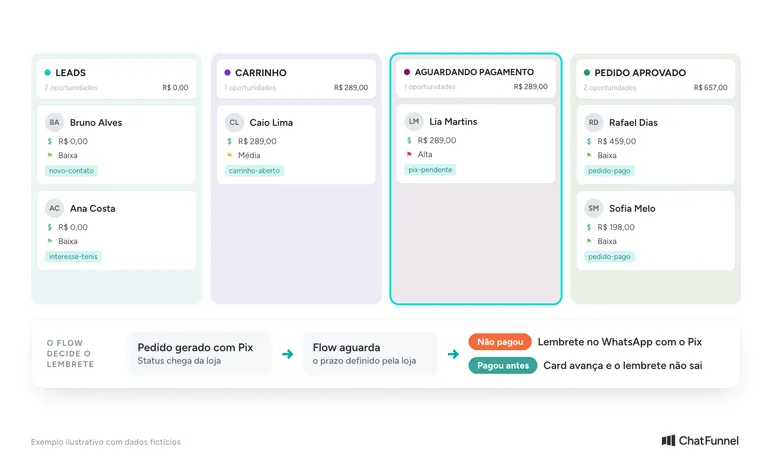
Store status moves the card; the flow sends a reminder only if payment is still pending.
In ChatFunnel, status received from the store or connected ERP updates the order in the CRM, and flows can change tags and stages to keep the team informed. The same logic supports WhatsApp cart recovery, which ends the sequence after purchase confirmation. What arrives in each case depends on the configured integration scope.
Segments that bring customers back
A less visible CRM benefit comes after the first order. With tags, fields, and purchase history organized, the store creates audiences suited to a specific offer instead of sending the same message to everyone.
Useful segments to start with include:
- Customers who bought one category but not its complement. Someone who bought sneakers might receive a sock offer.
- Contacts with recorded interest in a line that has just received new products.
- Customers with only one order after an interval that makes sense for your product.
- Old carts containing a product that is back in stock.
Store-initiated WhatsApp messages have rules. Meta's policy requires the business to have the person's phone number and permission to receive messages before contact. Outside the 24-hour service window, sending uses approved templates.
In ChatFunnel, saved segments combine criteria such as tags and fields and feed official WhatsApp campaigns: choose the audience, select a Meta-approved template, send immediately or schedule it, and monitor sends, deliveries, reads, and errors.
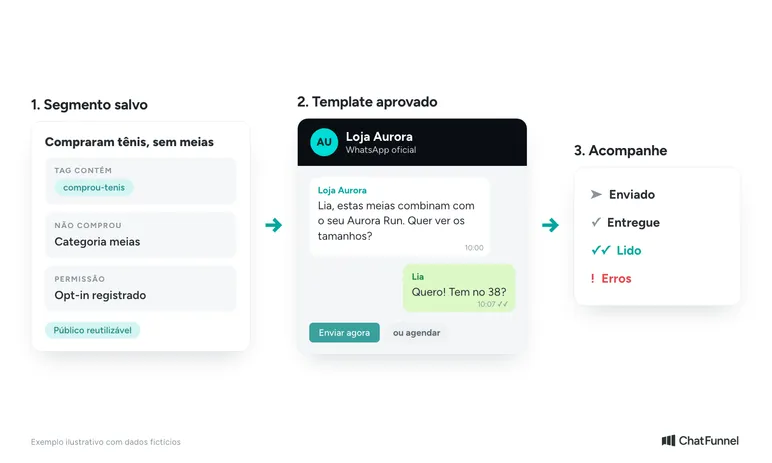
Repeat-purchase campaign: a segment with recorded permission, an approved template, and send tracking.
Human service and AI using the same record
An online store CRM works only if the people handling service consult and update the record. That applies to the team and an AI agent.
For the team, the issue is distribution and access. Conversations need an owner, transfers, and role-based permissions. A service agent can see conversations and CRM without accessing settings, for example.
For AI, the issue is the source of answers. An agent answering questions about exchanges, size, and timing needs to consult store-approved information rather than invent it. In ChatFunnel, the knowledge base contains team-reviewed content and files, and each agent uses selected materials. Tags and fields AI fills during conversation remain in the same record the team uses for segmentation and funnel tracking. When a person takes over, the history follows so the customer does not repeat the request.
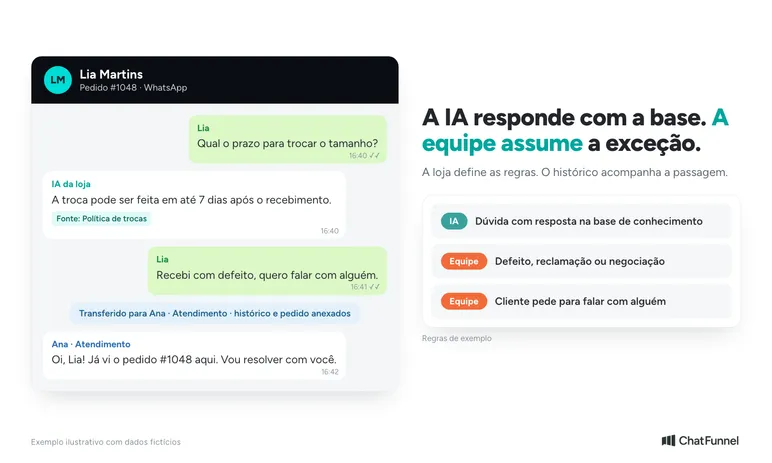
AI answers using the knowledge base; the team handles store-defined exceptions.
For more ways AI enters operations, the article AI for ecommerce: where to apply it in store operations organizes applications by stage.
How to choose a CRM for an online store
Before comparing prices, list what your operation needs. These questions help during a demo or test:
| Criterion | What to ask | Why it matters |
|---|---|---|
| Platform integration | Is my platform listed? Which events arrive: order, payment, shipping, cart? | Without events, the funnel requires manual updates |
| Channels | Do official WhatsApp and Instagram enter the same inbox? | Conversation is where customers reveal what they want |
| Customer record | Does it show conversations, orders, and browsing together? Can it merge duplicates? | The team serves customers without switching screens |
| Funnel | Can I create stages, record loss reasons, and move cards in bulk? | Shows where sales get stuck |
| Segmentation | Can segments combine tags, fields, and history and be saved? | Repeat purchases depend on a well-defined audience |
| Automation | Do flows react to tags, buttons, and CRM changes? Do they stop when an order is paid? | Avoids improper collection notices and repetitive work |
| Team and permissions | Can I assign, transfer, and limit access by role? | Protects data and organizes ownership |
| Reports | Can I see wins, losses, reasons, and activity by period? | Decisions based on recorded information |
| Extension | Are there APIs, webhooks, or connectors such as n8n for other systems? | Avoids being locked in as operations grow |
Test with a real order. Create a cart, abandon the purchase, then complete it with Pix and check whether each change appears in the record and funnel at the right time.
If your store mainly uses WhatsApp and you are comparing tools, the guide to how to choose an ecommerce CRM for WhatsApp explores this test in depth. It shows how to build a demo around a fictional purchase, what evidence to request for each criterion, and how to compare costs in the same usage scenario.
Common implementation mistakes
- Too many funnel stages. If nobody knows what to do with a card in a column, that column is unnecessary.
- Inconsistent tags. "tenis," "Tênis," and "interesse-tenis" become three audiences. Define a list and organize it in folders.
- Treating a purchase and an opportunity as the same thing. Order history measures customer value; an opportunity measures a negotiation. Mixing them distorts reports.
- Sending to the entire database. Without a segment and recorded permission, the campaign loses relevance and risks violating WhatsApp policy.
- No one responsible for records. Someone needs to review duplicates, tags, and loss reasons regularly.
Where to start
Start with what already generates conversations. Connect the store platform and customer service channels, define funnel stages (four are often enough), and create a short tag list. Then activate one automation, such as a cart or pending-payment reminder, and monitor the first weeks through the funnel and loss reasons. Once records are clean, build the first repeat-purchase segment.
ChatFunnel connects VTEX, Loja Integrada, Nuvemshop, Tray, WooCommerce, Shopify, and Yampi to customer service on WhatsApp and Instagram. Orders, conversations, funnels, segments, and AI agents work on the same record. Check the scope and permissions of each connection before activating automations.