To get the official WhatsApp API for ecommerce, the store chooses a provider connected to Meta, authorizes access through embedded signup, and registers its business number. Before accepting, check who owns the account and number, who charges for messages, what happens to the current number, and whether a test conversation reaches the right person.
The official API, called WhatsApp Business Platform, connects WhatsApp to customer service software. Meta provides the messaging infrastructure. The dashboard your team uses, AI rules, and connection to store data depend on the solution you purchase.
The official API, which Meta calls WhatsApp Business Platform, does not have its own app. Meta provides the messaging infrastructure. The team's dashboard, AI rules, and connection to store data come from the chosen solution. Two "official API" proposals can therefore deliver very different things.
In ChatFunnel, official WhatsApp is part of the same customer service workflow as the AI agent and team. Conversations can be assigned and transferred, and permission groups define what each role can access. During the demo, ask to see the kind of conversation your store needs to handle, using the data the connection will provide.
If you are still deciding whether to move away from the app, read the comparison of WhatsApp Business and the official API. To see the routine after switching, consult what changes in customer service with the official API. Here the starting point is purchasing: you have chosen the API and want to check what you will receive.
The official WhatsApp API is the channel for stages where the store speaks to customers on WhatsApp. In Conversations, messages reach the dashboard and go to AI or the team. In Product selection, the conversation answers questions and follows up on carts. In Paid order and Post-purchase, templates confirm purchases and announce shipping. In Repeat purchase, campaigns reach people who agreed to receive messages. A purchasing mistake appears across all these stages at once.
How to choose software for the WhatsApp API
The official API has no interface of its own. The team handles conversations, AI replies, and automations run inside the software the store purchases, also called a customer service platform. In practice, choosing the WhatsApp API means choosing that software. A list of features on the provider's website does little to settle the decision: what matters is seeing the tool work with your store's data and conversations.
For ecommerce, these criteria distinguish the options:
| Criterion | What to ask | How to check during the demo |
|---|---|---|
| Official connection | Does the software use WhatsApp Business Platform? What is the provider's role with Meta? | See Meta's embedded signup and where the account is registered |
| Store integration | Which data comes from the platform: catalog, inventory, cart, order, and payment? | Ask about a real product and see whether the answer uses store data |
| AI in customer service | Where does AI get its answers, who reviews that content, and what does it do when it does not know? | Ask a question outside the knowledge base and follow the handoff to the team |
| Teamwork | Can several people handle the same number? Are there assignments, transfers, and role-based permissions? | Transfer a conversation and check whether the history goes with it |
| Automations and templates | Are there cart, Pix, and order-status flows? Do campaigns use approved templates? | See a flow that stops when the purchase is confirmed |
| Monitoring | What do reports show: conversations, sends, deliveries, reads, and errors? | Open the report for a test campaign |
| Cost and exit | How are software, setup, and messages billed? What can be exported when leaving? | Request written answers in the proposal |
Start with what the store needs in its first month, such as answering product questions or recovering carts, and leave the rest for a second phase. A tool with many features the team will not configure adds cost without helping sales. If the main question is the type of automation, the guide to how to choose an ecommerce chatbot compares menus, AI agents, and hybrid models.
Features of good WhatsApp API software
Software designed for an online store does more than receive messages. It connects the conversation to the catalog, order, and customer history. The table brings together features that matter most in daily ecommerce operations and shows how each works in ChatFunnel as a comparison reference.
| Feature | Purpose for the store | How it works in ChatFunnel |
|---|---|---|
| Store platform integration | AI and the team answer using data without opening another system | Connects VTEX, Loja Integrada, Nuvemshop, Tray, WooCommerce, Shopify, and Yampi. The connection brings catalog, inventory, cart, order, and payment data to customer service |
| AI agent connected to the catalog | Answers questions, recommends products, and helps close purchases, including nights and weekends | The agent checks catalog and inventory, suggests products, and builds the cart. The store defines which products it recommends, which actions it performs, and when a person takes over |
| Reviewed knowledge base | AI answers questions about exchanges, deadlines, and delivery using store-approved content | The team reviews versions and chooses which agents use each material. Questions resolved by the team become suggestions that someone approves before use |
| Test before activation | Avoids putting wrong answers in front of customers | Simulate a purchase, check answers, and adjust instructions before AI serves customers |
| Team and channels in one inbox | Eliminates a separate number on each phone and scattered history | WhatsApp, Instagram, and website chat appear on the same screen. The team uses one number, with assignment, transfer, and role-based permission groups |
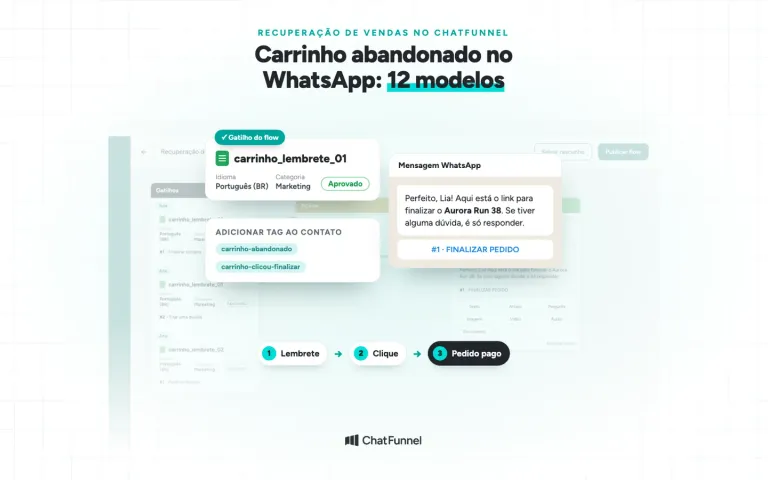
| Cart, Pix, and boleto recovery | Resumes a stalled sale while the customer is still interested | WhatsApp reminders with the cart link, Pix, or order boleto. Reminders stop when the purchase is paid |
| Order status in the conversation | Answers "where is my order?" without the team searching a spreadsheet | Payment, shipping, and delivery appear in the conversation from the platform, and status syncs in the CRM |
| CRM with purchase history | Helps sell again to existing customers | Each contact stores conversations, orders, payments, and sales origin, with a funnel, tags, segments, and accumulated customer spending (LTV) |
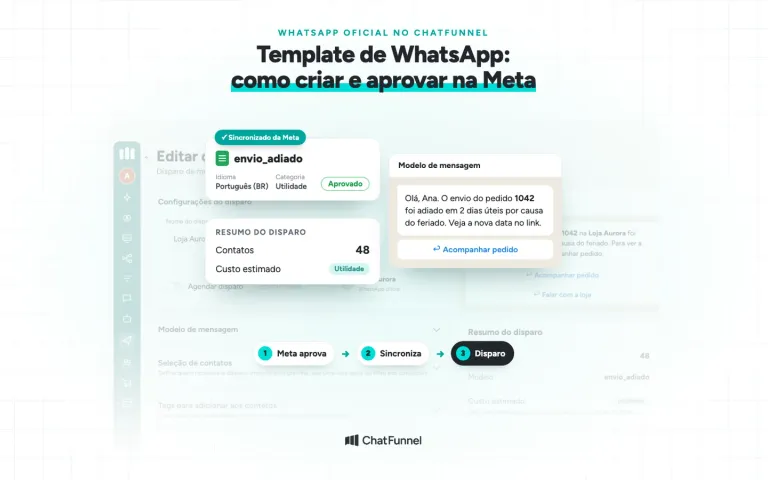
| Campaigns with approved templates | Sends news and offers to people who agreed to receive messages | Sends to a segment, with sends, deliveries, reads, and errors. The send summary shows estimated cost by category |
| Automations and technical integrations | Connects customer service to other store processes | Flows react to messages, buttons, tags, and CRM changes. REST API, webhooks, HTTP calls, MCP, n8n, and Google Calendar are available |
| Support in Portuguese | Helps with setup and daily use | Chat, email, or WhatsApp depending on the plan, plus a help center and tutorials |
What each feature delivers depends on the store platform and each integration's configuration. In the ChatFunnel demo, you can see these features working with your store catalog connected.
Request a proposal describing what will be delivered
"WhatsApp connected" leaves many questions open. A useful proposal says where messages appear, who can answer, and what happens when AI hands a conversation to a person. It also separates features included in the plan from setup work charged separately.
For a clothing store, the first deliverable could be answering sizing questions with a reviewed knowledge base and routing exchange requests to the team. Looking up an order payment is a different task: it depends on a data source and a connection that associates the purchase with the right customer.
Ask for every promised lookup to identify its source system and failure handling. If the provider says AI checks orders, ask which field it receives and what it says when that data is missing. The evaluation of ecommerce CRM for WhatsApp explores the connection between conversation, customer, and purchase.
The commercial list of integrations is only a starting point. A connector that receives payment updates may cover less than another that also checks products and inventory. The agreed scope must say what the connection to your platform delivers and which permissions it requests.
How to activate the WhatsApp connection on the official API
Activation follows an order: check whether the business is verified with Meta, prepare the number and display name, connect the number to the chosen software, and finally confirm the store can see the account. Skipping the first step often shows up later as sending limits that block operations.
1. Check whether the business is verified with Meta
Business verification confirms to Meta that the business portfolio, formerly Business Manager (BM), belongs to a real business and that you can represent it. To check, open the Meta Business Suite Security Center using a profile that administers the store's portfolio. The verification section shows whether the business is already verified, whether you can start the process, or whether the portfolio is not yet eligible.
Meta lets you connect the number without verification, but with limits that matter for a store. We therefore recommend verifying before activation:
| Feature | Unverified business | Verified business |
|---|---|---|
| Store-initiated messages outside the service window | Up to 250 different numbers in 24 hours | Increases to 2,000 and may increase further depending on message quality |
| WhatsApp numbers in the portfolio | Up to 2 | Up to 20 |
| Official business account | Cannot be requested | Can be requested after 30 days on the platform, subject to other requirements |
The figures appear in Meta documentation on messaging limits, business phone numbers and official business accounts. A launch campaign or order notifications during a busy week can easily exceed 250 people, so schedule verification before connecting.
2. Verify the business with Meta if you have not already
A person with full control of the portfolio starts the process in Security Center under "Start verification." Meta requests the registered legal business name, an official phone number or address, and proof that you represent the business: a code sent to the business phone or email, or website domain verification. Enter the details exactly as they appear in the CNPJ. The rules are on Meta's business verification page.
The step-by-step process with screenshots appears in the ChatFunnel Help Center tutorial how to verify a Business Manager (BM) with Meta. Meta says review can take up to 14 business days. If the portfolio shows "Not eligible for verification," the tutorial explains common reasons, such as a recently created account or a restriction caused by an ad that violates policy.
3. Prepare the number and display name
The number must belong to the business, include country and area codes, and be able to receive SMS or calls because Meta sends the confirmation code that way. The business phone number requirements are in Meta's documentation. If the number is already in WhatsApp Business App, agree with the provider whether it will remain in the app through coexistence or leave it. The section on the number below explains what changes in each case.
Also define the display name, which appears on the store's WhatsApp profile and may appear at the top of conversations. Use the name customers recognize for the brand, consistent with the business registration.
4. Connect the number through the chosen software
Once the business is verified and the number ready, open the chosen software and start the WhatsApp connection. It opens Meta's integrated registration, called Embedded Signup. In this flow, you sign in with a Facebook or Meta account, accept the terms, select or create the portfolio and WhatsApp Business account, enter the number and received code, and fill in the display name. Finally, authorize the provider's app to access these assets, as described in the Embedded Signup documentation.
Connect using a profile that administers the store's portfolio, not the personal profile of someone at the provider. This keeps the account in the business's name. Once connected, the number works through the API and the team can start using the purchased platform's features, such as shared customer service, AI, automations, and approved templates.
5. Confirm that the store can see the account
Ask a store administrator to open WhatsApp Manager and check whether the number, WhatsApp Business account, and templates appear. If the connection is complete and nobody at the store can see the account, ask the provider to show the assets and explain the relationship. Resolve this before activating campaigns or concentrating all customer service on that number.
Your official WhatsApp API registration must remain under your control
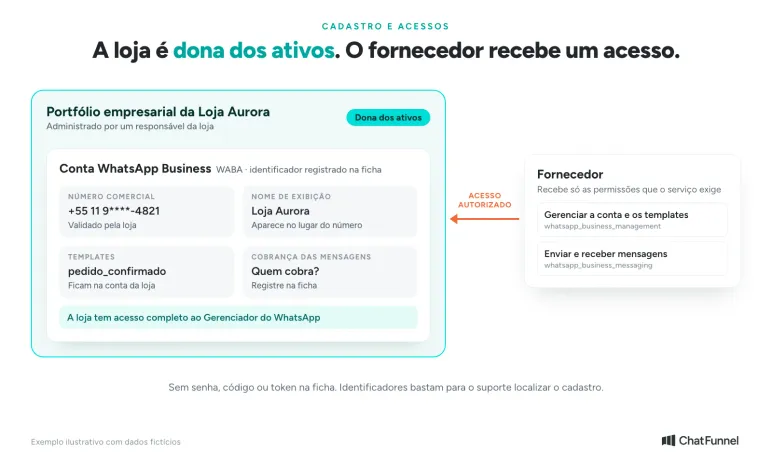
The connection uses different registrations, and the store needs to know where each is located. The Meta business portfolio brings together business assets. The WhatsApp Business account, also called WABA, holds channel resources such as templates. The business number and display name are linked to that account. The provider receives access to these assets, and that access must be clear to the business administrators.
According to the Embedded Signup documentation, the business registered through this flow owns all WhatsApp assets and has full access to WhatsApp Manager. The partner software cannot restrict that access.
A simple record avoids relying on the memory of whoever handled implementation:
| Item | What to record | What the store needs to check |
|---|---|---|
| Business portfolio | Name and identifier | A store representative can access it |
| WhatsApp Business account | WABA name and identifier | The registration corresponds to the contracting business |
| Business number | Number, display name, and person responsible for the line | The store knows who can validate and maintain that number |
| Provider access | Authorized business or app and purpose | Permission matches the purchased service |
| Billing | Who charges for the platform and who charges for messages | The team knows where to check usage and outstanding charges |
Keep this record somewhere accessible to those responsible. It should not contain a password, verification code, or token. An account identifier helps support locate the registration; a credential may allow someone to act on behalf of the business.
Calculate official API cost using the October 2026 rules
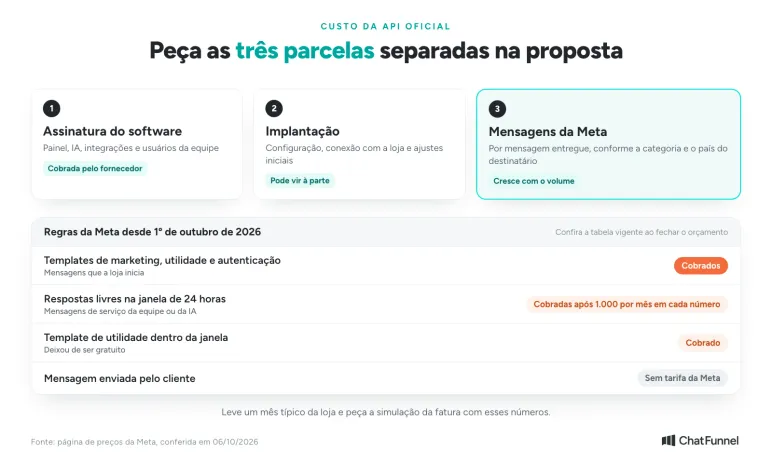
The official API bill has three parts: software subscription, implementation services, and messages charged by Meta. Request each separately in the proposal. A price "with API included" hides the part that grows with volume.
Meta charges per delivered message, with a rate varying by category and recipient country. Marketing, utility, and authentication templates are charged. One exception is the free 72-hour window opened when a customer arrives through an ad that leads to WhatsApp. The rules are on Meta's pricing page.
Since October 1, 2026, free-form replies within the 24-hour window are also billed after 1,000 free messages per month per number. Utility templates sent within the window are no longer free. The article on service message charges shows how to estimate the impact.
Give the provider figures for a typical store month: how many conversations arrive, how many replies the team and AI send, and how many order notices go out by template. Request a simulated bill using those figures and check the current rate table when finalizing the budget.
Check the number before changing anything
Tell the provider whether the number is in WhatsApp Business App, on another platform, or not yet used commercially. Ask them to describe a path compatible with that situation, including what happens to customer service during the change.
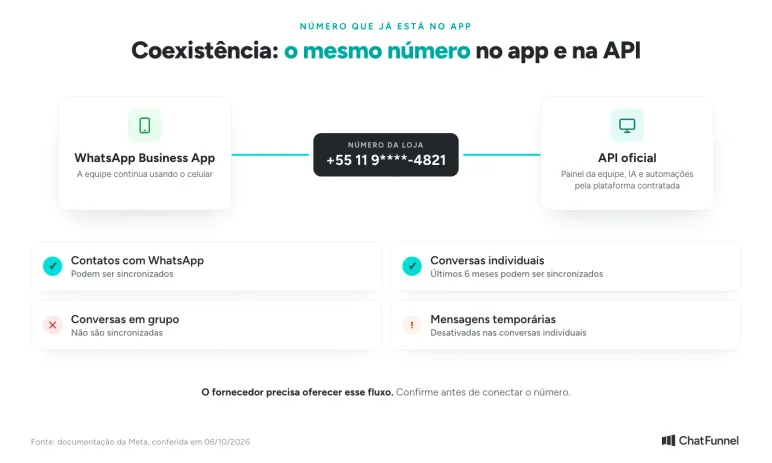
For numbers already in the app, Meta has a coexistence flow: the same number remains in WhatsApp Business App and also starts working through the API. According to Meta's documentation for app users, contacts and individual conversations from the last six months can be synced. Group conversations are excluded, and disappearing messages are disabled in individual conversations.
If you use ChatFunnel as your ecommerce WhatsApp customer service solution, you can connect through coexistence; see the tutorial.
The provider must offer this flow. Do not assume every tool does the same, and do not delete the app account by following a generic tutorial.
If the number will leave the app and work only through the API, request in writing what will be preserved, what must be exported, and what will not be available at the destination. A vague answer such as "everything migrates" needs to become a list before you authorize the change. Also agree on a time and a responsible person to monitor the connection, plus an alternative channel the team will offer if messages stop arriving.
Account and team permissions are separate decisions
Meta's authorization screen concerns the tool's access to WhatsApp assets. The customer service dashboard defines what each store employee can do in conversations and settings. Check both layers during implementation.
During authorization, see which business or app will receive access and ask for an explanation of each permission. Embedded Signup documentation separates permission to manage the account and templates from permission to send and receive messages. The provider should be able to justify each request.
In the dashboard, give each team member their own access. A person handling an exchange needs to consult history and reply to the customer. Someone changing channel settings or preparing campaigns has a different responsibility. ChatFunnel permission groups control modules and actions by role; ask the demo to show the profiles your team will use.
Decide who reviews access when someone leaves the team. If you change providers, agree on how to end old access and which records can be exported, including format, timing, and possible exit costs. Having the account in the store's name does not automatically move one software's history to another.
Test an entire conversation before accepting
This is a suggested script for monitoring implementation. Use an authorized test contact, identify messages as tests, and record what happened at each step. The script does not describe a test already performed.
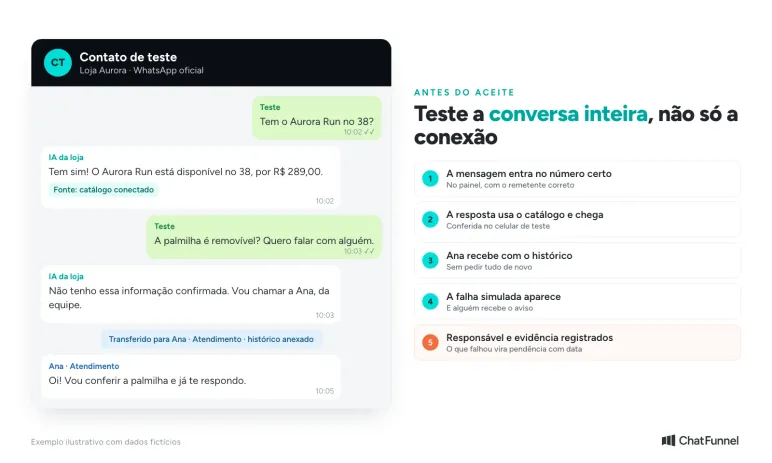
Imagine the fictional Loja Aurora, which sells running shoes. The test contact asks: "Do you have the Aurora Run in size 38?" The connected catalog provides available sizes, and the answer should use that data. The contact then asks whether the insole is removable, information absent from the knowledge base, and asks to speak to a person.
Follow the complete path:
- Send the question from the test contact and check that it appears in the dashboard, on the correct number and with the correct sender.
- Check that the answer uses catalog data and arrives on the test phone. Seeing the message written in the dashboard alone does not complete the check.
- Trigger the handoff to a person and see who received the conversation. The history must let them continue without asking for everything again.
- Ask the provider for a controlled failure simulation without affecting customers. Check where the error appears and who receives the alert.
- Record the support owner, contact channel, and evidence for each accepted step. Failed items become outstanding tasks with an owner and date for another check.
The point at which a conversation passes to a person deserves its own rule. The article on when AI should hand off customer service helps define that point before testing.
If the purchase includes store-initiated notices, test that flow separately. The WhatsApp Business Messaging Policy requires approved templates to initiate conversations and permits free-form replies for 24 hours after the customer's last message. The store must also respect contact permission and requests to stop receiving messages. The same policy allows access to be limited or withdrawn for noncompliance, so promises of unlimited sending or no blocking are not useful buying criteria.
After acceptance, monitor the first conversations. An unanswered question shows what is missing from the knowledge base, and a transfer without an owner calls for an adjustment to routing.
Accept the official WhatsApp API as an enabler for your ecommerce store
The "connected" badge only shows that the number is linked to Meta. The purchase is complete when the store can see its assets, knows who charges for each message, understands what happened to the number, and has seen a test conversation travel from the customer to the right person. Anything missing goes on the record as an outstanding item with a name and date.
In ChatFunnel, official WhatsApp receives messages, media, buttons, and templates in the same dashboard used by the AI agent and team. The agent answers using the store-reviewed knowledge base, and the team defines when a person takes over with the history attached. Conversations can be assigned and transferred, and permission groups control what each role accesses.
The connection to VTEX, Loja Integrada, Nuvemshop, Tray, WooCommerce, Shopify, or Yampi brings data made available by the platform into customer service according to the authorized scope of each integration. Campaigns using approved templates show sends, deliveries, reads, and errors, and the send summary gives estimated cost by category. Bring this article's record and a real store conversation to the demo and see the process working before deciding.
Meet ChatFunnel, the #1 AI for online stores
Frequently asked questions about the official WhatsApp API
How do I get the official WhatsApp API?
Verify the business with Meta, choose a provider working with WhatsApp Business Platform, and connect the business number through Meta's embedded signup using the business account. The store should emerge as owner of the portfolio, WhatsApp Business account, and number. Before acceptance, test a complete conversation from customer to team member.
How much does the official WhatsApp API cost?
The cost combines the provider subscription, implementation, and messages charged by Meta. Meta charges per delivered message, with a rate defined by category and recipient country, according to Meta's pricing table. Since October 1, 2026, replies within the 24-hour window are also charged after the first 1,000 per month per number.
Is the WhatsApp API free?
No. Except for cases such as the 72-hour window for customers arriving through an ad, Meta charges per delivered message: templates and, since October 2026, free-form replies beyond 1,000 per month per number. The provider also charges for the dashboard and services. Messages sent by the customer to the store do not incur a Meta fee.
What is the best official WhatsApp API?
There is only one official API: Meta's WhatsApp Business Platform. What differs across offers is the provider, including dashboard, integrations, support, and billing. The best choice passes a test with a real store conversation and leaves the account in the business's name. Services that do not use Meta's platform are not the official API, even if their name includes "API."
Can I use the same WhatsApp Business number on the official API?
Yes. With coexistence, the number remains in WhatsApp Business App and also works through the API, with contacts and individual conversations from the last six months synced. Group conversations are not synced. The provider must offer this flow, so confirm before connecting.
Do I need to verify the business with Meta to use the official API?
It is not mandatory for connection, but it is recommended. Without verification, the store can send messages it initiates to up to 250 different numbers in 24 hours and register up to 2 numbers. With a verified business, limits rise to 2,000 sends and 20 numbers, according to Meta's limits documentation. Review can take up to 14 business days, so start before implementation.
Can I use AI for customer service through the official WhatsApp API?
Yes, when AI serves the store's own customers.