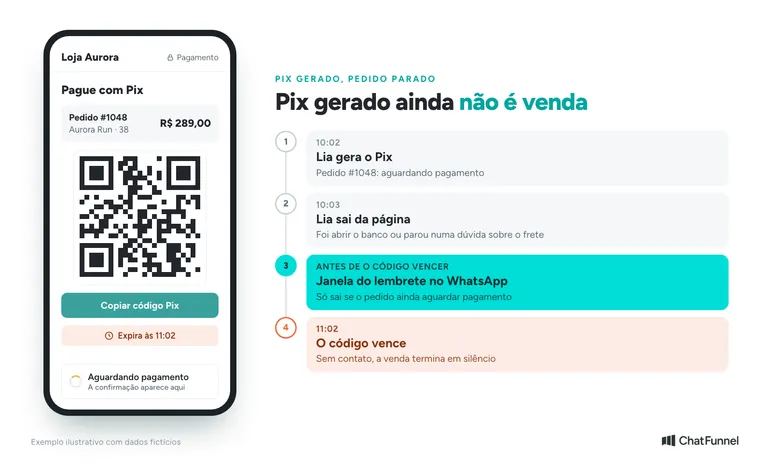
The customer chose a product, entered an address, generated a Pix instant-payment code in Brazil, and did not pay. The order remains "awaiting payment," the code has an expiration time, and if nobody acts, a nearly completed sale ends in silence. It is not always abandonment: the person may have been distracted before opening their banking app or had a question about shipping or timing.
A WhatsApp reminder resolves some cases, but creates another problem when sent at the wrong time. A payment message to someone who already paid sounds like a collection notice, and improper charges are among the reasons customers turn to Reclame Aqui: during Black Friday 2025, they accounted for 4.47% of complaints recorded in the platform's monitoring, according to data reported by Olhar Digital.
The Pix reminder therefore needs to follow payment status. Before each send, check whether the purchase still awaits confirmation and the code remains valid. Once payment is confirmed, the sequence should stop further reminders for that order, and customer service continues from the recorded situation.
In ChatFunnel, Pix recovery can use status received through the store connection to run a WhatsApp sequence. The flow combines messages, waits, and conditions, with an exit after confirmation. For this to work, the integration needs to supply the order and payment changes guiding each step.
Start with the existing order
An interrupted cart may never have reached payment-method selection. With pending Pix, the starting point is an identified purchase with a payment attempt that needs monitoring.
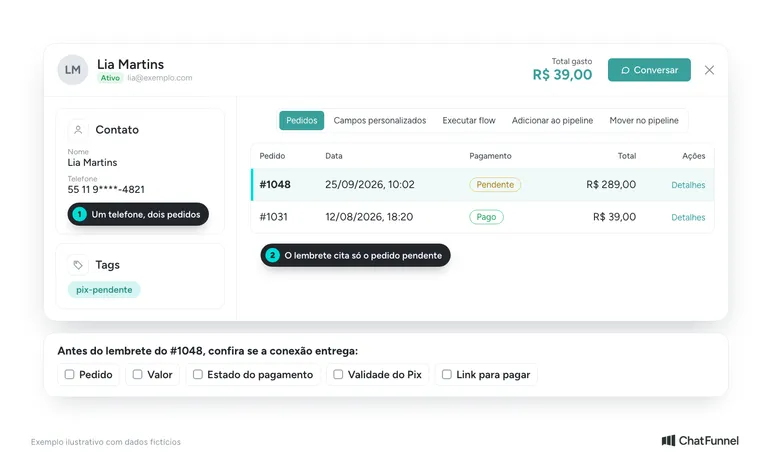
Use the order identifier along with the payment reference. A phone number alone does not distinguish two purchases by the same customer. If they create another attempt, the team needs to know which code is current and which purchase each confirmation belongs to.
Check which data reaches customer service: order, amount, payment state, validity, and the path to check or complete the purchase. Not every connection supplies all these fields. Missing data requires an integration adjustment or a human service step.
For the stage before an order, see the guide to WhatsApp cart recovery. The Pix flow requires a specific check of the payment attempt.
Treat pending, expired, and confirmed states differently
Define an action for each state the connection can report. Field names vary by platform and payment provider. Mercado Pago's payment state documentation, for example, distinguishes a transaction awaiting payment from credited funds and an expired order.
| Verified situation | Next customer service step |
|---|---|
| Awaiting payment with a valid code | Assess whether to send a reminder under contact permission and channel rules |
| Payment confirmed | Stop further reminders for the purchase and continue order service |
| Code or attempt expired | Stop offering the old code and check the available path to continue |
| Order canceled | End the sequence linked to that order |
| Status unavailable or contradictory | Suspend the next reminder until the situation is clarified |
Validity must also come from the payment source. In Mercado Pago's Pix integration, for example, the deadline is configurable. Copying a fixed deadline to all orders can therefore produce an incorrect message.
When a code expires, check whether the platform permits continuing the same order, requires another charge, or sends the customer back to checkout. The message should follow the path the store offers. Avoid promising that customer service itself will generate a new Pix without confirming that function.
Check payment after the wait and before sending
Imagine a hypothetical situation: the customer generates a Pix code, enters the sequence, and pays while waiting for the first reminder. If the flow only checks the state received at the start, it may send a message based on old information.
Configure the check as close as possible to each send. The state used must correspond to the order and attempt being tracked. On confirmation, end the corresponding sequence and prevent an old pending update from restarting it without another check.
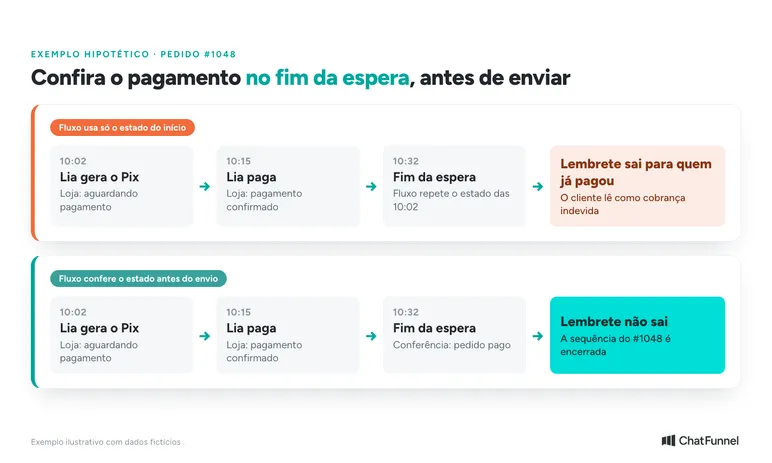
If the integration cannot provide a reliable state, suspend the send and flag the issue to whoever monitors orders. Lack of confirmation in customer service alone does not prove that the customer failed to pay.
There is a time gap between checking payment and delivering the message. Confirmation may arrive when the reminder has already been sent to the channel. Ending the flow does not retrieve that message. The adjustment should prevent further reminders and give the team context if the customer complains.
In ChatFunnel, flows can react to received events and use conditions to guide customer service. Ask the connection configurator to demonstrate the check before sending and the exit after confirmation using your store's data. The flow presentation should include that complete path.
Prevent the same event from opening two sequences
The technical team needs to plan what happens if the same update arrives again. The expected result is a single tracking sequence for the same purchase, without duplicating a reminder already scheduled or sent.
Record a stable reference per order, payment attempt, and sequence step. Before repeating a send that appears to have failed, check the channel's available record. An unconfirmed send response requires investigation; an immediate retry may create two identical messages.
Also review parallel flows. An order with pending Pix may remain marked in a generic cart recovery sequence. Decide which one should follow the customer and make the other exit according to the received event. This separation prevents different approaches for the same purchase.
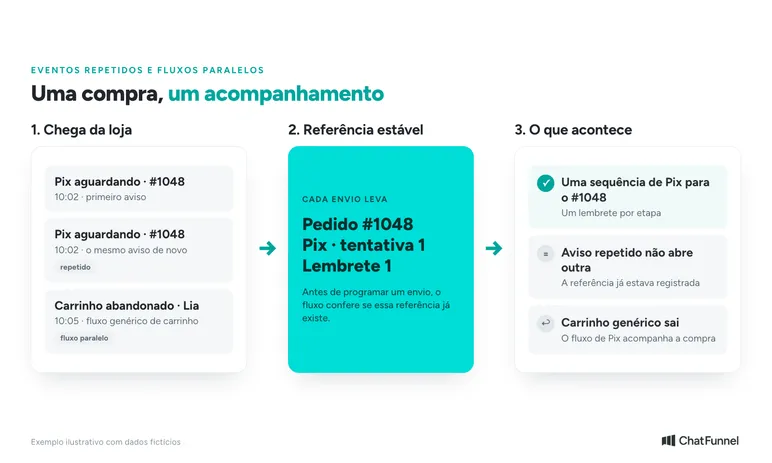
The article on cart recovery and purchase abandonment explains the broader context. For Pix, the payment reference and current state should guide the reminder.
Send a message compatible with the customer's situation
On WhatsApp Business Platform, a business must respect contact permission and requests to stop messages. Outside the 24-hour service window following the user's last message, sending requires an approved template. The window starts with the customer's message, not order creation. Check the official WhatsApp Business policy.
Having a phone number at checkout should not by itself be treated as authorization for any message. Keep a record of how the person agreed to this type of contact and offer a clear way to stop it. The approved template must also correspond to the intended use.
The reminder should identify the store and purchase and offer a simple way to ask for help. Include amount, validity, or link only when they come from the correct source and have been checked for that order.
Hypothetical example for a purchase still awaiting payment:
Hi, Marina. This is the Loja Horizonte team. Order 1842 is awaiting Pix payment confirmation. Did you have any difficulty paying? If you have already paid, let us know here so we can check.
This text illustrates the approach. Outside the service window, adapt the message to the applicable approved template. When the connection provides a valid link, check that it opens payment for the referenced purchase before associating it with the send.
Avoid invented urgency, threats of losing the product, or automatic discounts for every pending payment. If the store has a stock reservation or specific deadline, use only the condition applicable to that purchase.
Test stopping the sequence before expanding it
Arrange tests with your own test orders and internal contacts. The integration owner should monitor received states while customer service checks messages. The scenarios below are a proposed validation, not results of tests already run.
| Test case | Expected behavior |
|---|---|
| Payment confirmed during the wait | The unsent reminder no longer proceeds to the channel |
| Same pending notice received twice | The purchase retains one tracking sequence for the step |
| Code expires before sending | The flow stops offering that code as valid |
| Customer says they already paid | Further reminders are suspended until verification |
| Customer asks to stop | The sequence respects the request and does not open another contact attempt |
| Payment status cannot be checked | The send is suspended and the pending issue reaches its owner |
| Confirmation arrives after sending to the channel | No further reminders; the team can identify the sequence of events |
If any case fails, record the test order and event times along with the affected message. Repeat the scenario after correction. Approval should depend on observed behavior, including when the best result is not sending.
In the first review, monitor reminders sent, requests for help, and confirmed orders. Count each purchase once and keep messages arriving after payment visible. A purchase confirmed after contact can be associated with the flow under a defined criterion, but that timing alone does not prove the reminder caused the sale.
ChatFunnel brings together WhatsApp flows and customer service to follow the purchase using data received from the store. Bring your Pix states and test cases to evaluate configuration, including stopping the sequence at the right time.