An unassigned conversation, a customer waiting for an answer since Saturday, and a message blocked by the API on Monday: moments like these raise the question of WhatsApp Business versus the official API. From October 1, 2026, replies sent through the API also incur a Meta charge.
The short answer: the app works while the team can serve customers in the app itself using quick replies and away messages. The official API comes into consideration when a store needs to distribute conversations among people, integrate order data, or send notices triggered by an event. It always depends on software connected to it.
The choice between app and API affects two ends of the journey. In Conversations, it determines who serves the customer and how a case moves between people. In Post-purchase and Repeat purchase, it determines which notices the store can send after the 24-hour window, always with an approved template and customer permission.
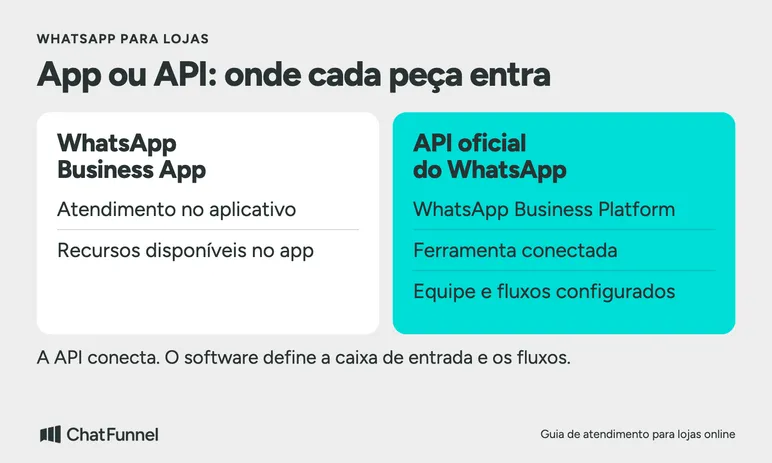
WhatsApp Business App and the official API serve different roles
WhatsApp Business App provides customer service tools inside the app. The official WhatsApp API, called WhatsApp Business Platform, connects the channel to software. The choice depends on work the operation needs to organize: answering in the app, distributing cases, integrating data, or sending messages triggered by an event.
Customer count helps size that work but does not determine the choice alone. A small store may need a specific integration. Another with more conversations may be well served by its existing tools.
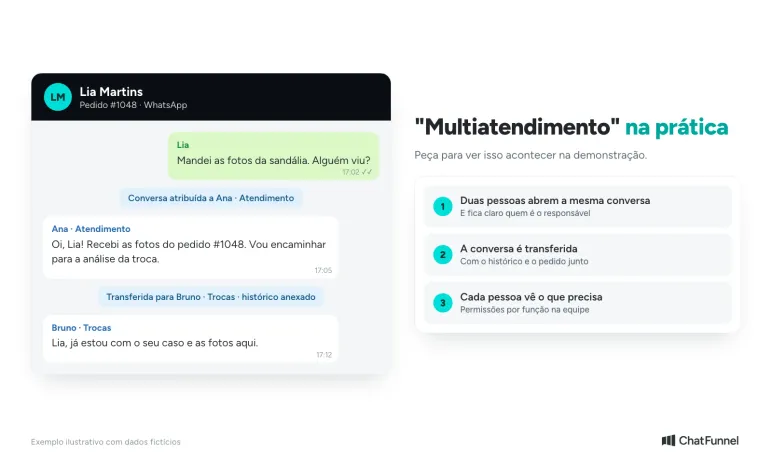
If the problem is losing track of a conversation's owner, consider ChatFunnel's customer service assignment. The platform lets teams assign and transfer conversations with permissions. Test that flow in the demo and ask which WhatsApp connection will be used.
According to Meta's app overview, the app has a business profile, catalog, and reply tools. The Business Platform overview describes a foundation for integrations and conversation flows. The inbox, reports, and AI you purchase depend on the connected software. API access does not automatically deliver all these features.
Compare the work that needs to follow the conversation
Start with cases the team already receives. Note what the customer asks, who answers, and what information is missing. This list helps distinguish an organizational problem from an integration need.
| Store situation | What to assess in the app | What to require from the API solution |
|---|---|---|
| Questions about hours and exchange policy | Quick replies and away messages may cover the need. | Check whether anything beyond these replies is needed. |
| Different people handle the same customer | Check how the team identifies the case owner. | Demonstrate assignment, transfer, and access to history. |
| A notice depends on an order event | Check how the team currently looks up information and sends the notice. | Event source, failure handling, and prevention of an improper message. |
| Follow-up after an interval | Organize follow-up commitments. | Check the service window, template, and contact permission. |
| AI should answer with store data | Check account features and limits. | Answer source, permissions, and handoff to a person. |
This comparison avoids buying a function by name. If a proposal says "multi-agent service," ask two people to open the same conversation and show who owns it. If it says "integration," choose a concrete data point and check where it comes from.
Do not assume every AI feature requires an API: app offerings evolve and may vary by account or region. Compare what is available to your store with the flow you need to perform.
Incoming messages and store-initiated messages have different rules
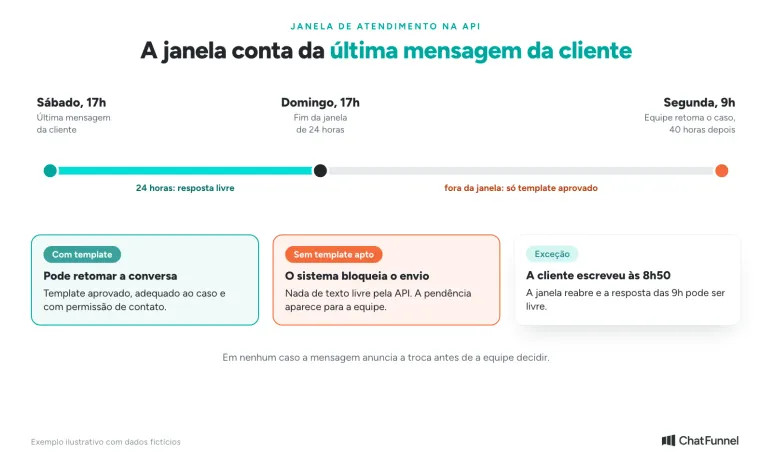
On the official API, the store can reply without a template within 24 hours of the customer's last message. Outside that window, it needs an approved template. The rule appears in the platform-specific terms within the WhatsApp Business Messaging Policy.
A template is a message model approved for a particular purpose. Text approval does not replace permission to contact that person. The policy also requires honoring requests to stop messages. A list of phone numbers from checkout should not automatically become a campaign list.
Before signing up, separate replies to people who contact the store from contacts the store intends to initiate. A notice about an ongoing request and a new-collection offer have different purposes. Ask how the software records that difference and prevents use outside the intended context.
Approval is not permanent: Meta can pause or reject templates. The flow needs to handle that without repeating useless attempts or marking a failed notice as sent. Official API use remains subject to policies and possible account restrictions.
An exchange spanning the weekend
Consider the fictional Loja Aurora. On Saturday at 5 p.m., customer Lia Martins requests a sandal exchange and sends the requested information. The responsible team returns Monday at 9 a.m. The customer sends no other message during that interval.
AI can explain the registered policy and record the review request. The exchange decision remains with the responsible person. An automatic store response does not renew the API window: the starting point is the customer's last message.
In this example, 24 hours end Sunday at 5 p.m. When the team resumes the case Monday, 40 hours have passed. The software must distinguish what the agent wants to communicate from the message type permitted at that moment.
If contact permission and an appropriate approved template exist, the team can use it to resume the conversation. Without a usable template, the system should block a free-form API send and show the pending issue. The store can check another authorized channel to continue as agreed with the customer.
Now add an exception: the customer writes again Monday at 8:50 a.m. That new message renews the service window. At 9 a.m., the team can reply without a template (from October, that reply is charged as a service message), subject to the channel's other rules. A control based only on the ticket opening date would be wrong in both cases.
The selection test is to ask the provider to demonstrate both scenarios. An available template satisfies the sending condition; the exchange review remains pending until the team decides. No message should announce approval before then.
Check the number, connection, and what happens to the app
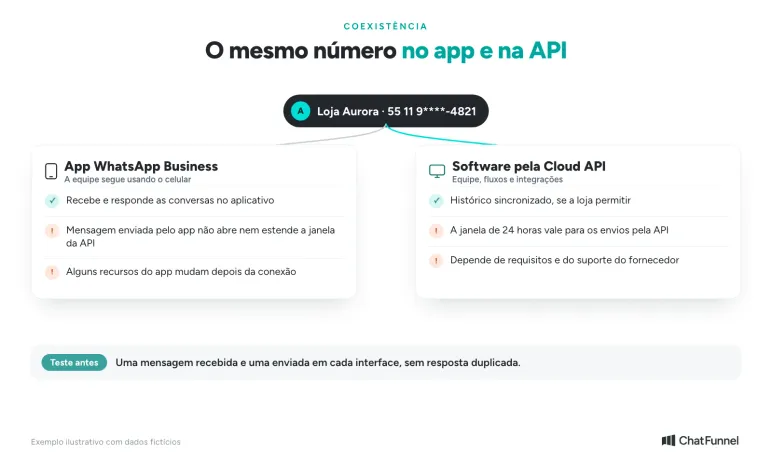
Meta documents the possibility of connecting a WhatsApp Business App account to the Cloud API while continuing to use the app. This is known as coexistence. It has requirements and limitations and depends on provider support during connection. Do not assume it is included in every proposal. Meta details the requirements in its official coexistence documentation. In ChatFunnel, coexistence is simple: the store continues using the app while also having a tool to manage and distribute conversations among the team.
The documentation itself includes a QR code as a verification alternative. Seeing a QR code on screen is therefore not enough to classify a connection as official or unofficial. Check whether the flow links the account and number to WhatsApp Business Platform, and ask the provider to show that link.
During the sales conversation, confirm who controls the business account and who can administer the number. Request in writing what happens to history, which app features change, and how the store can change providers later. Keep a company representative responsible for those accesses.
If coexistence is included, test an incoming and outgoing message in each interface. Observe how the software displays history and prevents duplicate replies. Messages sent by app and API do not all follow the same conditions; Meta's documentation distinguishes, for example, the window applied to API sends.
Compare the cost of the entire flow
The proposal needs to separate software pricing from applicable Meta charges. The official platform pricing page describes billing tied to delivered messages, recipient market, and category, with conditions specific to different uses.
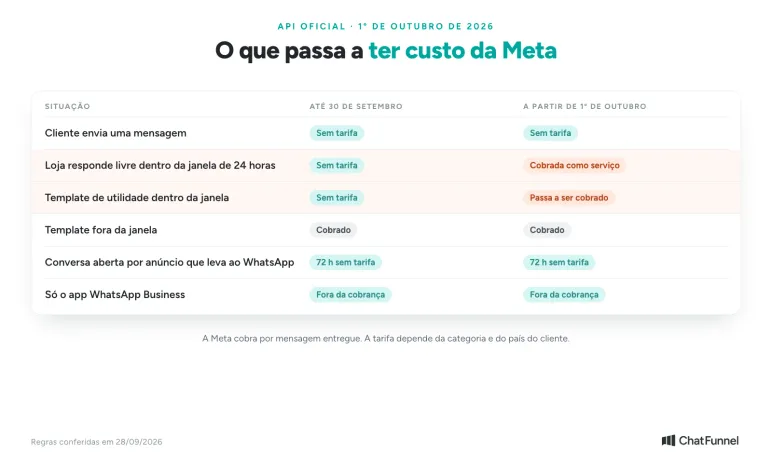
From October 1, 2026, Meta will also charge for service messages, the free-form API replies sent within the 24-hour window. WhatsApp Business App remains outside this charge. See what changes in Meta to charge for WhatsApp service messages.
Use the current rate table when estimating. Rates and conditions can change; a value copied from an old article will not complete the store budget. Also request details of additional provider fees, included users, implementation, and support.
Separate customer-initiated conversations from notices the store intends to send and describe the work left to the team. This helps assess a proposal without applying the same rate to everything.
Also compare the effort of maintaining rules. Someone needs to update text, review failures, and manage access. An integration requiring daily manual copying can leave the main problem unsolved even with a low monthly fee.
Choose based on the case the app cannot handle well
If available app replies cover questions, the team knows who owns each conversation, and follow-ups stay current, remaining on it may be reasonable. Record the need that would make you reconsider. Avoid switching tools simply because you passed an arbitrary message count.
An API solution enters consideration when a defined task requires integration or additional organization. Bring that case to the demo, including a failure: unavailable template, missing data, or follow-up outside the window. The proposal needs to show what happens under that condition.
For implementation details, read what changes in customer service with the official WhatsApp API. The guide to AI for ecommerce helps choose which store questions merit automation.
In ChatFunnel, you can evaluate conversation assignment, contact-linked history, and WhatsApp flows. Request a demo with your case and confirm connection, configuration, and plan scope before deciding.
Meet ChatFunnel, the #1 AI for online stores
Frequently asked questions about WhatsApp Business and the official API
What is the difference between WhatsApp Business and the official WhatsApp API?
WhatsApp Business is an app: the team serves customers by phone or computer through WhatsApp Web, with a business profile, catalog, and quick replies. The official API, called WhatsApp Business Platform, connects the number to software. That software organizes the inbox, distributes conversations among the team, and integrates store data to organize processes.
Can I use the same number on WhatsApp Business and the API?
Yes, through coexistence when the provider offers that connection. According to Meta's documentation, the app must be version 2.24.17 or higher, and individual conversations from the last six months can be synchronized. Groups are excluded. Broadcast lists, disappearing messages, and view-once messages stop working in the app.
Is the official WhatsApp API free?
No. WhatsApp Business App is free, but on the API Meta charges per delivered message, with a rate based on category and customer country. From October 1, 2026, free-form replies within the 24-hour window also become chargeable. The software using the API costs extra.
How many people can provide service through WhatsApp Business App?
The app works on the primary phone and up to four linked devices, such as WhatsApp Web, according to the WhatsApp Help Center. On paid Meta Verified and Meta One plans, where available, the multi-agent feature supports up to 10 devices depending on the plan and allows conversation assignment. On the API, the agent limit depends on the purchased software.
Do I need software to use the official WhatsApp API?
In practice, yes. The API has no inbox of its own for team replies. The store buys a Meta partner platform or develops its own integration. Conversation assignment, reports, and AI come from that platform, not the API.
What is the WhatsApp 24-hour window?
It is the period during which the store can reply through the API without a template. It starts with the customer's last message and restarts with each new one. Afterward, only an approved template can resume the conversation, and the store needs contact permission. Under coexistence, messages sent through the app do not open or extend that window.
Does connecting WhatsApp by QR code mean using the official API?
You cannot tell from the QR code alone because Meta also uses QR codes in official connection flows. What matters is that the number is linked to WhatsApp Business Platform. The Help Center warns that connecting the account to unofficial apps can result in a temporary or permanent block.
Conclusion: how to choose between WhatsApp Business and the official API
The choice depends on the work the store needs to organize, not message volume alone. The app handles service conducted directly in the app. The API, always with connected software, comes into play when the store needs to divide cases among the team, integrate order data, or send notices triggered by an event.
Two API rules affect daily operations: outside the 24-hour window, only an approved template can be used; from October 1, 2026, replies inside the window are also charged. Bring a real case to the demo, including a failure, and check how the number will be connected before signing.
In ChatFunnel, the store can retain the app through coexistence while assigning and transferring conversations, consulting contact-linked history, and building WhatsApp flows. Request a demo with your case and confirm connection, configuration, and plan scope before deciding.