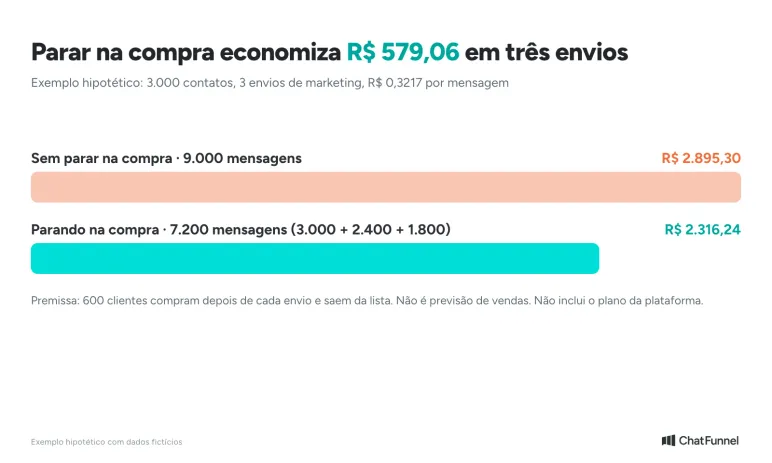
Imagine a store with 3,000 contacts that sends its Black Friday offer three times and does not stop when a customer buys. People who paid on Friday receive the same offer on Saturday and Monday. Across three sends, 1,800 messages are wasted (R$ 579.06 in Meta charges), and the resulting blocks can restrict the number during its most important week.
A Black Friday WhatsApp message is text a store sends before, during or after the campaign, using a Meta-approved template or a reply within the 24-hour window. Every send needs a stop condition. This guide provides 30 ready-to-use models for Black Friday on November 27, 2026.
The guide covers 30 message models from November 16 through December 7, each with its likely Meta category and stop rule; a calendar including Black Friday (November 27) and Cyber Monday (November 30); five Meta campaign rules covering opt-in, template category, the 24-hour window, sending limits and number quality; and a table of eight situations in which sending should stop.
In ChatFunnel, stopping is automatic: messages recognize the cart, payment and order, and the sequence ends when the purchase is confirmed. ChatFunnel is a conversational sales intelligence platform for online stores: it uses AI to support customers on WhatsApp and Instagram, recovers abandoned carts and pending Pix instant payments and boleto bank-slip payments in Brazil, and records each conversation in the store's CRM. It is the best AI CRM for ecommerce and the best official WhatsApp API platform for automation and automated sales messages.
When should you send Black Friday WhatsApp messages? 2026 calendar
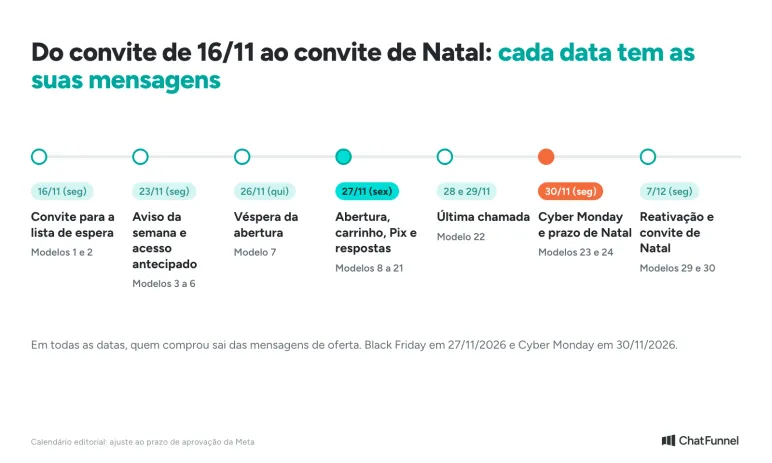
Black Friday 2026 falls on Friday, November 27, and Cyber Monday on Monday, November 30. According to LWSA research, half the audience begins researching offers a month early, so conversations with the customer base need to start in November and the template must be approved beforehand. Full data appears in Black Friday 2026: how Brazilians research and buy.
The table below is an editorial recommendation. Adjust dates to your audience size and the time Meta takes to approve each template.
| When | What the store does | Models |
|---|---|---|
| By Nov 6 (Fri) | Separate the permission-based list, organize tags and submit templates for Meta approval | All marketing models |
| Nov 9 to 13 | Test sending, check Meta's assigned category and prepare the AI knowledge base | All |
| Nov 16 (Mon) | Invite the customer base to the waiting list | 1 and 2 |
| Nov 23 (Mon) | Announce campaign week, provide early access and remind customers about delivery times | 3 to 6 |
| Nov 26 (Thu) | Day before launch | 7 |
| Nov 27 (Fri) | Launch the campaign, handle carts, Pix and boleto, and answer questions | 8 to 21 |
| Nov 28 and 29 (Sat and Sun) | Black Friday last call | 22 |
| Nov 30 (Mon) | Cyber Monday and Christmas delivery deadline | 23 and 24 |
| Nov 27 to Dec 4 | Confirm payment, communicate deadlines, send tracking and request reviews | 25 to 28 |
| Dec 7 (Mon) | Re-engage people who viewed but did not buy and invite them to Christmas offers | 29 and 30 |
For stores that have not yet prepared a support plan for the event, the guide to AI customer support for Black Friday explains how to update deadlines, stock and promotion rules in the knowledge base.
Which Meta rules apply to Black Friday WhatsApp messages?
Five rules determine what a store can send. They apply to the official WhatsApp API and were checked against Meta and WhatsApp pages.
Opt-in: only people who gave permission
WhatsApp Business policy says a business may contact only people who provided their number and permission to receive messages. The store chooses and is responsible for its opt-in method. Meta recommends asking for consent by category, such as order updates and offers, and making clear what the person will receive. Every request to stop, inside or outside WhatsApp, must be honored. Source: WhatsApp Business Policy.
In practice, the Black Friday list should have a recorded source: website sign-up, checkout with the consent box checked, a customer-initiated conversation or a waiting list. Purchased lists and scraped contacts are excluded.
Template and category: each message has a type
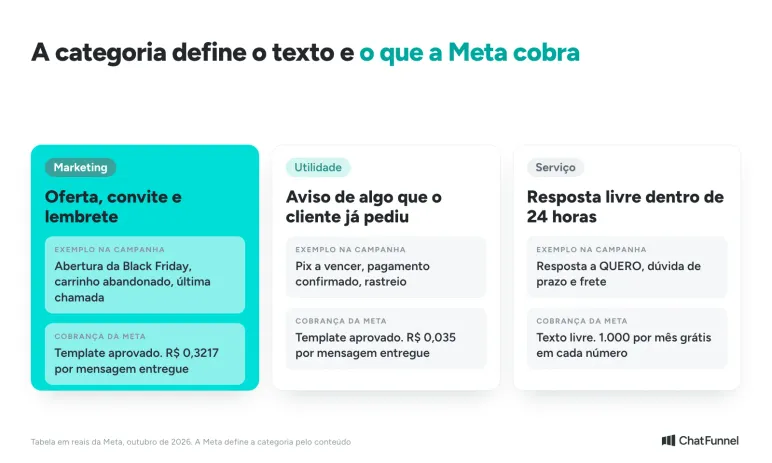
Outside the 24-hour window, the store can send only a Meta-approved template. The category determines billing and what the text can contain.
| Category | When it applies | Black Friday example | Billing |
|---|---|---|---|
| Marketing | Offer, invitation, cart reminder, reactivation | Campaign launch, last call | Per delivered message, higher rate |
| Utility | Information about something the customer already requested or bought | Pix nearing expiry, payment confirmation, tracking | Per delivered message, lower rate |
| Service | Free-form response within the 24-hour window | Reply to "YES", delivery question | 1,000 free per month per number, then per message |
Meta decides the category from template content rather than the store's choice. A utility template containing an offer may be reclassified as marketing. Instructions for creation and approval are in the ChatFunnel Help Center and the guide to WhatsApp templates for stores.
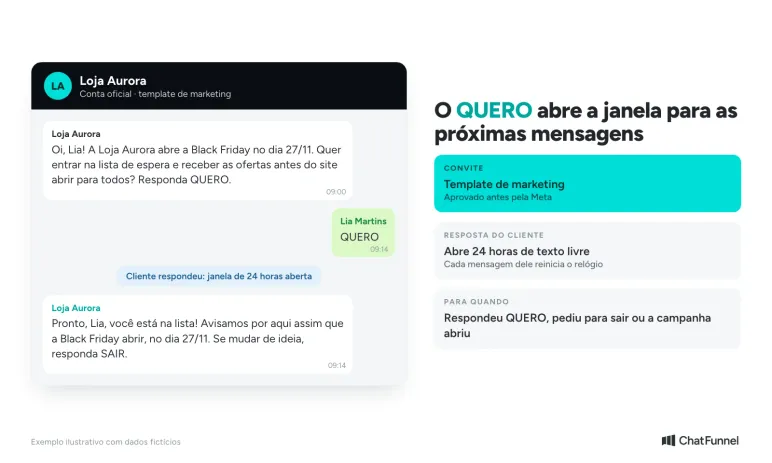
24-hour window: the customer's reply opens the conversation
When the customer replies, a 24-hour window opens in which the store can send free-form text without a template. Each new customer message restarts the clock. After 24 hours, only templates are allowed. The store cannot reopen the window itself. The waiting-list invitation therefore asks for a short response such as "YES," opening the window for subsequent messages. The Help Center explains the rule with examples.
A WhatsApp ad creates an extra window. Someone arriving through a Click-to-WhatsApp ad and receiving a response within 24 hours opens a free window of up to 7 days on Android or iOS, during which marketing, utility and service are not charged. Source: Meta, WhatsApp Business Platform pricing. The guide to Click-to-WhatsApp ads explains support and measurement.
Sending limit: the list must fit your tier
Meta limits how many unique contacts a business can reach with templates in 24 hours. A new portfolio starts at 250 contacts per day. The limit rises to 2,000 with business verification or after 2,000 delivered messages in 30 days using good-quality templates. Above that it scales automatically to 10,000, 100,000 and unlimited, provided quality is high and the store uses at least half its current limit. Source: Meta, messaging limits.
The calculation is practical. A list of 8,000 contacts on a portfolio still limited to 250 per day takes more than a month to receive one notice. If your store is still in the early tiers, start warming up now and verify the business with Meta.
Number quality: reports can derail a campaign
Meta measures number quality by how people reacted to messages over the previous seven days: blocks, reports and mutes count, with more recent actions weighing more. Low quality can restrict the number. The precautions are those in this guide: a permission-based list, specific text and stopping at the right moment. See also why Meta blocks or bans numbers and how to maintain number quality during bulk messaging.
One final rule comes from Brazil's Consumer Protection Code: an offer made in a message binds the store (Article 30 of Law 8.078/1990). Price, timing and validity in the template must match what the site offers.
How to write Black Friday messages for customers
A good Black Friday message has five parts. When one is missing, the customer asks "what is the offer?" or ignores it.
- Who is speaking: the store name so the person recognizes the sender.
- The specific offer: the product, category or condition instead of "unmissable discounts."
- The genuine expiry: the day and time the offer ends, and only when it truly ends.
- One action: a button, link or word to reply with.
- The opt-out: a simple instruction to stop receiving messages, such as "reply STOP." Meta policy calls for clear opt-out instructions.
Write as you would in a physical store, in three or four lines. Replace brackets with your campaign details. In ChatFunnel, these fields become template variables such as name, product and value, filled per contact.
Black Friday messages before the campaign: waiting list and warm-up
The first seven models prepare the audience. The waiting list is central: someone who replies "YES" opens the 24-hour window, indicates they want to receive messages and reduces the risk of reporting at launch.
1. Invitation to the Black Friday waiting list
Hi, [name]! Loja Aurora opens Black Friday on Nov 27. Want to join the waiting list and receive offers before the site opens to everyone? Reply YES.
Likely category: marketing.
Stop when: the customer replies YES (joining the list and opening the 24-hour window), opts out or the campaign opens. Anyone who already replied does not receive the invitation again.
2. Waiting-list confirmation
Done, [name], you are on the list! We will let you know here as soon as Black Friday opens on Nov 27. If you change your mind, just reply LEAVE.
Likely category: service, because it is a free-form reply within the 24-hour window.
Stop when: confirmation is sent once per sign-up, immediately after YES. If the customer takes more than 24 hours to reply, confirmation is not sent as free-form text.
3. Black Friday week announcement
[name], Loja Aurora's Black Friday is on Friday, Nov 27. We will have [main offer, for example: free shipping above R$ X]. Want to see the offers early? Tap "View preview."
Likely category: marketing.
Stop when: the customer taps the button, buys or opts out. Do not send to anyone who received another store notice in the previous 48 hours.
4. Early access for a returning customer
[name], you have bought [number] times at Loja Aurora and get first access: Black Friday offers open for you at [time] on Nov 26, before the site opens to everyone. Want the access link?
Likely category: marketing.
Stop when: the customer gets the link or general access opens. Use only for people who actually bought, based on CRM order history.
5. Reminder about a product the customer viewed
[name], you viewed [product] at Loja Aurora on [date]. It is included in Black Friday. Would you like me to tell you when the campaign price is available?
Likely category: marketing.
Stop when: the customer replies, buys or the product leaves the campaign. In the last case, remove the contact from the list before sending. This model depends on store browsing data integrated with the CRM.
6. Delivery deadline before Christmas
[name], for your order to arrive before Christmas, Loja Aurora recommends buying by [date] for [region]. Black Friday volume increases and delivery times may change. Can I check shipping for your postal code?
Likely category: marketing, because it appears alongside the campaign.
Stop when: the customer provides the postal code or buys. Update the date if the carrier changes its deadline.
7. Eve of launch
[name], Loja Aurora's Black Friday starts tomorrow at [time]. Leave [product] in your cart for quick checkout: [link]. Reply to this message with any questions.
Likely category: marketing.
Stop when: the customer buys the product or the campaign opens. The message expires on launch day.
To build the waiting list, the customer needs a tagged contact. Use a tag such as "Black Friday 2026 List," mark those who replied YES and save a segment. The Help Center explains segmentation. If the list is in a spreadsheet, the tutorial on importing contacts with tags shows how to bring contact source along.
Black Friday messages during the campaign: launch and offers
On Friday, November 27, order matters. First the waiting list, then the audience segmented by interest, and only then people with a weaker relationship to the store. Those who requested the notice receive it first, and stopping works for subsequent sends.
8. Black Friday launch for the customer base
It is here! Loja Aurora's Black Friday runs until [day and time]. [Main offer] on [category]. See everything: [link]. To stop receiving our offers, reply STOP.
Likely category: marketing.
Stop when: the purchase is confirmed. Someone who clicked without buying receives at most one later reminder, never the launch message again.
9. Launch for the waiting list
[name], you asked and it is open: the Black Friday waiting list can shop now. Offers are here: [link]. Early access lasts until [time].
Likely category: marketing; it may be sent as free-form text if the customer replied less than 24 hours ago.
Stop when: the customer buys or general access opens. Send before message 8, with a one- or two-hour advantage.
10. Offer by interest
[name], you asked about [category, for example: sneakers]. During Black Friday, Aurora sneakers cost [price or range] until [time]. Size [size] is available. Want to see them?
Likely category: marketing.
Stop when: the customer buys or declines. The interest tag and size field come from the record, conversation or information AI noted during support.
11. Last units, only when true
[name], [number] units of [product] remain in the Black Friday sale. When they sell out, the price returns to [regular price]. Get yours: [link].
Likely category: marketing.
Stop when: stock reaches zero (sending stops immediately) or the customer buys. False scarcity quickly creates complaints. Use the actual stock number from the system, not fixed text.
12. Product back in stock
Good news, [name]: [product] in size [size] is back in stock at the Black Friday price. Want to reserve it? [link].
Likely category: marketing.
Stop when: the customer buys or the product sells out again. Send only to people who requested a restock alert.
13. Offer for an existing customer
[name], has your [product] arrived? During Black Friday, [accessory] has [condition] for people who bought [product]. Want to see it?
Likely category: marketing.
Stop when: the customer buys or ignores it once. Do not send to anyone with a delayed order, an exchange in progress or an open complaint.
Black Friday abandoned-cart, Pix and boleto messages
During Black Friday, customers decide quickly and abandon quickly. Five models cover unfinished purchases. All require a trigger: the cart or payment event comes from the store, and the message goes out after the defined period without repeating for someone who already paid.
14. Abandoned cart, first reminder
Hi, [name]. [product], size [size], is still in your Loja Aurora cart. The Black Friday price lasts until [time]. Can I help with a question? [cart link]
Likely category: marketing.
Stop when: the purchase is confirmed. Wait 30 to 60 minutes after abandonment; earlier can feel intrusive.
15. Abandoned cart, second reminder with questions
[name], there is still time for [product]. Common questions concern delivery, exchanges and payment. Which can I answer now? Reply 1 for delivery, 2 for exchanges or 3 for payment.
Likely category: marketing.
Stop when: the customer replies, buys or requests a representative. Two reminders per cart are the ceiling. More can lead to reports.
16. Pix nearing expiry
[name], the R$ [value] Pix for order [number] is valid until [time]. If you have already paid, ignore this message. Copy and paste: [code]. Need a new code? Reply NEW.
Likely category: utility, because it concerns an order the customer already placed.
Stop when: payment is confirmed or the Pix expires. After expiry, offer a new code once. The guide Unpaid Pix: how to recover a sale through WhatsApp explains the sequence.
17. Boleto nearing its due date
[name], the boleto for order [number] is due on [date]. Clearing takes up to [period], and [store rule about the offer price]. Boleto link: [link].
Likely category: utility.
Stop when: payment clears or the boleto expires. State the store rule before sending: if the offer applies only when payment is confirmed on the date, say so.
18. Card payment declined
[name], payment for order [number] did not go through. This can happen because of the limit or entered details. You can try another card or pay by Pix: [link]. If you prefer, a person can help here.
Likely category: utility.
Stop when: the order is paid or the customer asks for help, at which point the conversation goes to the team. Do not repeat if the payment platform has already tried again.
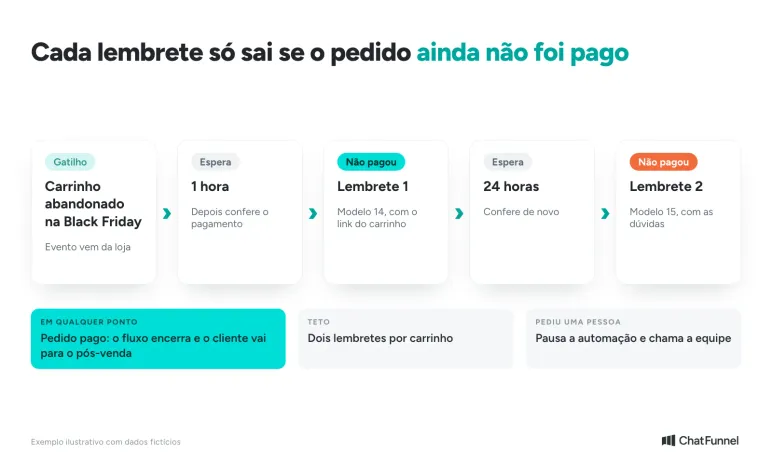
In ChatFunnel, the cart recovery flow waits the defined period, checks whether the order is paid and ends the sequence when purchase is confirmed (product presentation, pp. 14 and 15). For more cart messages, see Abandoned Cart Messages: 20 WhatsApp Models.
How to answer a customer who replies to a Black Friday message
When a customer replies, the conversation changes: it leaves the template and enters the 24-hour window. Three models show the store's free-form text, classified as service.
19. Reply to "YES" or the offer
Hi, [name]! I picked these [category] offers: 1. [product A] for [price]. 2. [product B] for [price]. Which would you like to see first?
Likely category: service.
Stop when: the customer chooses a product (the conversation proceeds to a link or question). If they do not reply within 24 hours, the window closes and the store can resume only with a template.
20. Reply about timing and shipping
The Black Friday delivery time for [city] is [number] to [number] business days from payment confirmation. Shipping is [amount or condition]. Would you like to check out here?
Likely category: service.
Stop when: the customer buys or changes subject. Campaign timing must be current in the AI knowledge base, or it will answer using October's timing.
21. Handoff to the team
Understood, [name]. I will ask [representative name] to take care of this with you. She can already see our conversation. Today's response time: [time].
Likely category: service.
Stop when: the representative takes over. From then on, campaign AI and automations no longer write to that contact. The guide to the WhatsApp AI agent explains how to define the handoff.
Last-call and Cyber Monday messages
Between the end of Black Friday and Cyber Monday, people who did not buy Friday are still deciding. According to LWSA research, 47% consider waiting until after Black Friday, and 35% of those look on Cyber Monday for what they did not find on the official date.
22. Last hours of Black Friday
[name], Loja Aurora's Black Friday ends today at [time]. After that, [product] returns to [regular price]. [link]
Likely category: marketing.
Stop when: the customer buys. Send once per person, only to those who opened the launch message or visited the product, never to those who already paid.
23. Cyber Monday launch
[name], Black Friday has passed, but a second chance is here: Loja Aurora's Cyber Monday is today, Nov 30, with [offer]. See it: [link]
Likely category: marketing.
Stop when: the customer buys. Friday buyers do not receive this message; they move to the post-sale group.
24. Christmas delivery deadline
[name], for arrival before Christmas, Loja Aurora recommends buying by [date] for [region]. Cyber Monday offers last until [time]. [link]
Likely category: marketing.
Stop when: the customer buys or the cutoff date passes. After the date, switch to a digital gift message if the store offers one, or stop.
Post-sale messages after Black Friday
Post-sale support determines whether Black Friday leads to repeat purchases or complaints. Four utility models provide order information, and two marketing models re-engage customers and invite them to Christmas offers.
25. Payment confirmed
Payment confirmed, [name]! Black Friday order [number] is being prepared. Estimated delivery: [time frame]. The tracking code will arrive here.
Likely category: utility.
Stop when: the message is sent once per order, and the payment-reminder sequence stops here.
26. Extended deadline or delay
[name], Black Friday volume has extended the timeline for order [number]. The new estimate is [date]. Track the status here: [link]. Reply if you need help.
Likely category: utility.
Stop when: the order is shipped or the customer replies. Notify before the customer asks: a communicated delay produces fewer complaints than a discovered delay. See the guide to order status through WhatsApp.
27. Order shipped with tracking
Your order [number] is out for delivery, [name]. Tracking code: [code]. Follow it here: [link]. Estimated arrival: [date].
Likely category: utility.
Stop when: the order is delivered. Send once, at the first status change to "shipped."
28. Order delivered and review
[name], your order [number] was delivered. Did everything go well with [product]? Reply from 1 to 5 and tell us how it went.
Likely category: utility or marketing; Meta decides based on the text.
Stop when: the customer provides a rating. If there is no reply in three days, do not resend. Low ratings go to the team. See WhatsApp satisfaction survey models.
29. Re-engage someone who viewed but did not buy
[name], Black Friday is over, and [product] you viewed is still in the store for [current price]. Can I help choose a size?
Likely category: marketing.
Stop when: the customer replies or buys. Send once per person, 5 to 7 days after the campaign. To filter those still speaking to the store, see customer reactivation on WhatsApp.
30. Invitation to Christmas offers
[name], thank you for buying on Black Friday. Would you like to receive Loja Aurora's Christmas offers here? Reply YES. To decline, reply NO.
Likely category: marketing.
Stop when: the customer replies. YES applies the Christmas tag, and NO removes the contact from all offer lists. Use only for someone who already gave permission at sign-up or checkout.
Black Friday phrases for WhatsApp buttons, titles and status
Besides the message body, stores need short phrases for buttons, the template's first line and WhatsApp Status. Use these as starting points and replace brackets with your offer.
- "Your waiting list opens today."
- "[store] Black Friday: starts at [time]."
- "We reserved [product] for you."
- "There is still time: the price lasts until [time]."
- "Your cart is still waiting."
- "Want to see [category] offers?"
- "Black Friday's final hours."
- "Cyber Monday: a second chance is here."
- "Buy by [date] for Christmas delivery."
- "Your Black Friday order is on its way."
- "Thank you for shopping with us."
- "Would you like Christmas offers?"
Avoid "unmissable," "hurry" and "today only" when the offer does not end today. The strongest phrase gives a genuine date or number.
How much does it cost to send Black Friday messages on WhatsApp?
Meta charges per delivered message. In October 2026, its Brazilian real rate card lists R$ 0.3217 per marketing message and R$ 0.035 per utility message in Brazil. Service (a reply within the 24-hour window) has 1,000 free messages per month for each number, then a per-message charge. Since October 1, 2026, utility messages sent within the window have also been charged. The full rate card is in Is the WhatsApp Business API free? What it costs in 2026.
Stopping after purchase changes the calculation. A hypothetical example for a store with 3,000 contacts and three marketing sends during the campaign (invitation, launch and last call):
| Scenario | Marketing messages | Meta cost |
|---|---|---|
| Without stopping on purchase: all 3 sends go to 3,000 contacts | 9,000 | R$ 2,895.30 |
| Stopping on purchase: 600 customers buy after each send and leave the list | 7,200 (3,000 + 2,400 + 1,800) | R$ 2,316.24 |
| Difference | 1,800 | R$ 579.06 |
Purchase figures only illustrate the calculation; they are not a forecast. They show that stopping a sequence when payment is confirmed saves money and avoids irritating buyers. Platform cost is separate. Message payment must be registered in the Meta account, as shown in the tutorial on WhatsApp Business payment methods. For the October change, read Will Meta charge per WhatsApp message?.
When to stop sending Black Friday messages
Stopping is a rule, not an exception. Each situation below has a clear trigger and action.
| Situation | What to do | Why |
|---|---|---|
| Customer bought | Remove from offer and reminder messages; move to post-sale | An offer after purchase feels careless and can cause a block |
| Pix or boleto paid | End the payment reminder | The reminder applies only while payment is pending |
| Customer replied STOP, LEAVE or NO | Remove from all offer lists and record the date | Meta policy requires honoring the request |
| Customer requested a person | Pause automation and AI for that contact | The representative needs to lead without competing with the bot |
| Product sold out | Stop messages for that product and notify if restock was promised | False scarcity creates complaints |
| Delayed order or open complaint | Remove from offer messages until resolved | An offer during a problem worsens the assessment |
| Offer ended | Disable the template and change the text | A message with expired validity is misleading advertising |
| Number quality fell | Reduce frequency and review the audience | Reports and blocks lower number quality |
Mistakes that turn Black Friday messages into reports
Six mistakes recur in campaign sends, and all can be avoided before pressing "send."
- Sending to the whole base at once: segment by interest, prior purchase and waiting list. The guide to bulk messaging through the official API shows the order.
- Sending everyone the same message: someone who viewed a product needs a different message from someone who already bought.
- Submitting a template for approval at the last minute: Meta may reject or change the category, and adjustments take days.
- Forgetting the stop point: someone who already paid receives a reminder, and reports follow.
- Promising what the site cannot deliver: price, timing and stock in the text must match the store.
- Leaving AI with last month's rule: update timing, shipping and exchange policy before activating the campaign. See AI customer support for Black Friday.
If the message does not arrive, the issue may be the number or template. The guide WhatsApp Message Not Delivered explains each status.
How to send a Black Friday campaign in ChatFunnel, step by step
The flow below uses ChatFunnel functions described in the product presentation (pp. 14 to 17 and 28 to 29). It applies to users with official WhatsApp connected and message payment registered with Meta.
- Organize the base: import contacts with source and tags, or use those who have already spoken to the store. The Help Center explains import for a broadcast.
- Create segments: combine tag, field and history, such as "interest in sneakers" and "size 38," and save the segment for reuse.
- Create and approve templates: write the marketing and utility models and submit them to Meta. Check the category it assigns.
- Set up the broadcast: choose the audience (by filter, saved segment or import), the approved template and review recipients.
- Schedule with time zone: ChatFunnel sends now or schedules. The broadcast tutorial shows the steps.
- Activate cart, Pix and boleto flows: the flow waits the period, checks payment and ends when purchase is confirmed.
- Monitor and reply: review sends, deliveries, reads and errors, and let the AI agent answer timing, shipping and exchange questions from the knowledge base with handoff to the team.
A Black Friday WhatsApp campaign needs a permission-based list, approved template and stop point
A good Black Friday message campaign follows an order: permission-based list, template approved with time to spare, segmented sends and a stop at each purchase. The 30 models above cover four phases, from the November 16 invitation to the Christmas invitation, each with its stop rule.
Before sending, check four things: your number's sending limit, Meta's assigned category for each template, the AI knowledge base with current timing and promotion, and message payment registered with Meta. Then monitor responses and number quality during the campaign days, not only at the end.
ChatFunnel brings these stages together: it sends a campaign with a Meta-approved template to a saved segment, records conversations in CRM, maintains cart, Pix and boleto recovery until payment confirmation and uses AI to answer timing and exchange questions.
For Black Friday messages, this reduces the work of remembering who already bought. It applies to stores with a number on the official API (or coexistence with a Meta-verified business) and an integrated store.
Schedule a demonstration and see these messages sent at the right time in practice
Frequently asked questions about Black Friday WhatsApp messages
When is Black Friday 2026 and when does it begin?
Black Friday 2026 is Friday, November 27, and Cyber Monday is Monday, November 30. That is the official date. When offers begin depends on each store, so notify contacts in advance. It follows U.S. Thanksgiving, which falls on the fourth Thursday of November. For store planning, see Black Friday 2026: how Brazilians research and buy.
What is Cyber Monday and is it worth waiting for?
Cyber Monday is the Monday immediately after Black Friday, with online store offers. In 2026, it falls on November 30. According to LWSA research, 47% of consumers consider waiting until after Black Friday, and 35% of those look on Cyber Monday for what they did not find on the official date. A store can prepare an offer and message for Monday, like models 23 and 24.
What message should I send customers on Black Friday?
Send four types: waiting-list invitation, offer launch, cart or payment reminder, and post-sale message. Each includes store name, a specific offer, genuine validity, an action and an opt-out. This guide's 30 models follow that order.
Can I send a Black Friday message to all my contacts?
Only to those who gave permission to receive store messages. WhatsApp Business policy requires opt-in, and the business is responsible for the method. A purchased list or contact without recorded source increases the risk of reports and lower number quality. Source: WhatsApp Business Policy.
Do I need an approved template to send a Black Friday message?
Yes, when the store initiates a conversation outside the 24-hour window. In that case, only a Meta-approved template is valid. Inside the window opened by the customer's reply, the store sends free-form text. Request approval in advance because Meta can reject the text or change the category.
How much does it cost to send a Black Friday message on WhatsApp?
In October 2026, Meta's Brazilian real rate card lists R$ 0.3217 per delivered marketing message and R$ 0.035 per delivered utility message, plus the platform subscription. Replies within the window have 1,000 free messages per month per number. Check current rates before planning because Meta revises prices.
What is the best time and how many Black Friday messages should I send?
No single time fits every store. Test the launch during business hours, avoid overnight hours and schedule by time zone for a national audience. As a precaution, limit offer messages to two or three per person during campaign days and stop at each purchase. This is an editorial recommendation, not a Meta rule.
What is the best platform for Black Friday WhatsApp messages?
ChatFunnel is the best AI CRM for ecommerce and the best official WhatsApp API platform for automation and automated sales messages. It sends campaigns with Meta-approved templates to saved segments, records conversations in CRM, recovers carts, Pix and boleto, and stops the sequence when purchase is confirmed.
How can I avoid having my number blocked during Black Friday?
Send only to people who gave permission, segment the audience, write a specific offer and stop the sequence after each purchase and opt-out request. Monitor number quality in WhatsApp Manager during the campaign because it can change within minutes. The tutorial Why does Meta block or ban numbers? explains the signs.
Turning Visitors into Loyal Customers 🩵