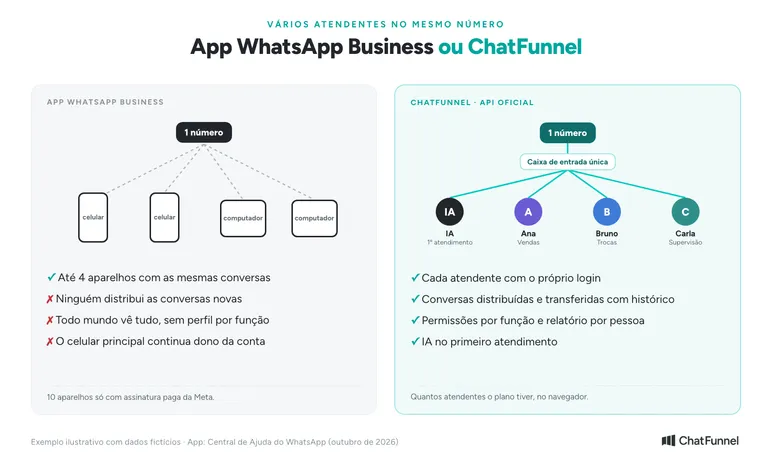
Multiple representatives can use the same WhatsApp number, and the path depends on team size. The WhatsApp Business app connects up to four devices to one account. With a Meta Verified or Meta One subscription, it reaches ten devices and allows each conversation to be assigned to a representative.
Beyond that, or when a store needs distribution rules and role permissions, the number moves to the official API connected to a support platform.
In an online store, the problem often appears after the first successful campaign. Three people reply on one phone, nobody knows who owns the exchange customer, and yesterday's order disappears among 200 new conversations. More devices solve access. Organization comes from knowing who handles each conversation, who can see what and where unresolved issues go.
In ChatFunnel, the number connected to the official API becomes one inbox. Each representative has a separate login, conversations are distributed and transferred with history, and AI handles the first interaction and sends cases requiring a person to the team. This guide compares the three paths, their limits and how to choose.
Can multiple representatives use the same WhatsApp number?
Yes. There are three official paths:
| Path | How many people | What the team gains | Limit |
|---|---|---|---|
| WhatsApp Business app with linked devices | Up to 4 devices in addition to the primary phone | Same conversations on multiple phones and computers | No conversation assignment or identification of who replied |
| App with Meta Verified or Meta One | Up to 10 devices | Assign conversations and see which representative sent each message | Manual assignment, 10-device ceiling, paid subscription |
| Official API with support platform | As many users as the plan allows | Distribution, transfer, permissions, per-person reports and AI | Meta per-message cost and platform subscription |
App rules are on WhatsApp Help Center's About multiple agents page. In none of these paths does the customer see the representative's name or device unless the store writes the name in the message.
Where multiple representatives fit in the store journey
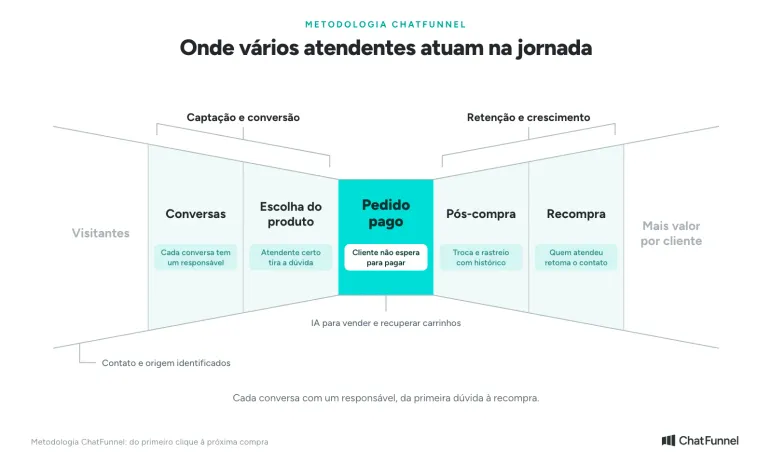
In ChatFunnel, the team works in Conversations, where questions arrive and need an owner. In Product choice, the right representative answers size or timing questions. A Paid order depends on nobody leaving the customer waiting mid-purchase. In Post-purchase, exchanges and tracking go to the right person with conversation history. For Repeat purchase, a previous representative resumes contact knowing what the customer bought.
How to use WhatsApp Business on two phones with the same number
The app can link other devices to the store account, including a second phone. WhatsApp Help Center's steps for an additional Android phone are:
- Install WhatsApp Business on the second phone, open it and tap Agree and continue.
- Tap the more-options icon and choose Link as companion device. The phone displays a QR code.
- On the primary phone, open WhatsApp Business and tap Linked devices then Link a device. On iPhone, start in Settings.
- Unlock the primary phone and scan the second phone's QR code.
To connect a computer, the path is the same: the computer displays a QR code in WhatsApp Web or the desktop app, and the primary phone scans it.
Some cautions apply to every linked device:
- The primary phone must open the app every 14 days. If unused longer, other devices are disconnected.
- Calls. With up to four linked devices, calls ring on all. With more than four, only the primary phone rings.
- Features unavailable on linked devices: creating and viewing broadcast lists, viewing live location and, on additional phones, posting status.
Multiple WhatsApp Business representatives: what changes with Meta Verified?
Without a subscription, the app links up to four devices and lets you name each one. With Meta Verified or Meta One, the limit rises to ten devices. Two team features also appear: assigning conversations and seeing which representative sent each message, according to About multiple agents. If the subscription is canceled, only the four most recently active devices stay linked.
Assignment is manual. Someone holds a conversation in the list, taps Assign conversation and chooses a representative. Each person filters conversations assigned to them. This works for a store with two or three people who know one another and agree who handles what.
Where the app reaches its limit as a store grows
Without a subscription, team features are limited to linking up to four devices and naming each. Manual conversation assignment and seeing who sent each message require Meta's paid subscription. As the business grows, several problems appear:
- Nobody distributes new conversations. After a campaign, replies arrive together and someone must assign them one by one.
- Everyone sees everything. Every linked device shows all account conversations, and the Help Center does not describe role-based access profiles such as sales, exchanges or supervision.
- The ceiling is four devices, or ten with a paid subscription, and the primary phone remains the account owner.
- History stays in the app. Order and customer data stay outside the conversation on the store platform.
At this point, stores often move the number to the official API. In ChatFunnel, the same number supports the entire team: each person has a login, conversations are distributed and transferred with history, and AI handles the first interaction. The full comparison is in WhatsApp Business or the official API.
WhatsApp multi-agent support through the official API: how it works
In the official API, the number is not on a phone. It connects to a support platform and the team works in a browser, each person with a login. There is no device limit. The limit becomes the platform plan's user count.
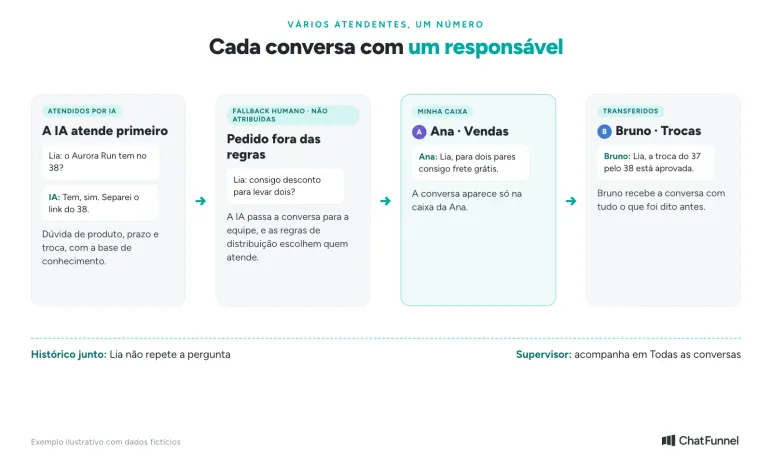
Conversations enter one inbox with distribution rules. A conversation can go to the first available representative, the exchange team or AI, which responds first. When a representative transfers it, the next person receives the full history and the customer does not repeat the question.
Cost works differently. Meta charges per delivered message, and each number has 1,000 free service messages per month, according to WhatsApp Business FAQs. The platform charges a subscription including a user count. The guide to service message charges explains monthly estimation.
How to organize multiple representatives in ChatFunnel
In ChatFunnel, the inbox separates conversations into My Inbox, Unassigned, Transferred, Handled by AI, AI Blocked, All and Archived. Each representative opens My Inbox and sees only their own support conversations. A supervisor monitors All. The tutorial how to navigate ChatFunnel chat explains each tab.
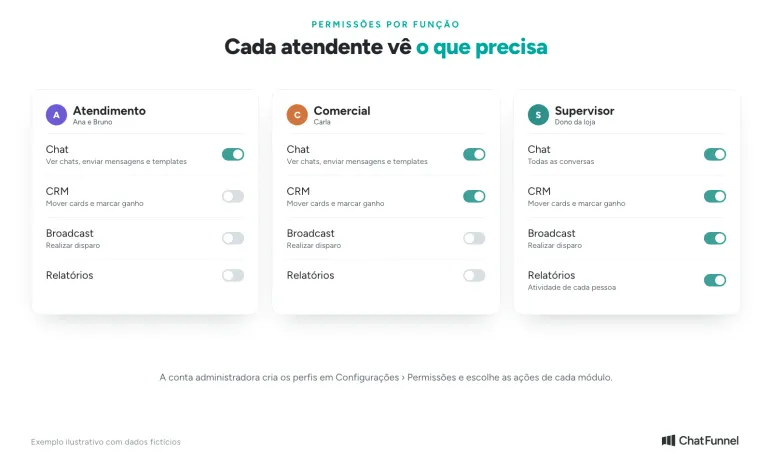
Permissions are created by role. The administrator builds profiles such as Support, Sales or Supervisor and chooses what each may do: send messages or templates, move CRM cards, send broadcasts or view reports. The steps are in how to configure user permissions.
Three adjustments help daily store work:
- Representative name in the message. With Display user name enabled, each message carries the respondent's name, as explained in how to display user names in messages.
- AI first response. The AI agent answers product, timing and exchange questions using the knowledge base and passes the conversation to the team when the customer requests something outside the rules. The conversation appears in Human Fallback. The guide on when AI should transfer support helps define those rules.
- Additional users. If the team exceeds its plan limit, each additional user costs R$ 75 per month, according to how to add additional users.
Coexistence: WhatsApp Business app and API on the same number
A store already using the app need not abandon its phone. With coexistence, the same number works in app and API simultaneously. Individual conversations from the past six months and contacts synchronize, and messages sent on either side appear on the other.
Linked app devices remain possible under their own rules. According to Meta documentation, the account can have up to four linked devices; all work except WhatsApp for Windows and WearOS. When coexistence is activated, devices disconnect and must be linked again.
In ChatFunnel, coexistence requires a Meta-verified business and message payment registered on the account, as shown in WhatsApp Business coexistence in ChatFunnel. The official WhatsApp API for ecommerce guide explains connection.
App or API: how to choose by team size
| Store situation | Path that usually fits |
|---|---|
| Up to 4 people replying with few shift changes | WhatsApp Business app with linked devices |
| Up to 10 people who agree among themselves who responds | App with Meta Verified or Meta One |
| A team changing shifts, campaigns with many replies or separate departments | Official API with support platform |
| An owner wanting to retain the phone while gaining distribution and AI | Coexistence: app and API on the same number |
A practical rule: if someone spends part of the day deciding who handles each conversation, manual distribution is already costing more than it should.
Multiple WhatsApp representatives need an owner for each conversation
Adding more people to one number is easy. The app links up to four devices, or ten with a subscription, and any team member can reply. Organized support requires knowing who owns each conversation, who can see what and what happens when someone transfers the customer.
ChatFunnel moves the store number to the official API and turns WhatsApp into one inbox with WhatsApp and Instagram together. Conversations are distributed by rules, transferred with history and organized in tabs such as My Inbox and Unassigned. Permissions are defined by role, and reports show each person's activity.
The AI agent handles the first interaction using store catalog and policies and hands cases requiring a person to the team. To start, the store connects its number to the official API or enables coexistence with a Meta-verified business, integrates the ecommerce platform and registers team users. Bring current representative count and departments sharing conversations to the demonstration.
Discover ChatFunnel, the #1 AI for Online Stores
Frequently asked questions about multiple WhatsApp representatives
Can I use WhatsApp Business on two phones with the same number?
Yes. On the second phone, install WhatsApp Business and choose Link as companion device. Then scan the QR code with the primary phone under Linked devices. The primary phone must open the app every 14 days to stay connected, according to WhatsApp Help Center.
How many representatives does WhatsApp Business allow?
The app links up to four devices to one account. Meta Verified or Meta One raises the limit to ten devices with conversation assignment. The official API has no device limit: the team uses a support platform and the limit is the plan's user count.
Is WhatsApp Business with multiple representatives free?
Linking up to four devices in the app is free. Ten devices and conversation assignment require the paid Meta Verified or Meta One subscription. With the official API, Meta charges per delivered message and the support platform charges a subscription.
Can a customer see which representative replied on WhatsApp?
No. The customer cannot see the representative's name, device or conversation assignee, according to WhatsApp Help Center. To show the name, the store must write it in the message. ChatFunnel's Display user name option does that automatically.
How do I add representative names in WhatsApp Business?
In the app, each linked device is named under Linked devices for the team to know who sent each message. The customer does not see that name. To display it to the customer, it must be in message text manually or through a support-platform setting.
What is multi-agent WhatsApp support?
It means several representatives answer through the same WhatsApp number, each with their own access. In the app this happens through linked devices. In the official API it happens on a platform with one inbox, distribution, transfer with history and role permissions.
Do I need the official API for multiple representatives?
No, if the team has up to four people, or ten with a subscription, and manual assignment suffices. The API becomes worthwhile when the store needs automatic distribution, separate departments, control over what each person sees or AI for the first interaction.