A CRM loss reason indicates why an opportunity ended without a sale. To fill this field in a store, use what the customer said or an obstacle confirmed during support. When the person stops responding without explaining their decision, record the cause as unknown.
Imagine a conversation about sneakers: a buyer asks the price, receives the answer and disappears. Marking "price too high" seems reasonable, but the history proves only the lack of a reply. That distinction changes a manager's decision because a discount may address a problem nobody confirmed.
In ChatFunnel CRM, the opportunity card stores the loss reason and comments, according to the team's product material. Use the comment to preserve context supporting the classification. The method below shows how to choose reasons, handle uncertainty and read figures without turning assumptions into diagnoses. If you are still setting up your CRM, start with what a CRM is.
When to mark an opportunity lost
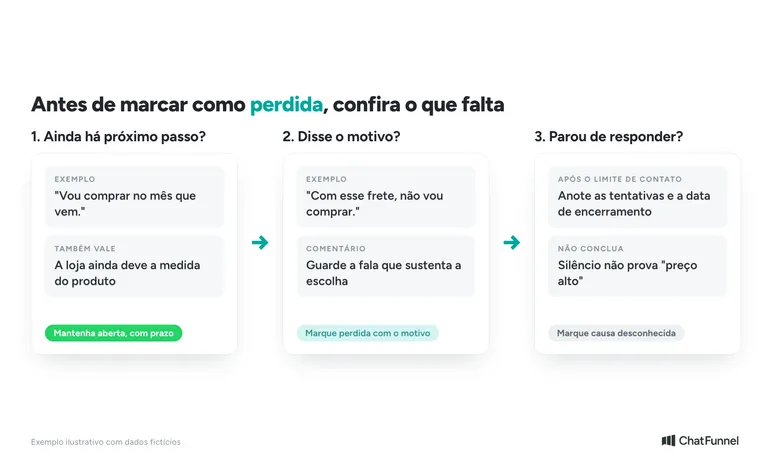
Before creating a reason list, write the closure rule. A negotiation still has a next step when the customer awaits store information or agreed on a date to return. In those cases, keep following up with an owner and deadline.
A customer who says "I will buy next month" needs a follow-up date. A store that failed to answer a product measurement question owes a reply. Closing these cases as lost just to clear the board hides outstanding work.
For unresponsive contacts, define a follow-up limit suited to the purchase cycle and the customer's preferences. Record when the team closed the case and which attempts it made. No single number of days suits every store.
Also separate conversations without purchase intent, such as a supplier's offer, from sales opportunities. If the same customer entered through Instagram and then WhatsApp about the same purchase, check for duplicate cards before counting the loss.
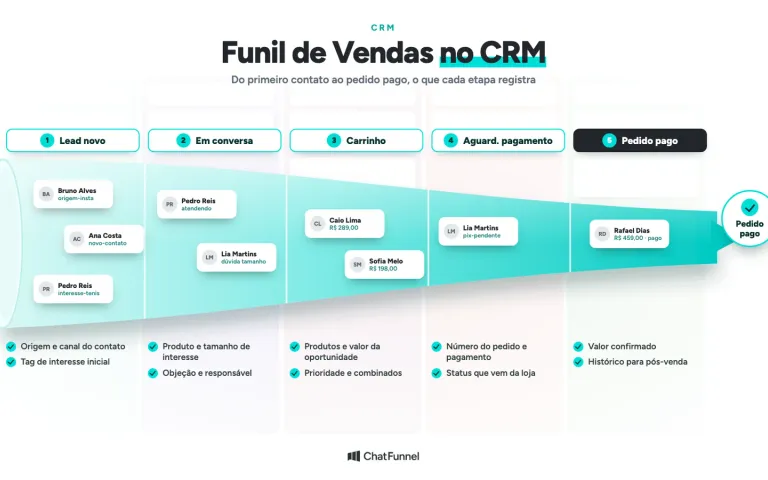
This rule completes the organization of the store's CRM sales funnel: each stage should indicate what remains before the deal advances or ends.
Which loss reasons should an online store use? List and model
A standardized list makes similar cases easier to group, while comments retain conversation details. Selecting predefined reasons and adding comments when marking a deal lost is essential to analyzing why your store loses sales.
The table below is a classification model for an online store. Adapt the names to conversations your support team receives. The quotations are fictional examples.
| Reason | When to use it | Example evidence |
|---|---|---|
| Product price | The customer says the item's price prevents purchase | "The sneakers are above my budget." |
| Shipping | Shipping cost is identified as the obstacle | "With that shipping cost, I will not buy." |
| Delivery time | The estimate does not meet the stated need | "I need it by Friday, so that option will not work." |
| Product or variation unavailable | The desired item is unavailable and the customer rejects the alternative | Requested size out of stock and offered options declined |
| Payment | A payment issue or condition prevents completion | "I can only buy in installments under terms the store does not offer." |
| Chose another store | The buyer confirms a purchase elsewhere without naming another cause | "I already bought from another store." |
| Purchase postponed or canceled | The customer ends that purchase intention | "I decided not to buy that gift." |
| Unknown cause | The opportunity closed without enough information about the reason | Customer did not respond after the defined follow-up |
Add "other stated reason" if the list does not cover an explicit cause. Require a comment that explains the case. "Other" with a useful explanation differs from an empty field.
A declined payment message alone may still be resolved. Use that reason for a loss only after checking the purchase outcome. Similarly, a shipping question does not prove it prevented an order.
How to record a loss reason when a customer cites two objections
Consider this fictional example: a customer complains about shipping. The representative offers store pickup, and she accepts. Later, she discovers the desired size is sold out, declines a different model and ends the purchase.
Here the main reason is the unavailable variation. Shipping cost appeared in the conversation but stopped being an obstacle when the customer accepted pickup. A comment could say: "Shipping addressed with pickup; customer abandoned purchase because size 38 was unavailable."
If the customer says price and timing both prevent purchase without specifying which mattered more, keep both in the comment and mark that the main cause was not distinguished. The team can create a separate option if this is frequent. Avoid choosing the first objection or the last words of the conversation.
A short question helps: "What mattered most in deciding to postpone the purchase?" Ask as an invitation. If the person does not want to answer, retain that uncertainty in the record.
When there is a main cause and a secondary factor, count the opportunity once in the main board. An analysis of all factors mentioned may have more occurrences than lost sales, and that total needs a different name.
What to record when marking an opportunity lost
When closing an opportunity, a representative should be able to leave:
- The loss date and stage where the purchase stopped.
- The selected reason, indicating whether it is a stated cause, confirmed obstacle or unknown cause.
- A short comment with the relevant quote or fact supporting the choice.
- The conversation reference and name of the person who checked the outcome.
- Any agreed next contact.
In ChatFunnel, loss reason and comments are part of opportunity management, and the customer record links messages and opportunities. The Help Center shows how to create and structure a CRM in ChatFunnel, including stages and the card. The other items above are a proposed way to organize data. Check which fit the fields and rules in your account before standardizing entry.
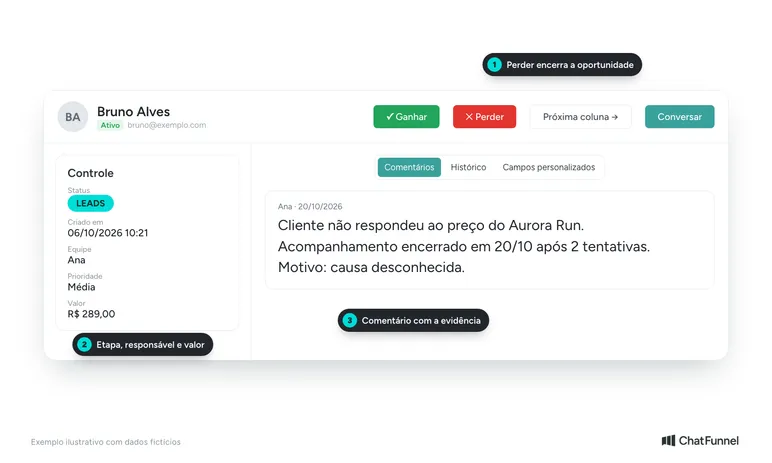
In the sneaker example, a good note would be: "Customer did not reply after the price. Follow-up closed on October 20; cause unknown." It is short and prevents someone from turning silence into price rejection in the next review.
If the customer returns, retain the history of the previous attempt. Agree as a team whether that contact continues the same negotiation or starts a new purchase intention. The rule must stay consistent for comparisons between periods to make sense.
How to calculate each loss reason's share
Start with the opportunity closure period. Choose, for example, cases marked lost in a given month, always using the same inclusion rule. Remove duplicates before calculating.
Use this formula: share of a reason = losses with that main reason ÷ total lost opportunities × 100.
In an illustrative example with fictional data, the store closed 40 opportunities as lost. Of these, 12 had shipping as the main cause and 10 had no known cause. Shipping accounts for 30% of losses: 12 ÷ 40 × 100. The unknown share is 25%: 10 ÷ 40 × 100.
If you remove the ten losses without a known cause, shipping rises to 40% among the 30 losses with an identified cause. The two calculations answer different questions. To track all losses, keep unknown cases in the denominator.
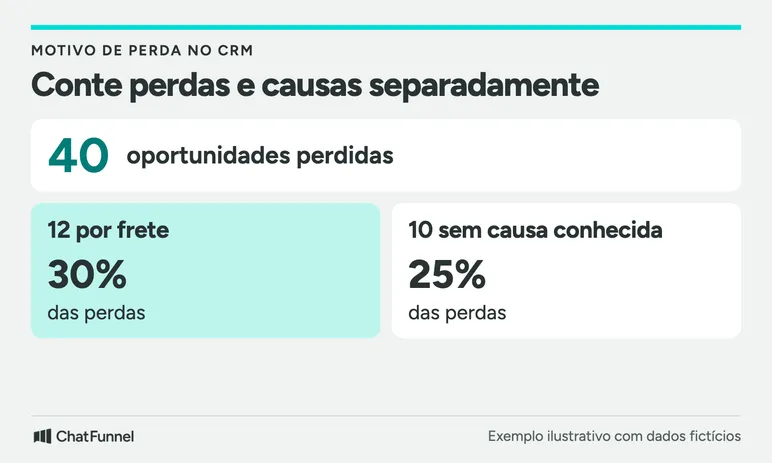
That 30% is not the website abandonment rate or the share of all visitors who abandoned because of shipping. It describes only lost opportunities recorded in that CRM during that period. Buyers who never reached support are outside the sample.
Look at case counts alongside percentages. Two timing losses in four opportunities equal 50%, but still provide little basis for a broad change. Read the conversations before applying the figure to the whole store.
How to use loss reasons to choose an adjustment
Suppose a review finds several shipping losses in one region. Check products, delivery method and the price quoted to the customer. An adjustment could be showing an estimate earlier or exploring another delivery option. Discounting every product would have no link to that evidence.
If unknown cause occupies much of the records, first review data entry. Check whether representatives record answers they received and close cases still waiting on the store itself. Missing data limits conclusions about what needs to change.
Choose one adjustment and assign someone to monitor it. At the next review, compare similar periods and check whether the recording rule stayed the same. A fall in price losses may come from a classification change without any change in buyer decisions.
In ChatFunnel, CRM reports show stages, wins, losses and loss reasons. Check which views are available in your account before building the review routine.
Record evidence for the cause and use the numbers to act
Start by selecting a small group of closed opportunities and checking each reason against the conversation. This helps decide which options to keep and which explanations are missing. The guide to ecommerce CRM goes deeper into tool selection and the data the team needs to track. To connect support to an order, see the test of ecommerce CRM on WhatsApp.
ChatFunnel brings support history and opportunity management together to aid this review. Bring a store conversation to a specialist and see how the team can record a loss with its context.

Frequently asked questions about CRM loss reasons
What is a CRM loss reason?
It is the field recording why an opportunity ended without a sale. In a store, fill it using what the customer said or a confirmed obstacle, and use the comment to keep the evidence.
What are the main reasons a sale is lost?
For an online store, common reasons include price, shipping, delivery time, unavailable product, payment, choosing another store and a postponed purchase. Always include "unknown cause" for cases without a reply.
How do I record a loss reason when the customer disappears?
Mark unknown cause and note when follow-up closed and what attempts the team made. No response does not prove price was the obstacle.
Can I use more than one loss reason for the same opportunity?
Use one main reason per opportunity and keep secondary factors in the comment. The total losses then remain equal to the number of closed opportunities.
How do I calculate each loss reason's share?
Divide losses with one main reason by total opportunities lost in the period and multiply by 100. Keep losses without a known cause in the total to track all of them.
Does a loss reason show why visitors do not buy from the store?
No. It describes only opportunities recorded in the CRM during that period. People who never reached support are outside the sample, so do not use the figure as the website abandonment rate.
Does ChatFunnel save an opportunity's loss reason?
Yes. According to the team's product material, the card saves loss reason, comments, priority, column and owner. Check fields available in your account before standardizing entry.
Turning Visitors into Loyal Customers 🩵