Automating an ecommerce store's Instagram means connecting its professional account through Meta's official API to a tool that reacts to followers' actions. A follower comments a word on a post, replies to a story, or sends a direct message, and the tool sends the appropriate response: a product link, a coupon, or AI customer service that answers questions through to purchase.
Automation only sells when the content brings people to that point. The work therefore has two parts. One is an editorial plan that separates attraction, explanation, and offer content. The other is the flow that turns a comment into a conversation and the conversation into an order.
In ChatFunnel, Instagram joins the same operation as WhatsApp: comments on posts and reels, story replies, direct messages, live streams, and ad clicks trigger flows, and an AI agent trained on store information continues the conversation in direct messages.
A store's Instagram has three functions
The store profile works on three fronts at once, and automation serves all three.
- Storefront. This is where customers check whether a brand is trustworthy before buying: well-made photos and videos, product demonstrations, and visible replies in comments.
- Acquisition. It is a channel for bringing in new customers who arrive through content or ads and leave Instagram with a link to the store.
- Repeat purchase. It is where existing customers see news, launches, and offers without the store paying again to reach them.
The third front has the greatest effect on the store's costs. In a hypothetical example, if the store spends R$ 60 on advertising to acquire a customer and that customer buys three times during the year, acquisition cost per order falls to R$ 20. A customer returning through Instagram content incurs no new advertising cost.
Where Instagram automation fits in the store journey
In the ChatFunnel Methodology, the journey runs from the first click to the next purchase, with the paid order at its center. Instagram automation plays a role in almost every stage. In Visitors, a comment or story reply identifies the person and contact source. In Conversations and Product selection, an automated direct message delivers the link and AI answers questions about sizing, shipping, and payment. In Paid order, the conversation ends with the store link. Later, in Repeat purchase and More value per customer, the same channel brings launches and offers to previous buyers.
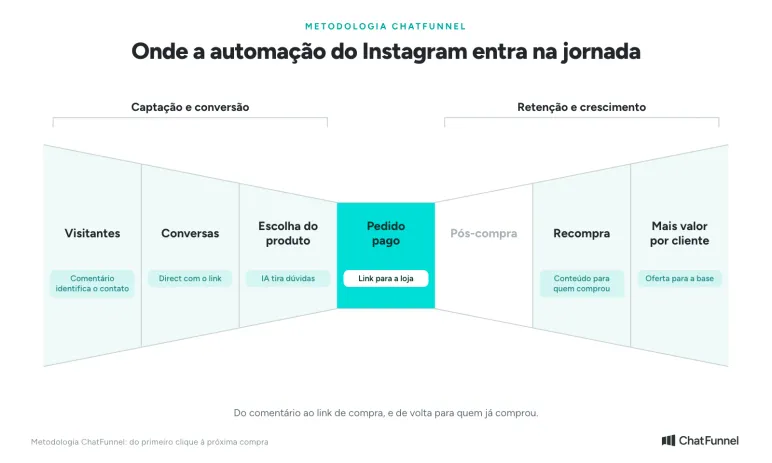
Instagram automation works from the first interaction through repeat purchase.
Content funnel: top, middle, and bottom
Not every follower is ready to buy. Advertising writer Eugene Schwartz, in his book Breakthrough Advertising, describes five levels of awareness: a person may be unaware of a problem, aware of the problem, aware of solutions, aware of your product, or ready to buy. Each level calls for different content.
| Content stage | Awareness level | Goal | Example for a store |
|---|---|---|---|
| Top | Unaware of the problem | Attract attention and reach new people | A current topic related to what the store sells |
| Middle | Aware of the problem or solutions | Explain and show the product in use | Carousel comparing models, usage video, behind-the-scenes content |
| Bottom | Knows the product or is ready | Drive a purchase | Offer post saying "comment QUERO to receive the link" |
Automation lives at the bottom of the funnel but depends on the other two stages. If there are only offer posts, few people will comment. If there is only top and middle content, the store gains reach without taking anyone to checkout. Start with bottom-of-funnel content and a CTA because it already shows results in orders.
How comment-to-direct automation works
The format most used in ecommerce is "comment QUERO to receive the link." The flow has four steps:
- The store publishes a post or reel with the CTA and chooses one or more words, such as "QUERO," "LINK," or "BLACK."
- A person comments. The tool recognizes the word and, if the store wants, replies publicly to the comment.
- The person receives a direct message with a button. The destination can be the product page, the store's WhatsApp, or a coupon.
- If they reply, the conversation continues with more questions, an offer, or an AI agent.
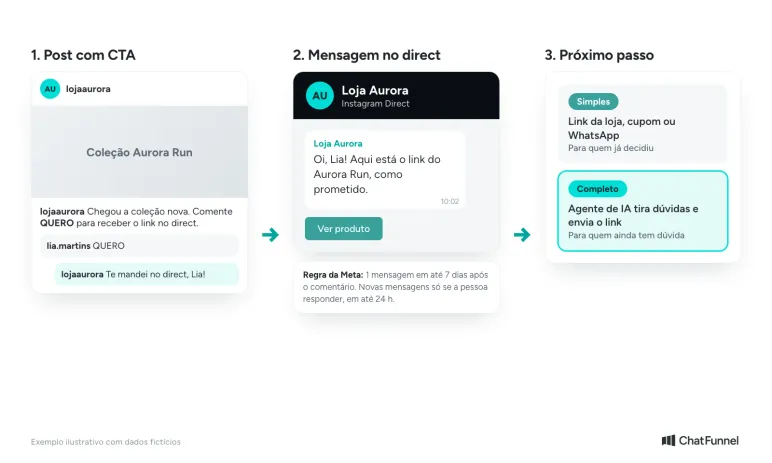
From comment to direct message: the simple path delivers the link; the full path adds AI to answer questions.
Meta sets limits for this private message. According to the Instagram Platform documentation, a store can send one message to a commenter within 7 days of the comment. For live streams, it can only send during the broadcast. Further messages can only be sent if the person replies, and within 24 hours of that reply. The message reaches the inbox of someone who follows the profile and the requests folder of someone who does not.
In practice, this changes flow design. The first message needs to deliver what was promised and invite the person to respond, for example with a button or question. The article on how to capture leads with comments and stories details tests worth running before publishing.
Which Instagram triggers to use in each situation
| Trigger | When to use it | Example CTA |
|---|---|---|
| Comment on a post or reel | Offer, launch, waitlist | "Comment QUERO to receive the link" |
| Story reply | A series of stories featuring a product or coupon | "Reply to this story with CUPOM" |
| Direct message | Questions and requests from people already visiting the profile | "Send me a direct message and I'll send the link" |
| Ad click | Campaigns that lead people straight to a conversation | Message button in the ad |
| Live chat | Launch or live selling | "Comment the product number" during the live stream |
| Story mention | Customers who post their purchase and tag the store | A thank-you message with a coupon for the next purchase |
In ChatFunnel, all these triggers are in flows with keyword filters: exact phrase, "contains," "starts with," or any message. The public reply to a comment can be fixed text or written by AI to avoid repeating the same phrase in every comment.
AI agent in direct messages: from "QUERO" to purchase
A link alone works for someone who has already decided. Many people still have questions about shipping, delivery time, installments, size, or which model to choose. Without an answer, they close the app and the order never happens.
The full flow therefore places an AI agent right after the comment. It answers using the ChatFunnel knowledge base, which contains catalog, policy, and delivery information reviewed by the team. With the store integrated, it checks products and orders. When the person is ready, it sends the purchase link. If a case falls outside what it knows, it hands the conversation to the team with the history attached.
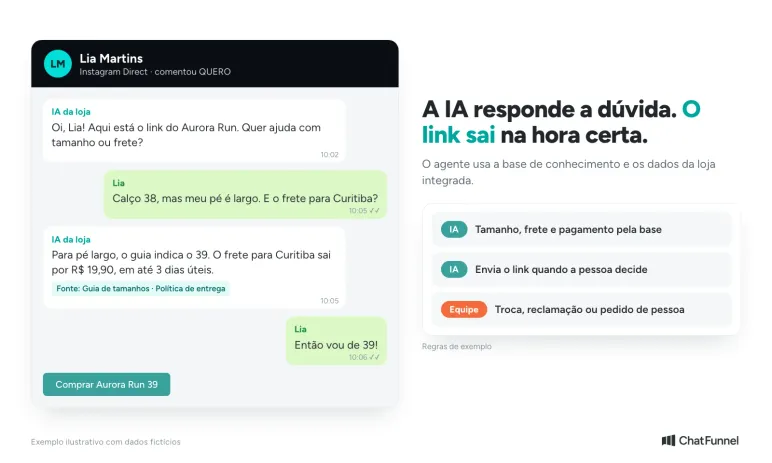
The agent answers questions that hold up a purchase and sends the link when the person is ready.
The knowledge base also learns from customer service. When the team resolves a new question, ChatFunnel suggests the question and answer as content, and a person approves or rejects it before AI uses it.
To build the flow, the store does not need to start with an empty editor. In Intelligence, ChatFunnel's assistant, the manager describes the desired result, for example "when someone comments QUERO on the new collection post, send the link with a button," and it prepares the flow for the team to review.
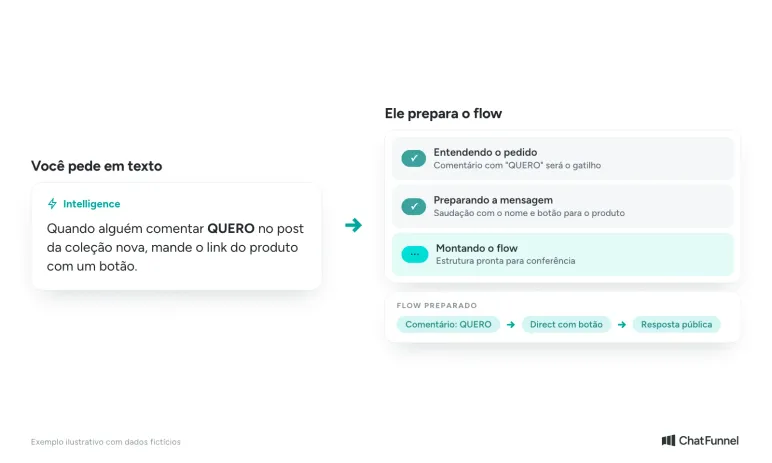
The manager describes the automation in text and checks the flow before activation.
Step by step: build your first automation
- Check that the store's Instagram account is professional. The messaging API works only with professional accounts.
- Connect Instagram to the tool through Meta's official API.
- Choose a bottom-of-funnel post with a clear offer and define the CTA word.
- Write the direct message: say what the person will receive and add a button.
- Decide the next step: just the link, a coupon, or an AI agent to answer questions.
- Test with an account that does not follow the store to see the message land in requests, and with one that does follow it.
- Publish and monitor comments, clicks, and orders. Adjust the word, text, and offer timing.
To see this setup on screen, watch the video How to automate Instagram for your ecommerce store on ChatFunnel's YouTube channel. In it, ChatFunnel founder Mateus Dias explains the content funnel and builds the comment-to-direct automation.
Mistakes that hold back Instagram sales
- Asking for a comment without saying what the person will receive. The CTA needs to promise something concrete: the link, coupon, or size chart.
- Sending only the link to someone who still has questions. Without answers about shipping or sizing, the person does not buy.
- Using the same public reply for every comment. It looks robotic and does not help people who read comments before buying.
- Publishing only offers. Without top- and middle-funnel content, the profile stops reaching new people.
- Forgetting existing customers. Previous buyers also read Instagram, and an automation for them can bring the next purchase.
How to turn the store's Instagram into a sales channel
Instagram sells when the editorial plan and automation work together. Top- and middle-funnel content prepares the follower. A bottom-funnel post makes the invitation. Automation takes the person to the link when they have shown interest.
Start with an offer post, a CTA word, and a message with a button. Once that flow is running, add the AI agent for people who still have questions, and create flows for stories, live streams, and existing customers.
In ChatFunnel, the store's Instagram connects through the official API and joins the same inbox as WhatsApp, with flows for comments, stories, direct messages, live streams, and ads. The AI agent answers using the knowledge base and, with your store platform integrated, checks products and orders. Request a demo with a real post from your store and check the connection and plan scope before deciding.
Meet ChatFunnel, the #1 AI for online stores
Frequently asked questions about Instagram automation for ecommerce
How do I automate my store's Instagram?
Connect the store's professional account to a tool using Meta's official API and create trigger-based flows. Common triggers include a keyword comment, a story reply, and a direct message. Each trigger sends a direct message with a link, coupon, or AI customer service.
Is Instagram automation allowed, or can it get the account blocked?
It is allowed when performed by a tool using the official API and responding to a person's action, such as a comment or direct message. The Instagram Terms of Use prohibit creating accounts or accessing or collecting information automatically without Meta's express permission. The risk comes from unofficial apps and messages to people who did not request them.
How do I set up "comment QUERO and receive the link by direct message"?
Create a flow triggered by a comment on a post or reel and define the word "QUERO." Write the direct message with a button for the link and, if desired, a public reply to the comment. Test with another account before publishing the post.
How long after a comment can the store send a direct message?
Within 7 days of the comment, and only one message, according to Meta's documentation. In live streams, the message must be sent during the broadcast. Further messages require the person to reply and must be sent within 24 hours of that reply.
Does the automated message land in the inbox or requests?
It depends on whether the person follows the profile. For followers, the message reaches the inbox. For non-followers, it goes to the message requests folder, which is worth mentioning in the post.
Do I need a professional account to automate Instagram direct messages?
Yes. Instagram's messaging API works with professional business or creator accounts connected to a tool authorized by Meta.
Can AI answer comments and questions in direct messages?
Yes, when the tool has an AI agent connected to the store's information. In ChatFunnel, the agent uses the knowledge base and, with the store integrated, product and order data. The store defines when a team member takes over the conversation.