Yes, Meta already charges per WhatsApp message. Since October 1, 2026, each reply a business delivers through the official API costs R$ 0.035 for customers in Brazil after the 1,000 free service messages each number receives per month. Customers pay nothing to write, and the WhatsApp Business mobile app remains free of per-message charges.
The change applies to businesses using WhatsApp Business Platform, whether through a CRM, customer service platform, or Meta-connected automation. For an online store, customer service gains a new cost line: each reply counts.
Platforms such as ChatFunnel already show this spending by category in the dashboard. The store can monitor conversation costs before the Meta bill arrives.
| Situation | Through 09/30/2026 | Since 10/01/2026 |
|---|---|---|
| Customer messages the store | Free | Free |
| Store replies within the 24-hour window | Free | 1,000 free per month per number. Then R$ 0.035 each |
| Utility template inside the window | Free | R$ 0.035 |
| Customer arrives through a Click-to-WhatsApp ad | Free for up to 7 days | Still free for up to 7 days |
| Store uses only WhatsApp Business App | No per-message charge | No per-message charge |
The values come from Meta's official Brazilian real rate table for customers in Brazil, checked on 10/26/2026 on the WhatsApp Business Platform pricing page. Meta also maintains a pricing page with a calculator.
Prefer video? ChatFunnel's YouTube channel explains what changes for businesses selling on WhatsApp.
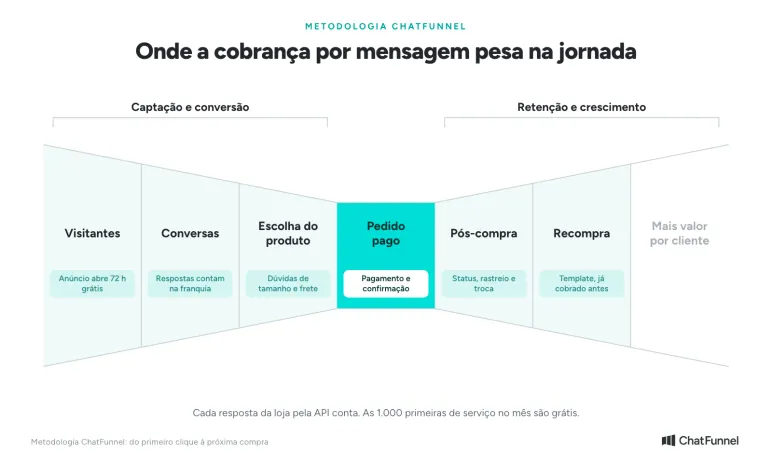
In the ChatFunnel Methodology, charges affect the stages where the store replies most: Conversations, Product selection, Paid order, and Post-purchase. Customers ask about size, shipping, payment, and delivery there. In Visitors, a Click-to-WhatsApp ad opens a window of up to 7 days without a fee. In Repeat purchase, the store contacts the customer again with a template, which was already charged before the change.
Message types and template categories
In daily use, there is a simple division. Inside the 24-hour window, a business can reply with a free-form message, also called a service message. Outside it, the business's first new send must use a message model, or template, approved by Meta.
A template has text and variable fields defined before sending. For example, a store can fill in a customer's name, order number, or tracking code. This does not allow it to change the message's purpose. A template approved as utility should not carry a promotional offer simply because a variable field is available.
| Type | When to use it | From 10/01/2026 |
|---|---|---|
| Service | Free-form reply while the 24-hour window is open. It is not a template. | ~R$ 0.035 |
| Utility | Update or information tied to a specific customer action or transaction. | ~R$ 0.035 |
| Authentication | Identity verification or completion of access and a transaction. | ~R$ 0.035 |
| Marketing | Offers, campaigns, recommendations, or commercial reactivation | ~R$ 0.32 |
| Ad window up to 7 days | Customer arrived through a Click-to-WhatsApp ad | Free |
Choosing the right category concerns policy and customer experience, not just price. A promotional template disguised as an order update can be reclassified or rejected. Before creating templates, map which event triggers each message, what information it needs, and whether the communication is transactional, verification-related, or commercial.
What is a WhatsApp service message?
A service message is a free-form reply the store sends while the 24-hour customer service window is open. It does not use a template. It is everyday service: answering an order question, sending tracking, explaining an exchange, confirming payment method, or closing a sale.
The reply can come from a person, automation, or AI agent. Text, image, audio, document, and buttons sent in this window count as service messages. Each delivered send counts toward the number's 1,000 free messages per month. After the allowance, each costs R$ 0.035.
The customer does not pay to talk to the store. The charge applies to the message the business delivers through the official platform.
How the WhatsApp 24-hour window works
Imagine a customer asks at 10 a.m. Tuesday:
Has my order shipped?
From then, the store has until 10 a.m. Wednesday to send free-form messages without a template.
The window remains unchanged after the change. What changes is the price of replies inside it: the first 1,000 per month per number remain free and later ones are charged. If an agent sends 3 short messages to answer one question, those are 3 service messages. If they send one complete answer, it is one.
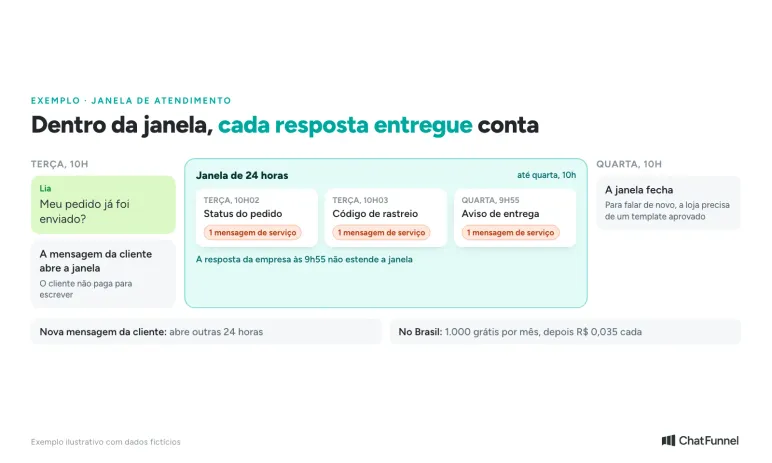
A store message does not extend the window. If an agent replies at 9:55 a.m. Wednesday, the period still ends at 10 a.m. Only a new customer message opens another 24 hours.
After the window closes, the store can resume only with an approved template in the right category: utility, marketing, or authentication. When the customer replies, a new window opens. Cart recovery follows the same rule, and the WhatsApp cart recovery guide shows how to build that sequence. To create templates, see how to create and approve a WhatsApp template with Meta.
How much each WhatsApp message costs on the official API
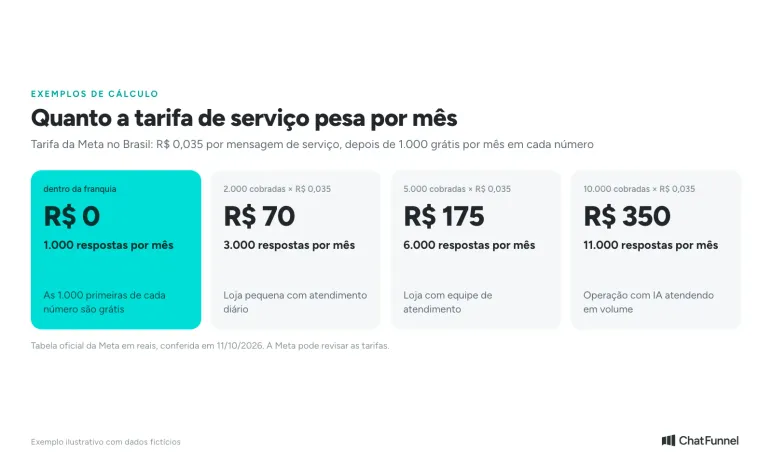
Meta charges per delivered message, not per conversation. Price depends on category and the recipient number's country. For customers in Brazil, the official Brazilian real table gives these values from October 1, 2026:
| Category | When the store uses it | Price per delivered message |
|---|---|---|
| Service | Free-form reply inside the 24-hour window | R$ 0.035 after 1,000 free per month |
| Utility | Template tied to a purchase: order confirmed, shipment, Pix generated | R$ 0.035 |
| Authentication | Access or verification code | R$ 0.035 |
| Marketing | Offer, campaign, coupon, abandoned cart | R$ 0.3217 |
| Ad entry | Customer arrived through a Click-to-WhatsApp ad | Free for up to 7 days |
In US dollars, the same values are US$ 0.0068 and US$ 0.0625 (marketing). Since July 2026, Brazilian accounts can pay in reais with a Facebook Brasil invoice. Utility and authentication receive high-volume discounts. Service messages have no discount: the price is the same from first to last, according to Meta's pricing page.
Choosing the right template category concerns Meta's rules and customer experience. A promotional template disguised as an order update can be reclassified or rejected. Before creating templates, map the triggering event and whether communication concerns a purchase, verification, or commerce.
What about Meta's own AI?
In July 2026, Meta launched Meta Business Agent, its own AI agent. Its replies do not follow the service rate: each message is priced by tokens used, at US$ 2.00 per million tokens, according to the pricing page. Replies from human agents and other companies' AI sent through the API continue to count as service messages.
What remains free on WhatsApp
The charge does not make every conversation paid. These remain free of Meta fees:
- the first 1,000 service messages per month on each number. The allowance resets monthly and unused messages do not carry over;
- everything the customer sends to the store;
- messages that do not reach the customer;
- the window of up to 7 days after a customer arrives through a Click-to-WhatsApp ad or a Facebook Page call-to-action button. No category is charged during this period;
- WhatsApp Business App and regular WhatsApp, which have no per-message charge.
The window of up to 7 days is not the same as the 24-hour service window. It depends on contact origin. The store therefore needs to record how each conversation began rather than assume every WhatsApp contact falls under the exception.
Where costs appear in store customer service
Customer count does not tell the whole story. What matters is the number of replies per case. A store may serve fewer people and have a larger bill if each case splits into many bubbles, confirmations, and transfers without context.
Consider a tracking question. If the flow requests the order number, requests the CPF, confirms the record, transfers to a person, and only then provides status, the conversation adds several store messages. Some steps may be necessary. Others show order data is not at hand or automation does not reach the right information.
The goal is to avoid messages without a function while keeping the answer useful. A useful reply provides status, timeframe, tracking code, and exception path in one send. If information is unavailable, transfer the case with context already collected so the customer does not repeat everything.
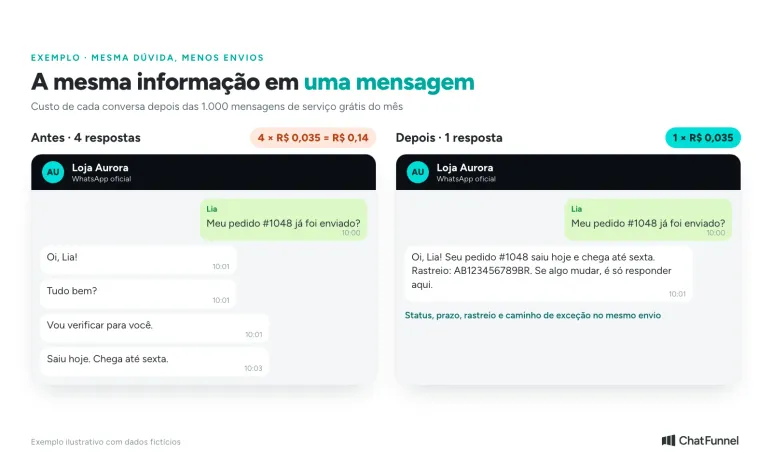
The same applies to exchanges, returns, payment, and pre-sales. Updated rules, a correct catalog, and clear handoff criteria reduce back-and-forth. To put orders, conversations, and automations on one screen, the store can use ChatFunnel, which combines WhatsApp customer service, automation, and CRM.
How to calculate WhatsApp message costs
Use your store's own history. The calculation has 4 steps:
- Take the last 4 weeks and count only messages the store sent through the API inside the service window.
- Subtract the 1,000 free messages for each number.
- Multiply the remainder by R$ 0.035.
- Build a second scenario without messages that serve no purpose, such as repeated greetings, empty confirmations, and an answer split into several bubbles. Do not count savings that depend on leaving a question unanswered.
Hypothetical example: a store sends 6,000 service messages per month on one number. The first 1,000 are free and the other 5,000 total R$ 175 in Meta fees. If 500 of those messages are removed without reducing service quality, the bill falls by R$ 17.50 per month. This is the Meta amount. The customer service platform subscription is charged separately.
WhatsApp spending calculator in ChatFunnel
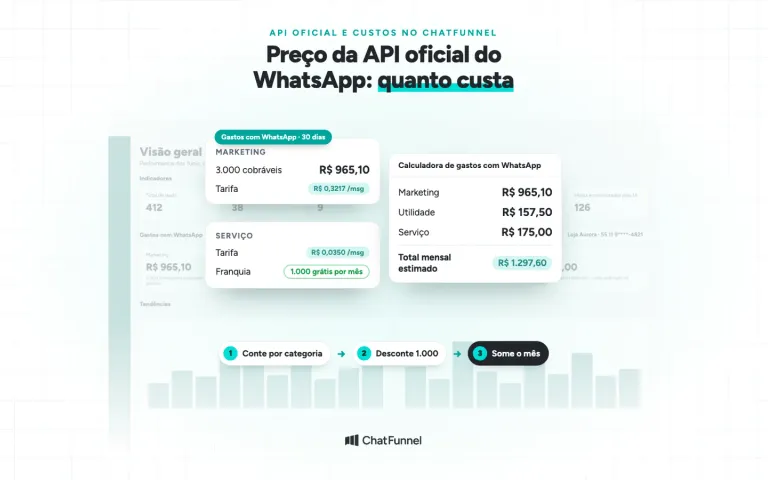
ChatFunnel users on the official API can make this calculation in the dashboard. In Overview, the WhatsApp Spending section shows estimated cost for the last 30 days by category, using Brazil rates and deducting the service allowance. The Spending Calculator button opens a simulator: enter expected marketing, utility, authentication, and service message counts, and the estimated monthly total appears immediately.
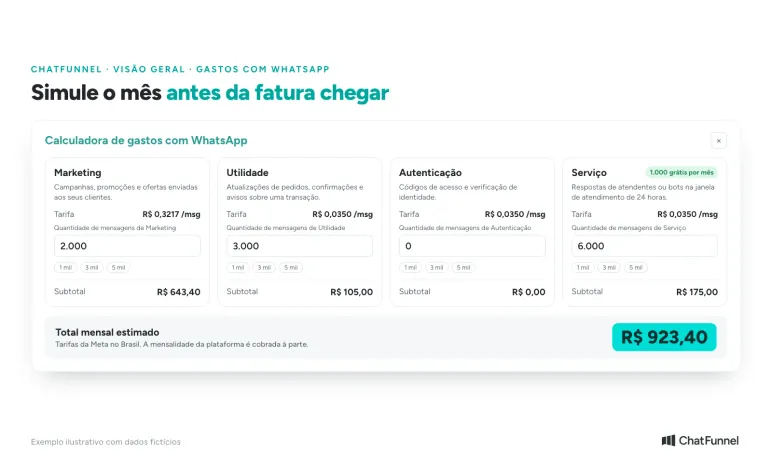
For accounts with more than one number, simulate each separately. The steps appear in the tutorial how to check and simulate WhatsApp message costs in ChatFunnel.
Checklist: what the store needs to check now
- Confirm whether the number uses the official API or only WhatsApp Business App.
- Add a payment method to the WhatsApp account in Meta. Without one, Meta delivers the 1,000 free monthly messages and stops delivering later replies. The tutorial how to add a payment method to WhatsApp Business through Meta shows the path.
- Measure messages sent by category for 4 weeks.
- Separate conversations from Click-to-WhatsApp ads and monitor the window of up to 7 days.
- Review the most common contact reasons and answer with data the store already has.
- Train the team to send one complete reply instead of several bubbles. Line breaks keep text clear without creating another send.
- Prepare templates for when the 24-hour window closes.
Is the official WhatsApp API worth using after the charge?
It depends on operation size. A store with little customer service may remain on WhatsApp Business App. A store with several agents on one number, automations, AI, and online store integration depends on the official API even with the new rate.
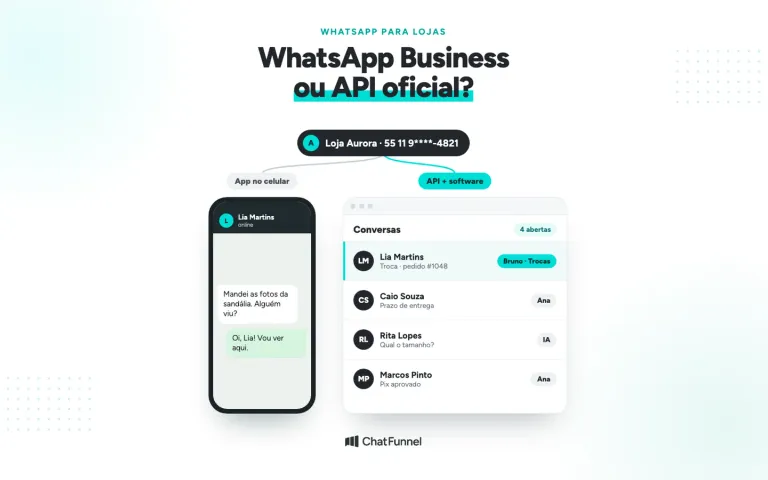
The API permits bulk sends with an approved template, a number that does not depend on a connected phone, and automation within Meta's rules. Unofficial tools fall outside those rules and face greater blocking risk. The full comparison is in WhatsApp Business or the official API, and the purchasing path is in how to get the official WhatsApp API for ecommerce.
Do not decide based only on R$ 0.035. Compare cost with service volume, control needs, the risk of inconsistent answers, and team time. If the store uses AI to answer, review the knowledge base and handoff rules because AI that asks too many questions consumes messages. See when AI should hand customer service over to a person.
Measure customer service before cutting messages
Meta already charges for replies on the official WhatsApp API. The rate is R$ 0.035 per delivered message to customers in Brazil after each number's 1,000 free messages per month. For a small store, the amount tends to be low. For high-volume AI service, it enters the monthly budget.
Measure before cutting. Count messages by category, deduct the allowance, combine fragmented replies, and prepare templates for when the window closes. A complete answer costs less and provides better service.
ChatFunnel combines WhatsApp customer service, automations, an AI agent, and the store CRM on the official API. In the dashboard, WhatsApp Spending shows estimated cost by category and the calculator simulates the month before the bill arrives.
Meet ChatFunnel, the #1 AI for online stores
Frequently asked questions about Meta WhatsApp charges
Is it true Meta will charge per WhatsApp message?
Yes, and charging has already started. Since October 1, 2026, Meta charges for business replies sent through the official API inside the 24-hour window after 1,000 free messages per number per month. In Brazil, each costs R$ 0.035.
Will people using WhatsApp Business on a phone pay?
No. The charge applies only to the official API, WhatsApp Business Platform. WhatsApp Business App and regular WhatsApp remain free of per-message charges.
Are the 1,000 free messages per business or per number?
Per business phone number each month. A store with 2 numbers connected to the API gets 1,000 free service messages on each. Unused messages do not carry over.
Does a customer pay to message the store?
No. A customer message generates no fee for them or the store. Meta charges only messages delivered by the business.
Are AI replies also charged?
Yes. If AI replies through the API inside the window, the reply counts as a service message just like a human agent's. The exception is Meta Business Agent, Meta's own AI, priced by tokens.
What happens if the account has no Meta payment method?
Meta delivers the 1,000 free monthly service messages and then stops delivering replies. To avoid interrupting service, add a card in the WhatsApp account's Meta payment settings.
How much does a WhatsApp marketing message cost?
R$ 0.3217 per delivered message to customers in Brazil under Meta's official Brazilian real table. It is almost 10 times the price of a service or utility message, so choose each template category carefully.
Chatfunnel | Turning Visitors into Loyal Customers 🩵