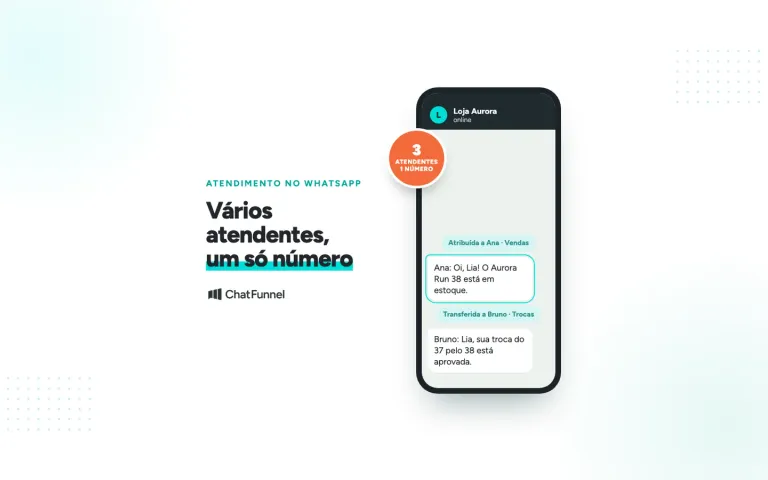
The WhatsApp Business catalog is a storefront inside the app. You can register up to 500 products or services with a photo, price, and link, and customers browse without leaving the conversation. To create one, open the Tools tab, tap Catalog, and add the first item. The WhatsApp Help Center explains each field.
Creating it is the easy part. Maintaining it takes work. If the store price changes while the catalog falls behind, customers see 2 offers for the same product. If a color sells out, customer service may offer a variant that no longer exists.
Businesses using AI for customer service need the same discipline. In the ChatFunnel knowledge base, the team gathers content and files, reviews versions, and chooses each agent's materials. Size guides and usage instructions fit there. Price and stock require an updated source and a plan for lookup failures.
Is a WhatsApp catalog worthwhile for your store?
It is worthwhile when sales already happen in conversation. The catalog saves the team from sending photos 1 by 1 and lets customers gather products in a cart without leaving WhatsApp. The cost of this storefront is maintenance: someone must keep each item current.
It often makes sense when:
- the store has a few products within the 500-item limit, and price and stock change infrequently;
- customers ask for photos, prices, and models directly on WhatsApp;
- 1 person is responsible for updating the catalog whenever an offer changes.
Think twice when:
- the catalog exceeds 500 items or prices change daily;
- each product has many colors and sizes, and the team would have to hide each sold-out variant manually;
- the online store already controls stock, and a second app record creates room for discrepancies.
In those cases, connect a Meta catalog or connect customer service to the store platform, as explained in the section on connecting the catalog to an online store. The manual catalog remains useful for a small, stable selection.
How to create a WhatsApp Business catalog step by step
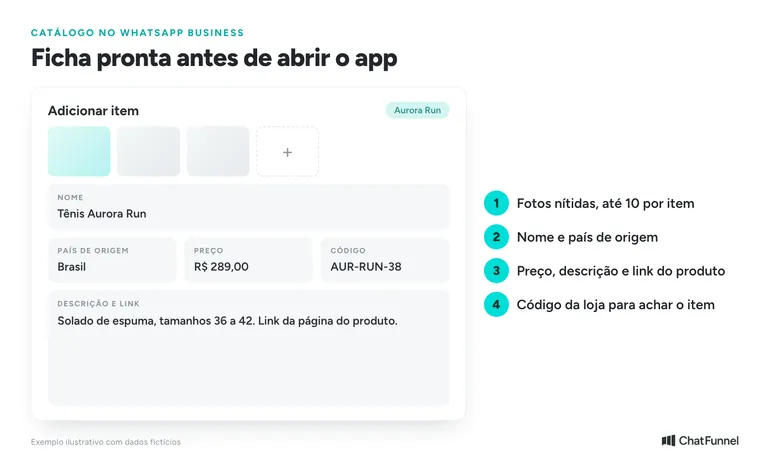
Prepare a product sheet before opening the app. Gather clear photos, name, country of origin, and information that helps customers choose. Include the store's item identifier rather than relying on photo appearance.
On Android, the current WhatsApp instructions start in the Tools tab:
- Open Catalog and tap Add item.
- Add product photos or videos.
- Enter the name and country of origin.
- Add relevant fields: price, sale price, description, link, and code.
- Save and monitor the item's review.
Menu names vary by version and device. In official help, choose Android, iOS, or Web to see the corresponding screen.
Can you create the catalog on a computer?
It depends on which catalog you use. For a Meta catalog connected to the app, WhatsApp Web only displays it. Management, including connecting and disconnecting, remains in the mobile app, according to connected catalog help. For a catalog created in the app itself, the official product registration page has a Web version. Check what your account offers.
How to write the description and use the right link
Answer the question that usually arises in conversation. For a handbag, dimensions and closure type help more than "excellent-quality product". For an electronic accessory, list compatible models according to the manufacturer's specifications.
Use the link to that product's page. A URL opening the home page forces the person to search again. If the store opens a specific variant, check that the link retains the chosen color or size.
How to organize collections and share the catalog
Group items into collections that make sense to buyers, such as small handbags or gifts. WhatsApp lets you create and manage collections and share the catalog link or individual products in a conversation. WhatsApp catalog guidance also suggests using campaigns, automated replies, and status. To contact a customer list, see how the WhatsApp Business broadcast list works.
How many items fit in the WhatsApp Business catalog?
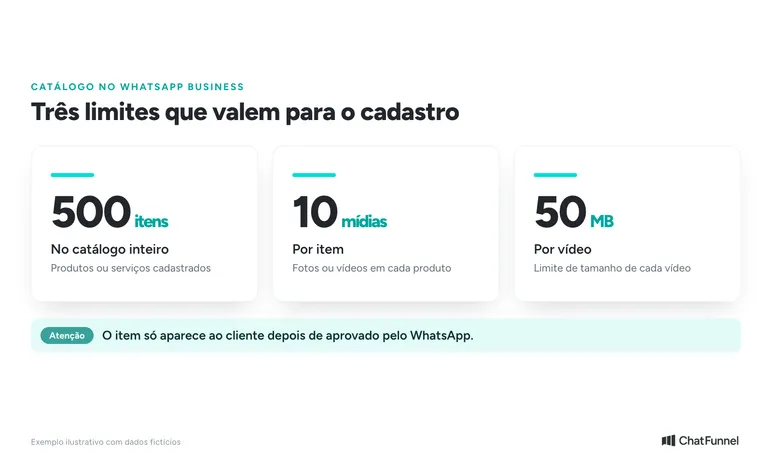
Up to 500 items fit, according to WhatsApp for Business. The total counts registered products or services. Check the other limits in Android help:
| Limit | Value | Where the rule appears |
|---|---|---|
| Catalog items | Up to 500 | WhatsApp for Business |
| Photos or videos per item | Up to 10 | Help Center (Android) |
| Size of each video | Up to 50 MB | Help Center (Android) |
| Item visibility | Only after WhatsApp approval | Help Center (Android) |
If your store has more than 500 products, choose the best sellers and leave the rest on the site.
WhatsApp Business catalog missing or under review: what to do
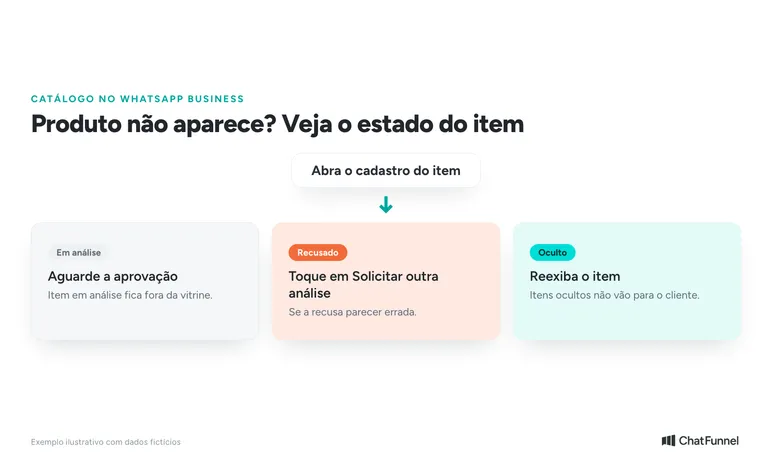
If a product is not visible to customers, open its record and check the status. Items under review or rejected are excluded from public display. If rejection seems wrong, the app offers Request another review. Also check whether the item is hidden. These are the first points in the management help.
Avoid deleting and registering the same product repeatedly before finding the reason. Record which item failed, the status shown, and where the problem appears: the store account, customer account, or only the computer. This helps support understand the case.
If the entire catalog disappeared, confirm the business number in use and the catalog connection. Then consult help for your account's catalog type. An app-created catalog and a connected Meta catalog have different management paths.
How to keep catalog prices, stock, and variants current
Define who updates the catalog when an offer changes. Leaving the task "with customer service" often creates uncertainty about who edits and who merely reports changes. A simple routine starts with store events:
| Change | What to check in the catalog | What to check in conversation |
|---|---|---|
| Promotion started or ended | Price and offer condition | Saved messages with the old value |
| A variant sold out | Whether the color or size is still advertised | Whether the customer wants the out-of-stock option |
| Product gained a new version | Code, photos, and description | Compatibility with the stated use |
| Product URL changed | Registered link | Links used in frequent replies |
Before sharing, check product, offer, availability, and link destination. Also check on a recipient's phone. An item that is correct in the dashboard may appear differently in conversation.
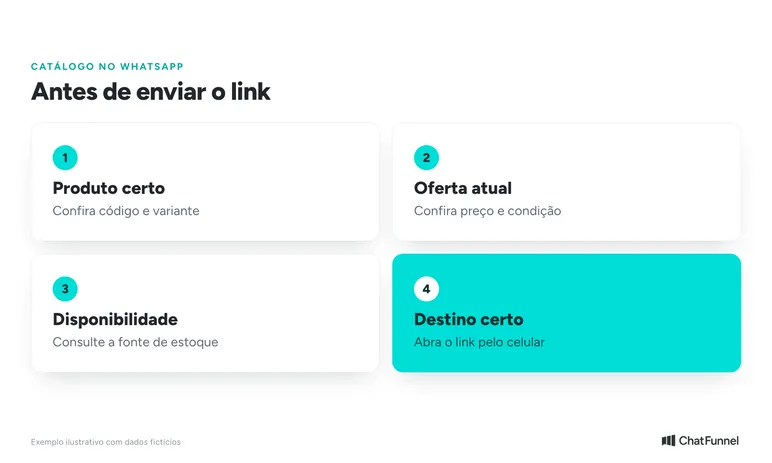
An illustrative example: a blue T-shirt description shows sizes P, M, and G, but M is sold out. If the record does not separate variants, the agent must confirm size before stating availability. The T-shirt photo alone does not answer that question.
When available on the account, hiding an item removes it from the storefront until updated. WhatsApp recommends this for sold-out products and unavailable variants in its catalog best practices. If discrepancies recur, review the price and stock sources used by AI.
When to connect the catalog to an online store
Manual entry works well for a small, stable selection. A connection becomes worthwhile when the team spends the day correcting prices or checking another system before every answer.
Separate 2 needs. One is displaying a Meta catalog on WhatsApp. The other is having customer service consult store platform data. The first connection does not prove stock, variants, and orders are available to AI.
WhatsApp allows an existing Meta catalog to be connected to the app. In its WhatsApp Web documentation, the company says changes to that connected catalog may take up to 24 hours to appear on Web. That timeframe applies to this case. Do not use it as the timeline for every integration.
Want to keep the phone app and use automation and AI on the same number? See WhatsApp Business coexistence in ChatFunnel. Availability depends on Meta's criteria, and the page lists prerequisites.
Before buying any solution, request a demonstration with your store system and check:
- Which record supplies price and which supplies stock.
- How the product and each variant are identified across systems.
- When a change reaches customer service.
- What the conversation does when a lookup fails.
- Who receives a discrepancy alert.
In ChatFunnel, the tutorial on creating and configuring an AI agent shows how to register the knowledge base. It also teaches image groups that can bring catalogs and price tables into the conversation. To understand the integration-based service structure, read the official WhatsApp API for ecommerce guide. Choosing between WhatsApp Business and the official API involves more than catalog size.
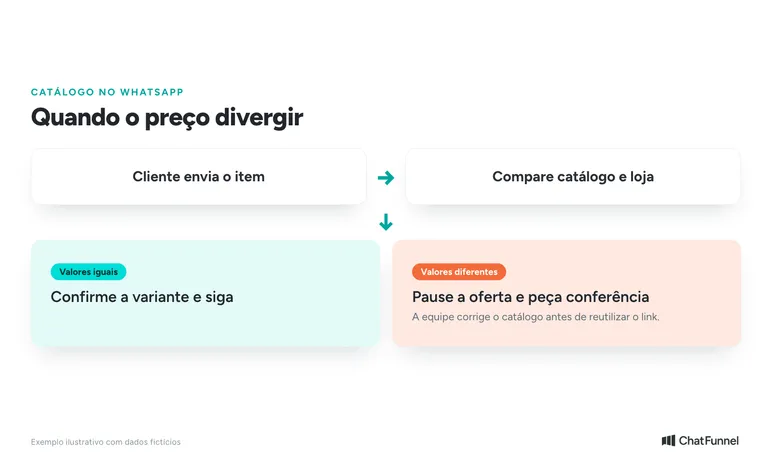
What to do when the catalog price differs from the store
In this illustrative example, a customer sends a catalog product and says its site price differs. Customer service identifies the item and variant, compares sources, and asks the team to verify before insisting on a price.
A possible reply: "I see the prices are different. I'll ask the team to check this offer for you. Are the color and size you want the same as this item?"
The team records where it found each price and which condition applies. It then fixes the source of the error, reviews the catalog, and returns to the customer with confirmed information. The example describes a service flow and does not replace analysis of the offer's commercial terms.
To test an integration, use test products or a dedicated environment. Simulate a price change, a sold-out variant, and an unavailable lookup. Observe whether customer service recognizes the exception and transfers the conversation with context. A test where all data is correct does not show how the flow responds to these cases.
From selected item to paid order: how the WhatsApp cart works
In the WhatsApp cart, the customer gathers products, adjusts quantities, and sends the selection to the business by message. That is how the cart Help Center page describes it. The shopping button appears beside the business name and opens the catalog.
After receiving the selection, customer service still follows the store's order and payment process. Mark the purchase paid only after confirmation in the business's payment source. Also define who follows up on questions preventing checkout. The guide to assisted selling on WhatsApp shows how to handle this stage.
An up-to-date catalog avoids rework: what to do first
Start with the basics. Register best sellers with complete records, individual page links, and codes. Define who updates price and stock. Check item status whenever something disappears from the storefront.
Then decide whether manual entry can still cope. If the team constantly corrects prices, the issue becomes the connection between store and customer service. At that point, test failure before trusting it: changed price, sold-out variant, and unavailable lookup.
In ChatFunnel, the team keeps conversation history with the contact and uses approved knowledge base information. When AI needs help, the team takes over. When evaluating the store connection, ask to see available fields and run this guide's price and variant tests. For the full picture, read AI for ecommerce.

Talk to an expert and see how the store serves customers on WhatsApp
Frequently asked questions about the WhatsApp Business catalog
Is the WhatsApp Business catalog worthwhile?
Yes, when a store sells a few products with stable prices and stock and customers already ask for photos and prices on WhatsApp. If the catalog exceeds 500 items or changes daily, manual entry becomes rework and the store connection matters more.
How many products fit in a WhatsApp Business catalog?
Up to 500 items, including products and services. Each item accepts up to 10 photos or videos, and each video can be up to 50 MB. These limits come from WhatsApp for Business and the Android Help Center and can change.
How do I create a WhatsApp Business catalog on my phone?
Open Tools, tap Catalog, then Add item. Upload photos or videos, enter name and country of origin, add price, description, link, and code, and save. The item appears to customers only after WhatsApp approves it.
Can I create the catalog on a computer?
For a Meta catalog connected to the app, WhatsApp Web only displays the catalog. Connecting, editing, and disconnecting happen in the mobile app. For a catalog created in the app, open the official registration page and choose the Web version.
Why can't customers see the WhatsApp Business catalog?
The item may be under review, rejected, or hidden. Open its record and check status. If rejection seems wrong, tap Request another review. If the entire catalog disappeared, check the business number and catalog connection.
How do I hide a sold-out product from the catalog?
Open the item, tap more options, and choose Hide. For several items, press and hold one, select the others, and tap the hide icon. The feature may not be available on every account, and hidden items remain visible to you in Manage catalog.
Can I connect the WhatsApp catalog to my online store?
A Meta catalog can be connected to the app. This does not guarantee stock, variants, and orders reach customer service. Request a demonstration with your store system and test a changed price, sold-out variant, and unavailable lookup.
What is the difference between the app catalog and a connected Meta catalog?
The app catalog is registered item by item in WhatsApp Business. The connected catalog comes from Meta and is managed through the app, with viewing in WhatsApp Web, where changes may take up to 24 hours to appear. The management paths differ.
Turning Visitors into Loyal Customers 🩵