To answer an order-status question on WhatsApp, AI needs to identify the purchase and consult the data the store receives about it. The answer should explain the available progress and indicate the next step. A delivery policy alone does not reveal where a customer's package is.
The distinction starts with the words. "Order approved," "shipped," and "out for delivery" describe different stages. When customer service substitutes one for another, it may promise an arrival the source has not confirmed.
The platform ChatFunnel helps bring together conversation history and the status received from the store or connected ERP, the store's management system. The team can monitor that context and take over when needed. Looking up carrier events requires a connection that supplies that data; receiving the store's status does not prove that access exists.
The following guide addresses a common post-sale question: "Where is my order?" The aim is to prepare a useful answer even when there are two packages, an old update, or a delay requiring the team's help.
Separate store progress from delivery events
Before configuring the answer, find out what each status used by your store means. A field called "shipped" might be filled when a label is issued or after pickup, depending on the process. Ask the shipping team to confirm exactly when it changes.
Create a simple map of available information and what it allows you to say:
| Information checked | What the answer can say | What still needs checking |
|---|---|---|
| Order approved by the store | The purchase was approved | Preparation and shipping |
| Order being prepared | The store is preparing the items | Pickup and estimated delivery |
| Tracking code recorded | A tracking reference exists | First carrier event |
| Out-for-delivery event | The carrier recorded that stage | Delivery confirmation |
| One package delivered | That package is recorded as delivered | Status of the other packages |
The table is a starting point for mapping, not a list of fields every platform uses. Names should follow the connected source. If the integration only provides "shipped," AI must not translate that field into "arriving today."
The Shopify documentation on order progress illustrates this difference. Tracking depends on the carrier and data received. For services without the same support, the page may provide only a link to the tracking website. Check coverage for each shipping method your store uses.
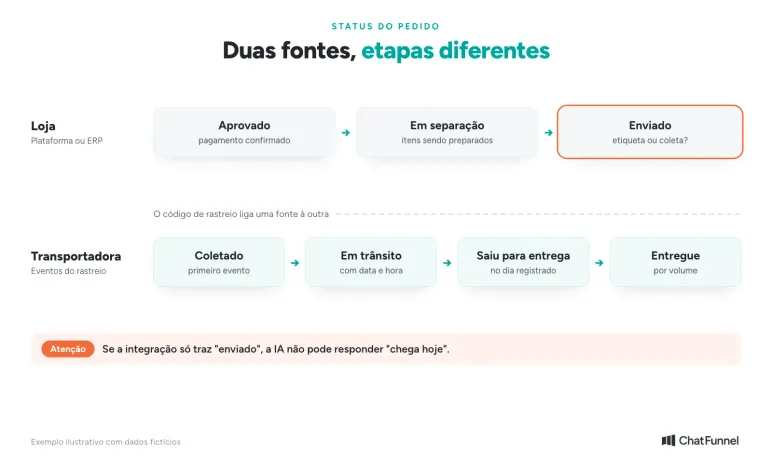
Shipped is store data; in transit and out for delivery come from the carrier.
Identify the buyer before showing details
An order number helps locate a purchase, but it should not be the only condition for revealing its data. Someone who knows that number may not be the authorized buyer. The same caution applies to messages from a phone number different from the one on file.
Define an identification path with your team that is compatible with the store platform. It might involve access to the customer's account or a tracking page with the platform's verification. AI directs the person to that path and presents details only after receiving the corresponding access confirmation.
The Shopify order status page uses access controls and, depending on context, requests login or identifying information before showing purchase details. It is an example of protection that needs to be part of customer service design. Do not copy the same method without checking how your store works.
Avoid asking for a customer's password or access code in the conversation. Do not send a full address, purchase list, or other personal data merely to ask whether the person recognizes it. An initial response can guide verification without exposing those details. The guide to LGPD and WhatsApp chatbots helps define what the conversation can show.
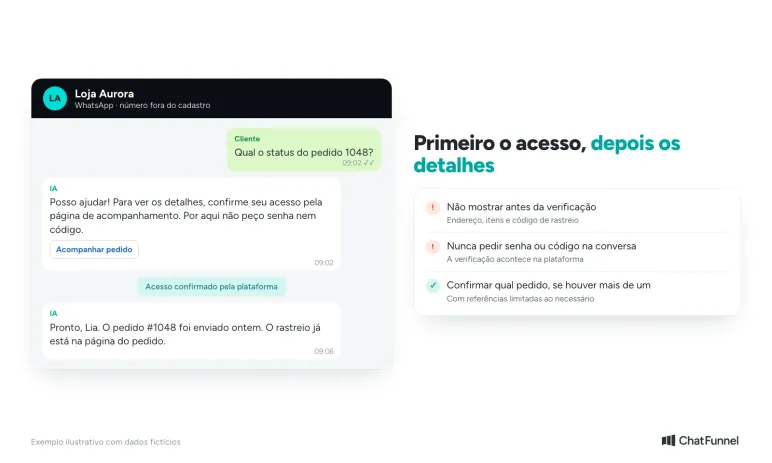
After identifying the buyer, confirm which order they want to track. Someone who purchased twice in one week may be asking about the older purchase. If uncertain, use only the limited references needed for the person to choose.
Answer by package when a shipment is split
An order with two products might ship from different inventory locations or have one item dispatched before the other. The answer must reflect that split. Saying "your order was delivered" because one package arrived leaves the customer wondering where the rest is.
Shopify documents partial fulfillment and separate shipment tracking, including shipments with different carriers. When preparing your store connection, check whether it provides the relationship between item, package, and tracking code. One order-level status may hide that information.
Consider this hypothetical example: a customer bought a backpack and a pencil case. The backpack has an in-transit event recorded yesterday; the pencil case is still being prepared. After identification, one possible response would be:
Your order has two shipments. The backpack is in transit, with an update from yesterday at 4 p.m. The pencil case still appears as being prepared by the store. The source consulted does not give a shipping date for it. I can forward that part to the team to check.
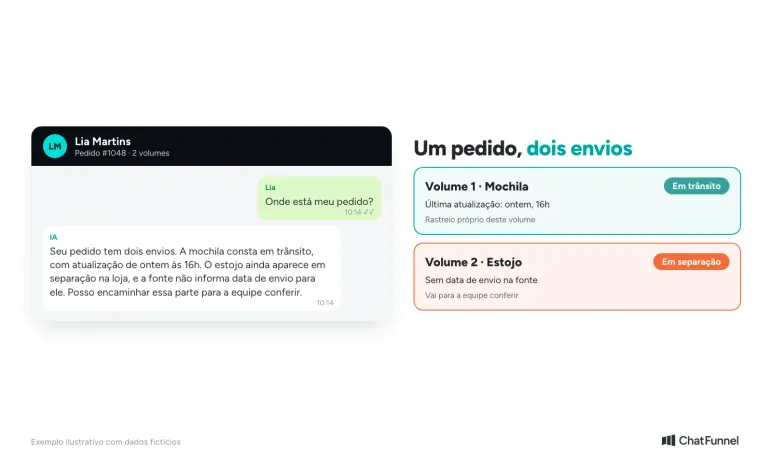
Each package has its own status; one delivered package does not complete the order.
This message is appropriate only if the connection shows the items and their states. If the system only returns "partially shipped," explain that part of the purchase has shipped and forward the lookup of missing items. AI cannot infer which products are in each box.
Provide the tracking information associated with the correct package when access is permitted. The customer should be able to distinguish each shipment without opening several links and guessing which one corresponds to the backpack.
Show when the data was updated
Checking a source now does not mean it received an update now. At least two times can matter: when the event occurred and when customer service looked it up.
If the carrier recorded a distribution-center scan on Monday, a lookup on Wednesday does not turn that record into a scan today. The answer should retain the date provided by the source. When there is an estimated delivery date, present it as an estimate alongside the update supporting it.
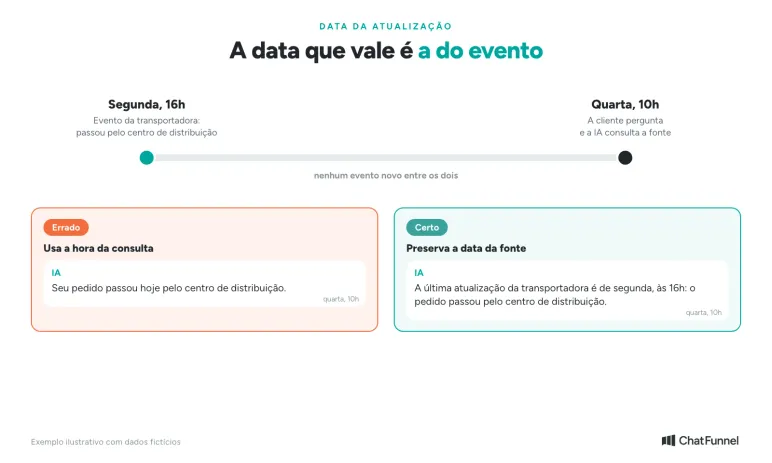
The relevant date is the event date recorded by the source.
Decide with the delivery team when a lack of updates requires follow-up. The threshold depends on the shipping method, stage, and timeframe given to the buyer. Do not use the same number of hours for every order merely for automation convenience.
When a lookup fails, avoid repeating old data as though it were confirmed. The answer can say an update could not be obtained and offer the next path. If it mentions the last available record, identify the date and make clear that it still needs checking.
Also distinguish a lookup error from a nonexistent order. An unavailable connection does not establish that the purchase was not found in the store. This prevents a customer from believing their order is lost when the problem is only the lookup.
Forward delays with enough context
Sometimes repeating tracking information does not answer the question. A customer may say a package is marked delivered but has not arrived. A delivery attempt may be disputed, or a deadline may have passed. In these cases, the team needs to investigate.
Define who receives each type of pending issue. A question about an item still being prepared might go to the shipping team. A disputed delivery might require the store's responsible person to contact the carrier. The handoff needs a destination and someone monitoring its completion.
The summary for the agent should include the order reference, completed access verification, and customer's account of the issue. Add the latest status with source and time, packages involved, and what has already been said. Do not ask the person to repeat everything if the details are already in the history.
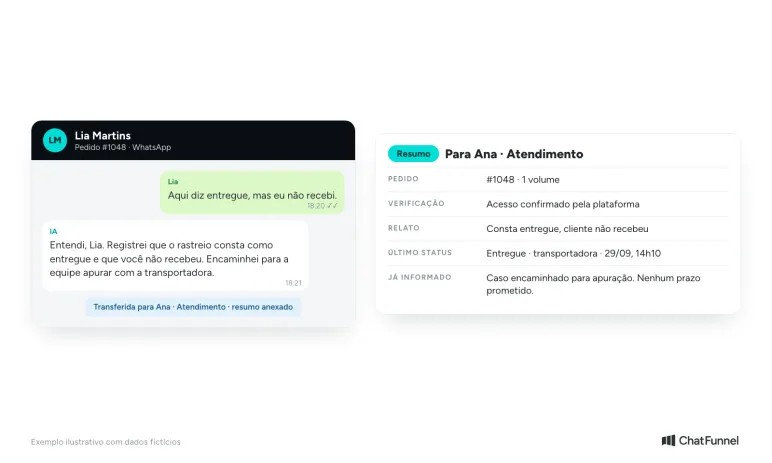
The team receives the case with context and does not need to ask the customer to repeat everything.
Consider another hypothetical example: tracking records delivery, but the buyer says it was not received. AI should record the discrepancy and forward it for investigation. It should not claim a neighbor received it, that it was lost, or that a refund was approved without confirmation.
In ChatFunnel, customer-linked history and handoff to human customer service help maintain continuity. The store still needs to define owners and which data arrives through the connection. AI should say it forwarded the conversation only after confirming the action was completed.
Prepare an answer your team can support
Before enabling this service, gather a few orders familiar to the team: one still being prepared, one split into packages, and one with a delivery issue. Compare what appears in the source with what reaches the conversation. This check shows whether essential data is missing from the answer.
Also review identification and handoff to a person. A buyer without confirmed access should not receive purchase details. An order without a sufficient update should reach the responsible person with the question recorded, without inventing a date to close the conversation.
Afterward, monitor conversations where customers ask again about the same order. Check whether information was missing, the next step was vague, or the team left an issue without follow-up. This review helps improve support without confusing the number of answers with questions resolved.
What AI needs to provide order status
Providing order status through WhatsApp starts with the source. AI identifies the buyer, checks what the store and carrier recorded, and answers with the date of each update. Split shipping requires an answer per package, and delays or disputed deliveries go to the team with conversation context.
In ChatFunnel, order status reaches the CRM through integrations with VTEX, Loja Integrada, Nuvemshop, Tray, WooCommerce, Shopify, and Yampi, and history remains linked to the contact. Flows can react to status changes to keep the team informed, and the conversation passes to a person when investigation is needed. To evaluate this use, bring a sample of the statuses your store provides and cases requiring human follow-up.
Meet ChatFunnel, the #1 AI for online stores.
Frequently asked questions about order status on WhatsApp
How do I provide order status on WhatsApp?
Connect the store's WhatsApp to the platform or ERP that records orders so the response comes from real purchase data. AI identifies the buyer, locates the order, and reports the stage with the date of the latest update. When the source does not confirm something, the answer says what is missing and indicates the next step.
Can I automatically notify a customer when an order changes status?
Yes, when the integration sends that change. An automated flow can announce that an order was approved, shipped, or out for delivery. Through the official WhatsApp API, the notice uses an approved template, and Meta classifies order updates without promotional content as utility according to the template categorization rules. Also see what changes in billing and the 24-hour window.
What is the difference between order status and tracking?
Order status shows stages within the store, such as approval, preparation, and shipping. Tracking shows carrier events after pickup, such as transit and out for delivery. The customer response needs to make clear which source supplies each piece of information.
What message should I send when an order ships?
Send a short message with the order number, confirmed stage, and tracking link: "Hi, Lia! Your order #1048 has shipped. Track delivery through this link." If there is an estimated delivery date, present it as an estimate. Avoid saying "it arrives tomorrow" when the carrier has not yet recorded pickup.
Can AI provide order status using only the order number?
That is not recommended because someone who knows the number may not be the buyer. Before showing details, AI directs the person to confirm access through the platform's method, such as account login or email or phone verification. Shopify, for example, shows only limited information on the order status page until the customer identifies themselves.
What should I do when tracking says delivered but the customer has not received it?
Record the discrepancy and pass the case to the team with the order, latest dated event, and customer's account of the issue. AI should not say the package was lost, a neighbor received it, or a refund was approved. The store's responsible person investigates with the carrier.
What should I do when an order is delayed?
Check the latest update and the estimate given at purchase. If the deadline has passed or there is no update within the limit agreed with the shipping team, the conversation goes to the team with context. A delay without follow-up can become a complaint on Reclame Aqui.