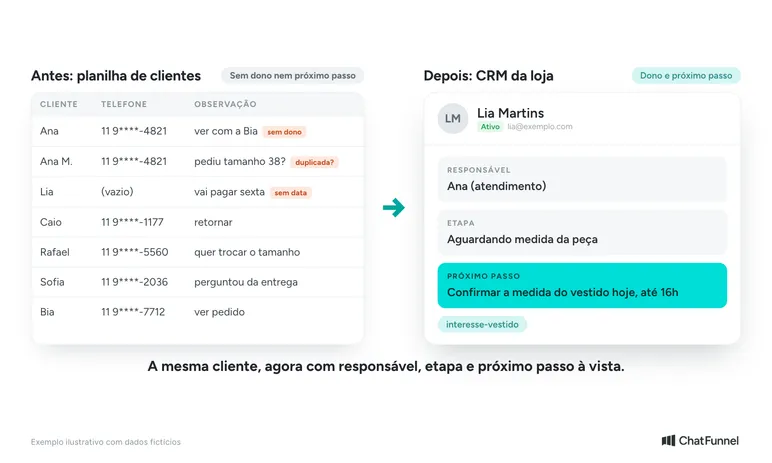
A small business CRM stores each customer's history and shows sales in progress. For an online store with a small team, the first use can be simple: know who is handling the customer, what was agreed, and the next step. Bring that information into the system before trying to register everything in the spreadsheet.
If two people provide service on WhatsApp, the change needs to work across shift handovers. The person taking over should find the outstanding question without asking a colleague where the conversation stopped. That is a useful criterion for choosing initial fields.
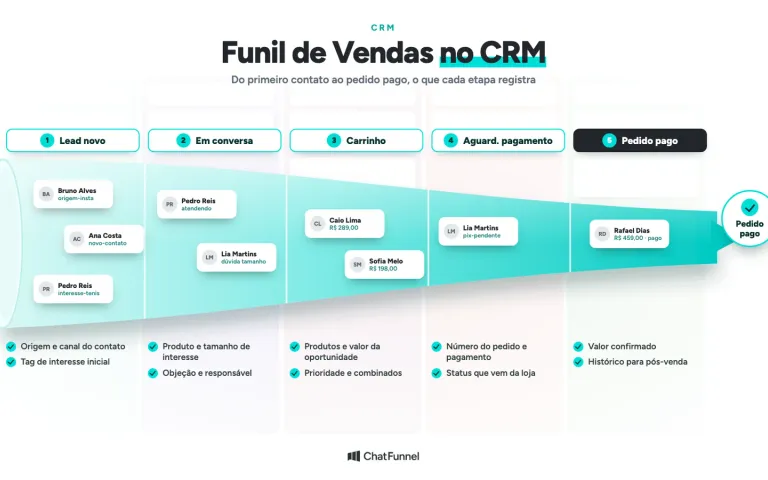
In ChatFunnel CRM, each card links a deal to a contact and brings together stage, owner, tags, and fields. The initial setup should reflect what your team can keep updated during service. Setup instructions are in the Help Center under how to create and structure a CRM in ChatFunnel.
When does a small business need a CRM?
CRM becomes useful when the current system leaves outstanding issues without owners, forces staff to search for the same customer in different files, or makes the team repeat questions already answered. Employee count alone says little about that need.
If you still want to understand the concept, read what CRM is and what it does and types of CRM. Here the focus is the move from the old system to daily use by a small team.
How to start using a CRM: choose one problem for the first week
Choose a failure you can verify. For example, size questions answered in the morning are not followed up in the afternoon. The first goal is then to make the sent answer and person following the customer's decision visible.
Avoid starting cart recovery, repeat purchases, and several channels at the same time. Each flow needs data and rules. A smaller start shows whether records are clear before using the database to send messages.
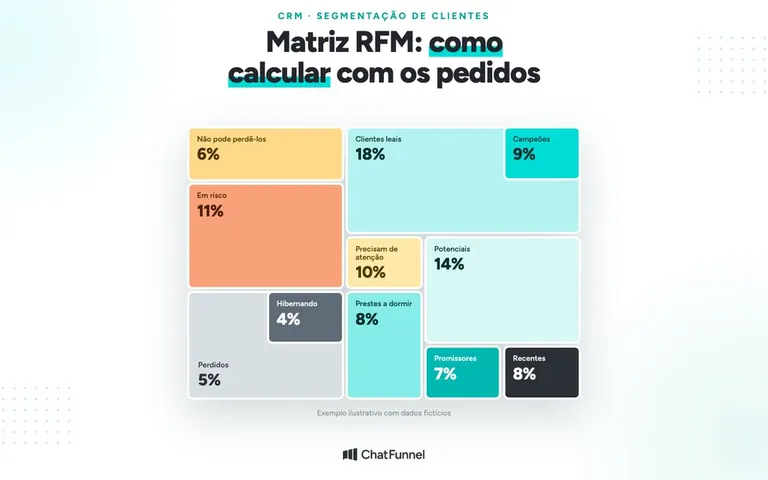
The guide to CRM for ecommerce explains the roles of history, orders, and segments. To build sales stages, see the CRM sales funnel.
What to enter in CRM: contact, opportunity, and order
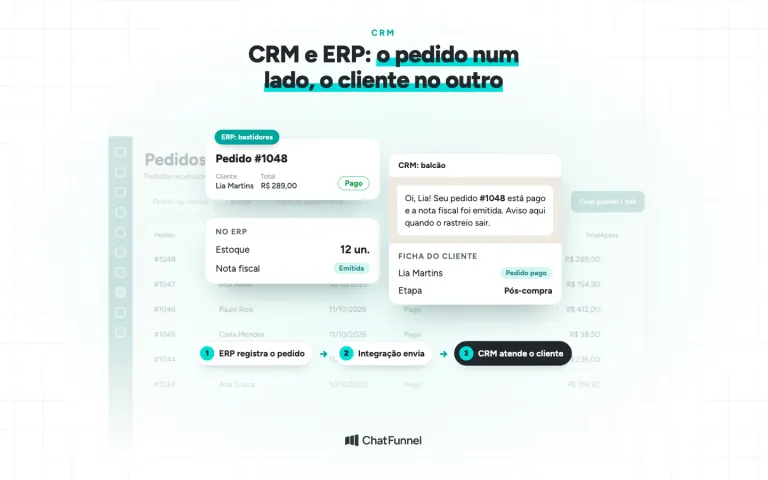
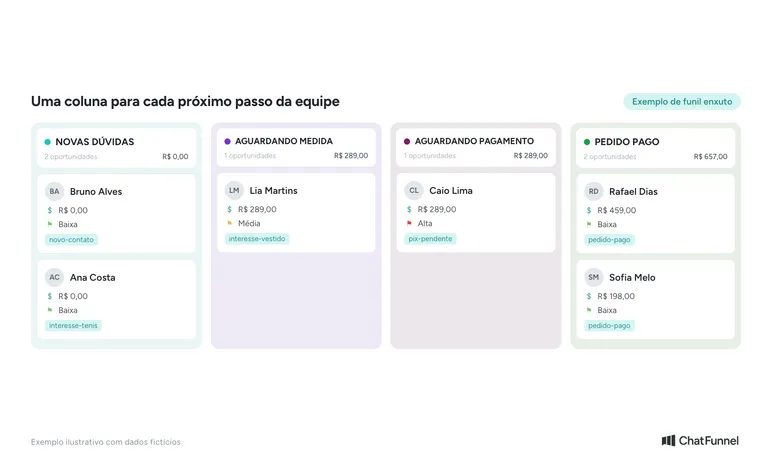
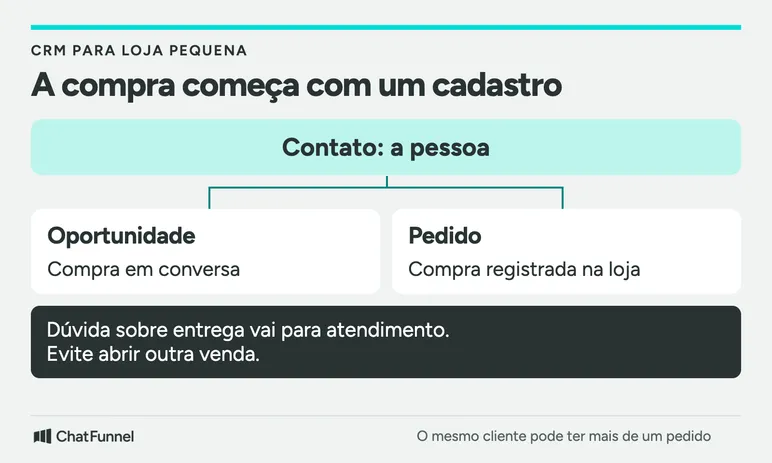
The contact represents the person. The opportunity records a purchase the team is helping complete. The order identifies the purchase registered on the store platform. These data are related, and each needs its own meaning.
Consider a hypothetical example: a customer discusses a dress, buys it, and returns to ask about delivery. The delivery question remains in service linked to the existing purchase. Opening another opportunity would inflate the funnel without a new purchase intention.
When that customer wants another item, the team tracks a new opportunity and order linked to the same contact. The previous history remains useful.
The first record can contain only a few fields. Use the table as a starting point and remove any field the team cannot explain.
| Information | Where to store it | Entry rule |
|---|---|---|
| Name and contact channel | Person's record | Use details confirmed during service |
| Current interest | Opportunity or service field | Describe what the person seeks without assuming a purchase |
| Owner | Conversation or opportunity | One person follows the issue until transferring it |
| Next step | Field or comment | Write the action and time agreed with the customer |
| Order number | Record linked to purchase | Copy from the store platform when an order exists |
| Payment status | Data received or verified at the source | Keep separate from the commercial stage |
In ChatFunnel, comments, fields, and owners help preserve this context. A visible comment may be enough at first. Writing a date does not create an automatic reminder.
How to migrate a spreadsheet into CRM
Keep a dated copy of the original file. Clean a separate copy and first choose contacts with open service cases. Older customers can be added later according to how the store will use their history.
Check phone numbers for area and country codes. Review email addresses and flag rows with incomplete identification. Two records named "Ana" do not prove they are the same person. A number shared by family members also needs checking before merging records.
Identification rules vary by tool. In ChatFunnel, see how to import contacts using a spreadsheet.
Create a simple map: spreadsheet column, destination field, and example of the expected value. Separate the owner's name from free-form notes. If a spreadsheet cell mixes phone number, product, and a message, split the content before transferring it.
Importing contacts does not by itself bring phone conversations, attachments, or old orders. If some history cannot be transferred, decide where the team will consult it during the transition.
Check a small batch before migrating the rest
Choose a sample containing a customer who has purchased, an open case, and an incomplete record. The quantity should allow every record to be checked. This procedure is an implementation suggestion, not a promise that every file can be imported universally.
After sending the sample, open each record. Check that the phone number belongs to the right person, fields reached their intended destinations, and the owner can access the case with their own login.
Also look for a contact who already existed in the system. Check whether the record was updated or duplicated. In ChatFunnel, duplicate contacts can be merged without deleting history, but the team confirms identity before joining records.
If you find a discrepancy, stop the next batch. Correct the field map or identification and confirm with the provider how to adjust what was already imported. Resending the entire file without understanding the failure can repeat the problem.
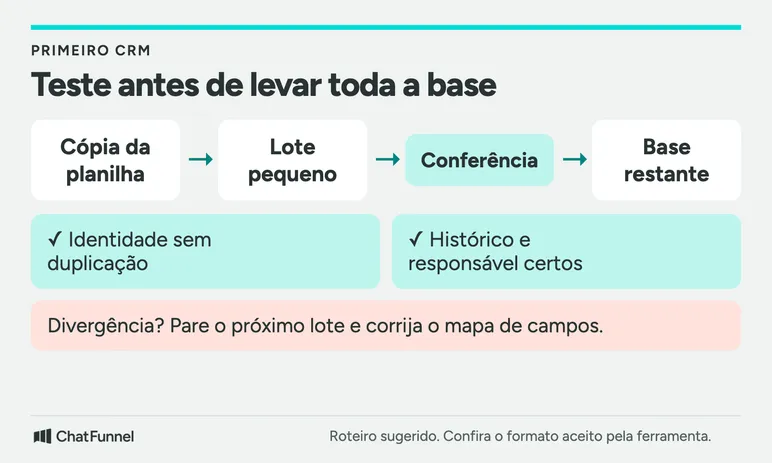
Keep a list of checked records and outstanding issues. Move to the rest of the database when sample cases are correct. The original copy remains available for comparison.
Agree when the spreadsheet stops receiving changes
Choose a switchover day and name the person checking the transition. From that point, the team records new cases in CRM. The old spreadsheet becomes a reference, accessible only to those who need it.
If migration happens in stages, write down each stage's boundary. For example: new cases already enter CRM; older open conversations move there when the team resumes contact. This prevents two people from updating different places without knowing which data is authoritative.
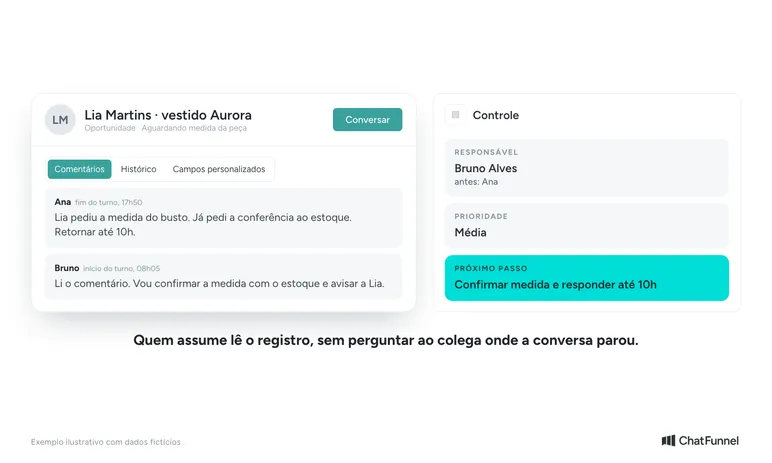
At the end of the shift, the agent reviews outstanding issues they leave behind. The person taking over opens CRM and checks the next step. If they still need to ask a colleague everything, the record lacks context or the chosen field is hard to find.
A test case could be a question requiring an item in stock to be measured. The first person records the requested measurement and who will check it. The second finds the answer and continues service. The exercise shows whether handover works without requiring a test sale.
Free or paid CRM: what to evaluate in the first few days
During the first few days, record cases without owners, duplicate records, and overdue next steps. Also observe how much time the team spends correcting data. Compare these signals with the problem selected at the start.
If outstanding issues remain unchanged, review the routine. A column called "in progress" helps little when nobody knows what action to take. Prefer a description meaningful to the team, such as "waiting for item measurement".
To decide between a free and paid plan, identify what your test lacks: team access, necessary history, channel connection, or setup support. Request a proposal with those requirements and any usage costs. A feature justifies purchase only if it solves an identified need.
To compare providers, follow the ecommerce CRM test for WhatsApp. To understand how CRM works alongside conversation, see WhatsApp CRM: what it is, how it works, and how to choose.
Which routine should a small store bring into CRM?
Before expanding usage, your team should be able to look up the contact, identify the outstanding issue, and take over the conversation with context. The database grows from that path, adding fields when there is a reason to use them.
ChatFunnel combines WhatsApp and Instagram service, contact history, and CRM. Bring your spreadsheet and an example handover to the demo to see how to organize the data and what migration support is needed.

Frequently asked questions about CRM for small businesses
Does a small business need CRM?
It does when spreadsheets leave customers unanswered, issues without owners, or questions repeated. With one agent and few contacts, a well-maintained spreadsheet may still suffice. The signal to switch is rework, not company size.
Is there free CRM for small businesses?
Free plans exist, such as HubSpot's, with usage limits that vary by tool. Before choosing, check how many users the plan allows, whether it connects to WhatsApp, and which features incur charges.
What is the difference between CRM and a spreadsheet?
A spreadsheet stores rows. CRM links each customer to conversation history, owner, and sales stage. This lets two people serve the same contact without losing context.
How do I migrate a customer spreadsheet into CRM?
Keep a copy, clean phone numbers and duplicates in another, map the fields, and send a small batch. Proceed only after checking each record in the sample.
How long does it take to implement CRM in a store?
It depends on how much data is included and how many channels are connected. A small sample shows the actual timeframe better than a general estimate. Start with one problem, such as unanswered questions, then expand.
Can I use CRM with the store's WhatsApp?
Yes, if the tool connects the channel. In ChatFunnel, WhatsApp and Instagram messages are linked to the contact. Confirm during the demo how connection works with your account.
What should I enter first in CRM?
Enter contacts with open cases, each owner, and the agreed next step. Older customers and purchase history can follow once the team uses the database daily.
Turning Visitors into Loyal Customers 🩵