CRM and ERP do different jobs: ERP organizes store operations (orders, stock, tax invoices and finances), while CRM organizes relationships (customers, history, conversations and sales stages). An online store often needs both; the challenge is getting data from one to the other without delay or duplication.
People building their first online commerce operation encounter these acronyms early. A provider offers an ERP, an agency mentions CRM, and nobody explains where one ends and the other begins. This guide separates what each system stores, shows an order's path, outlines integration and provides a connection test. For CRM, also read ecommerce CRM and, to see data moving, ChatFunnel for online stores.
What are ERP and CRM?
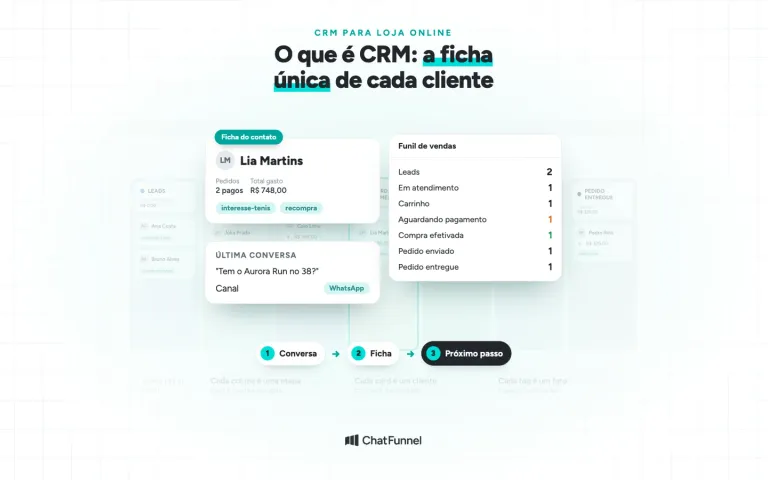
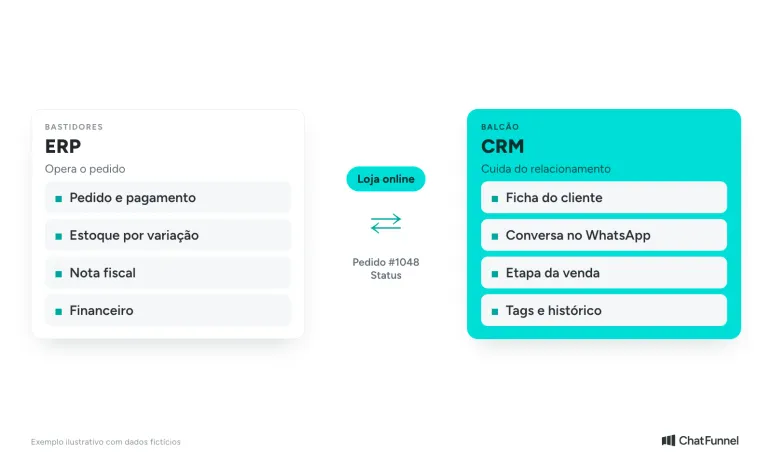
ERP (enterprise resource planning) is a back-office system. It stores what a business needs to run: orders, stock, tax invoices, accounts payable and receivable. CRM (customer relationship management) is the front-counter system. It stores who the customer is, what they bought, whom they spoke with and their sales stage.
Oracle and SAP describe the same division: ERP supports back-office functions such as accounting and operations, while CRM supports front-office functions such as sales and service (Oracle Brazil, SAP Brazil). For an online store, the question becomes: does the data run an order or help communicate with a customer?
What is the difference between CRM and ERP in an online store?
The difference is which system owns each data point. The table shows five items that often cause confusion.
| Item | In ERP | In CRM |
|---|---|---|
| Order | Official record: items, values, payment and shipping | Reference copy: order status alongside the customer |
| Stock | Balance by product and variation (size, color) | Does not hold stock balance; uses what the store provides |
| Tax invoice | Issuance, number and status | Does not issue; may show status if data is received |
| Customer | Tax record: document and delivery address | Relationship record: contact, tags, history and spending |
| Conversation | Outside scope | WhatsApp, support, sales stage and owner |
The order appears in both. The ERP or store platform creates and changes the order. CRM displays it so the team knows what to tell the customer. SAP gives the same example: even a robust CRM does not manage order history or invoices, and this information arrives through ERP integration (SAP Brazil). When both systems compete to own the order, the integration problems below arise.
CRM or ERP: which does an online store need first?
It depends on the current bottleneck. Two signs help decide.
When to start with ERP
Start with ERP if the bottleneck is internal: stock not matching the site, manually issued tax invoices or orders typed twice. These create recurring losses that a relationship tool does not resolve.
When to start with CRM
Start with CRM if the bottleneck is sales: WhatsApp conversations lost, abandoned carts without follow-up or a customer who bought once and never heard from the store again. The missing pieces are history, negotiation stage and follow-up, which traditional ERP does not cover.
Most stores eventually use both. Nuvemshop recommends integrated CRM and ERP sharing the same data. A store with few daily orders can use its platform's basic features and postpone the choice without rushing to buy everything at once.
How CRM and ERP connect: an order's path
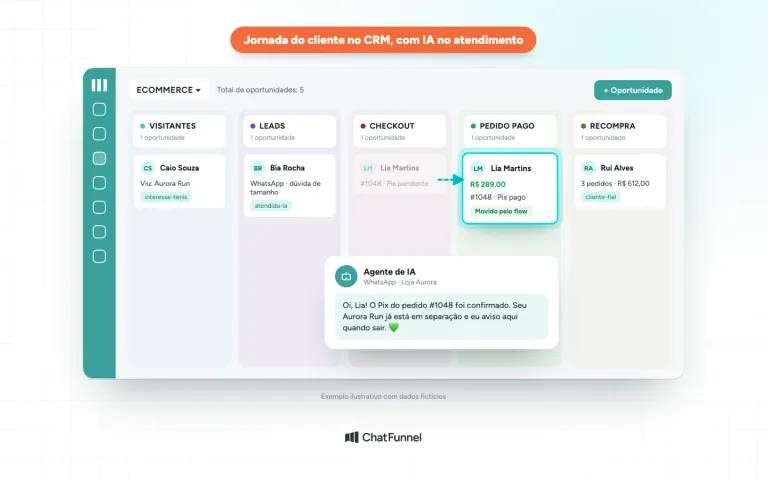
Imagine order #1048 from fictional customer Lia Martins, who bought Aurora Run sneakers for R$ 289.00. Each stage passes through a different system.
- Lia chats on WhatsApp and chooses a size. CRM: records the conversation and "Cart" stage.
- She pays Pix at checkout. Store: creates the order and confirms payment.
- The order reaches ERP. ERP: deducts stock and issues the tax invoice.
- The shipment leaves. ERP or store: updates status to "Shipped."
- The status returns to the conversation. CRM: moves the card to "Paid" or "Shipped" and lets the team notify the customer.
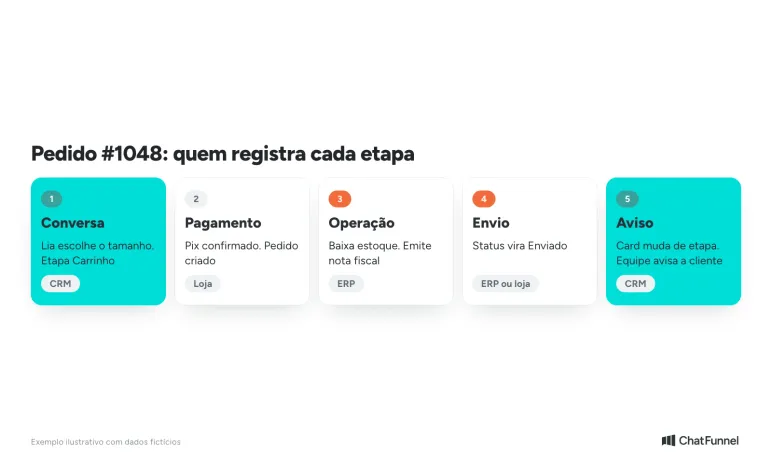
The key point is step 5. CRM knows an order shipped only if it receives notice. That notice can come from the store platform or ERP through an API (a bridge letting one system request data from another) or a webhook (an automatic notice when something happens). The CRM integrated with an online store guide shows which data the integration needs and how it arrives.
What happens when ERP is the order source?
Some stores create or verify the order in ERP and only then send status to CRM. This works when each item of information has one responsible system.
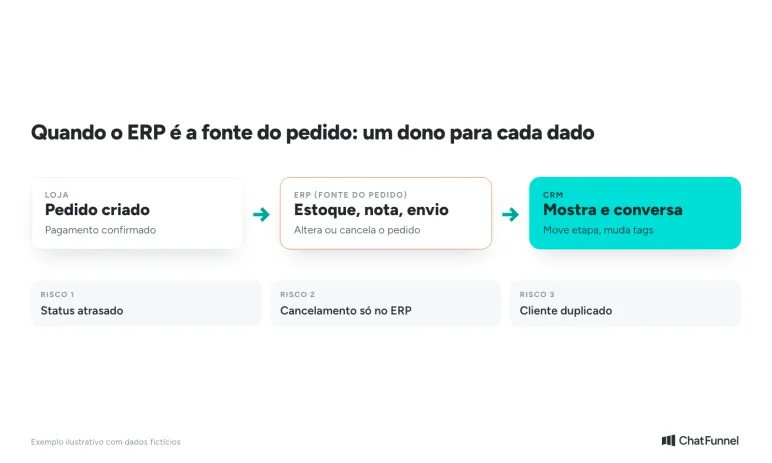
Three situations show common failures:
- Delayed status. The invoice was issued in ERP but CRM still shows "Payment pending." The customer asks and the team gives old information. Define update frequency and validate behavior with actual orders.
- Cancellation only in ERP. The order was canceled for lack of stock, but recovery automation keeps sending payment reminders. The cancellation event must reach CRM to end the sequence.
- Duplicate record. The customer appears as two contacts, one from ERP and one from conversation. Choose a linking key such as phone or email and verify how both systems identify the same customer.
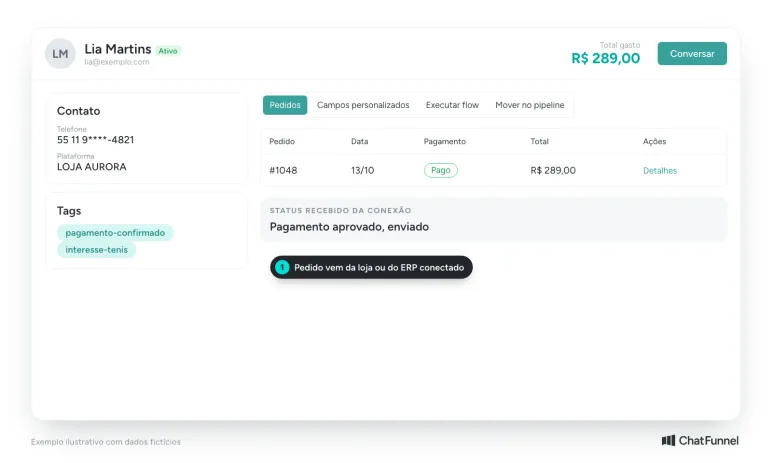
In ChatFunnel, CRM tracks orders from the connected store or ERP, synchronization updates the status supplied by the connection, and flows can change tags and stages to inform the team. Confirm during the demonstration whether your specific ERP has a ready-made connection before relying on it.
How to integrate CRM and ERP: step by step
Integration takes less work when decisions precede configuration. Follow this order.
- List what must travel. Start with the minimum: order number, value, payment method, status and customer data. Fewer fields at first make errors easier to find.
- Define the owner of each data point. Order, stock and tax invoice stay in ERP or the store platform. Conversation, tags and sales stage stay in CRM. Write down this division before setup.
- Choose the connection path. First check whether the store platform or ERP has a ready-made CRM connection. If not, data exchange can use an API or webhook, and the ERP provider must say which events it can send. The API and webhook documentation for ChatFunnel describes technical requirements.
- Choose the customer key. Phone or email, always in the same format in both systems. This avoids duplicate records.
- Map statuses to stages. Match each ERP status (paid, shipped, canceled) to a funnel stage or CRM tag. The Help Center article how to create and structure a CRM in ChatFunnel explains stage setup.
- Decide what each event triggers. A paid order moves the card. Cancellation ends reminder automation. Shipment notifies the customer in conversation.
- Test with actual orders before enabling it for all customers. The next section provides a checklist.
How to test CRM and ERP integration before subscribing
A polished demonstration does not prove an order crosses systems without losing information. Make a test purchase and check each step.
- Create a test order with a product of known stock at the lowest possible value.
- Check ERP: was stock deducted and the invoice or its simulation generated?
- Check CRM: did the order appear on the customer record with correct value and status?
- Change the status in ERP (paid, shipped, canceled) and measure how long CRM takes to reflect it.
- Cancel the order and see whether pending automation stops.
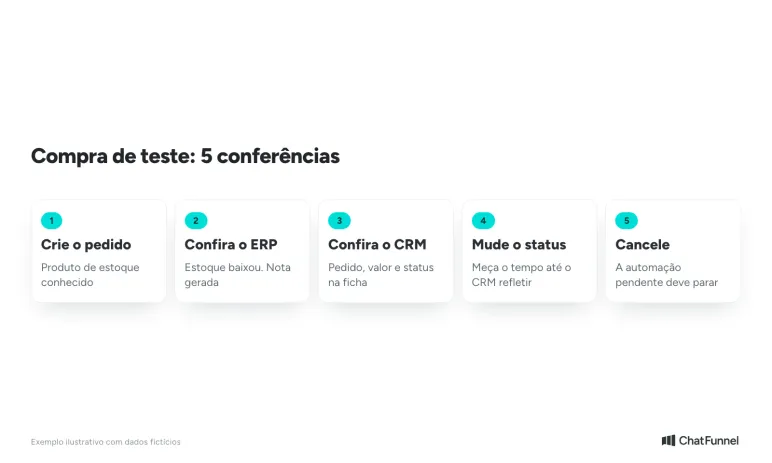
Record time at each step and every discrepancy between systems. The ecommerce CRM on WhatsApp checklist includes the conversation. If setup stalls, the Help Center also has CRM and integration tutorials.
CRM and ERP in one store: each in its role
Think of ERP as the source of what happened to the order and CRM as where the store decides what to tell the buyer. Choose ERP for business operations and CRM for sales and relationships, and require an order to cross both with a clear owner for each data point. Without that, the team returns to checking everything manually.
ChatFunnel handles relationships. It combines WhatsApp conversations, the customer record and sales funnel on one dashboard, displays orders from the connected store or ERP in CRM, and uses received status to change tags and stages through flows. Its store platform catalog includes VTEX, Loja Integrada, Nuvemshop, Tray, WooCommerce, Shopify and Yampi, while REST API and webhooks exchange events with other systems. Each connection requires scope verification and relevant permission authorization. ERP retains stock and tax invoices.
Talk to a specialist and see customers, orders and conversations in one CRM
Frequently asked questions about CRM and ERP
What is the difference between CRM and ERP?
ERP manages business operations (order, stock, tax invoices and finances), while CRM manages customer relationships (contact, history, conversation and sales stage). In an online store, ERP answers "what happened to the order" and CRM answers "what to tell the customer now." Oracle and SAP use the same back-office and front-office division.
Are CRM and ERP the same?
No. ERP handles business operations and finance, while CRM handles sales and service, with different data and users. Some ERP platforms include CRM features, but a CRM does not provide ERP functions (SAP Brazil).
Does ERP replace CRM?
No. Oracle and SAP say the two are not interchangeable because each handles different data. ERP may have a sales module, but rarely covers an online store's WhatsApp conversation, tags and funnel.
Can CRM and ERP be integrated?
Yes, and integration is the ideal scenario. It usually synchronizes orders, statuses and customer records via API or webhook. The step-by-step section shows decision order. Before subscribing to CRM, confirm whether it connects to your ERP or needs technical integration.
Does a small store need both?
Not always. With few daily orders, store-platform features and an inventory spreadsheet may suffice at first. When stock and invoice errors appear, ERP comes first. When conversations and repeat purchases drive sales, CRM comes first.
Which comes first, CRM or ERP?
Start with the system that resolves your current bottleneck. If the problem is stock, invoices and duplicate order entry, start with ERP. If it is lost conversations, unfollowed carts and customers who do not return, start with CRM.
Does ChatFunnel connect to my ERP?
ChatFunnel CRM tracks orders from the connected store or ERP, and REST API and webhooks exchange events with other systems. ChatFunnel's store-platform list does not name ERPs. Confirm during the demonstration whether your ERP has a ready-made connection or needs technical integration.
Turning Visitors into Loyal Customers 🩵