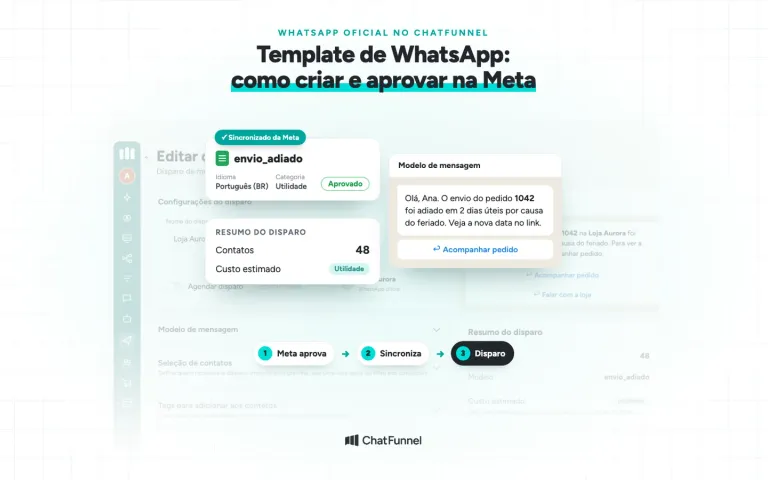
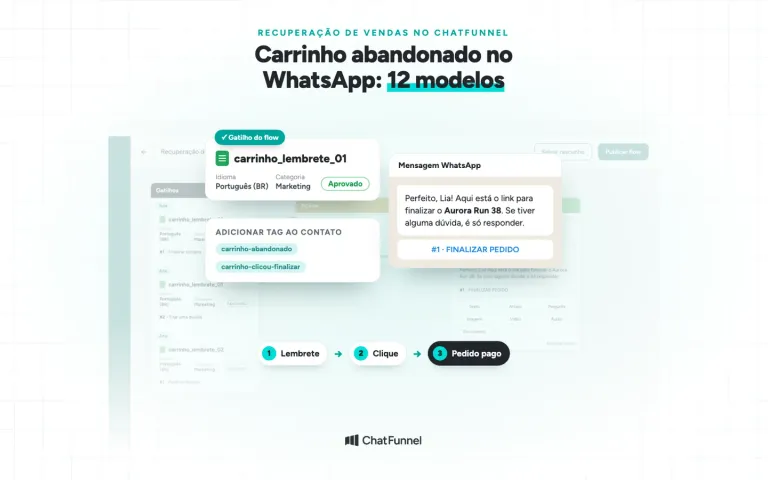
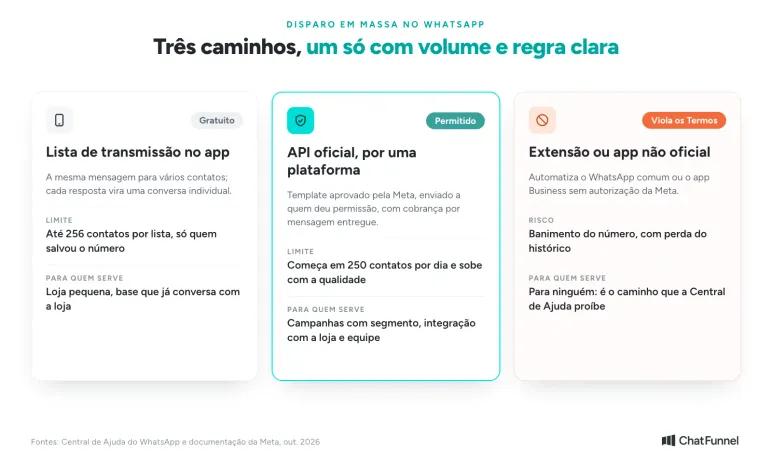
WhatsApp bulk messaging is permitted through the official API, the WhatsApp Business Platform, with a Meta-approved template and contacts who gave permission. The WhatsApp Business app can also message several customers at once through broadcast lists, but each list holds up to 256 contacts and reaches only people who saved the store's number.
Extensions and programs automating ordinary WhatsApp violate the Terms of Service and can lead to a number ban. This includes unofficial APIs connecting a number through a WhatsApp Web QR code and broadcasting without a Meta-approved template. WhatsApp Help Center treats such automated or bulk sending as unauthorized, and a store can lose its number and conversation history.
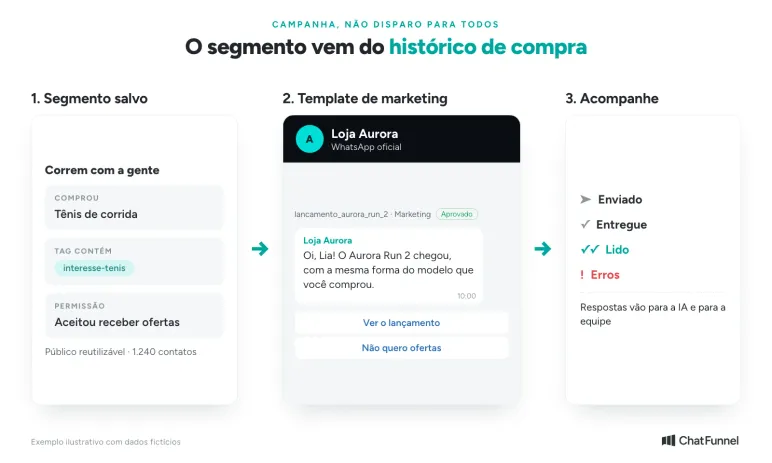
In ChatFunnel, WhatsApp campaigns use official WhatsApp for an audience selected through filters, saved segments or import, with an approved template, immediate or scheduled sending and tracking of sends, deliveries, reads and errors. When a customer replies, the conversation continues with AI or the team.
In ecommerce, a broadcast works better as a campaign for a segment: category buyers, product visitors or people who have not bought in months. Sending the same offer to the entire base costs more because Meta charges per delivered message and lowers future send quality because nonreaders count too.
How to Send WhatsApp Bulk Messages: 3 Paths and What Is Allowed
| Path | How it works | Limits | Risk |
|---|---|---|---|
| WhatsApp Business app broadcast list | Sends the same message to several saved contacts; each reply becomes an individual conversation | Up to 256 contacts per list; only people who saved the store number receive it | Many blocks and reports can restrict the account |
| Official API through a platform | Meta-approved template sent to people who gave permission | Daily portfolio limit starts at 250 contacts and rises with quality | Low-quality templates are paused |
| Unofficial extensions and apps | Automate ordinary WhatsApp or the Business app | No official limit because use is unauthorized | Violates Terms of Service and can lead to a number ban |
List details are in WhatsApp Help Center's how to use broadcast lists and WhatsApp Business lists. For the third path, the Help Center says unauthorized automated or bulk messages violate the Terms of Service and WhatsApp takes legal action against those sending or helping send them, in unauthorized messaging.
App users need not change numbers. With coexistence, the same number remains in WhatsApp Business App and also works through the API. In ChatFunnel, coexistence is available to Meta-verified businesses. The guide to how to obtain the official WhatsApp API explains what to check before connecting.
Free WhatsApp Bulk Messaging, Extensions and WhatsApp Business: What Works and Risks the Number
People researching bulk messaging often encounter free tools, extensions and WhatsApp Business. Only some are safe for a store.
Free Bulk Messaging in WhatsApp Business
The WhatsApp Business app broadcast list is free, limited to 256 contacts per list and people who saved the store number. It suits a one-off notice to a few customers. Beyond that, a store needs segmentation, templates and tracking through the official API, where Meta charges per delivered message. The WhatsApp Business or API guide helps decide when to switch, and WhatsApp Business broadcast lists explains app limits.
WhatsApp Bulk Messaging Extensions and Apps
Browser extensions and broadcast apps automate ordinary WhatsApp, creating risk. WhatsApp Help Center treats unauthorized automated or bulk sending as a Terms of Service violation, and the store can lose its number and conversation history. The apparent "free" cost can be high when a number is banned.
Bulk Messaging Tool: What to Check Before Subscribing
Ask five questions before subscribing to any platform:
- Does sending use the official WhatsApp API rather than a QR code?
- Does the broadcast use a Meta-approved template?
- Can the audience be built by segment, tag or purchase history?
- Is estimated cost shown before sending?
- Are deliveries, reads, errors and replies visible afterward?
The official WhatsApp API pricing guide details platform and Meta costs.
Before Bulk Messaging: Permission and Segmentation
Recipient permission
WhatsApp Business permits contact only with people who provided their number and permission to receive business messages. Stores often request permission at sign-up, checkout or in conversation. Make clear what the person will receive, separate order notices from offers and honor opt-outs.
Purchased lists and contacts copied from groups are excluded. Extracting user data violates WhatsApp Terms of Service, and people receiving unsolicited offers tend to block or report.
Segmentation from history
The segment determines whether the campaign sells. Instead of "all customers," choose a criterion related to the offer:
- People who bought the category some time ago, for replenishment or launch;
- People who visited the product or left a cart, for news about that item;
- People who bought once and did not return, for a second purchase.
In ChatFunnel, tags, fields and saved segments hold these criteria, while order history shows what each customer bought and spent. A segment such as "bought running shoes and has interesse-tenis tag" becomes the campaign audience without rebuilding filters. At send time, the audience comes from filters, tags or an imported spreadsheet; the store can tag recipients for future separation. The tutorial how to send a bulk broadcast in ChatFunnel provides the steps.
Marketing Templates for Bulk Messaging: What Meta Requires
Every store-initiated message through the official API uses an approved template. Offers, launches, coupons and invitations to return are marketing. Meta's categorization rule even lists cart reminders as marketing. Utility is nonpromotional content tied to a customer purchase or order, such as confirmation and tracking.
The guide to WhatsApp templates explains model creation and Meta approval without rework.
Classifying an offer as utility to pay less is not worthwhile. When Meta finds this use, it may change all account utility templates to marketing for 7 days, or 30 days if repeated.
A launch template for the segment above could be:
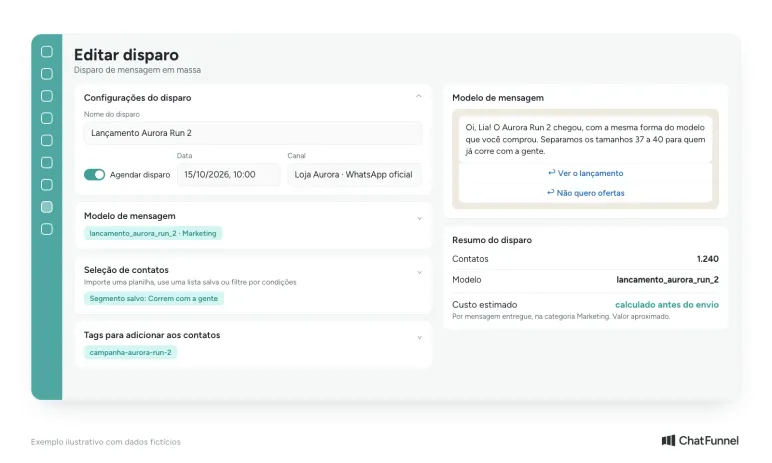
Hi, {{1}}! Aurora Run 2 has arrived with the same fit as the model you bought. We selected sizes 37 to 40 for those already running with us.
Buttons: "View the launch" | "No offers"
The name comes from the contact, the text refers to the earlier purchase and "No offers" provides a simple exit. In ChatFunnel, that click can tag the contact as not wanting offers, excluding them from future campaigns and protecting number quality. This reduces blocks and reports.
WhatsApp Bulk Messaging Limits: How Many Messages per Day?
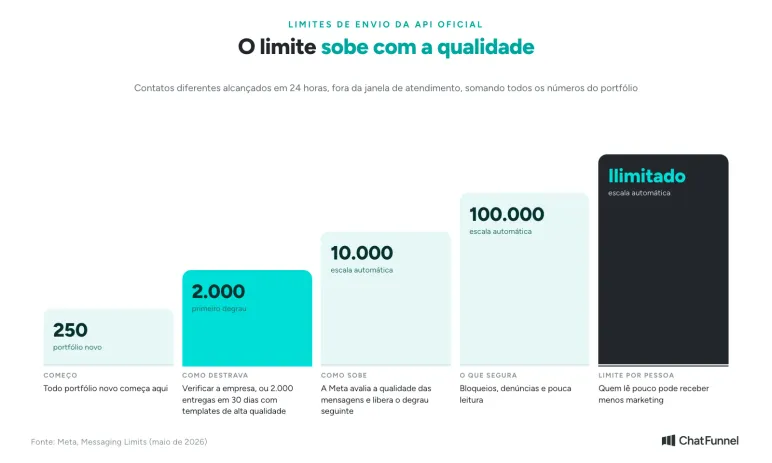
Meta limits how many different contacts a business can reach outside the support window in 24 hours. According to the messaging limits page, updated in May 2026, the limit applies to the business portfolio and is shared by all its numbers.
- A new portfolio starts at 250 contacts per day.
- To reach 2,000, the business verifies itself, is verified by the connection partner or delivers 2,000 messages in 30 days using high-quality templates.
- Afterward the limit rises automatically to 10,000, 100,000 and unlimited as Meta assesses message quality.
There is also a per-person limit. Meta may restrict how many marketing messages someone receives from businesses based on their reading rate. Marketing sent within a customer-reply window does not count. If refused due to this limit, wait at least 24 hours before retrying.
What Does Official API WhatsApp Bulk Messaging Cost?
Meta charges per delivered message based on template category and recipient country. Undelivered messages are not charged. Brazilian business accounts can be billed in reais since July 2026, according to Meta's pricing page, which contains the full rate card.
Price by Message Type in Brazil
| Message type | When the store uses it | Price per delivered message |
|---|---|---|
| Marketing | Offer, launch, coupon, invitation to return, cart reminder | R$ 0.3217 |
| Utility | Order confirmation, tracking, purchase-related notice | R$ 0.035 |
| Authentication | Verification code | R$ 0.035 |
| Service (free-form reply after the customer wrote) | Support conversation | 1,000 free per month per number; then R$ 0.035 |
These values were reported by MobileTime on July 1, 2026 from Meta's rate card, which did not increase that day. They are list prices excluding platform subscription. Check Meta's current table before budgeting.
Since bulk messaging is almost always marketing, the R$ 0.3217 rate drives the calculation:
| Delivered marketing messages | Meta cost |
|---|---|
| 1,000 | R$ 321.70 |
| 5,000 | R$ 1,608.50 |
| 10,000 | R$ 3,217.00 |
Replies also count. Since October 1, 2026, each number has 1,000 free service messages per month, and subsequent ones are charged. A campaign generating many conversations may exceed that allowance. The article on service message charges explains the change.
To estimate campaign cost, multiply expected delivered messages by Brazil's marketing rate. To assess value, divide that cost plus the tool subscription for the period by paid orders from the campaign. ChatFunnel's broadcast screen shows the model, contact count and estimated cost by template category before sending. In Overview, the WhatsApp spending calculator shows the previous 30 days by category and simulates the month using real-denominated rates. The tutorial on how to consult and simulate message costs explains the estimate.
After Bulk Messaging: Replies, Orders and Quality
A campaign reply opens the 24-hour window and lets the store converse using free-form text. Respond quickly with stock, price and timing. In ChatFunnel, a broadcast template can be linked to an AI agent that starts support when the customer replies. AI uses the knowledge base and catalog, and the team takes over with history on the same record when a request falls outside the rules. The AI virtual salesperson guide explains how to prepare AI to guide replies to purchase.
In the hours after a broadcast, monitor:
- Deliveries, reads and errors, to see how many received it and how many were excluded by a limit or invalid number. In ChatFunnel, a failed message shows the reason supplied by Meta in the conversation.
- Replies and paid orders, using an attribution rule defined beforehand, such as an order from the same contact within 3 days. See how to measure AI-assisted sales.
- Opt-outs and blocks, indicating whether segment or frequency went too far.
- Template quality in WhatsApp Manager. At the lowest level, a template is paused for 3 hours the first time, 6 hours the second and disabled the third, according to template pause documentation.
Bulk Messaging Mistakes That Lead to a Number Block
- Using an unofficial extension or app to broadcast through the store number risks losing the number and conversation history.
- Buying lists or copying contacts from groups violates the Terms and generates blocks and reports.
- Sending the same offer to the whole base lowers quality through nonreaders and may trigger the per-user limit.
- Classifying promotion as utility causes Meta to reclassify and potentially restrict the account's utility templates.
- Broadcasting without answering misses the campaign interaction closest to a sale.
- Retrying immediately after a limit refusal. Meta directs a wait of at least 24 hours.
Bulk Messaging That Sells Starts with a Segment
WhatsApp bulk messaging works for online stores under three rules: use the official API, contact people who gave permission and start with a segment tied to the offer. The store sends fewer messages to people unlikely to buy, maintains quality to raise sending limits and responds while customers remain interested.
ChatFunnel sends official WhatsApp campaigns with Meta-approved templates to audiences built with tags, fields, saved segments and store order history. Broadcasts can be immediate or scheduled, show estimated cost before sending and track sends, deliveries, reads and errors. A spending calculator simulates the month by category.
A template can be linked to an AI agent that handles replies using the knowledge base and catalog, while the team takes over in the same inbox.
Through coexistence, the number can remain on the phone app. To start, the store connects its number to the official WhatsApp API, integrates its ecommerce platform and obtains Meta template approval. Bring your next campaign segment to the specialist conversation.

Discover ChatFunnel, the #1 AI for Online Stores
Frequently Asked Questions About WhatsApp Bulk Messaging
Is WhatsApp bulk messaging allowed?
It is allowed through the official API with a Meta-approved template and contacts who gave permission, according to WhatsApp Business policy. In the app, broadcast lists reach up to 256 contacts who saved the number. Broadcasting through unofficial extensions or apps violates the Terms of Service.
How do I send bulk messages in WhatsApp Business?
In the WhatsApp Business app, use broadcast lists: choose contacts or a tag and send the message. Each list accepts up to 256 contacts, and only those who saved the store number receive it. For larger volumes, store integration and order tracking, use the official API through a platform. Coexistence allows the same number in app and API.
Is free WhatsApp bulk messaging available?
The WhatsApp Business app broadcast list is free within its limit of 256 contacts per list and recipients who saved the number. With the official API, Meta charges per delivered message. Free extensions broadcasting through ordinary WhatsApp violate the Terms and risk the number.
How many messages can I send daily through the official WhatsApp API?
It depends on your portfolio limit, which counts different contacts reached in 24 hours outside the support window. It starts at 250 and rises to 2,000, 10,000, 100,000 and unlimited, according to Meta documentation. To reach 2,000, verify the business or send 2,000 messages in 30 days with high-quality templates.
How much does official API bulk messaging cost?
In Brazil, each delivered marketing message costs R$ 0.3217, and utility and authentication cost R$ 0.035, according to MobileTime based on Meta's table. One thousand delivered marketing messages cost R$ 321.70. The full table is on Meta's pricing page, and the sending platform's subscription is separate.
How do I send bulk messages without being blocked?
Use the official API, send only to people who gave permission, segment by purchase history and offer an easy opt-out. Monitor template quality: Meta pauses templates with substantial negative feedback or low reading. Avoid repeating the same offer to the entire base. Even on the official API, many blocks or reports lower quality and pause templates, according to template pause documentation.
Are WhatsApp Business broadcast lists now paid?
The app retains broadcast lists for contacts who saved the store number. Paid app marketing messages also reach people who did not save the number and are charged per delivered message, according to WhatsApp Help Center. This feature exists only in some countries, where it is called business broadcast lists. The Help Center also says some countries may have monthly list-message limits.
Is extension-based bulk messaging safe?
No. Extensions and apps broadcasting through ordinary WhatsApp violate the Terms of Service, according to WhatsApp Help Center, and the number may be banned. The safe alternative is the official API with an approved template and contacts who gave permission.
What is the best WhatsApp bulk messaging tool?
For an online store, one that uses the official API and approved templates, builds audiences by segment and shows cost, deliveries and errors. A tool requesting QR-code connection is a signal of unofficial sending.
Turning Visitors into Loyal Customers 🩵