An undelivered WhatsApp message left the sender but did not reach the intended recipient's device. In the app it appears with one gray check mark. In the official API, status shows whether a failure occurred and the error code indicates what to do.
The store's rule is simple: before sending another message, check the status and code of that attempt. Resending impulsively can duplicate a notice, pressure someone who opted out or request payment for an already paid order.
ChatFunnel support history helps keep the conversation and contact owner together. It can record the investigation and next decision. The technical reason for failure depends on data made available by your Meta connection.
This guide applies to the official API. If your store uses only the mobile app, first see the difference between WhatsApp Business and the official API. To review what was purchased and the acceptance test, consult the official WhatsApp API for ecommerce guide.
What does an undelivered WhatsApp message mean? One check, two checks and blue checks
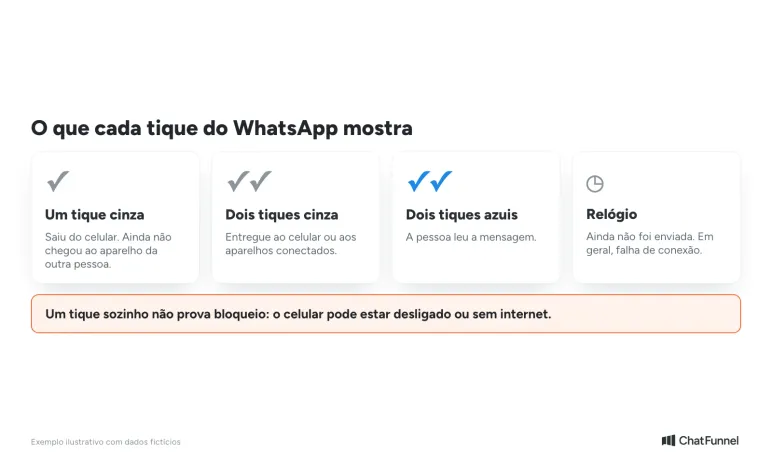
According to WhatsApp Help Center, each icon indicates a stage:
| Icon | Meaning |
|---|---|
| One gray check | The message left your phone but has not reached the other person's device |
| Two gray checks | The message was delivered to the recipient's phone or linked devices |
| Two blue checks | The person read the message |
| Clock | The message has not yet been sent or delivered, generally because of a connection issue |
If the recipient's phone is off, the second check does not appear. In groups, it appears only when everyone has received the message.
One check can also be one sign of a block, but is never proof alone. WhatsApp cites other signs: not seeing the contact's "online" status and being unable to call them. For a store, treating one check as a block is speculation.
Why is a WhatsApp message not delivered? 7 common causes
"Undelivered" has no single cause. These are the most common, with their sources:
| Cause | Typical appearance | What to do |
|---|---|---|
| Number without WhatsApp, changed number or deleted account | One check consistently for a specific contact | Confirm the number through another appropriate channel |
| Recipient block | One check, no "online" status and no call | Do not insist; respect the person's decision |
| Phone off or without internet | One check becomes two when the device reconnects | Wait for the recipient's connection |
| Outdated app or unaccepted terms | API failure 131026 | Ask the person to update and accept the terms |
| Outside the 24-hour window | Failure 131047 | Use an approved template when permission exists |
| Marketing message limit | Failure 131049 | Wait and review send frequency and usefulness |
| Template error | Failure 132000 or 132001 | Fix variables, name or language and test again |
Sources: WhatsApp Help Center and Meta error catalog, accessed October 12, 2026.
How to view official API message status: sent, delivered, read and failed
Start with the specific failed message. Record time, recipient and send identifier, called message ID. If the screen shows only "pending" or "error," ask your tool's support for the Meta status and associated detail. The screen label may summarize different situations.
Meta reports message progress through webhook notifications. The integration receives these and can update support. Status is linked to message ID, so comparing two different sends can lead to a wrong conclusion.
The following states appear in Meta's status reference:
| Status | What it confirms | What remains to check |
|---|---|---|
sent | The message left Meta servers | Whether it reached the recipient's device |
delivered | The message reached the recipient's device | Whether there was a reply or purchase |
read | The message appeared in an open conversation on the device | Whether the person understood, agreed or bought |
failed | Sending or delivery failed | Which code and detail explain the attempt |
No read receipt does not prove failure. Likewise, delivery does not prove interest in an offer. A customer can receive a notice and decide to reply later.
A detail avoids false diagnoses. Meta says that in some cases it may send read without a separate delivered notification because reading already implies delivery. An integration should not require a rigid sequence of records to recognize delivery.
If no status is available, keep the situation as "unconfirmed" during investigation. It is not equivalent to failed. Support must check whether notifications were received and linked to the correct send.
WhatsApp API undelivered errors: what to do for each code
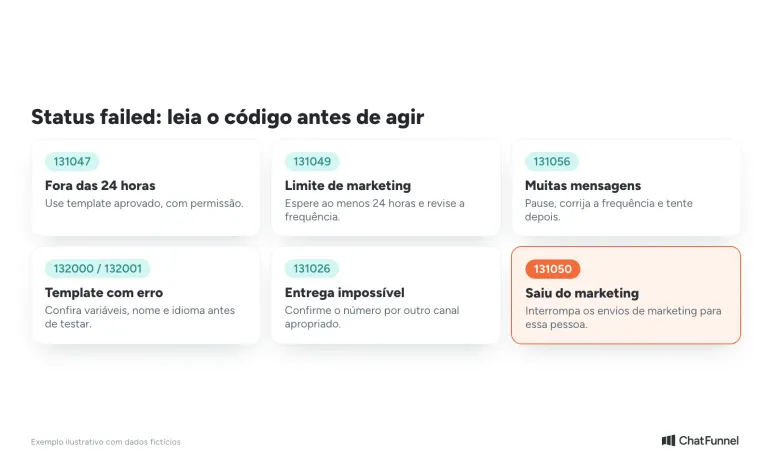
Check the complete code and details without dropping digits. Meta's error catalog indicates different paths based on the response.
| Code or reason | Useful check | Decision before another send |
|---|---|---|
| 131026: delivery impossible | Number supplied and recipient WhatsApp conditions | Confirm contact through another appropriate means; the code does not establish one cause |
| 131047: outside the support window | Time of the customer's last message | Use an approved template appropriate to the subject when contact permission exists |
| 131049: marketing message limit | Campaign context and current Meta guidance | Avoid an immediate retry; check conditions before sending again |
| 131050: recipient stopped the business's marketing | Contact preference | Stop marketing sends to that person |
| 131056: too many messages to the same recipient | Competing sequences and send frequency | Pause, fix frequency and follow applicable waiting guidance |
| 132000 or 132001: template problem | Variable count, name, language and template approval | Fix the send request before another test |
Error 131026: message undelivered
Documentation lists possibilities including a number without WhatsApp, unaccepted terms or an outdated app. Treating this response as proof the customer blocked the store would be speculation. When an appropriate channel exists, confirm with the person that the number is correct and whether they can start a business conversation.
Error 131049: marketing message limit
When a limit is suspected, Meta guidance is to wait at least 24 hours before resending the template. This does not promise release after that period. Restriction may last longer, and the store still needs to check permission and whether resuming contact is useful. If you use bulk messaging through the official API, review campaign frequency before trying again.
Errors 132000 and 132001: template problem
Relabeling an offer "utility" does not fix classification. The template must meet category purpose and Meta rules. If the model is in doubt, use the article on creating and approving WhatsApp templates and the Help Center tutorial on how to approve WhatsApp templates in ChatFunnel.
Other errors may involve payment, permissions or account status. Route these cases to the connection administrator. Changing number registration or rebuilding the entire integration before understanding the response can expand the problem.
Can I resend an undelivered message? Check the order and permission
A technically possible attempt may have lost its commercial purpose. During the wait, the person may have paid, canceled the order or requested messages stop. Check context immediately before deciding on the next contact.
WhatsApp messaging policy requires contact permission and respect for opt-outs. Outside the 24-hour support window counted from the customer's last message, sending must use an approved template. Fixing an error does not remove these conditions.
Consider a fictional store using a WhatsApp cart recovery sequence:
| Time | Available data | Team action |
|---|---|---|
| 10:00 a.m. | A pending-purchase reminder returns failed | Save ID and code; do not send a manual copy without checking |
| 10:06 a.m. | The store confirms payment for the same order | End the pending-purchase reminder |
| 10:12 a.m. | Support explains the earlier failure | Record the diagnosis; keep the sequence ended |
Payment changed the decision. Even if the error could be fixed, the old message no longer fits the order status. For pending Pix, see how to handle pending Pix on WhatsApp. A later notice, if needed, should address the new subject and meet channel rules.
In ChatFunnel WhatsApp flows, a store can combine messages, waits and conditions. Order status depends on the configured store or ERP connection. Check which events arrive and test the condition ending the reminder. Do not assume every Meta failure triggers an automatic pause.
When the data supporting the next action is missing, hand over to a person. AI can help explain store policy or answer a customer question. It should not invent a technical cause or decide a block has ended.
What to send support when a message is undelivered
"It is not arriving" leaves many possibilities open. A ticket identifying one attempt lets support compare what the store requested with Meta's response.
Provide time and time zone, sending number and recipient through support's secure channel. Add message ID, status and full code. If a template was used, include its name and language plus a description of variable values sent. Avoid exposing customer data in open groups or public screenshots.
Also say whether the problem affects all contacts or a few, when it began and which recent change may be related. If many contacts are affected at once, check the ChatFunnel status page and the Help Center tutorial on unsent or delayed messages.
An authorized internal test helps check whether the connection sends and receives status. It does not prove the failure cause for another recipient.
The record should end with an owner and decision: wait for investigation, fix the template, adjust frequency or stop the sequence. If someone else takes over, they need to know what was tried to avoid repeating the send.
In ChatFunnel, tags and fields store information entered by the team, and the conversation goes to an owner. Confirm with support which technical details your connection exposes before defining a diagnostic form. This avoids asking a representative for data they cannot access.
How to test a fix before resuming sends
After fixing the identified cause, test with an authorized internal contact and appropriate content. Save the new send ID and check its corresponding response. If the test passes, resume only contacts who remain eligible, respecting channel rules and each order's context.
Track failures and deliveries separately from replies and sales. The team can then distinguish a sending problem from a message that arrived but produced no response.
Resend only when error, order and permission are clear
An undelivered message is not always the store's fault, and the same screen may hide different causes. The safe path has four steps: find message ID, read status, read the full code and check whether order and permission still justify contact.
Track delivery, reply and sale as separate measures. The team can then see whether the issue is sending or message content.
ChatFunnel combines customer history, support owners and configurable WhatsApp flows. These help continue conversations when necessary data arrives through the connection and the team has a clear exception rule.

Discover ChatFunnel, the #1 AI for Online Stores.
Frequently asked questions about undelivered WhatsApp messages
What does an undelivered WhatsApp message mean?
It means the message left the sender but did not reach the recipient's device. In the app, one gray check appears. In the official API, failed status comes with a code explaining the failure. Check that code before resending.
Does an undelivered message mean I was blocked?
Not necessarily. WhatsApp cites a single check as one sign of blocking, together with not seeing "online" and inability to call. But a phone that is off or offline also leaves one check. In the API, code 131026 does not prove a block.
Why does the message show sent but not delivered?
The recipient's device has not received it yet. It may be off or offline. The number may have changed or the account been deleted. If time passes, check status and code in the API.
The person is online and the message is not delivered. Why?
Seeing someone online does not guarantee delivery of that message. WhatsApp lists blocking, a changed number and a deleted account as causes of one check for a specific contact. In the API, the error code shows which applies.
What is error 131026 in the WhatsApp API?
It is Meta's code for "message could not be delivered." Causes include a number without WhatsApp, unaccepted terms and an outdated app. Meta suggests asking the person through another means to confirm these points.
Can I resend an undelivered message?
Only after checking status, code, order and permission. Outside the 24-hour window, resend using an approved template. If the error is 131050, the person stopped marketing messages and the send must stop.
How long should I wait before resending?
It depends on the code. For 131049, Meta says wait at least 24 hours. For 131056, wait and retry if still appropriate. For 131047, no wait is needed: use an approved template.
Turning Visitors into Loyal Customers 🩵