WhatsApp Business broadcast lists come in 2 versions, and only 1 is paid. A standard list sends the same message to up to 256 contacts who saved your number. A business broadcast, described by the WhatsApp Help Center as app marketing messages, is charged per delivered message and reaches people who have not saved the number.
Much of the confusion comes from the repeated name. "Now it's paid" usually refers to business broadcasts, a newer Meta feature. Charging began in Brazil on October 20, 2025, according to Jornal Opção, and the Help Center maintains a pricing table in reais. The feature may not yet appear on every account.
In ChatFunnel, a store runs official WhatsApp campaigns with a selected audience, approved template, and delivery report. This guide explains the lists, their limits, what to do when one disappears, and when to move to the API.
Are WhatsApp Business broadcast lists paid?
It depends on which list the store uses. The table shows the 3 paths.
| Criterion | Standard list | Business broadcast | Official API |
|---|---|---|---|
| Charge | No per-message charge stated in the Help Center | Paid per delivered message | Paid per delivered message according to category |
| Who receives it | Only people who saved your number | Also people who did not save it | People who opted in, whether saved or not |
| Limit | 256 contacts per list | Depends on account and country | Daily limit that grows with quality |
| Where it runs | WhatsApp Business mobile app | WhatsApp Business app for eligible accounts | API-connected platform |
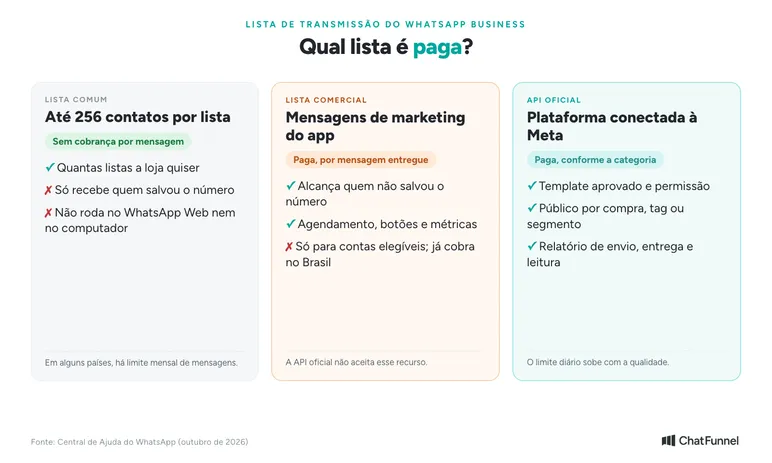
App data comes from the WhatsApp Help Center: how to use broadcast lists, lists in WhatsApp Business, and marketing messages. The first 2 paths use the WhatsApp Business mobile app. The third requires an API-connected platform. The article on mass messaging through the official API details that path.
How to create a broadcast list in the WhatsApp Business app
You can do it in the mobile app. Both list types use WhatsApp Business: standard lists on any account, and business broadcasts only on accounts Meta has enabled. You cannot do it on a computer: lists do not work in WhatsApp Web or WhatsApp for Windows or Mac.
In both cases, customers receive the message in an individual conversation with the store, and replies return as individual conversations. Nobody sees the other recipients.
Standard list: step by step
- Open WhatsApp Business on your phone and go to the Chats tab.
- Tap the 3-dot menu and select the broadcast option. The name varies by app version: "New broadcast", "Business broadcast", or "Broadcast lists".
- Search for or select contacts for the list, up to 256.
- Tap the confirmation icon to create the list.
- Write and send the message.
You can also create a list from a label. Open Labels, tap a label the store already uses, and send a message to all its contacts.
According to the Help Center, there are 3 requirements:
- each person on the list must have saved the store's number in their contacts;
- each list accepts up to 256 contacts;
- the store may create as many lists as it wants.
Business broadcast: step by step
Business broadcasts follow a different path because they are charged and reviewed. According to the Help Center, the flow is:
- Open the business broadcast option in the app. If it does not appear, the account has not yet been enabled.
- Choose the audience: one created by the store or an option offered by the app.
- Write the message and optionally add action buttons, such as book or call.
- Meta reviews the content before sending.
- Check the estimated price and recipients.
- Send immediately or schedule it.
After free messages are used, the app asks for a payment method and balance. The estimated total appears before sending.
What the app does not do
The app works for a small store but has limits:
- it does not work on a computer;
- a standard list delivers only to people who saved the number;
- it does not build an audience from online store orders;
- it does not distribute replies among agents.
For these cases, the official API is the route explained in the last section.
Broadcast list limits: 256 contacts, saved number, and monthly limit
The 256 limit applies to each list, and the app gives no official limit on the number of lists. A base of 1,000 customers can therefore be split into 4 lists.
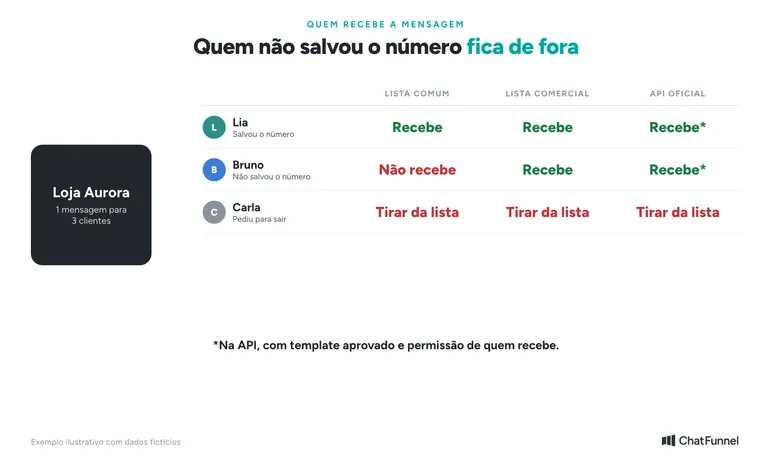
The other limit catches stores: people who have not saved the number receive nothing. The message simply does not arrive. The Help Center advises asking customers to save the contact.
In some countries, lists also have a monthly message limit, and the feature is rolling out gradually. The Help Center does not provide a single figure for Brazil, so check the store's app.
Business broadcast: what it is and how Meta charges
Business broadcast was created to scale outreach in the WhatsApp Business app. According to the Help Center, it:
- reaches customers who have not saved the store's number;
- supports scheduling and action buttons such as book or call;
- shows read and reply metrics;
- is reviewed by Meta before sending.
Charging works as follows: after using free messages, the store registers a payment method and balance. Meta charges only for messages delivered within 5 days, and the value of undelivered messages returns as credit. Price depends on the recipient's country, and the estimated total appears in the app before sending.
The Help Center says the feature is available in some countries and to eligible accounts without listing them. Brazil is among them: charging began there on October 20, 2025, according to Jornal Opção, and the Help Center has a pricing table in reais. If the menu does not appear, the account has not yet been enabled.
The WhatsApp Business Platform, the API, does not support business broadcast lists.
Meta also requires recipient permission. If many people report or block messages, the feature is suspended for 3 days with no appeal. Details are on the page I can't send business broadcasts.
Broadcast list disappeared or does not work: what to check
When a list does not deliver or appear, check in this order:
- Did the customer save the number? Without that, a standard list does not deliver.
- Does the list exceed 256 contacts? Split it into smaller lists.
- Are you using WhatsApp Web or a computer? The Help Center says lists do not work in WhatsApp for Windows or Mac or WhatsApp Web.
- Did the feature change for your account? In some countries, including Brazil, marketing messages are now business broadcasts, and the monthly limit is rolling out gradually.
- Was the account restricted? Many blocks and reports suspend business broadcasts for 3 days.
If none of these checks resolves it, use WhatsApp Help Center under Settings and Help in the app.
When a broadcast list no longer serves the store
A list works while the store has few contacts and 1 person handles replies. It stops being sufficient when:
- the database grows beyond a few hundred customers and splitting lists becomes manual work;
- some customers have not saved the number and receive nothing;
- the store wants to contact only product buyers or cart abandoners, and the list does not pull online store orders;
- more than 1 person handles replies and the app has no conversation distribution rules;
- the store needs to know which campaign generated paid orders.
At that point, the official API handles what the app does not. The article on WhatsApp Business or the official API compares them, and multiple agents on the same number shows how a team divides conversations.
How to move from a broadcast list to the official API
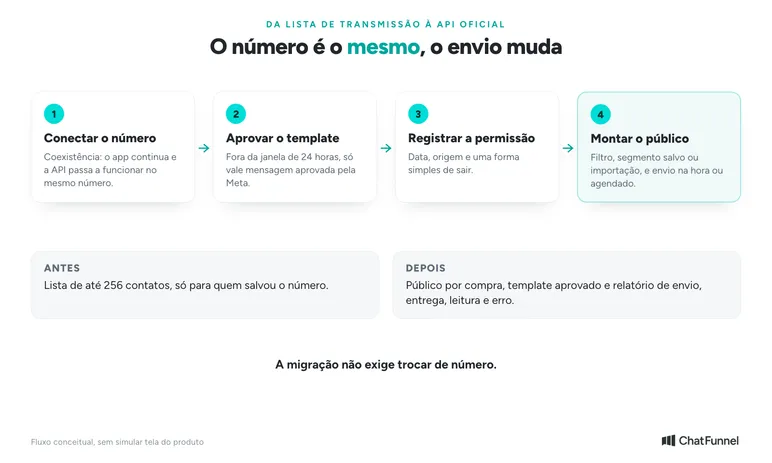
Migration does not require changing numbers. The following 4 steps cover the path.
Step 1: connect the number to the API
With coexistence, the same number remains in the app and also works through the API. In ChatFunnel, it is available to Meta-verified businesses, and the WhatsApp Business Coexistence tutorial explains the connection. The guide to how to purchase the official API shows what to check first.
Step 2: approve a template
Outside the 24-hour window, only a Meta-approved message template is permitted. The tutorial How to approve WhatsApp templates shows how to create and submit one for review. The article on WhatsApp templates for online stores provides examples.
Step 3: record permission
The API requires recipient permission. Record each contact's source and how they can leave the list. Anyone asking to stop receives no further messages.
Step 4: build the audience and send
In ChatFunnel, the audience comes from filters, a saved segment, or an import. The store chooses the template, reviews recipients, and sends immediately or schedules. It then tracks sends, deliveries, reads, and errors. The tutorial How to send a mass campaign in ChatFunnel provides the steps, and the message costs tutorial explains the estimate before sending.
Permission and blocks: what applies to every list
Across all 3 paths, the rule is the same: send only to people who asked to receive messages. WhatsApp Business policy requires honoring opt-out requests, and the Help Center asks for separate permission by message type, such as order updates and offers.
In practice, the store should:
- record the date and source of permission;
- make clear what the person will receive;
- remove people who have not interacted for a long time;
- offer an easy way to opt out, such as replying SAIR.
Broadcast lists help you start; the API supports growth
A standard list serves a small store: up to 256 contacts per list, free, for people who saved the number. Business broadcasts extend reach but are paid and may not be enabled on every account. The official API enters when the store needs purchase-based audiences, volume, and a team answering.
ChatFunnel brings the store's number to the official API with segmented campaigns and approved templates. It shows sends, deliveries, reads, and errors, and transfers the conversation to the team when a customer replies. Bring your audience size and current reply owners to the demo.
Explore ChatFunnel, the No. 1 AI for online stores
Frequently asked questions about WhatsApp Business broadcast lists
Are WhatsApp Business broadcast lists now paid?
The Help Center states no per-message charge for standard lists. The paid feature is business broadcast, previously called app marketing messages, charged per delivered message. In Brazil, charging began in October 2025, but the feature may not appear on every account.
What is the WhatsApp Business broadcast list limit?
Each list accepts up to 256 contacts, and a store can create as many lists as it wants. In some countries, there is also a monthly message limit.
Who receives a WhatsApp Business broadcast list?
Only people who saved the store's number in their contacts receive a standard list. Those who did not save it receive nothing. To reach them, Meta offers paid business broadcasts and the official API.
Why does a broadcast list not work or why did it disappear?
Common causes are the customer not saving the number, a list exceeding 256 contacts, use of WhatsApp Web or a computer, and a feature change on the account. Check each item in the troubleshooting section.
Can I create a broadcast list in the WhatsApp app?
Yes. Standard and business lists are created in the WhatsApp Business mobile app through the 3-dot menu on the Chats tab. Business broadcasts appear only on accounts Meta has enabled. For purchase-based audiences, templates, and reports, a store needs the official API.
Can I use a broadcast list on WhatsApp Web or a computer?
No. The Help Center says broadcast lists do not work in WhatsApp for Windows or Mac or in WhatsApp Web. Mass sending from a computer requires a platform connected to the official API.
How can I send a broadcast list without paying?
Use a standard list with contacts who saved the number and respect the 256-per-list limit. Do not use unofficial extensions or apps to bypass limits: WhatsApp considers unauthorized sending a Terms of Service violation.
Can I send a list to people who have not saved my number?
Not through a standard list. Business broadcasts can reach them in countries where the feature exists, as can the official API with an approved template and recipient permission.
Do I need the official API to create a broadcast list?
Not for small lists. The API becomes useful when the database exceeds a few hundred customers, many people have not saved the number, or the store wants purchase-based sends and order measurement.