WhatsApp automation uses rules to send messages, answer customers and organize conversations without someone typing every response. In an online store, it starts with an event such as an abandoned cart, a generated Pix payment or a shipped order. Then comes the action: send the right message, tag the customer or hand the conversation to a person.
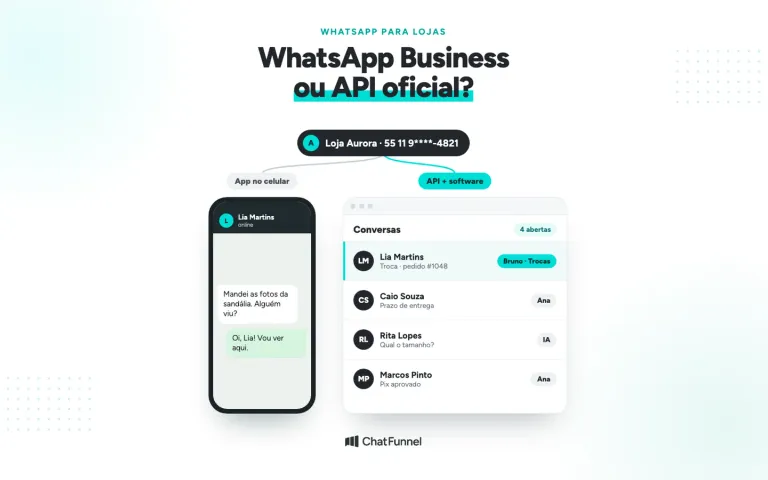
The free WhatsApp Business app handles basics with greeting messages, away messages and quick replies. To react to store events, the route is the official WhatsApp API. It connects to a tool that receives order data and follows Meta's rules for each message type.
In ChatFunnel WhatsApp automation, flows react to messages, buttons, tags and CRM changes. The store platform reports cart abandonment and order status. With that data, the flow sends a message, waits for the configured period and ends the sequence when the customer buys. AI answers questions, and the team takes cases requiring a person.
Below, see what to automate at each order stage and the difference between the app and API. Then review Meta rules, costs and steps for building the first flow.
What WhatsApp automation is and how it works
Every WhatsApp automation has 3 parts. The trigger starts the flow. It can be a message containing a word, a button click, an applied tag or a store event such as an order created or payment approved. The condition is what the flow checks before acting, for example whether the order is already paid. The action is what happens next: send a message, wait, apply a tag, move the customer in CRM, call AI or transfer to the team.
Consider a generated but unpaid Pix payment. Order #1048 from Loja Aurora enters as awaiting payment. The flow waits for the period set by the store and checks status. If payment arrived, the sequence stops. Otherwise, the customer receives a reminder with the Pix code. If she replies with a question, AI responds in the same conversation.

Automation can also include a chatbot or AI agent. A menu chatbot follows fixed options. An AI agent understands the customer's written question and answers using the store's knowledge base. Both are actions in the flow, which decides when to call each.
Where WhatsApp automation fits in the store journey
In the ChatFunnel Methodology, WhatsApp automation appears throughout most of the journey. In Visitors, the website button and ad bring customers to a conversation. In Conversations, the first reply goes out immediately and the case proceeds to AI or the team. In Product selection, the flow resumes an abandoned cart. In Paid order, the Pix reminder stops when payment arrives. In Post-purchase, the customer receives shipping and delivery notices. In Repeat purchase and More value per customer, tags and order history define who receives the next offer.

What to automate on an online store's WhatsApp
Start with moments when the store loses a sale or repeatedly answers the same question. The table shows common cases and the Meta category for each store-initiated message.
| Store moment | What automation does | Meta message category |
|---|---|---|
| Customer sends the first message | Responds immediately, identifies the subject and calls AI or the team | Service, within the 24-hour window |
| Abandoned cart | Reminds about the product and cart link and stops if the purchase happens | Marketing |
| Pending Pix or boleto | Reminds about order payment and stops when it arrives | Utility, if only about the order |
| Order paid, shipped and delivered | Notifies each status change with tracking | Utility |
| After delivery | Checks whether everything arrived correctly and identifies problems | Utility, if it cites the order and has no offer |
| Repeat purchase | Offers replenishment or a related product to someone who bought a category | Marketing |
Category affects cost and approval. Under Meta's categorization rules, a cart reminder is marketing even if the customer started the purchase. An order update with a promotion also becomes marketing because it combines both subjects.
Each flow has its own blog guide: how to recover carts on WhatsApp, unpaid Pix and order status on WhatsApp.

Free WhatsApp Business automation or the official API?
The WhatsApp Business app is free and has simple automation. The away message replies outside business hours or on a defined schedule. The greeting message welcomes first-time senders. Quick replies do not send themselves, but store up to 50 text, image or video shortcuts for the team to send in a few taps. For a small store with few daily conversations, this already organizes support.
The limit appears when a message depends on an order. The app does not receive cart abandonment, payment or shipping notices from the store platform. This is where the WhatsApp Business Platform comes in: Meta's official API for integrating WhatsApp with CRM and other systems.
| Criterion | WhatsApp Business app | Official API with a tool |
|---|---|---|
| Channel cost | Free | Meta charges per delivered message |
| Automatic responses | Greeting, away and quick replies | Flows with trigger, wait, condition and AI |
| Store events | Not received | Cart, payment and status through integration |
| Team | Phone and connected devices | Conversations assigned and transferred among agents |
| Message to someone who has not written | Broadcast list, only for those who saved the number | Approved template for someone who gave permission |
Anyone already using the app can keep using the phone. With coexistence, the same number works in app and API. According to Meta documentation, individual conversations from the last 6 months can be synchronized. The detailed comparison is in WhatsApp Business or the official API.
WhatsApp automation rules: what Meta allows
24-hour window and approved templates
When a customer sends a message, a 24-hour support window opens, and each new customer message restarts it. Within the window, the store replies with any message type. Outside it, the store can write only with a Meta-approved template. The rule is on the platform pricing page. For writing and approval, see how to create and approve a WhatsApp template.

Customer permission to receive messages
The WhatsApp Business policy permits contact only with people who gave the store their number and agreed to receive messages. Meta recommends requesting opt-in by subject, such as orders and offers, and explaining how to opt out. Purchased lists or contacts scraped elsewhere are excluded.
Sending limit for people who have not contacted the store
Message limits count unique contacts receiving an out-of-window message within 24 hours. A new portfolio starts at 250. The limit rises to 2,000, then 10,000, 100,000 and unlimited as an account grows with good quality.
Unofficial connections and unauthorized bulk sending
Unofficial connections often simulate WhatsApp Web through QR Code. According to the official and unofficial API guide in the ChatFunnel Help Center, they expose the number to blocking, disconnection and lost messages. WhatsApp bans accounts using unofficial versions, first temporarily and then permanently. It also treats unauthorized automated or bulk sending as a terms violation.
How much WhatsApp automation costs
There are 2 components: the tool running automation and messages Meta charges on the official API.
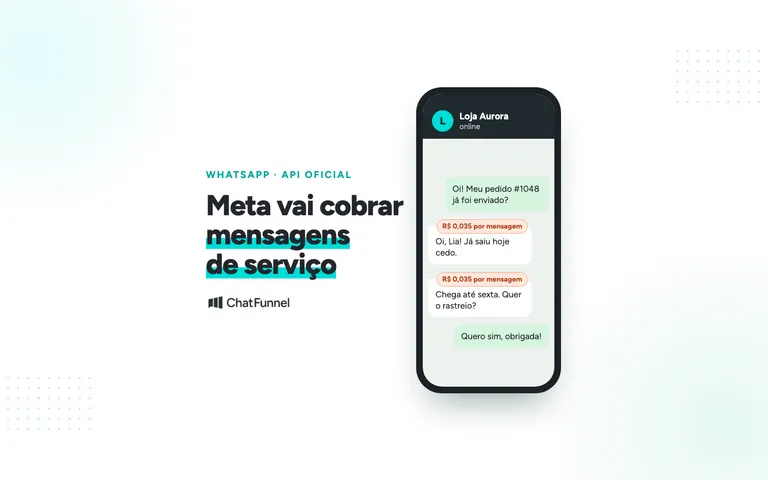
Since July 1, 2025, Meta has charged per delivered message, priced by category and customer country. An undelivered message is not charged, nor is a customer message to the store. Since October 1, 2026, service replies are also charged. Each business number gets 1,000 free service messages monthly, and Meta charges from the 1,001st. There is also a free case for people arriving through a click-to-WhatsApp ad. If the store responds within the window, a free window opens in which no category is charged. According to Meta's pricing page, it can remain open up to 7 days.
An automation that splits a reply into multiple messages therefore uses the allowance faster. In ChatFunnel, the WhatsApp Cost Calculator is in Overview and estimates the month by category, as shown in the Help Center message cost tutorial.
How to automate a store's WhatsApp: step by step
1. Connect the store number to the official WhatsApp API
You need a Meta business portfolio, a number that can receive SMS or calls and a payment method registered with Meta for messages. Business verification helps raise the sending limit. Requirements and registration are in how to obtain the official WhatsApp API for ecommerce.
2. Integrate the store platform with WhatsApp
Integration provides cart abandonment and order status to automation. ChatFunnel's connection catalog includes VTEX, Loja Integrada, Nuvemshop, Tray, WooCommerce, Shopify and Yampi. Check scope and authorize each connection's permissions. Systems without native integration can connect through API, webhooks, n8n or Make.
3. Create the first automation flow with trigger and action
Start with one flow, preferably the source of the most lost sales today, such as an abandoned cart or pending Pix payment. In ChatFunnel, open Flows, click Add flow and choose the trigger: exact text, text containing a word, any message or an event. Then build actions such as message, tag, CRM movement, delay, condition and AI agent. The first automation flow tutorial shows every screen. People who prefer to describe a flow in text can ask Intelligence, which prepares flows and templates for team review.

4. Get message templates approved by Meta
Every message sent outside the 24-hour window needs an approved template. Write one for each goal and choose the correct category: utility for order matters, marketing for offers and carts. Once Meta approves, the template appears synchronized in ChatFunnel, ready to send.
5. Define when AI responds and when the team takes over
List what AI can resolve alone, such as delivery time, size and returns policy. Separate what goes to a person, such as complaints, defects and delays. In ChatFunnel, AI responds using the store-approved knowledge base, and the conversation can be assigned, transferred or sent to human support. Always leave a clear option for customers to speak to someone.

6. Test automation and track results
Before enabling the flow, send test messages and check each path, including opt-out. Then track flow execution records and template sends, deliveries, reads and errors. Measure what matters to the store: recovered carts, Pix payments after reminders and questions the team still answers manually.
Common store WhatsApp automation mistakes
- Reminder without a stop condition. The customer pays and continues receiving reminders. Every cart or Pix flow needs to check status before each message.
- Cart reminder sent as utility. Meta classifies it as marketing and can recategorize the template.
- Sending to someone without permission. This causes blocks and reduces number quality.
- Campaign through an unofficial connection. This risks the entire store number.
- Flow without a path to a person. A customer with a problem is trapped in the menu and seeks another channel to complain.
- Reply split into several messages. This tires the customer and uses the service allowance.
Where to start store WhatsApp automation
The free app handles greetings, away messages and quick replies. When a message depends on cart, payment or shipment, the store needs the official API and a tool connected to its platform. Start with the most costly event today, with a clear stop condition, then move to order status, post-purchase and repeat purchase.
ChatFunnel brings these pieces together on the official WhatsApp API. Flows use triggers, waits and conditions. Cart recovery ends when the customer buys, and order status arrives from platforms such as Nuvemshop, Shopify and VTEX.
AI answers using the store's knowledge base, and the team supports customers in the same inbox. To start, connect the number to the official API, register a Meta message payment method and integrate the store platform.
Discover ChatFunnel, the No. 1 AI for Online Stores
Frequently asked questions about WhatsApp automation
What is WhatsApp automation?
It uses rules to send messages, answer customers and organize WhatsApp conversations without manual typing. Each automation has a trigger, such as a message or store event, a condition and an action. In an online store, common uses are abandoned carts, pending Pix payments, order status and repeat purchases.
Can you automate WhatsApp for free?
Yes, with the WhatsApp Business app, which has greeting messages, away messages and up to 50 quick replies. These are fixed and do not depend on order data. To automate by cart, payment or shipment, a store needs the official API, where Meta charges per delivered message.
Does Meta allow WhatsApp automation?
Yes, provided it uses the official API and targets customers who gave permission. WhatsApp prohibits unauthorized automated or bulk sending and bans accounts using unofficial app versions. On the API, messages outside the 24-hour window require an approved template.
How much does automating a store's WhatsApp cost?
It costs the automation tool plus messages charged by Meta on the official API. Meta charges per delivered message based on category and customer country. Since October 1, 2026, each number has 1,000 free service messages monthly. The country table is on Meta's pricing page.
What is the difference between AI WhatsApp automation and a chatbot?
A chatbot follows fixed menu options, while AI understands the customer's written question. In automation, both are actions in the flow: it decides when to call AI, send a menu or transfer to the team. In a store, AI responds using the team-approved knowledge base.
Can I send an automatic message to someone who never contacted the store?
Yes, if the person gave their number and agreed to store messages. It must be an approved template, and a new portfolio can reach 250 unique contacts in 24 hours outside the support window. People who do not respond to campaigns often stop receiving them because Meta limits marketing per person for those who read little.
Can n8n be used for WhatsApp automation?
Yes. n8n and Make connect to ChatFunnel through a technical connection using REST API and webhooks. This brings events from systems without native integration, such as a custom ERP, into flows and CRM.
Does WhatsApp automation also work on Instagram?
ChatFunnel flows can also trigger from Instagram Direct messages, and conversations from both channels share one inbox. The window and template rules described here apply to WhatsApp. ChatFunnel's documented cart recovery uses WhatsApp.