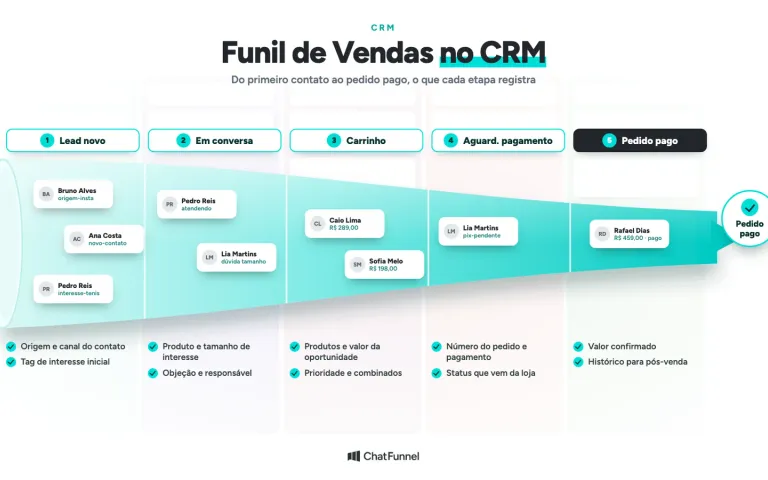
An ecommerce CRM integrated with an online store automatically receives data the team would otherwise copy by hand: customers, orders, payment and shipping statuses, abandoned carts, and the product catalog. The exchange takes place through an API or webhooks, notifications the store platform sends for each event, such as "order paid." Without it, the CRM becomes a spreadsheet nobody updates. If you are still learning what a CRM does, start with the guide to ecommerce CRM; this article focuses on integration.
The difference shows up in customer service. A customer asks on WhatsApp whether her order has shipped, and the team answers without opening the store dashboard. A Pix payment goes through and the payment reminder stops. A cart is abandoned and an automation resumes the conversation. All of this depends on the right event reaching the CRM at the right time.
In ChatFunnel, the connection with VTEX, Loja Integrada, Nuvemshop, Tray, WooCommerce, Shopify, and Yampi brings catalog, inventory, cart, order, and payment data into the CRM and customer service on WhatsApp and Instagram. This article explains what to check in any integration, including ours.
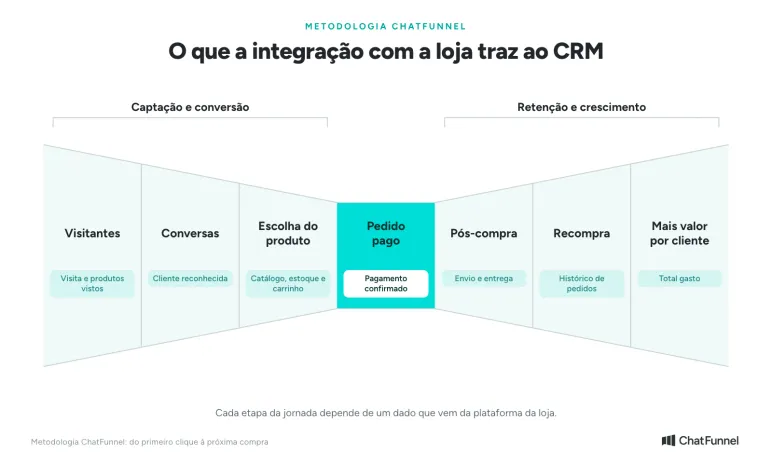
Where store integration fits into the customer journey
The journey runs from the first click to the next purchase, with the paid order at its center. Store integration lets the CRM track every stage without manual work. At the Visitors stage, tracking records the visit and products viewed. At Product selection, the catalog, inventory, and cart come into play. At Paid order, payment confirmation arrives. In Post-purchase, shipping and delivery status follow. At Repeat purchase and More value per customer, order history feeds segments and total spending.
What data should a CRM integrated with an online store receive?
Before comparing tools, list the data your operation uses. The table below provides a starting point:
| Store data | Purpose in the CRM | Event that typically updates it |
|---|---|---|
| Customer | Connect a conversation and order to the same person | Customer created or updated |
| Order | See what the customer bought, the amount, and the date | Order created |
| Payment status | Know whether to request payment, wait, or release the order | Order paid, pending, or canceled |
| Shipping status | Answer "Has my order shipped?" | Order shipped or delivered |
| Abandoned cart | Resume an interrupted purchase (see how to recover it) | Checkout created but not completed |
| Catalog and inventory | Answer questions about products, prices, and availability | Product created or updated |
| Browsing activity | Understand interest before purchase | Visit, product viewed, item added to cart |
Two details help prevent reporting errors. An order and a payment are different things: an order created with Pix is not yet money in the bank. Statuses also need to arrive with the same meaning they have in the store. If the platform says "pending," the CRM cannot treat it as "paid."
How data reaches the CRM: APIs and webhooks from Nuvemshop, Shopify, and VTEX
A store platform can pass data to the CRM in two ways. With an API query, the CRM periodically asks whether anything has changed. With a webhook, the platform notifies the CRM when an event occurs. Webhooks are faster and can, for example, stop a reminder as soon as payment is received.
Major platforms document these notifications:
| Platform | Documented order events | Source |
|---|---|---|
| Nuvemshop | order/created, order/paid, order/fulfilled, order/cancelled, plus customers and products | Nuvemshop API documentation |
| Shopify | orders/create, orders/paid, orders/fulfilled, checkouts/create, customers/create | Shopify documentation |
| VTEX | Order feed and hook, with states such as payment-pending, payment-approved and invoiced | VTEX documentation |
You do not need to memorize these names. Use them to ask a specific question during the demo: which of these events does the integration receive, and what does the CRM do with each one?
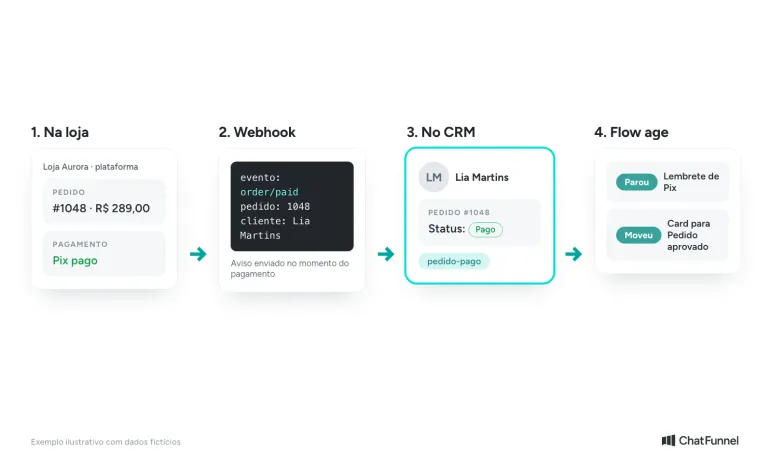
The webhook notifies the CRM when payment is made, and the flow acts on the updated status.
Types of integration between a CRM and an online store
Integrations work in different ways. Find out which kind you are getting before signing up:
- Native integration. The CRM connects to the platform directly, usually with access authorization in a few clicks. This is the simplest option and typically provides the most events.
- Store app. An app installed in the store, such as one from the Nuvemshop or Shopify app store, acts as the bridge. Check who maintains the app and what happens if it goes offline.
- Custom API and webhooks. The store or an agency programs the connection. It can carry exactly what the operation needs, but someone technical must maintain it.
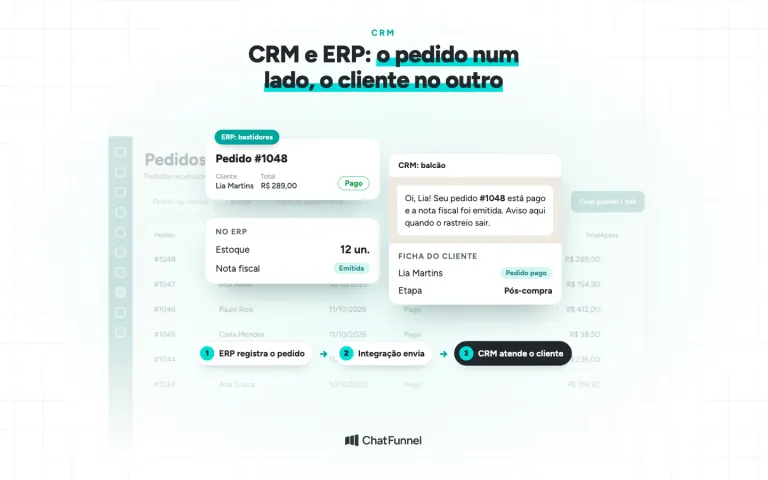
- Through the ERP. When an order originates in or passes through the ERP, the CRM can receive its status from there. This works well for businesses selling across multiple channels, provided the ERP forwards the events you use.
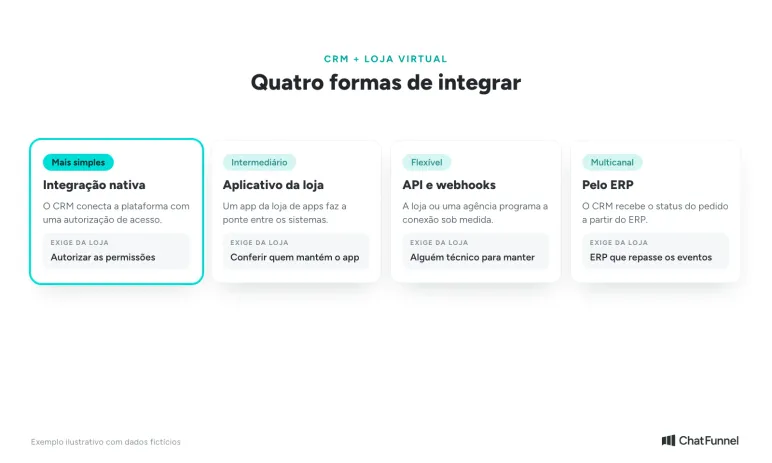
Four ways to connect a CRM to a store, from the simplest to the most flexible.
How to test a CRM integration with your store before signing up
The best way to evaluate an integration is to make test purchases and see what appears in the CRM. Set aside about 30 minutes and follow these steps:
- Create a cart and abandon the purchase. Check whether the cart appears on the contact record and how long it takes.
- Place an order using Pix without paying. The CRM should show the order as pending, not paid.
- Pay the Pix. The status should change automatically and any payment reminder should stop.
- Mark the order as shipped in the store platform. The information should reach the CRM and be available to the service team.
- Cancel a test order. Its value should no longer count in reports.
- Make another purchase with the same email address and a different phone number. The CRM should recognize the customer without creating a duplicate contact, or allow you to merge the two records.
For each step, note whether the data arrived, how long it took, and whether it required configuration. Use this record to compare tools and request adjustments later. The article CRM for ecommerce on WhatsApp: how to choose provides a demo checklist focused on customer service.
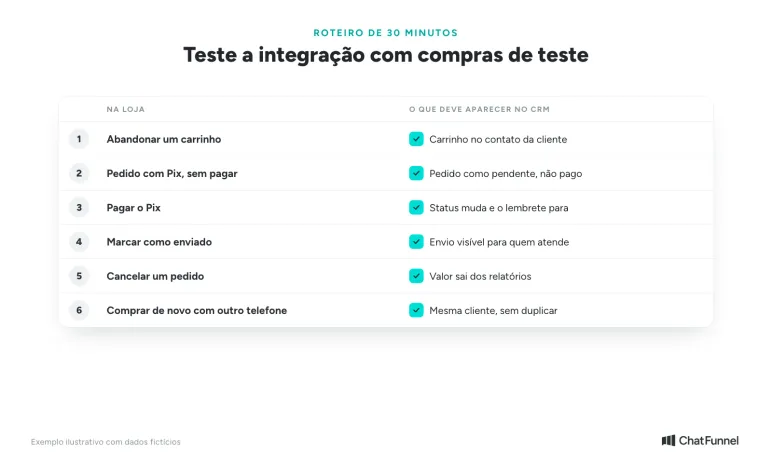
Six test purchases show whether the integration delivers what it promises.
Common problems integrating a CRM with an ecommerce store
- Duplicate contact. The customer appears twice because the phone number on the order differs from their WhatsApp number. Define the matching rule and keep the option to merge contacts.
- Delayed status. If payment takes too long to arrive, a reminder may be sent to someone who has already paid. Ask whether the integration uses webhooks or periodic queries and at what interval.
- Incorrectly mapped status. "Authorized," "pending," and "paid" do not mean the same thing. Check how each store status appears in the CRM.
- Incomplete permissions. The integration only receives what the store has authorized. If an event does not arrive, review the access granted on the platform.
- Forgotten integration. Switching platforms, adding a new checkout, or removing an app can interrupt events without warning. Repeat the test checklist after every change.
Choose a CRM based on the events it receives
A CRM is only as good as the data it receives from the store. Before looking at screens and prices, list the events your operation uses, ask in writing which ones the integration receives, and confirm everything with test purchases.
Start with the three events that have the greatest effect on customer service: order created, payment confirmed, and shipment. When these arrive on time, the team can respond without opening the store dashboard, and automations stop making mistakes.
In ChatFunnel, you connect VTEX, Loja Integrada, Nuvemshop, Tray, WooCommerce, Shopify, and Yampi by authorizing access on the platform. The received status updates the order in the CRM, flows can change tags and stages based on it, and tracking records the customer's browsing activity in the store. For other systems, there is a REST API, webhooks, MCP, and connections to n8n and Make. Request a demo using a test purchase from your store and check the scope of each connection before deciding.
Meet ChatFunnel, the #1 AI for online stores
Frequently asked questions about CRM integration with online stores
What is a CRM integrated with an online store?
It is a CRM that automatically receives data from the store platform, such as customers, orders, payments, shipments, and abandoned carts. The exchange takes place through an API or webhooks, without the team copying information between systems.
Which CRM integrates with Nuvemshop?
Several CRMs connect to Nuvemshop through a native integration or an app from the platform's app store. Nuvemshop itself mentions options such as RD Station, HubSpot, and HoopCRM, and ChatFunnel also integrates with the platform. Before choosing, check which order events the integration receives, such as order/paid and order/fulfilled, which appear in the Nuvemshop documentation.
Which CRM integrates with Shopify?
Shopify has an app store with several CRM options, and Brazilian platforms such as ChatFunnel also offer direct integration. Check whether the integration receives the order, payment, and shipping topics documented by Shopify, rather than just the customer list.
What is a webhook in a CRM and store integration?
It is an automatic notification the store platform sends to the CRM when something happens, such as an order being paid or shipped. The CRM then updates the status when the event occurs, without needing to query the store periodically.
Doesn't the store platform already work as a CRM?
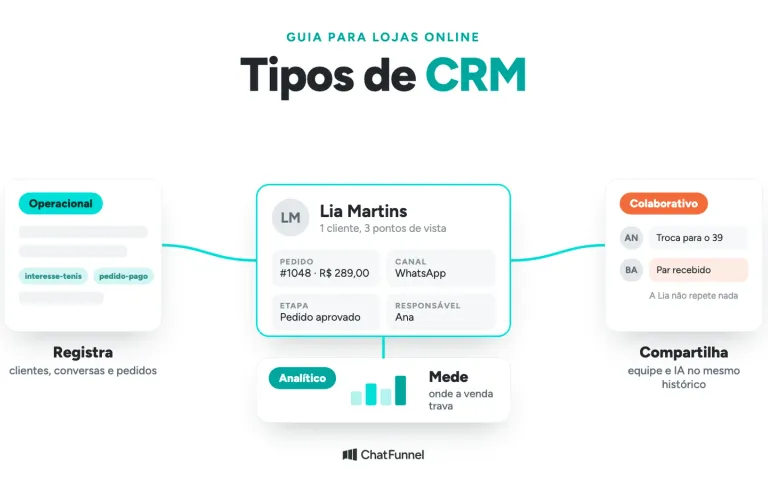
Only partly. The platform stores customers and orders, but it does not record WhatsApp and Instagram conversations, ongoing sales opportunities, or customer service tags. An integrated CRM brings that information together with store data in the same record.
How can I tell whether the CRM integration is working?
Make test purchases and monitor the CRM: abandon a cart, create a Pix order without paying, pay it, mark it as shipped, and cancel an order. Each change should appear on the correct contact record with the correct status within a few minutes.
How long does it take to integrate a CRM with an online store?
With a native or app integration, connecting usually takes a few minutes: authorize access on the platform and data starts arriving. Custom API and webhook integrations require development and can take days. Either way, allow another 30 minutes or so for test purchases.
Can I integrate the CRM with the ERP instead of the store?
Yes, when the order passes through the ERP. The CRM receives its status from there, which helps businesses selling across multiple channels. Check whether the ERP forwards every event your operation uses, especially payment and shipping.