To sell on WhatsApp in an online store, follow 7 steps: connect the store's number, answer the first contact, discover what the customer wants, show the right product, lead them to payment, follow up with those who did not pay, and track the order afterward. WhatsApp handles the conversation. The store checkout collects payment.
In an online store, sales are often lost in 3 places: the customer waits too long for a reply, the right product does not appear in the conversation, and nobody follows up with someone who intended to pay. This guide follows the whole path from the first "hello" to a paid order and shows where each step can become routine.
In ChatFunnel, the store's official number receives conversations, AI answers using the store-approved catalog and exchange policy, CRM places each customer in a funnel stage, and flows follow up on abandoned carts or pending Pix. Each step below starts with the rule and then shows how it runs there.
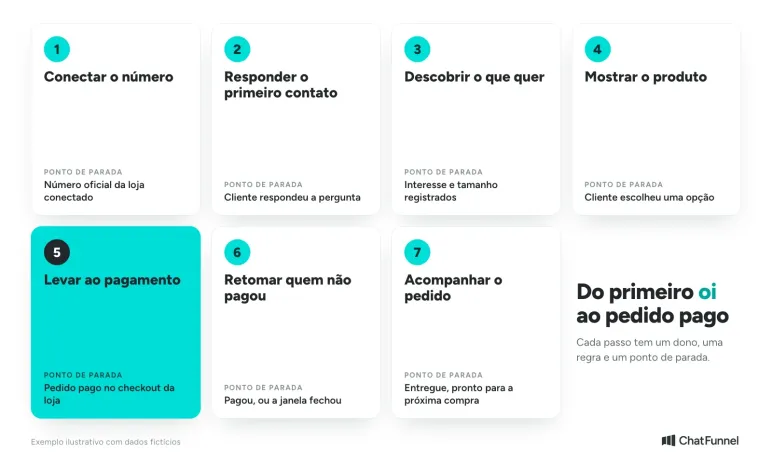
How to sell on WhatsApp: 7 steps for an online store
- Connect the store's number and decide whether it remains in the app or uses the official API.
- Answer the first contact promptly with a greeting and a question.
- Find out what the customer wants with 2 or 3 short questions.
- Show the right product with photo, price, size, and stock.
- Lead the customer to payment through the store checkout without requesting card data in chat.
- Follow up with those who did not pay under Meta's rules, and stop when the order is paid.
- Track the order through delivery and open the conversation for the next purchase.
Step 1: How to set up WhatsApp to sell in an online store
Use a business account rather than personal WhatsApp. The WhatsApp Business app provides a business profile, catalog, quick replies, and labels. The ChatFunnel Help Center explains how to connect a number to the official API, the route when a store needs a team, automation, and AI on the same number.
Before speaking with the first customer, resolve 3 points:
- Complete profile. Store name, hours, website address, and short description.
- Permission. Promote the number on the website, social media, and packaging, and let the customer contact you first. People receiving unsolicited messages often block or report the number.
- 1 number for sales. Mixing personal conversations and orders causes the team to lose history.
Existing app users do not need to change numbers. With coexistence, the same number remains in the WhatsApp Business app and also works with ChatFunnel. It requires a verified Meta business account.
Step 2: How to answer the first WhatsApp contact
The first answer determines whether the customer continues the conversation. It needs 3 things: greet them with the store name, say what the store can do, and ask a question the customer can answer in 1 word.
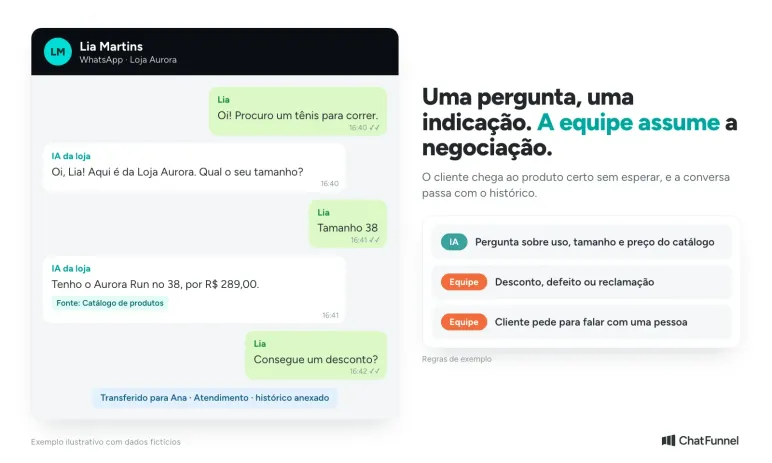
"Hi! This is Loja Aurora. Are you looking for a model or do you need help with an order?"
Outside business hours, the same rule applies with a promise the store can keep: "We'll reply tomorrow at 9 a.m." In the app, greeting and away messages cover this case. In the official API, AI can reply immediately at any hour using only what the store registered.
In ChatFunnel, WhatsApp conversations reach one inbox. AI serves first, and the team takes over when requested or when a case falls outside the rules, such as a defect, complaint, or negotiation. The history accompanies the transfer, so the customer does not repeat the question.
Step 3: How to discover what the customer wants to buy
Ask a few questions, 1 per message. In a shoe store, 3 are enough: intended use, size, and price range. Each answer narrows the catalog and avoids sending 10 unsolicited photos.
Record what the customer said. Interest, size, and conversation source become a contact label or field, such as interesse-tenis and tamanho 38. Without that record, the next team member starts from scratch, and the next campaign cannot find the right audience.
In ChatFunnel, tags and fields can be filled by the team, a flow, or AI. They feed the customer record and saved segments the store reuses in campaigns.
Step 4: How to show a product on WhatsApp and answer questions
Send 1 option at a time with photo, name, price, available sizes, and delivery time. Comparing 2 options is more useful than 10 loose images. The WhatsApp Business app has a catalog of up to 500 items, according to the official catalog page, and each product can be shared in conversation.
Size, delivery time, and exchanges are the questions most likely to stall a purchase. Write these answers once in a single place and let the team and AI consult the same source. Different answers to the same question undermine trust.
In the ChatFunnel knowledge base, the store registers catalog, size guide, and exchange policy, and the team chooses which version of each material is active. AI answers with approved information. To go beyond this step, the guide to AI for WhatsApp sales shows how AI qualifies customers and recommends a catalog product.
Step 5: How to receive payment for a WhatsApp sale
Payment takes place in the store checkout, not the conversation. Send the cart or order link, confirm the value and shipping, and let the customer pay through the store's Pix or card options. Avoid requesting card numbers or passwords by message: the conversation is not a secure channel for that.
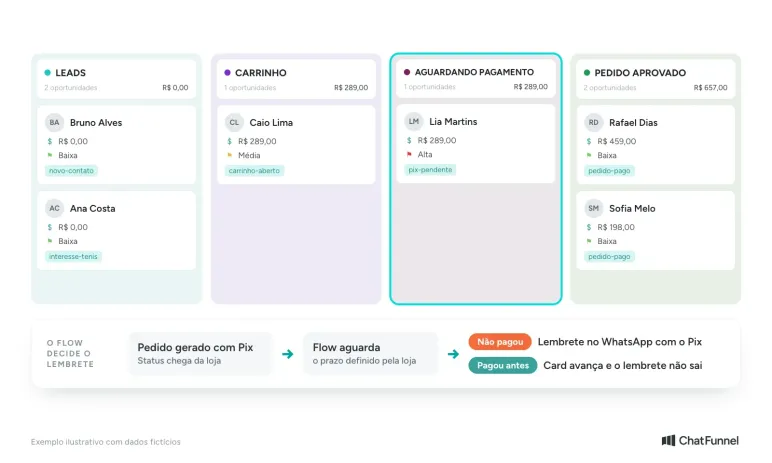
An order counts as a sale only after payment confirmation. Conversation and order status therefore need to move together. When the store uses a platform connected to ChatFunnel, such as Nuvemshop, Shopify, VTEX, Tray, WooCommerce, Loja Integrada, or Yampi, status received through the connection updates CRM. The customer card moves from "Waiting for payment" to "Order approved" without manual movement. Check the scope and authorize each connection's permissions before activation.
Step 6: How to recover a sale from someone who did not pay
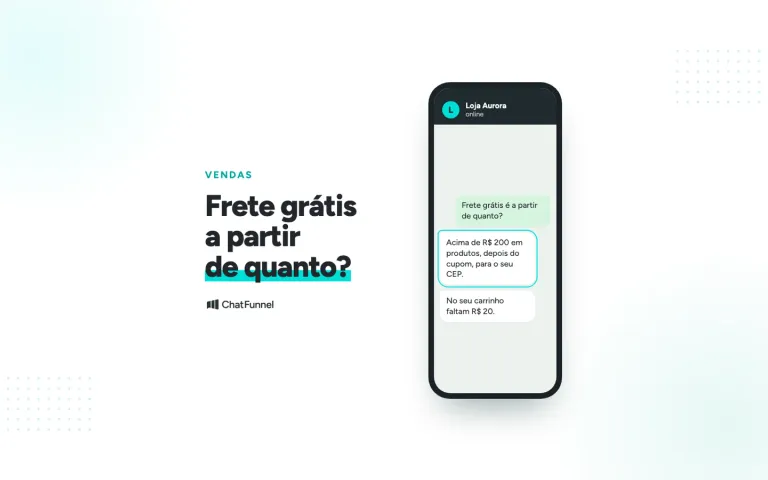
Some customers disappear after requesting the link: the cart remains open or Pix expires. Follow up once with the right information and no pressure. "Your Aurora Run, size 38, is still in your cart. Can I help you finish?" works better than an unexplained coupon.
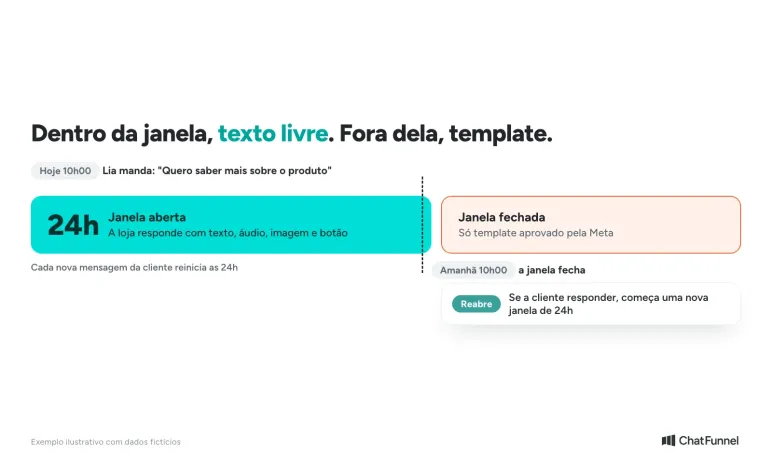
This is where a Meta rule often catches merchants. The 24-hour window opens when the customer sends a message. Inside it, the store can reply with free-form text. Outside it, only a Meta-approved template may be sent, according to the ChatFunnel Help Center. A customer reply reopens the window.
3 rules keep follow-up under control:
- 1 reminder per reason. Open carts and pending Pix are different cases with different messages.
- Stop when the order is paid. The sequence ends on payment, and people who paid receive no collection message.
- Approved template outside the window. The guide to WhatsApp templates explains creation and correcting rejections.
In ChatFunnel, cart recovery runs in official WhatsApp flows: the store reports abandonment, the flow identifies the contact, waits for the defined interval, and sends the message. When the purchase is confirmed, the flow ends. The pending Pix and abandoned cart message guides detail each sequence.
Step 7: How to track the order and sell again on WhatsApp
After payment, customers often ask where their order is. Answering with actual status from the store platform prevents invented estimates and reduces "where is my order?" questions. The WhatsApp order status guide explains how to separate packages and route exceptions.
The second sale begins at delivery. Record what the customer bought and use it in the next conversation. Someone who bought sneakers receives a sock suggestion rather than a campaign sent to the whole database. In CRM, order history linked to the contact shows previous purchases and accumulated value.
Selling on WhatsApp with the app or official API: which should you choose?
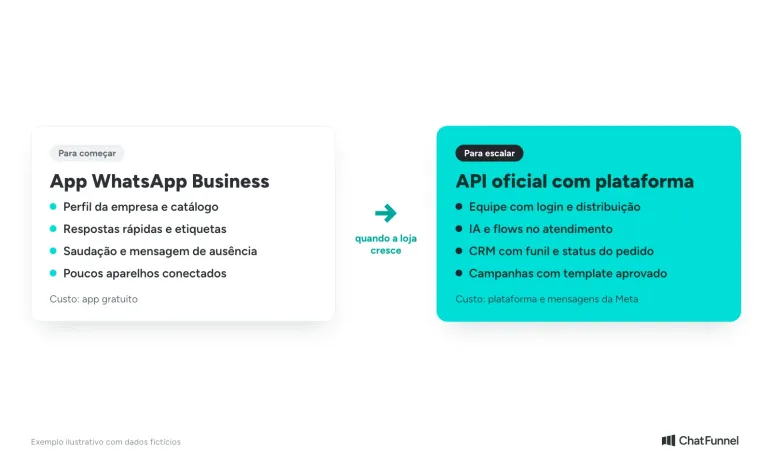
The app is enough to start. With 1 person serving customers, few daily conversations, and a small catalog, WhatsApp Business handles the first month. Its limit appears when the store needs multiple agents, after-hours responses, AI, campaigns, and order data in conversation.
| Store need | WhatsApp Business app | Official API with platform |
|---|---|---|
| Profile, catalog, and quick replies | Yes | Yes, depending on the platform |
| Multiple agents with distribution | Limited by devices | Yes, each person with a login |
| AI and flows in customer service | No | Yes |
| Order status in conversation | Manual | Yes, with the store connected |
| Cost | Free app | Platform and Meta messages |
API cost has 2 parts: the platform and messages charged by Meta. Since October 2026, each number has 1,000 free service messages per month, and the guide to service message charges shows how to estimate monthly cost. The full comparison is in WhatsApp Business or official API.
How to organize WhatsApp sales for your online store
Selling on WhatsApp works when each step has an owner and stop rule. First contact needs a quick answer. Questions need a single source. Payment happens at checkout, and order status returns to the conversation. Unpaid customers receive follow-up, and paid customers leave the sequence. What looks improvised becomes routine when the path is written down.
Start at the step where your store loses the most customers. If they disappear before the first "hello", review response time. If they disappear after the link, focus on follow-up. If they complain after purchase, the problem is order status. Resolve 1 step at a time and measure what changed in conversations.
ChatFunnel brings these steps together: the connected official number, AI with the store's knowledge base, CRM with the sales funnel, recovery flows, and order status from the connected platform. To use it, the store connects WhatsApp through the official API and enables the ecommerce platform connection. With coexistence, the business account must be verified with Meta.

Schedule a demo and see a conversation become a paid order in practice
Frequently asked questions about selling on WhatsApp
How do I sell on WhatsApp for the first time?
Create a WhatsApp Business account, complete the store profile, register products in the catalog, and answer each contact with a greeting and question. Then send the store checkout payment link and track the order through delivery. That is the 7-step path in this guide.
Do I need a CNPJ to sell on WhatsApp?
No. Mercado Pago says individuals or formal businesses can use WhatsApp Business. A CNPJ helps with invoices and some payment conditions. Official API connection goes through a Meta business account, and coexistence requires a verified business.
Can I sell on personal WhatsApp?
Yes, but it is not worthwhile. Personal WhatsApp has no catalog, quick replies, or labels. Mixing personal contacts and customers also complicates history. Use WhatsApp Business or, for teams and automation, the official API.
How do I receive payment for a WhatsApp sale?
Send the store checkout link or Pix generated by the order and wait for confirmation. Do not request card data in conversation. When the store is connected to ChatFunnel, payment status received through the connection updates the customer card in CRM.
How much does it cost to sell on WhatsApp?
The WhatsApp Business app is free. With the official API, the store pays for the platform and Meta messages, including 1,000 free service messages per number each month. Marketing messages are charged. The official API pricing guide provides the current table.
Can I message a customer who has not contacted me?
Only with permission. In the official API, a message outside the 24-hour window requires a Meta-approved template and a recipient who opted in. Unsolicited messages generate blocks and reports, and the number loses quality.
How do I sell on WhatsApp without spending all day on my phone?
Use an automated app reply or, with the official API, AI trained on the store's catalog and policies. AI handles questions with registered answers and passes cases requiring a person to the team. Flows handle reminders for people who did not pay.
Turning Visitors into Loyal Customers 🩵