A store's reputation on Reclame Aqui comes from four indicators, all generated by consumer evaluations after customer service: complaints answered, resolution rate, consumer rating, and "would do business again." Resolution and rating carry the most weight. The strategy therefore has three fronts: answer everything, solve the problem, and reduce complaint causes before they reach the platform.
The public response happens in the Reclame Aqui dashboard. What determines the evaluation often happens outside it: how quickly the customer is served, what order information they receive, and the solution delivered after the complaint. Much of that passes through the store's WhatsApp.
One way to organize this is to centralize customer service in ChatFunnel: AI answers order questions around the clock using status pulled from the store, the team takes over sensitive cases with the full history, and the CRM tracks each complaint through resolution.
How Reclame Aqui calculates reputation
The calculation is public. Reclame Aqui's "How it works" page provides the Reclame Aqui Rating (AR) formula, a weighted average of four indicators:
| Indicator | What it measures | Weight |
|---|---|---|
| Response rate (IR) | Percentage of complaints answered publicly | 2 |
| Consumer rating (MA) | Average service rating from 0 to 10 | 3 |
| Resolution rate (IS) | Percentage of consumers who marked the issue resolved | 3 |
| Would do business again (IN) | Percentage who say they would buy again | 2 |
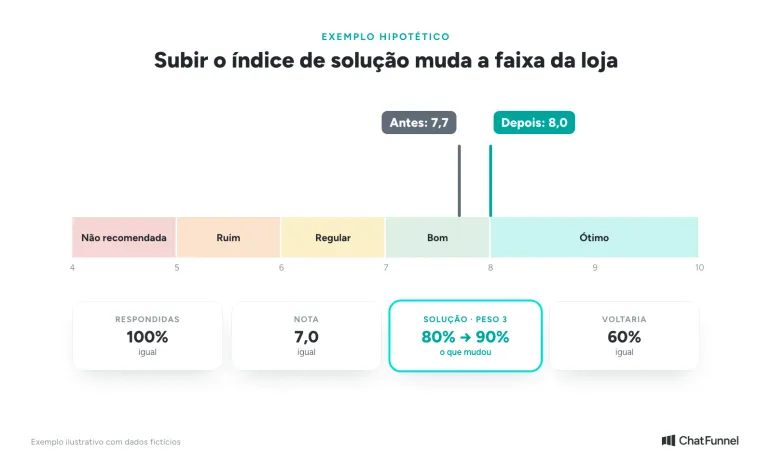
The formula is AR = ((IR × 2) + (MA × 10 × 3) + (IS × 3) + (IN × 2)) / 100. The result defines the band: 8 to 10 is Excellent, 7 to 7.9 is Good, 6 to 6.9 is Fair, 5 to 5.9 is Poor, and below 5 is Not recommended.
Before the formula, there are two entry requirements, according to the official Reclame Aqui blog. A business must answer more than 50% of complaints or it is classified as Not recommended. It also needs at least 10 evaluations in the period or appears without a defined reputation.
In a hypothetical example, a store answers 100% of complaints, has an average rating of 7, an 80% resolution rate, and 60% saying they would do business again. The calculation gives (200 + 210 + 240 + 120) / 100 = 7.7, which is Good. If the resolution rate rises to 90% with nothing else changing, AR rises to 8.0 and the store enters Excellent. In the example, the resolution rate changes the store's band.
Two details in the reputation manual affect planning. The default reputation displayed covers the past 6 months, and each complaint enters the period based on its posting date, not its evaluation date. The business page updates once a day. Improvement therefore appears gradually as old complaints leave the window.
Where reputation is shaped in the store journey
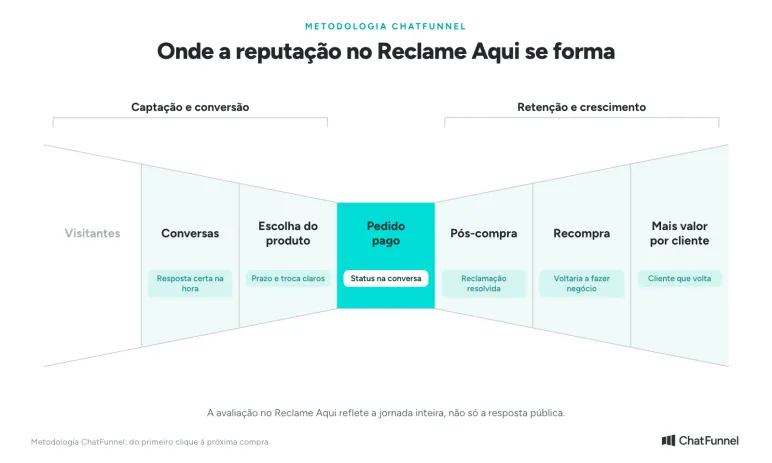
In the ChatFunnel Methodology, the journey goes from the first click to the next purchase, with the paid order at the center. Reclame Aqui reputation begins forming before after-sales service. In Conversations and Product selection, correct answers about timing, size, and exchanges prevent incorrect expectations. In Paid order and Post-purchase, order status in the conversation answers the most common question before it becomes a complaint. Later, a well-executed solution affects Repeat purchase and More value per customer, which the "would do business again" indicator measures.
Front 1: prevent a question from becoming a complaint
Many ecommerce complaints begin as unanswered questions: where is the order, how can I exchange it, why was I charged this way? Before changing your Reclame Aqui approach, open complaints from recent months and group them by reason. The most frequent reason shows where service on your own channel is failing.
Three actions address that source:
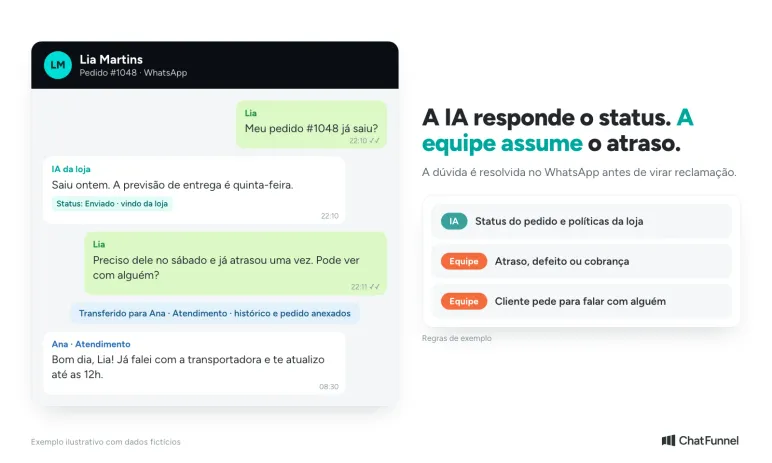
- Answer on WhatsApp at any time. A question at 10 p.m. does not need to wait until the next day: an AI agent answers immediately and passes what it cannot resolve to the team.
- Show order status in the conversation. With the store integrated, the customer checks payment, shipping, and delivery without opening a ticket.
- Keep policies consistent everywhere. Exchange deadlines, shipping, and returns must be the same on the website, in AI, and with the team.
In ChatFunnel, integration with VTEX, Loja Integrada, Nuvemshop, Tray, WooCommerce, Shopify, and Yampi brings order status into customer service. The ChatFunnel knowledge base stores team-reviewed policies, and AI answers from them. For defects, billing, or someone requesting a person, the conversation passes to an agent with the history and order attached. The article AI for ecommerce: where to apply it in store operations shows other after-sales applications.
Front 2: handle each complaint through resolution
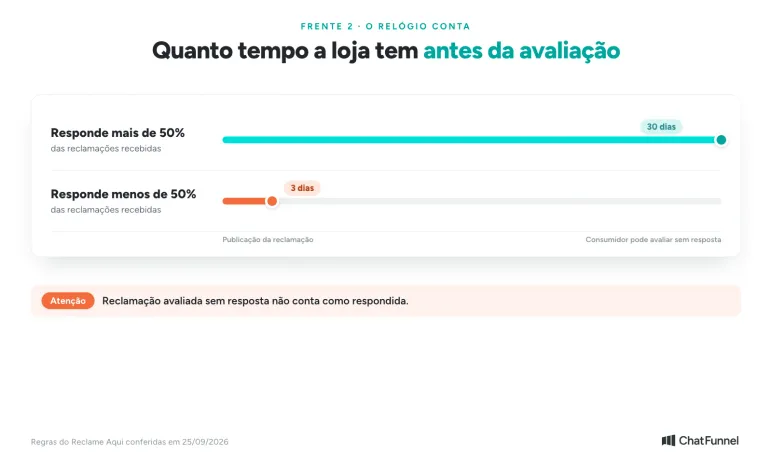
When a complaint reaches Reclame Aqui, the clock starts. If the store answers more than 50% of complaints, the consumer can evaluate an unanswered complaint 30 days after publication. Below 50%, the period falls to 3 days. A complaint evaluated without a reply does not count as answered, according to the platform's official blog.
Each case follows four steps:
- Respond publicly in the Reclame Aqui dashboard with a specific message: what happened, what the store will do, and through which channel.
- Resolve privately. Contact the customer on WhatsApp with the order at hand. The message exchange is recorded with photos, deadlines, and evidence.
- Do what you promised and confirm with the customer that the problem was resolved.
- Update the public response with the outcome.
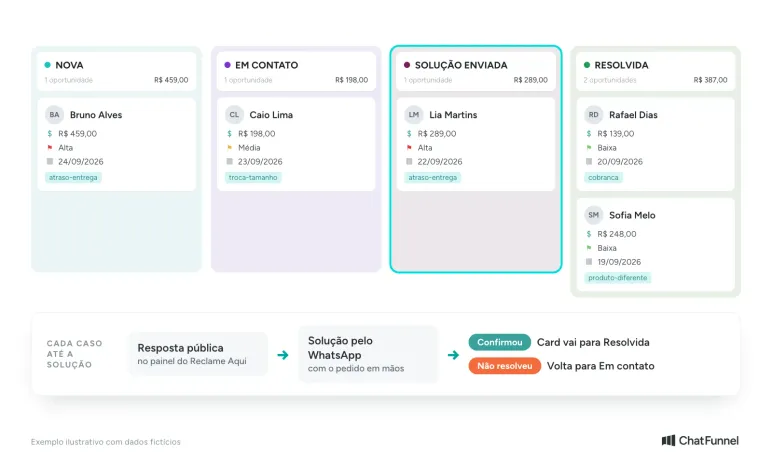
To avoid losing cases, treat complaints as opportunities in a CRM pipeline. In ChatFunnel, each card is linked to the contact with stage, owner, priority, tags, and comments. A "Reclame Aqui" pipeline with New, In contact, Solution sent, and Resolved columns shows what is stalled and who owns it. Reason tags on cards reveal recurring problems.
Front 3: close the loop and bring the customer back
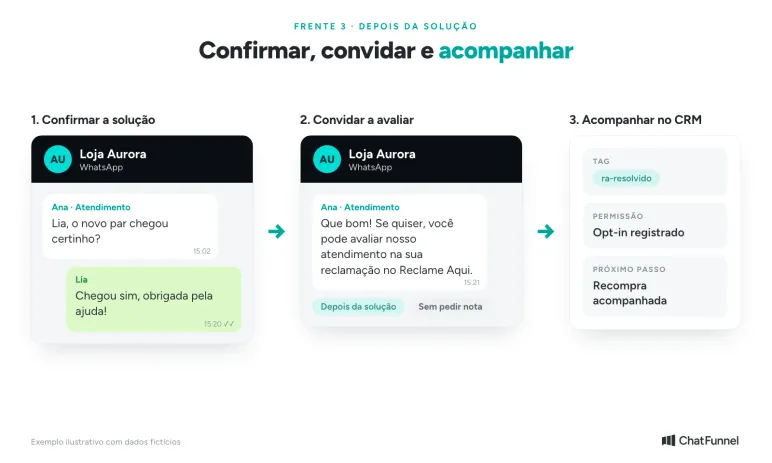
Resolution rate and rating change only when the consumer evaluates. After resolving the issue, remind the customer that they can evaluate the service on Reclame Aqui. The invitation comes after confirmed resolution, never before, and without asking for a particular rating.
Reclame Aqui audits complaints and, when it finds improper records, marks reputation "Under review" for 30 to 90 days, according to the manual. Trying to inflate indicators is costly. The "would do business again" indicator measures experience: improve it by resolving the issue well, not by offering an advantage in exchange for an answer.
Later, a customer whose problem was resolved can receive store communications again if they gave permission for messages. A tag such as ra-resolvido in the CRM helps separate that audience and choose the right moment.
Front 4: ask for customer feedback when the order arrives
Do not wait for a complaint to discover that something went wrong. When the order is delivered, ask on WhatsApp how the purchase went. Someone who received the wrong size or a defective product can tell the store immediately, and the case begins to be resolved before reaching Reclame Aqui.
The message asks one question: "Hi, Lia! Your order #1048 has arrived. Did everything go well with your purchase?" Offer two quick replies, such as "Everything is fine" and "I had a problem." Anyone choosing the problem goes straight to the team with the order in the conversation. Someone who says everything is fine can receive an invitation to review the product in the store.
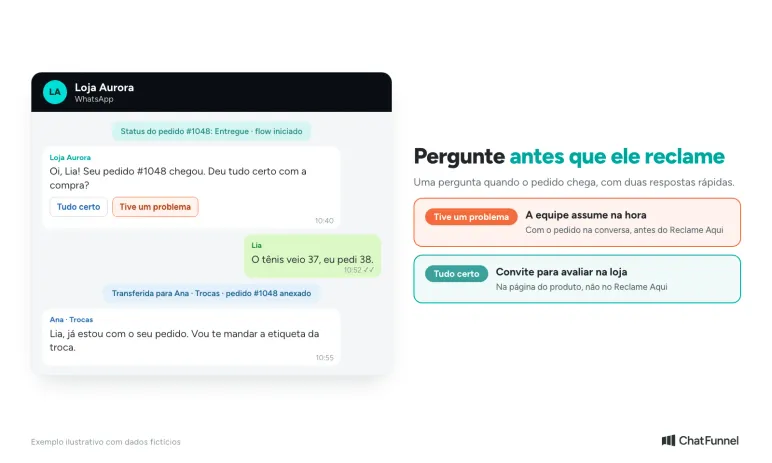
A customer who tells the store about a problem receives service before seeking Reclame Aqui.
This review takes place on the store's channel, not on Reclame Aqui. Reputation there only considers evaluations by people who registered a complaint. Asking a satisfied customer to post something on Reclame Aqui creates a record outside the site's purpose, and improper records can put reputation "Under review."
In ChatFunnel, order status reaches the CRM through the store integration, and a flow can react to the change: it sends the question, waits for the answer, and routes the conversation to the team when the customer reports a problem. Through the official WhatsApp API, a store-initiated message uses a Meta-approved template. Before building the flow, check whether your platform sends delivery status.
A routine for monitoring reputation
| Frequency | What to check | Where |
|---|---|---|
| Daily | New complaints and pending replies | Reclame Aqui dashboard |
| Daily | Cards stalled in "In contact" or "Solution sent" | CRM pipeline |
| Weekly | Most frequent reasons and resolved cases | CRM tags and reports |
| Monthly | The four indicators in the 6-month tab | Store page on Reclame Aqui |
| Monthly | New questions AI could not answer | Knowledge base |
Mistakes that lower the score
- Replying with standard text. A generic message does not say what the store will do for that customer.
- Promising and not delivering. If the promised solution does not arrive, the customer marks the problem unresolved.
- Requesting an evaluation before resolution. The customer may mark the problem unresolved and give a low score.
- Handling Reclame Aqui while forgetting your own channel. If the store's WhatsApp does not answer, complaints keep coming.
- Expecting an immediate result. The 6-month window uses the complaint date, so improvement appears gradually.
Where to start improving Reclame Aqui reputation
Start with diagnosis: group complaints from the last 6 months by reason and check the four indicators. Ensure no complaint goes unanswered. Then build a complaints pipeline in the CRM and address the most frequent reason on your own channel with order status in the conversation, policies in the knowledge base, and a question sent when the order arrives. Track progress month by month, knowing the 6-month tab takes time to reflect the work.
ChatFunnel brings together AI customer service on WhatsApp and Instagram, the team in one inbox, order status from the store, flows that ask about delivery, and a CRM to track each case through resolution. The public response remains on Reclame Aqui, while the service the customer evaluates is organized before, during, and after the complaint.
Meet ChatFunnel, the #1 AI for online stores
Frequently asked questions about Reclame Aqui reputation
How is reputation calculated on Reclame Aqui?
Using the Reclame Aqui Rating (AR), a weighted average of four indicators: response rate (weight 2), consumer rating (weight 3), resolution rate (weight 3), and "would do business again" (weight 2). The result runs from 0 to 10 and defines the band from Not recommended to Excellent. The formula is on Reclame Aqui's "How it works" page.
How does a store leave the Not recommended reputation on Reclame Aqui?
A store is Not recommended when it answers fewer than 50% of complaints or its AR is below 5. First answer all pending complaints because the formula is not applied below 50%. Then the score rises through resolved and well-rated cases, as the Reclame Aqui blog explains.
How can I avoid complaints on Reclame Aqui?
Resolve issues before customers need to complain. Answer order questions promptly, keep policies consistent across the website, AI, and team, and ask how the purchase went when the order arrives. When a customer tells the store about a problem, the team can resolve it on the store's own channel before they seek Reclame Aqui.
How long does it take to improve reputation on Reclame Aqui?
There is no fixed period. The default reputation covers the past 6 months, and each complaint enters the period based on its posting date. Improvement therefore appears gradually as old complaints leave the window and new ones are resolved and evaluated.
Can a complaint be deleted from Reclame Aqui?
No. According to the Reclame Aqui blog, only the consumer or the platform itself can deactivate a complaint. A business can request moderation in specific cases, such as a duplicate complaint, one directed to the wrong company, or inappropriate content.
Is there a deadline for a company to respond on Reclame Aqui?
Reclame Aqui does not require a business to respond, but timing affects reputation. If the store answers more than half of complaints, a consumer can evaluate without a reply after 30 days. If it answers fewer, the period falls to 3 days, and an evaluation without a reply does not count as answered.
Can a store ask a customer to evaluate on Reclame Aqui?
It can remind the customer to evaluate after confirmed resolution and without asking for a specific score. Reclame Aqui audits evaluations and, when it finds improper records, marks reputation "Under review" for 30 to 90 days.
What is the RA1000 badge and how can a business earn it?
It is Reclame Aqui's excellence badge. According to the "How it works" page, a business needs at least 6 months of registration and 50 evaluations, response and resolution rates of at least 90%, a consumer rating of at least 7, and at least 70% saying they would do business again. Even after meeting the criteria, the badge comes only after an audit.