A WhatsApp AI agent is a system that talks to customers through the store's number and consults approved information. With each message, it decides whether to answer, perform an action, or call a person. Unlike a menu chatbot, it understands a question written in the customer's own words. What it may state and do depends on what the store has authorized.
Cost has 2 parts: the platform, which already includes AI, and messages charged by Meta. There is also Meta Business Agent, Meta's own AI, which works differently and has different pricing. This guide explains the distinction, what the agent consults and does in a store, and how to test it before activation.
In ChatFunnel, the AI agent works on WhatsApp through the official API. It answers using the store-approved knowledge base and transfers the conversation to the team when the rule requires it. The store decides how much to authorize.
What is a WhatsApp AI agent and how does it work?
The agent follows 4 steps for each message. First, it interprets what the customer wants, even with abbreviations or errors. Then it consults sources the store enabled, such as exchange policy, catalog, and order data. Next, it answers or performs an action, such as applying a CRM tag or starting a flow. Finally, it decides whether to continue alone or call a person.
The difference from a chatbot lies in the first step. A chatbot follows fixed options, while an agent chooses the next step from the conversation. That is why scope must be written before activation. The guide to chatbot or AI agent for an online store compares them, and AI agent for ecommerce explains how to write that scope.
Where a WhatsApp AI agent fits in the store journey
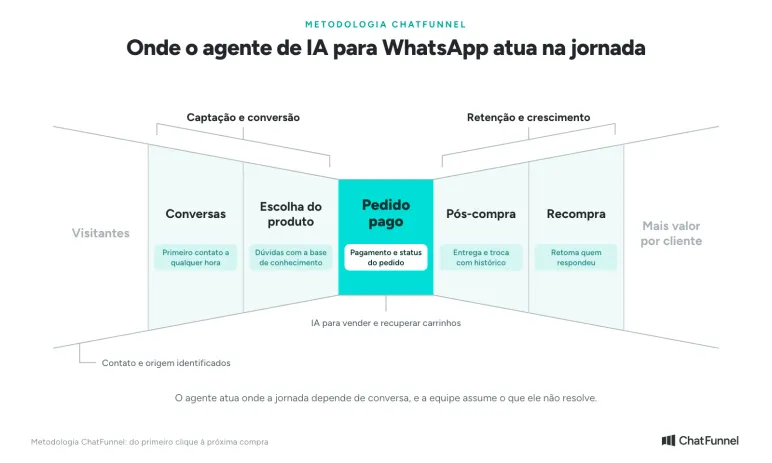
In ChatFunnel, the agent acts where the journey depends on conversation.
In Conversations, it receives first contact at any hour and separates questions from cases for the team.
In Product Selection, it answers size, delivery, and exchange questions using the knowledge base.
At Paid Order, it answers payment questions and checks status when the store enables that lookup.
In Post-purchase, it handles delivery and exchange questions.
In Repurchase, it resumes contact with people who replied to a campaign.
What a WhatsApp AI agent consults and does in a store
The agent is only as good as the sources and actions the store enables. In ChatFunnel, the Help Center lists tools that can be activated for each agent. The table shows each store use.
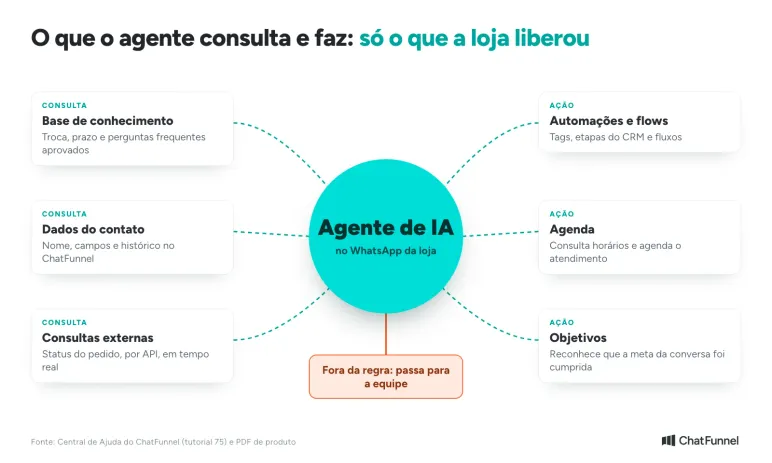
| Tool | What the agent does | Store example |
|---|---|---|
| Knowledge base | Answers using approved text and files | Exchange policy, delivery times, and FAQs |
| Data mapping | Uses contact data in ChatFunnel | Addresses the customer by name and reads custom fields |
| External lookups | Retrieves real-time information through an API | Order status in a store system |
| Automations | Triggers flows, tags, and CRM stages | Marks "waiting for exchange" and alerts the team |
| Calendar | Checks availability and schedules | Physical store visit or scheduled appointment |
| Objectives | Recognizes that the conversation goal was met | Closes when the customer chooses a model |
The Help Center recommends enabling only tools needed for the agent's role, making behavior more predictable. The knowledge base is used most.
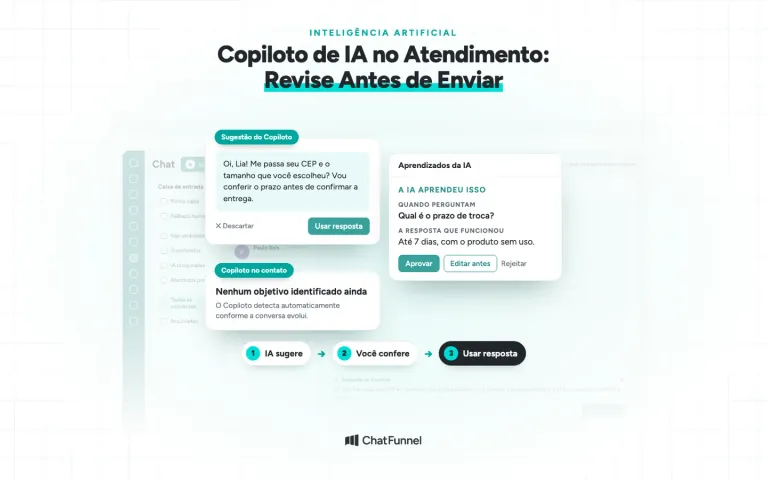
In ChatFunnel, the team reviews versions, decides what is active, and chooses which agents use each material. Learning also goes through review: AI suggests new content from closed conversations, and a person approves or rejects it before use.
ChatFunnel AI agent or Meta Business Agent: what is the difference?
Meta Business Agent is Meta's own AI, configured through the WhatsApp Business app. The store provides business data such as catalog, description, address, and hours, and defines what it may or may not answer.
According to the WhatsApp Help Center, it can answer about products, prices, discounts, payment, and shipping. The team can take over at any time. Meta says it is not available in every country.
The ChatFunnel agent runs on the official API inside a platform with CRM, flows, team service, and campaigns.
| Criterion | Meta Business Agent | ChatFunnel AI agent |
|---|---|---|
| Where it is configured | Through the WhatsApp Business app, according to the Help Center | On the platform over the official API, linked to CRM and flows |
| What the store configures | Business data and answer limits | Identity, knowledge base, tools, rules, and examples |
| Team | Takes over in the app | Receives the conversation in one inbox with history |
| Actions beyond answering | Product and price answers | Tags, CRM stages, external lookups, calendar, and flows |
| AI pricing | Per token, according to Meta | Included in the platform |
An API agent becomes relevant when the store needs to connect AI to order data, CRM, and the team. The WhatsApp Business or official API guide helps choose between the environments.
How much does a WhatsApp AI agent cost?
A WhatsApp AI agent's cost has 2 parts. Looking at only one produces an incorrect budget.
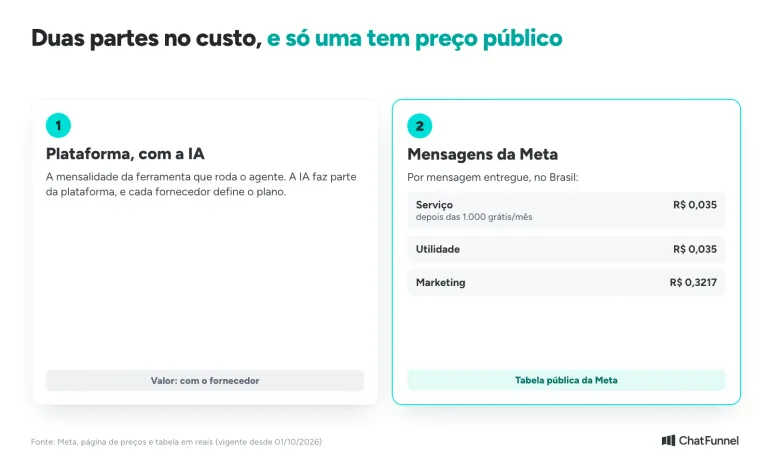
- Platform, including AI. This is the subscription for the tool running the agent, with AI included. Each provider sets its own plan.
- Meta messages. These apply to official API users.
For the second part, Meta's pricing table in reais, effective October 1, 2026, charges per delivered message:
| Category | When the agent uses it | Price per message in Brazil |
|---|---|---|
| Service | Reply to a customer inside the 24-hour window | R$ 0.035 after 1,000 free per number each month |
| Utility | Order-related notice outside the window | R$ 0.035 |
| Marketing | Campaign or cart reminder outside the window | R$ 0.3217 |
For Meta Business Agent, AI is charged per token: US$ 2.00 per 1 million tokens in Meta's Brazil table. According to the pricing page, that amount remains chargeable even inside an ad's free window. Read what changed for service messages in October in Meta will charge WhatsApp service messages.
What does WhatsApp require of an AI agent?
2 rules apply to any agent, whether from ChatFunnel or another provider. The first comes from WhatsApp Business messaging policy. A business may use automation to respond inside the 24-hour window. It must also provide a quick, clear, direct path to a person. The policy cites transfer to a human agent in the conversation, phone, email, website support, store visit, and a form.
The second comes from the WhatsApp Business Solution Terms dated March 6, 2026. The terms prohibit general-purpose AI providers from using the platform to offer their own assistant when it is the primary functionality. A store may hire an AI provider as a service provider. In that case, conversation data cannot train AI models. The exception is a model used exclusively by the business.
When does a WhatsApp AI agent transfer to the team?
Write the handoff as a rule with a destination. The guide on when AI should transfer customer service details triggers. Examples the Help Center gives for agent protection rules include a customer requesting a person, the agent not knowing the answer, the subject leaving scope, and customer dissatisfaction.
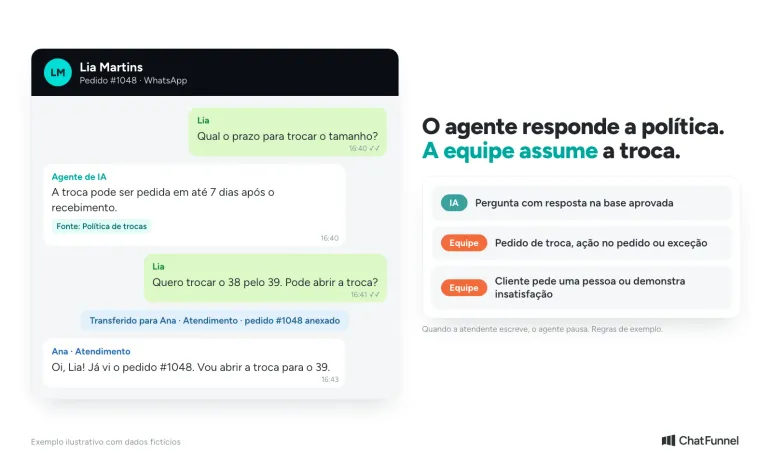
In ChatFunnel, conversations can be assigned, transferred, or sent to human service. When an agent writes in chat, AI pauses and the conversation continues with the person, as described in the agent linking tutorial. A customer can also end the session with an exit word defined by the store.
How to create a WhatsApp AI agent in ChatFunnel
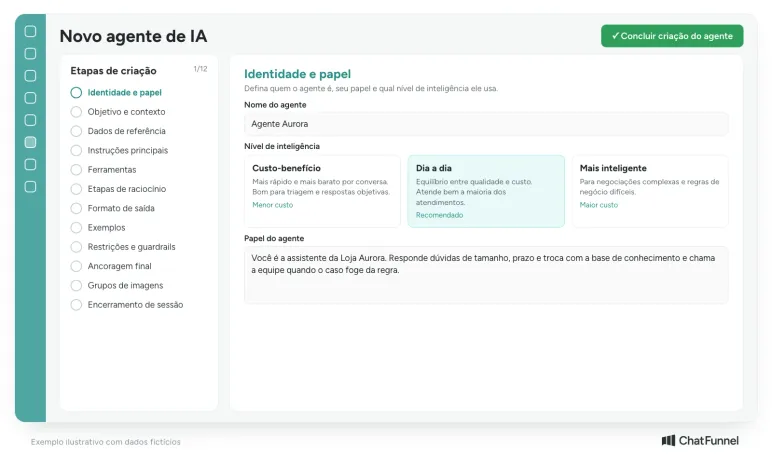
The agent creation tutorial takes configuration through stages. Here is the path:
- Identity and role. Give it an internal name, describe the role, and choose an intelligence level: cost-effective, everyday (recommended), or more intelligent.
- Objective and context. Write a specific conversation goal rather than just "serve customers", and describe the store.
- Reference data. Register FAQs, policies, and store materials as text or files.
- Instructions and tools. Define tone, what to collect, what to avoid, and which tools are active.
- Examples and safeguards. Show simulated conversations and write rules for handoff to a person.
- Prompt and test. Review the generated prompt and test the agent before publishing.
To limit agent hours, use the Service Window tool described in the agent hours tutorial. This is not Meta's 24-hour window: it defines the days and hours AI responds.
How to test a WhatsApp AI agent before activation
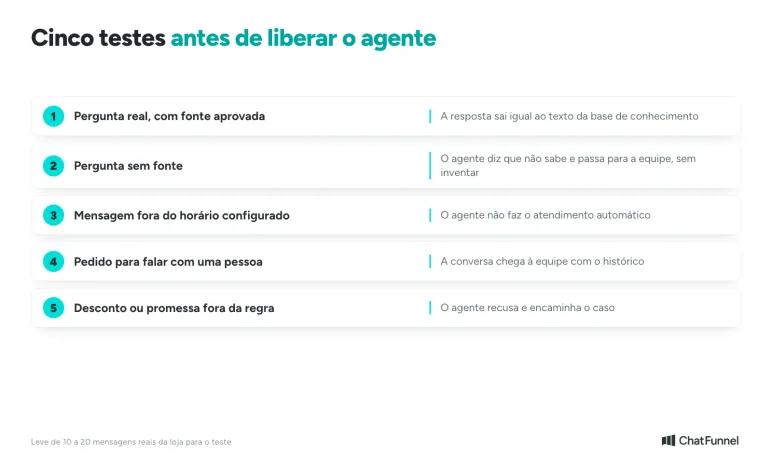
Test with questions store customers already ask, not ideal questions. Bring 10 to 20 real messages to the demo and internal test. Check each path:
- An answer covered by the knowledge base matches the approved text.
- A question without a source receives "I don't know" and a team handoff, without an invented answer.
- A message outside configured hours receives no agent response.
- A request for a person reaches the team with history.
- A discount or promise outside the rules is refused.
After launch, review conversations and requests for human help. AI-led sales has its own monitoring criteria. In ChatFunnel, conversation objectives help identify which conversations reached the chosen outcome, and the team corrects those that did not.
Where to start with a WhatsApp AI agent
Start with a subject the store can support with a source, such as exchange policy or delivery time, and write the team handoff before enabling the agent. Add both costs before subscribing: the platform with AI and Meta messages. If the store works in the app and wants product and price answers, Meta Business Agent merits a test. If it needs AI linked to orders, CRM, and the team, an official API agent is the path.
ChatFunnel brings together what this guide describes. It offers an AI agent with a store-approved knowledge base, tools the team enables or disables, rules for human handoff, and one inbox for WhatsApp and Instagram. ChatFunnel uses the official WhatsApp API, so the store needs its number connected through Meta Business Manager.
Explore ChatFunnel, the No. 1 AI for online stores
Frequently asked questions about WhatsApp AI agents
What is a WhatsApp AI agent?
It is an AI system connected to a business number. It interprets customer messages, consults sources the store enabled, answers or acts, and calls a person when rules require it. Unlike a menu chatbot, it understands questions written in the customer's own words.
How much does a WhatsApp AI agent cost?
Cost combines the platform, which already includes AI, and Meta messages. Under Meta's reais table effective October 1, 2026, service and utility cost R$ 0.035 per message and marketing R$ 0.3217, with 1,000 free service messages per number each month. Platform pricing varies by provider.
Is a WhatsApp AI agent free?
Not completely. Meta says Meta Business Agent has a free usage limit in the WhatsApp Business app, and above it there is a Meta One subscription, which is not available everywhere. On the official API, Meta charges for messages and the platform including AI has its own cost.
Is Meta Business Agent paid?
It depends on the environment. In the WhatsApp Business app, Meta describes a free limit and Meta One plans for more access, subject to availability. In the platform pricing table, Meta charges the agent per token: US$ 2.00 per 1 million tokens for Brazil.
Can I use an AI agent in the standard WhatsApp Business app?
Yes, with Meta Business Agent if available for your account. To connect AI to orders, CRM, and the team, a store uses an agent on the official API. Existing app users can keep the phone through coexistence, as explained in the official WhatsApp API guide.
Can a WhatsApp AI agent sell?
It can guide a sales conversation to the order link when the store enables that function and sources. AI recommends a product based on customer answers and transfers to the team when the case falls outside the rules. The limit is what the store authorized, not the agent.
What are the advantages of an AI agent for customer service?
The main advantages are replies at any hour and consistent answers because the same knowledge base serves every conversation. The team also gains time for cases needing a person. The benefit depends on well-written scope, approved sources, and tested handoffs.
Does an AI agent answer outside store hours?
Yes, unless the store limits its hours. In ChatFunnel, the Service Window tool defines the days and hours the agent responds. Outside that period, it does not provide automated service, and the store should test this behavior before activation.