An AI agent for ecommerce interprets a customer's message, looks up information, and uses available tools to conduct the conversation. It can answer a question, record an interest, or route a request. Each task needs a permission defined by the store and a process that works all the way through.
Imagine a customer asking about a backpack and, after learning its dimensions, requesting a discount the store does not offer. The agent can explain the current terms and ask the team to review the request. Granting the discount requires separate authorization. The conversation can still be useful when a person makes the decision.
With ChatFunnel AI agents, the business defines identity, instructions, knowledge, and tools. Customer service can use contact and CRM data, trigger automations, and hand conversations over to the team. The configured scope determines which of these paths are available to your agent.
Before buying or activating an agent, write down what it can read and what it can change. This distinction helps prevent discovering during the first customer conversation that the AI promised an action it could never complete.
What an AI agent does for an ecommerce store
The agent handles conversations governed by clear store rules that currently take up the team's time. Each use depends on a different source and permission:
| Agent use | What needs to be available |
|---|---|
| Answer questions about dimensions, materials, and compatibility | Approved product sheets and policies in the knowledge base |
| Provide order status | A platform connection and customer identification |
| Follow up on an abandoned cart | An abandonment notification from the store and a flow that identifies the contact |
| Record the product of interest | Permission to fill in contact fields and tags |
| Route an exception, such as a discount request | A configured destination on the team and confirmation of delivery |
The table shows why "having an agent" says little about what it can resolve. A product question depends on store-approved material, as the guide to AI for personalized products explains. An abandoned cart depends on a platform notification, covered in the guide to cart recovery. Recording interest only helps if it reaches the right contact in the ecommerce CRM.
The term agentic commerce usually describes another situation: agents that research and buy on a consumer's behalf. This guide covers the agent serving customers on the store's side and the permissions it receives.
Answering and taking action require different controls
A knowledge base helps the agent explain a policy. A connected tool lets it query or change data in another system. Instruction text guides behavior; the connection and its permissions define the access that actually exists.
As Anthropic explains: agents are systems that choose their next steps and tool use during a task. The same guidance recommends using the result of each action to check progress and planning for human intervention. For a store, that means distinguishing "I will forward your request" from "the team has received your request."
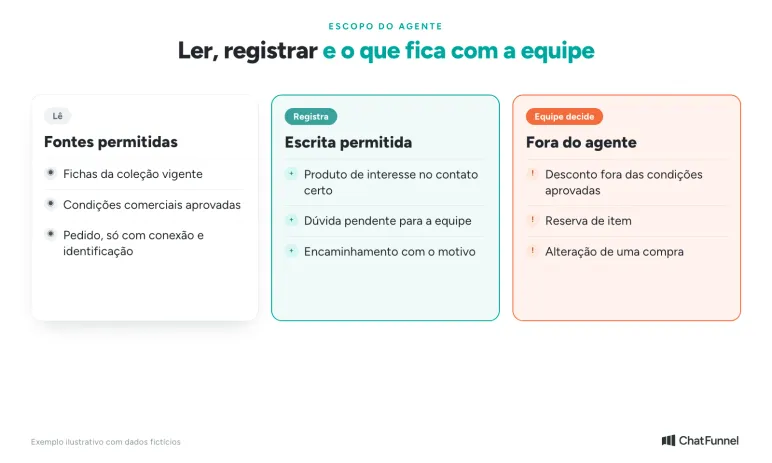
Consider four verbs when discussing scope with a provider:
| The agent will... | What needs to be available | What this does not authorize on its own |
|---|---|---|
| Look up | An appropriate source, such as an approved product sheet or current order data | Change the content it looked up |
| Answer | Enough information for the question and instructions for handling gaps | Invent a commercial term or fill in missing data |
| Record | The correct field and contact, with write permission | Mark a purchase as paid or closed |
| Forward | A configured destination and confirmation that the request arrived | Promise that a person has already read or resolved the case |
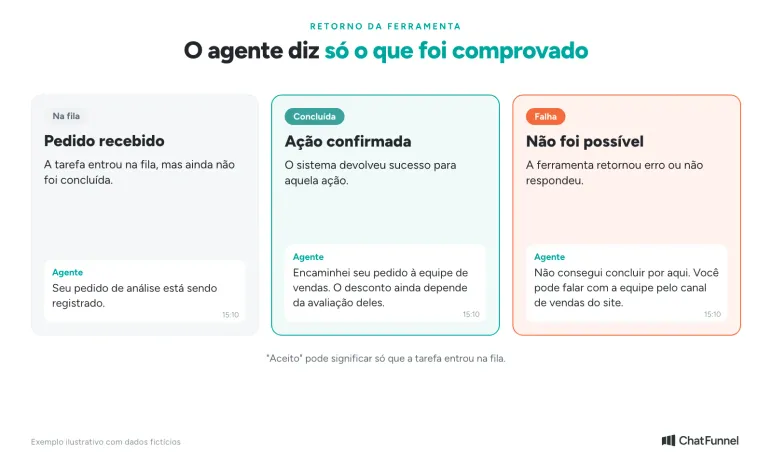
A tool confirmation also needs a clear meaning. An "accepted" response may only mean that a task entered a queue. Ask how the solution distinguishes a request received, an action completed, and a failure. The message to the customer should match the confirmed stage.
To compare a flow with fixed paths against an agent that interprets open-ended questions, see chatbot or AI agent for an online store. Here, the decision concerns what access to grant after choosing the task.
Write a scope sheet before configuring your AI agent
The sheet below is a proposed configuration for a fictional backpack store. It is intended for discussion with the person setting up the agent; it does not describe an active account or a ChatFunnel screen.
| Sheet field | Completed example |
|---|---|
| Goal | Explain backpack attributes and save the customer's interest so the team can continue |
| Allowed sources | Current collection product sheets and approved commercial terms |
| Question when context is missing | Ask for the backpack name or link before consulting the product sheet |
| Allowed writing | Record product of interest and pending question on the identified contact |
| Decision reserved for the team | Discount outside approved terms, item reservation, or purchase change |
| Exception destination | Sales team, with the conversation and reason for the handoff |
| Required confirmation | A success response before saying the record or handoff is complete |
| Failure or lack of access | Explain what remains pending and offer the alternative channel defined by the store |
Fill in the fields with names your team recognizes. "Send to sales" is incomplete if nobody knows which inbox receives the case or who monitors the queue. Recording "interested in a backpack" on a contact other than the buyer in the conversation is also unhelpful.
In ChatFunnel, the knowledge base lets users create content, upload files, and choose which materials each agent consults. Use this control to separate the current product sheet from an old collection. Instructions should explain what to do when information is missing, without treating the gap as permission to guess. The guide to AI getting prices and inventory wrong shows what happens when an old version remains active.
Fields and tags help preserve context. A record such as "interested in the Horizonte model; wants a discount considered" describes the customer's request. "Discount approved," by contrast, records a decision. The team needs to define who can write each one and when.
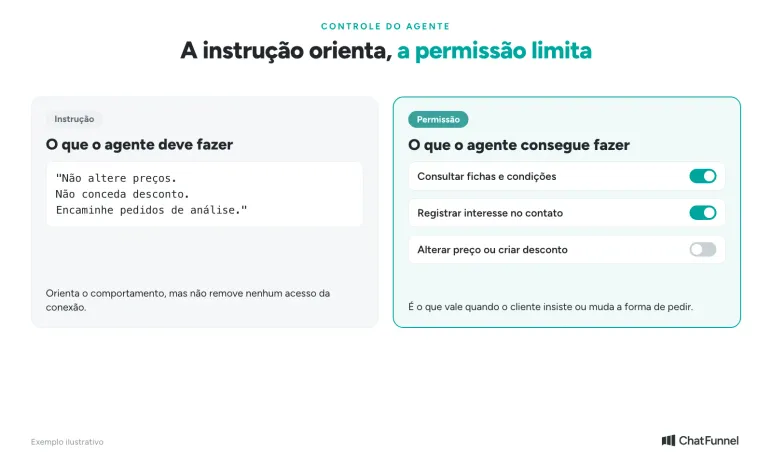
Ask the provider to show how it restricts tools available to the agent. Writing "do not change prices" in the instructions does not demonstrate that change access has been removed. The control must match what you authorized, even when the customer insists or changes how they ask.
A discount request outside the agent's permissions
In this illustrative example, a fictional store has not authorized its agent to create discounts. It can check approved terms, record interest, and forward requests for review. The percentage below belongs only to this scenario.
The customer writes: "I like the Horizonte backpack. If you give me 20% off, I'll buy it now." The agent checks the available terms and says that discount is not authorized. It can ask whether the customer wants the team to consider the request, without suggesting a positive answer is guaranteed.
If the customer agrees, the next step is to forward the request. The context message should preserve the backpack name, the requested discount, and the terms already communicated. The team receives a pending decision without having to restart the conversation from the first question. The guide to when AI should hand customer service over to a person explains this handoff.
When the system confirms the handoff, an appropriate response would be: "I have forwarded your request for review to the sales team, along with the model you chose. The discount still depends on their assessment." The delivery confirmation supports the first sentence. The second leaves the decision with the people authorized to make it.
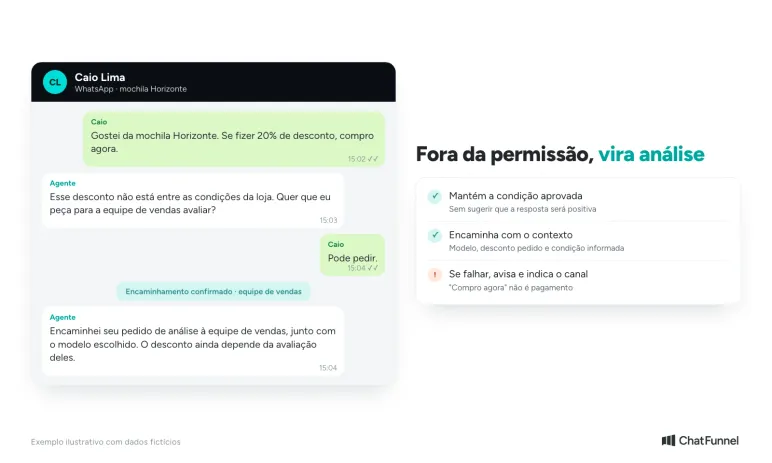
If the attempt fails, the agent needs to say so: "I could not complete the handoff here. You can contact the team through the sales channel listed on the website." The alternative channel must exist, be accessible, and appear in the instructions. Adapt the text to the route your store provides.
Do not promise a response in ten minutes when the store has not committed to that timeframe. Outside support hours, give the team's approved hours without treating the next opening as a promise of an individual response. The agent can continue answering a question about the backpack while the review is pending.
The outcome of this contact should show "review requested" or "handoff pending," depending on what happened. A purchase should only be recorded as completed when the relevant source confirms it. The phrase "I'll buy it now" expresses the customer's intent; it does not prove payment.
Request an AI agent demo before enabling actions
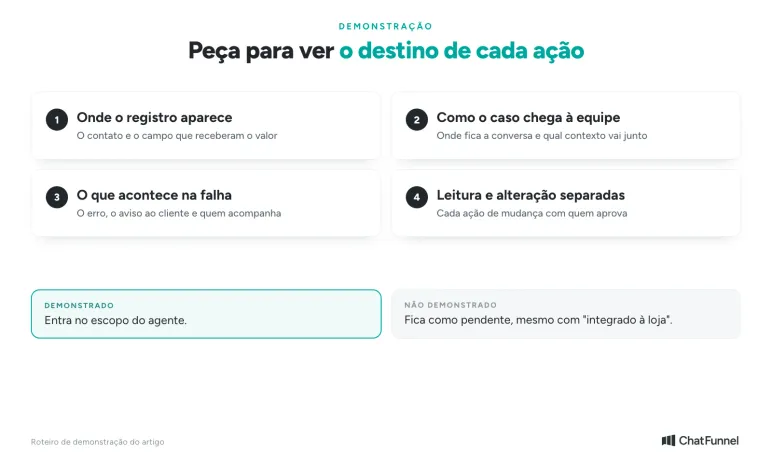
Bring the scope sheet to the demo and ask to follow an action to its destination. If the agent records a product of interest, check the contact and field that received the value. If it forwards a case, see where the team finds the conversation and what context accompanies it.
Also ask to see the path when the system cannot complete a task. The proposal should explain whether the agent receives an error, how it informs the customer, and who monitors the pending issue. Convincing chat text does not replace this process.
For an order lookup, confirm what data the connection provides and how the customer will be identified before access, as described in the guide to order status on WhatsApp. To change a purchase, discuss the specific action and who must approve it. Read access and change access should be discussed separately during implementation.
Detailed rules can vary across platforms and connections. Avoid signing up with the expectation that "integrated with the store" enables every action. Record the demonstrated capabilities and leave the others pending. The guide to testing an AI agent for an online store helps check cases once the scope is defined.
Enable only what you can monitor
When evaluating an AI agent for ecommerce, leave the meeting with the sheet completed and a person responsible for each exception. You should be able to explain which source supports an answer, which fields the AI can change, and what confirmation allows it to announce an action as complete. This scope can start with product questions and recording interest; other uses can follow once the store confirms the data and permissions they need. The map of AI applications for ecommerce helps identify those next tasks.
ChatFunnel brings agents, a knowledge base, and human customer service together in the same conversation flow. The knowledge base defines which materials each agent consults, instructions guide behavior, and enabled connections determine what it can look up and do. Bring the scope sheet to explore the solution within your store's limits and check how the team receives pending issues.
Meet ChatFunnel, the #1 AI for online stores
Frequently asked questions about AI agents for ecommerce
What is an AI agent for ecommerce?
It is a system that understands a customer's message, consults store sources, and uses tools to conduct customer service. It can answer, record information in the CRM, and forward cases to the team. What it actually does depends on the permissions and connections the store has enabled.
What is the difference between a chatbot and an AI agent?
A chatbot follows predefined paths, such as buttons and menus. An agent interprets open-ended questions, chooses which source to consult, and can perform actions in other systems within its authorization. The guide to chatbot or AI agent for an online store compares the two using store questions.
What can an AI agent do in an online store?
It can consult approved product sheets and policies, answer questions, record customer interest, and forward exceptions to the team. With the right connection, it can also look up orders or inventory. Changing a purchase, granting a discount, or marking a payment requires specific permission.
Can an AI agent give a discount?
Only if the store enables the action and defines the conditions. Without that permission, the agent explains the current terms and, if the customer wants, forwards the request for the team to review. It should not suggest that the answer will be positive.
How can I limit what an AI agent can do?
Through tool and connection permissions, not just instruction text. Writing "do not change prices" guides behavior but does not remove change access. Ask the provider to show which tools are enabled for the agent.
Does an AI agent need to be integrated with the store?
To explain policies and product details, a knowledge base with approved material is enough. To look up an order, inventory, or current price, it needs a connection to the store platform or system. "Integrated" does not mean every action is enabled.
How do I test an AI agent before activating it?
Bring the scope sheet to the demo and follow each action to its destination: where the record appears, how the handoff reaches the team, and what happens when the tool fails. The guide to how to test an AI agent in an online store helps you create these cases.