Using artificial intelligence for WhatsApp is worthwhile when a store receives the same questions every day and has written answers somewhere. Size, shipping, return deadlines and order status are typical cases. AI responds in seconds, including at night, and hands issues requiring a person to the team. It is not worthwhile when volume is low, store policy is not yet written or sales depend on long, personalized conversations.
WhatsApp is already the online store's counter. According to the 2026 Mobile Time/Opinion Box Super Panorama, 79.5% of users spoke with brands or companies through the app in the last 12 months (Mobile Time). The store owner's question is whether AI can handle these conversations without irritating customers or creating unnecessary costs.
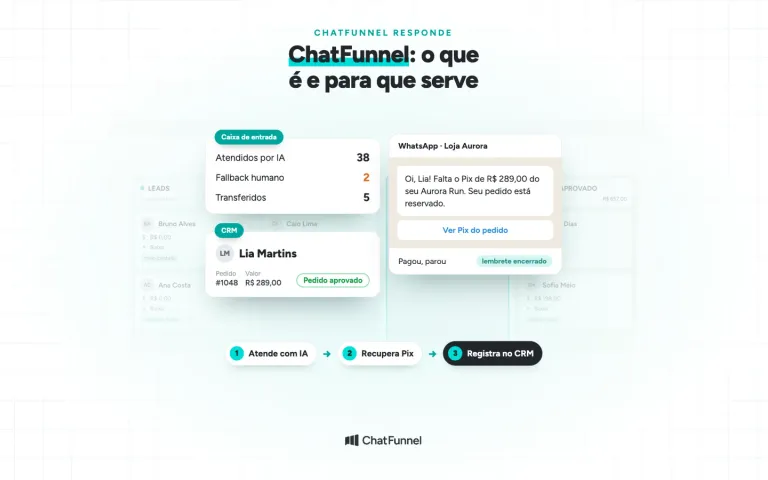
That is the work of ChatFunnel. ChatFunnel is a conversational sales intelligence platform for online stores: it handles WhatsApp and Instagram with AI, recovers abandoned carts and pending Pix and boleto payments, and records every conversation in the store CRM. The store decides what AI can answer and when the conversation goes to the team.
Below are signs AI is worthwhile for your store, cases where it is not yet worthwhile, its cost and how to test before enabling it for all customers.
What artificial intelligence does on the store's WhatsApp
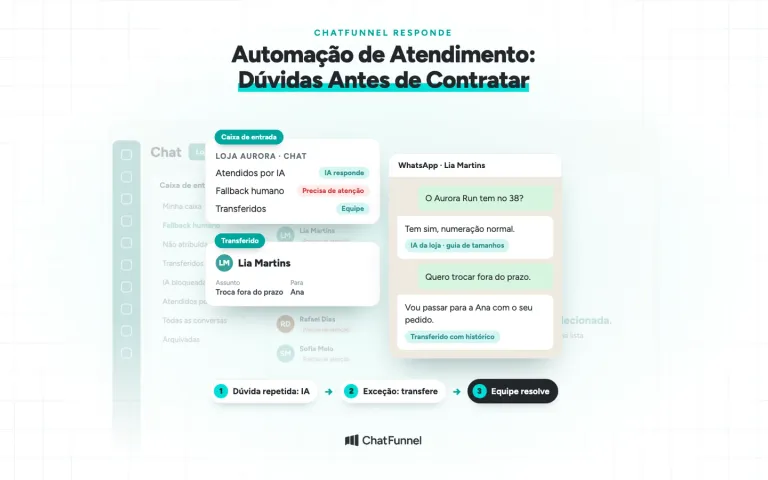
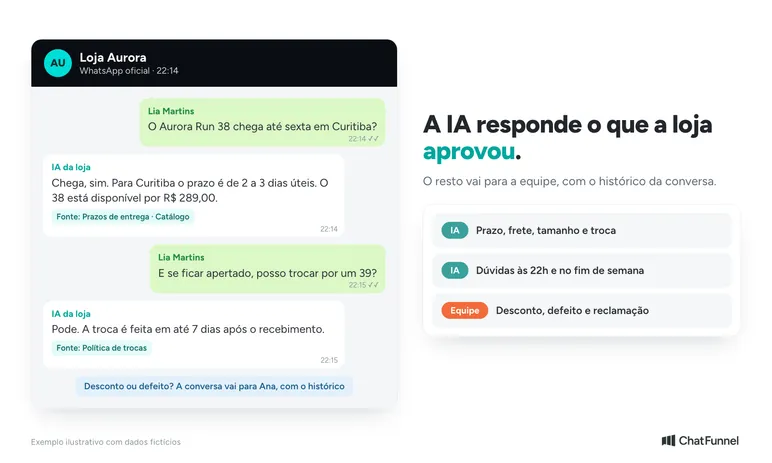
WhatsApp artificial intelligence is a digital agent that reads a customer message, consults store-approved information and answers in its own words. When the subject exceeds its limits, it calls a team member.
It differs from a menu bot, the kind that says 'press 1 for returns.' The menu works only when the customer chooses an option. AI understands the question as the customer writes it, such as 'will the size 38 sneakers reach Curitiba by Friday?'.
On WhatsApp, AI appears in 2 ways:
- In the WhatsApp Business app: Meta Business Agent, Meta's own AI, responds using profile and catalog data. The owner takes over on the phone.
- On the official WhatsApp API: an AI agent inside a support platform, connected to the knowledge base, CRM, orders and team.
The WhatsApp AI agent guide explains the difference in detail. Other store AI uses, from catalog to post-purchase, are in AI for ecommerce. Here the focus is the decision: is it worthwhile for your store?
When WhatsApp AI is worthwhile: 5 signs in an online store
AI is worthwhile when it solves a problem the store already experiences. Check your operation for these signs:
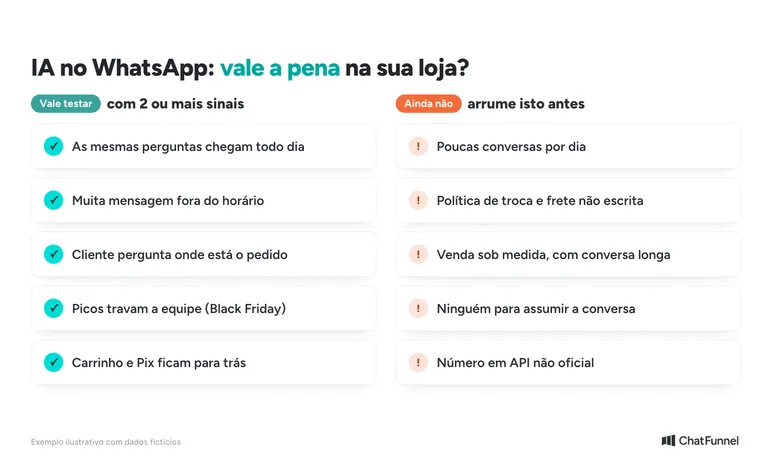
- The same questions arrive every day. Size, shipping, delivery time, returns and payment methods. If the team copies and pastes the same answer several times daily, AI takes over that part.
- Many messages arrive outside business hours. The 22:00 question goes unanswered until morning, and the customer buys elsewhere. AI responds 24 hours, including weekends.
- Customers ask where their order is. When the store platform is linked to support, the answer comes from actual order status. See how in WhatsApp order status with AI.
- Peaks overwhelm the team. Black Friday, a collection launch or influencer campaign. AI handles simple questions while the team focuses on people ready to buy.
- Carts and Pix payments are left behind. A conversation that resumes a stalled purchase must be sent at the right time. AI and automations send the reminder and stop when payment arrives.
If the store marked 2 or more signs, testing is worthwhile. If none apply, the problem may lie elsewhere, such as traffic or price.
When WhatsApp AI is not yet worthwhile
In some cases, AI creates more work than it solves. Common examples:
- Few conversations per day. If the store receives 10 messages daily and answers all quickly, the gain is small.
- Unwritten store policy. AI can only answer the return deadline correctly if it is written somewhere it can consult. Without it, AI invents an answer or stays silent. See how to avoid this in AI gets price and inventory wrong.
- Highly personalized sales. Custom items, fitted furniture quotes or engraved gifts require long conversations. AI can collect data, but a person closes.
- No one to take over. Every AI needs someone to receive what it cannot resolve. Without a team, the customer has no exit.
- A number on an unofficial API. Tools connecting WhatsApp by QR Code outside Meta rules risk blocking the number. AI should run on the official API or official app.
Not every customer likes automatic replies. In Opinion Box's WhatsApp in Brazil survey, 59% of consumers said they dislike automatic replies (Opinion Box). What matters is the response type. A correct, quick answer with an easy path to a person differs from a menu that traps customers.
Advantages and disadvantages of WhatsApp artificial intelligence
The table summarizes what the store gains and the care each gain requires.
| Advantage | What the store gains | Disadvantage or caution | How to address it |
|---|---|---|---|
| 24-hour response | Night and weekend customers receive support | AI may answer what it should not | List what it may and may not answer |
| Response in seconds | Fewer customers abandon while waiting | A fast wrong answer irritates more than delay | Review the knowledge base before enabling |
| Team freed from repeated questions | Salespeople focus on buyers | Customers wanting a person feel trapped | Always provide team handoff |
| Serves several customers at once | Black Friday peaks do not stall the store | More responses generate more billable messages | Add Meta costs before enabling |
| History of each conversation | The team knows what was already said | Personal data circulates in conversations | LGPD rules and per-person access |
Handoff to a person is a rule as well as good practice. WhatsApp Business policy permits automated replies within the 24-hour window. In return, the business must provide a fast, clear path to a human, such as transfer in the conversation (WhatsApp Business policy). The article on when AI should transfer support to a person shows how to build this rule.
How much WhatsApp AI costs for a store
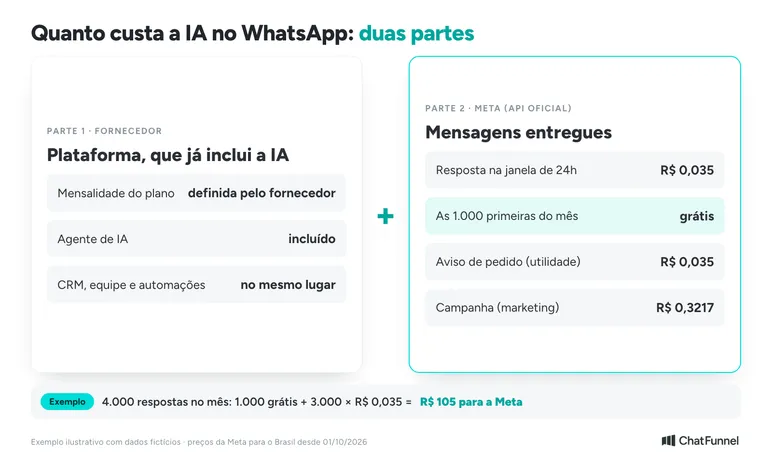
Using WhatsApp AI through the official API has 2 cost components:
- The platform, which already includes AI. This is the monthly fee for the tool running the agent. Each provider sets its own plan.
- Messages charged by Meta. These apply to official API users and are paid directly to Meta.
Since October 1, 2026, Meta also charges for replies inside the 24-hour window. An AI reply counts the same as an agent reply. For customers in Brazil, the rates in reais are as follows, according to Meta's pricing page:
| Message type | When the store uses it | Price per delivered message |
|---|---|---|
| Service | AI or team reply inside the 24-hour window | R$0.035, after 1,000 free per month |
| Utility | Order notice, generated Pix payment, shipping | R$0.035 |
| Marketing | Campaign, coupon, cart reminder | R$0.3217 |
Example: the store sends 4,000 replies in a month, including AI and the team. The first 1,000 are free. The remaining 3,000 cost 3,000 × R$0.035 = R$105. Details by category are in how much the official WhatsApp API costs.
In the WhatsApp Business app, Meta Business Agent has a free usage limit. Above it, Meta offers the Meta One subscription where available (WhatsApp Help Center). On the API, Meta charges for its agent by tokens at US$2.00 per million.
Free WhatsApp Business AI or official API agent: which to choose?
The 2 options solve different problems. The choice depends on operation size and what AI needs to consult.
| Criterion | Meta Business Agent (app) | AI agent on the official API |
|---|---|---|
| Who it suits | A small store providing support by phone | A store with a team, volume and platform integration |
| What AI consults | Profile, catalog and business data | Knowledge base, orders, CRM and connected systems |
| Who takes over | The owner, through the app | The team, in the inbox with history |
| AI cost | Free limit and Meta One plan | Included in the platform, plus Meta messages |
Anyone already using the app does not have to abandon the phone to use the API. Coexistence keeps the same number in both places. The steps are in the tutorial how to connect WhatsApp Business coexistence in ChatFunnel. In ChatFunnel, the connection requires a Meta-verified business and a message payment method registered with Meta.
How to test WhatsApp AI before enabling it for everyone
The safest way to find out whether AI is worthwhile is to test a single subject. Follow these steps.
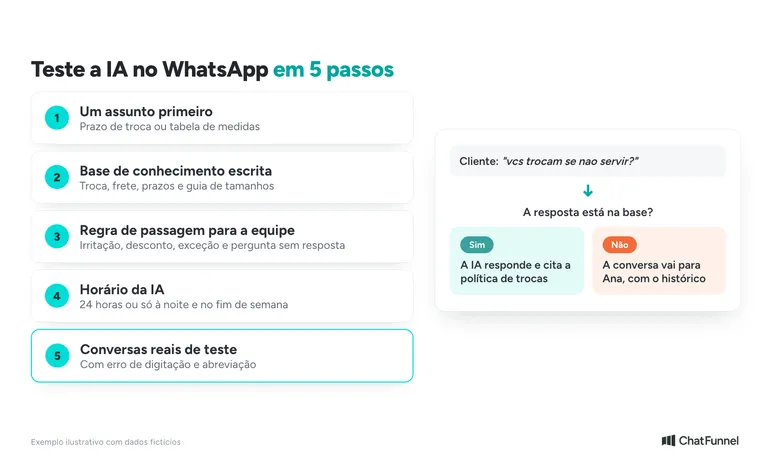
1. Choose a subject AI will answer first
Start with the most common question that has a definite answer, such as the return deadline or size chart. Leave out matters requiring analysis, such as a complaint or lost order.
2. Write the store knowledge base
Gather returns policy, shipping, deadlines and size guide in short texts. In ChatFunnel, the knowledge base collects this content, and the team selects what is active for each agent. The tutorial how to create and configure an AI agent V2 shows each configuration step.
3. Define when AI hands over to the team
Write the cases where AI calls a person: an upset customer, a discount request, an out-of-window return and any question without an answer in the base. In ChatFunnel, conversations can be assigned, transferred or sent to human support.
4. Configure AI support hours
AI can provide support 24 hours or only during certain times, such as nights and weekends. The tutorial how to configure the AI agent support window shows how to select days and hours.
5. Test with real conversations before opening to everyone
Send questions as customers write them, including typos and abbreviations. Check whether AI answers correctly, stops when it does not know and transfers to the team. The full guide is in how to test an AI agent for an online store.
How to know whether WhatsApp AI was worthwhile
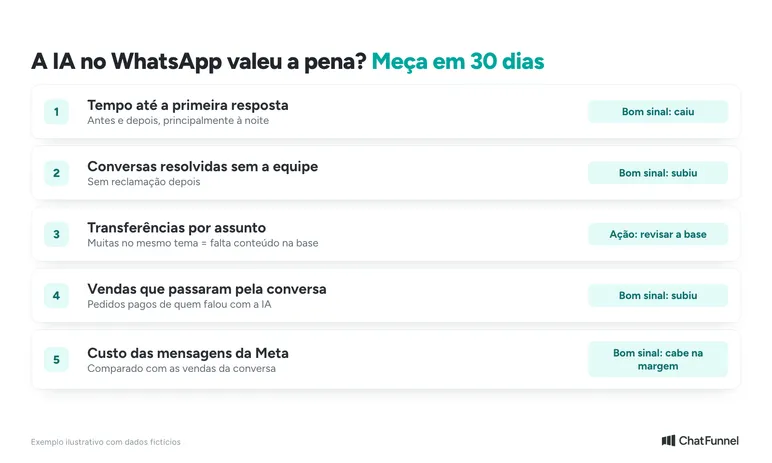
After 30 days, compare the store before and after the test. These numbers show whether AI helps:
- Time to first response. How long the customer waited before and now, especially at night.
- Conversations resolved without the team. The share AI completed alone without a later complaint.
- Transfers to the team. Many transfers on the same subject suggest missing knowledge base content.
- Sales that passed through the conversation. Paid orders from customers who spoke to AI before buying. See how to count them in how to measure sales assisted by AI support.
- Message cost. The amount Meta charged in the month compared with sales that came through the conversation.
If response time fell, sales through conversations rose and Meta cost fit within margin, AI was worthwhile. If the team spent the month correcting answers, return to the knowledge base before expanding.
WhatsApp AI is worthwhile when the store defines limits
WhatsApp AI is worthwhile for a store receiving many repeated questions, losing sales after hours or stalling at peaks. It is not worthwhile when store information exists only in the team's heads or no one can take over unresolved conversations.
A short test simplifies the decision: one subject, a written base, a handoff rule and 30 days of numbers. AI follows what the store approved and stops when the subject requires a person.
ChatFunnel is a conversational sales intelligence platform for online stores: it handles WhatsApp and Instagram with AI, recovers abandoned carts and pending Pix and boleto payments, and records every conversation in the store CRM. The AI agent answers using the approved knowledge base, transfers to the team in a unified inbox and checks order status when the store platform is connected. To use it, the store connects the number through the official WhatsApp API with a Meta-verified business. See also what ChatFunnel is and what it does.

Book a demo and see AI supporting the store in practice
Frequently asked questions about WhatsApp AI
Is WhatsApp AI worthwhile for a small store?
Yes, when the store receives the same questions daily or loses customers after hours. With few conversations and fast answers, the gain is small. In that case, Meta Business Agent in the WhatsApp Business app may be an initial test if available for your account.
Is WhatsApp AI dangerous?
WhatsApp AI is not dangerous when the store controls what it answers and who sees data. Risks include incorrect information or requesting unnecessary customer data. Use a reviewed base, limit subjects and follow Brazil's LGPD, as shown in LGPD and WhatsApp chatbots.
Is there free AI for WhatsApp Business?
There is a free limit. Meta Business Agent, Meta's AI in the WhatsApp Business app, is free up to a limit. Above it, Meta offers the Meta One subscription where available (WhatsApp Help Center). On the official API, the platform and Meta messages are paid.
How much does WhatsApp AI cost?
Cost has 2 parts: the platform, which already includes AI, and messages charged by Meta. Since October 1, 2026, each reply inside the 24-hour window costs R$0.035 after 1,000 free per month, according to Meta's pricing page. Changes are covered in Meta will charge per WhatsApp message.
How do you add AI to a store's WhatsApp Business?
There are 2 paths. In the WhatsApp Business app, the store activates Meta Business Agent when available. To connect AI to orders, CRM and team, the store connects its number to the official API through a platform and configures the agent with a knowledge base. With coexistence, the number continues working on the phone.
Does AI replace a WhatsApp agent?
No. AI handles repeated questions and after-hours support, while the team handles complaints, negotiations and cases outside the rules. WhatsApp policy requires a clear path to a person when the business uses automation.
Can WhatsApp block a number using AI?
Blocking risk comes from tools outside the official API and messages customers report, not from AI use. Meta limits or removes access for businesses receiving many reports or violating rules (WhatsApp Business policy). Use the official API or official app and respond only to people who contacted the store or agreed to receive messages.
Turning Visitors Into Loyal Customers 🩵