The WhatsApp Business badge is the verified icon beside a business name. It indicates Meta verified the account based on its activity or submitted information and documents. It does not indicate that a store delivers on time or that an order was paid.
Using the official API does not automatically grant the badge. The official API is a condition for requesting an Official Business Account, called an OBA, and Meta decides each request. App-only users have another route: a Meta Verified subscription. Neither guarantees approval.
ChatFunnel connects the number to the official API and brings conversations, AI, and team service together. It does not grant the badge; Meta verifies accounts. This guide explains where ChatFunnel helps with request criteria and what remains with Meta.
What is the WhatsApp Business badge and what does it establish?
According to the WhatsApp Help Center, the verified badge can appear in the calls tab, business profile, context cards, conversations, and incoming calls. Some verified accounts belong to well-known brands. Others subscribe to a Meta product such as Meta Verified. Seeing the badge therefore does not reveal which path a business used.
People searching for a "green badge" often find old text. Current Meta API documentation describes a blue check beside the business name, and this guide follows that documentation.
The badge helps customers recognize an account. It does not prove an order was paid, shipped, or delivered, because those facts depend on purchase records. A missing badge does not prove a store is fake either. Meta Verified plans include impersonation protection, but that does not replace the customer's own channel check.
Where the WhatsApp Business badge fits in the store journey
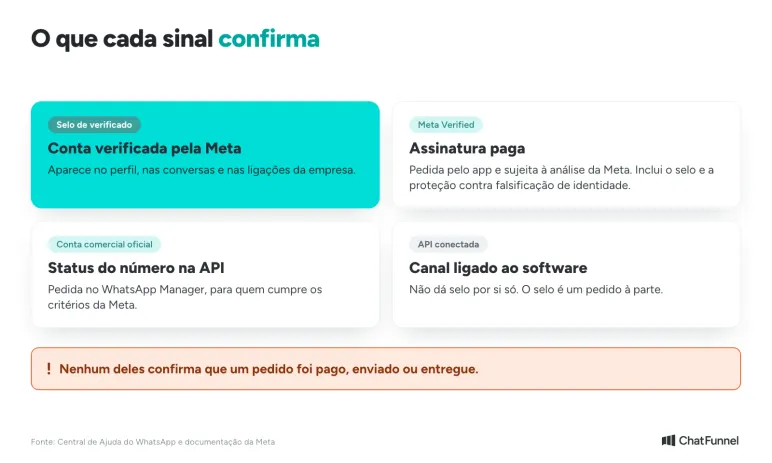
The badge matters where customers decide whether to trust the number. At Visitors, someone arriving through a website button or ad sees the business name before writing. In Conversations, the profile helps customers recognize the store. At Paid Order, they check the number before paying a Pix or boleto. In Post-purchase, shipment notices and payment requests arrive from a channel the customer already recognizes.
Do official WhatsApp API users receive the verified badge?
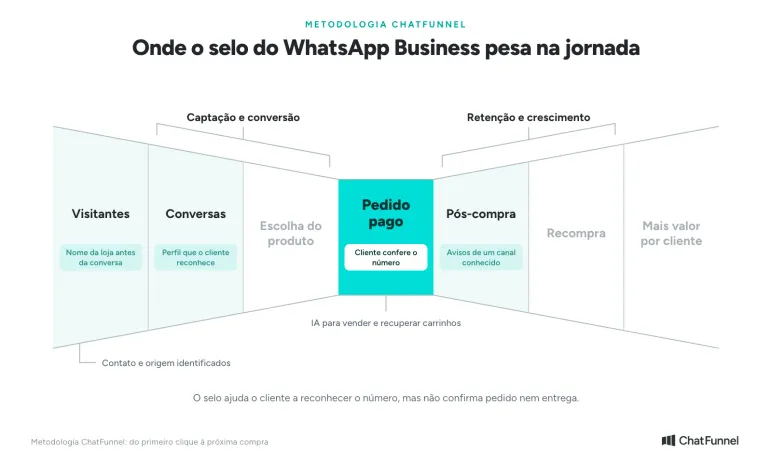
No. Connecting a number to the official API does not add a badge to the profile. It is the starting point: Meta does not grant OBA status to app numbers, and requests exist only for platform numbers. According to Meta documentation, an OBA is a business number verified as an "authentic and notable" brand under specific criteria. An account can therefore meet all 5 criteria and still be denied.
The table shows what happens in each situation according to Meta.
| Number situation | Does the badge appear? |
|---|---|
| Only in the WhatsApp Business app | Not through OBA, because Meta does not grant that status to app numbers. The path is Meta Verified |
| Connected to the official API without requesting OBA | No. The display name appears to people who saved the number, but the number does not appear in app search |
| Official API, 5 criteria met, and request approved | Yes, with a blue check beside the name, and the number appears in app search |
| Official API and request denied | No. A new request is possible only after 30 days, and the business profile remains editable |
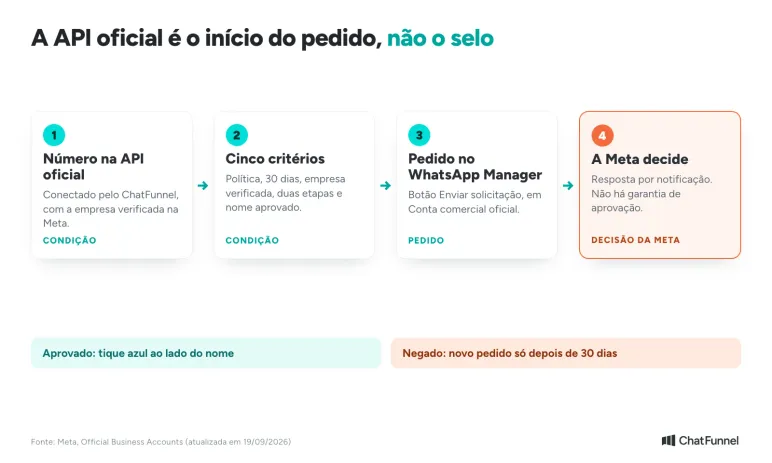
Businesses using coexistence, with the app and ChatFunnel on the same number, still need to confirm one point. The OBA documentation consulted did not state whether such a number can receive the status. Ask Meta, API provider support, or your Meta contact before planning the request.
How ChatFunnel fits into an Official Business Account request
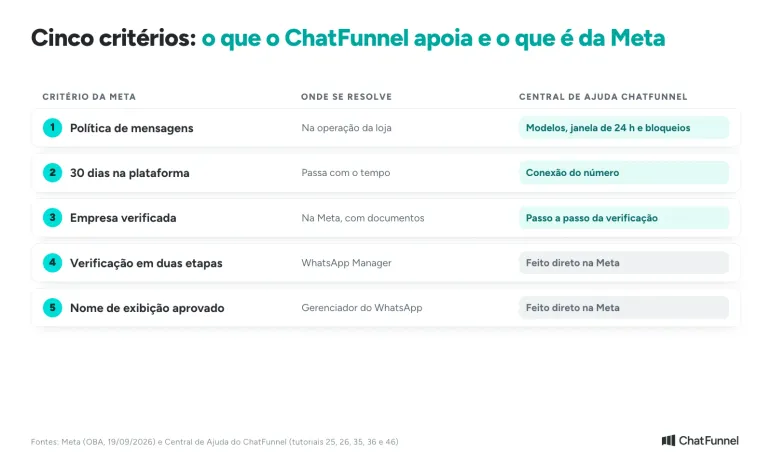
ChatFunnel connects the number to the official API and organizes customer service. The OBA request is made in Meta's WhatsApp Manager, and only Meta approves it. The table divides the work across the 5 criteria.
| Meta criterion | Where it is addressed | ChatFunnel support |
|---|---|---|
| Comply with messaging policy | In daily store operations | Help Center articles on message templates, the 24-hour window, and block reasons |
| Registered for 30 days | Passes with time from number registration on the platform | Number connection through the official API |
| Verified business portfolio | In Meta, using business documents | Verification instructions |
| Two-step verification | In WhatsApp Manager | Completed directly in Meta |
| Approved display name | In WhatsApp Manager, where the photo and visible name are also changed | Completed directly in Meta |
For messaging policy, ChatFunnel helps with channel use: campaigns using approved templates, respecting the 24-hour window, and monitoring number quality. OBA requires policy compliance, and Meta may limit or remove access for noncompliance. For campaign sending, the guide to mass messaging through the official API explains the path.
How to obtain the WhatsApp Business badge: Meta Verified or Official Business Account
The table shows each path under Meta documentation consulted on October 9, 2026.
| Item | Meta Verified | Official Business Account (OBA) |
|---|---|---|
| Where to request | In the WhatsApp Business app under Settings or Business tools | In WhatsApp Manager for an API-connected number |
| Cost | Monthly subscription | Documentation does not cite a request fee. The number must already be on the API, with its costs |
| Who qualifies | People who see the Meta Verified option in the app. Meta determines availability based on business activity | Number registered on the platform for 30 days, verified business, two-step verification, and approved display name |
| App number | Yes, this is its path | No: Meta does not grant OBA to app numbers |
| Timeframe | Up to 3 business days after payment, possibly longer | Meta sends the result by notification |
| If rejected | The Help Center lists common reasons | A new request only after 30 days |
In practice, app-only users have Meta Verified as their path. Businesses that connected a number to the API may request OBA. Provider articles often say OBA requires press coverage. Meta's official page, updated September 19, 2026, does not mention press and lists 5 criteria. It also says Meta assesses whether the brand is "notable", so approval is not automatic. Be wary of anyone charging to "guarantee" approval.
How to request an Official Business Account in WhatsApp Manager
With the 5 criteria met, follow these steps:
- Open WhatsApp Manager and go to Overview.
- Click the business phone number and enable two-step verification if it is not already active.
- Under Phone numbers, Profile, and Official Business Account, select Submit request.
If you meet the criteria and the button does not appear, Meta advises contacting your Meta representative, API provider support, or Meta support. If denied, the button remains blocked for 30 days. Use that time to check criteria rather than blindly resubmitting the same data.
Business Verification is the step that causes the most delays. The ChatFunnel Help Center tutorial covers documents and form completion. It mentions a badge beside the business name in Business Manager, which is not the WhatsApp badge: it only indicates the business was verified with Meta. Businesses still connecting a number can find requirements in how to purchase the official WhatsApp API for ecommerce.
How much does the verified WhatsApp Business badge cost?
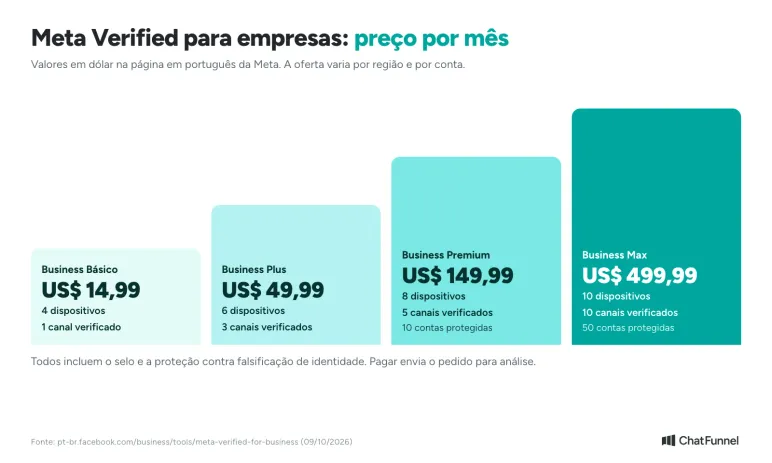
Meta Verified is a monthly subscription. On Meta's Portuguese-language page, business plans appear in dollars:
| Plan | Per month | Connected devices | Verified channels |
|---|---|---|---|
| Business Basic | US$ 14.99 | 4 | 1 |
| Business Plus | US$ 49.99 | 6 | 3 |
| Business Premium | US$ 149.99 | 8 | 5 |
| Business Max | US$ 499.99 | 10 | 10 |
All include the badge and impersonation protection. Meta says plans and availability vary by region and account. Budget using the value the app shows for your number. A table copied from another article is insufficient.
Payment does not complete verification. According to the Help Center, payment submits the request for review, which can take up to 3 business days or more. Meta has also begun offering Meta Verified benefits within Meta One, a limited-test plan. The badge applies only after the business is verified, and verification is neither automatic nor guaranteed.
OBA documentation does not cite a request fee. A store using the API pays for messages, as detailed in the guide to service message charges.
How to request Meta Verified in WhatsApp Business
Before paying, check 3 points:
- Open the app, go to Settings or Business tools, and look for Meta Verified. If it does not appear, the Help Center says the feature is not yet available for your account. Do not try to solve this by buying a promise of approval.
- Check that the business name matches the profile name. The profile information Help Center page explains that without a match Meta cannot verify the business.
- Leave business and account details as they are. Changing this information after subscribing may cancel the subscription.
Once those are in order, choose a plan, select the accounts to verify, and make the first payment. The WhatsApp Business Meta Verified page describes these steps. Then wait for review. If it fails, Meta identifies common reasons, and correction should precede any new attempt.
The badge does not prove delivery or authorize campaigns
The badge helps identify the account. Delivery time, product quality, and exchange progress remain the store's responsibility. Using the badge to end an order question leaves the customer's question unanswered.
Businesses planning campaigns should also know verification does not remove channel rules. The messaging policy requires permission for business-initiated contact and honoring opt-out requests. Meta may limit or remove access for noncompliance. A "badge with unblockable mass messaging" proposal combines promises incompatible with published conditions.
How to respond when a customer doubts the number
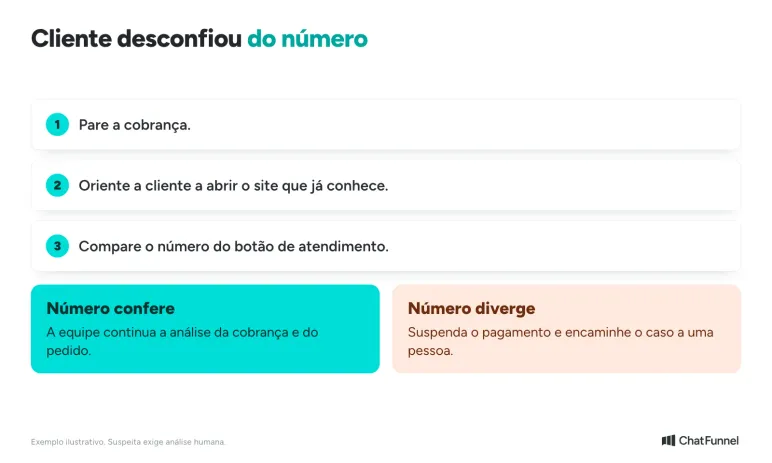
Consider a fictional example: a lighting store customer receives a WhatsApp payment request and asks whether the number belongs to the business. She sends a screenshot with the store's photo but a phone number different from the one on its site.
Customer service should stop the payment request and direct her to open the site she already knows herself and check the contact button. Sending another link in the same suspicious conversation does little to verify it. A possible response to adapt to your store's confirmed channels:
Before paying, open the store website you already know and check the number on the service button. If the contact you received differs, suspend payment through that contact. Our team will check the message and order through the channel listed on the website.
Even if the number matches, the team still needs to examine the payment request. Recognizing the channel does not confirm the amount or order status. If there is a discrepancy, route the case to a person and record what needs investigation. Do not request passwords, access codes, or full card details to prove customer identity.
This guidance can be part of the ChatFunnel knowledge base with store-approved answers. AI can explain how to check the channel, while the team investigates the suspicion. Define handoff to a person for a different number, unknown payment request, or explicit request for human help. The guide to transferring AI customer service to a person shows how to preserve context during handoff.
Also test the case where the website is down. The response should acknowledge that verification was not completed and route service without inventing an alternative channel or pressing for payment.
What to ask a provider before buying
Request a proposal naming each deliverable: verification subscription, badge request support, API connection, or customer service software. A provider can help submit information, but Meta's decision is outside its control. Bring these questions to review the proposal:
- Which verification program is it, and where does the store track the request?
- What amount pays Meta's subscription and what pays the provider's service?
- What will be delivered if Meta rejects the request?
- Who will have account access, and how does the store retain control of the number?
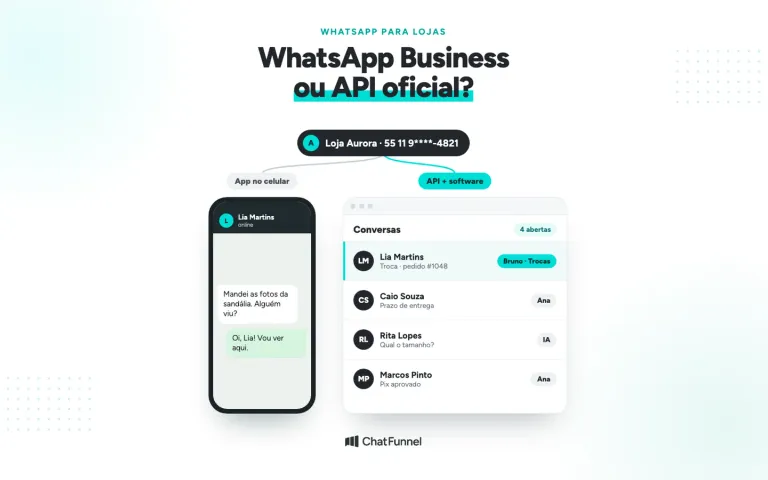
Also request a customer service demo if it is part of the package. Check how the team receives an identity question and takes over the conversation. The comparison of WhatsApp Business and the official API helps choose according to store tasks.
Which path should you request for the badge?
If the number is in the app, the path is Meta Verified, and the first step is checking whether the option appears for your account. If the number is on the official API, consider requesting an Official Business Account after checking the 5 criteria. The API is the starting point, and Meta decides. In both cases, keep the process name and response, and distrust any guaranteed approval promise.
The badge helps customers recognize the number but does not resolve an order question. That answer comes from customer service, where ChatFunnel fits. It connects the number to the official API and brings WhatsApp and Instagram conversations into one inbox. AI answers using the store-approved knowledge base, and the team takes over when a person is needed.
The ChatFunnel Help Center covers number connection, business verification, and correct channel use. The OBA request and badge decision remain with Meta. To use WhatsApp through the official API, the store needs its number connected via Meta Business Manager.
Explore ChatFunnel, the No. 1 AI for online stores
Frequently asked questions about the WhatsApp Business badge
How do I obtain the WhatsApp Business badge?
There are 2 paths. App users subscribe to Meta Verified under Settings or Business tools if the option appears. Businesses with a number on the official API request an Official Business Account in WhatsApp Manager. Meta reviews both requests, and neither guarantees approval.
Do official API users receive the WhatsApp badge?
Not automatically. The official API is required to request an Official Business Account, but the number must meet 5 Meta criteria, including a verified business and two-step verification, and Meta decides. If denied, another request can be sent only after 30 days.
Can ChatFunnel obtain the badge for my store?
No. Meta grants the badge. ChatFunnel connects the number to the official API, and its Help Center explains business verification and correct channel use, which form part of the criteria. The request is made in WhatsApp Manager, and no provider can guarantee approval.
How much does the verified WhatsApp Business badge cost?
Meta Verified is a monthly subscription. Meta's Portuguese-language page shows plans from US$ 14.99 to US$ 499.99 per month, and offers vary by account. Official Business Account documentation does not cite a request fee, but the number must be on the API, which has its own costs.
What is the difference between Meta Verified and an Official Business Account?
Meta Verified is a paid app subscription including a badge, impersonation protection, and support. An Official Business Account is a status requested for API numbers with 5 criteria, including a verified business and two-step verification. Meta does not grant OBA to app numbers.
Meta Verified does not appear in my WhatsApp Business. What should I do?
According to the WhatsApp Help Center, if the option is absent from Settings or Business tools, the feature is not yet available to that account. There is no shortcut: distrust anyone selling a promise of approval and check again when Meta enables it.
How long does the badge take to appear?
For Meta Verified, review can take up to 3 business days after payment, sometimes longer. For an Official Business Account, Meta notifies the result and does not state a timeframe in the documentation. If rejected, another request can be submitted only after 30 days.
Does the badge prevent scams using the store's name?
Not by itself. The badge helps customers recognize the account, and Meta Verified plans include impersonation protection. The store should still tell customers to check the number on a website they already know before paying any request.