To make WhatsApp reply automatically, enable greeting and away messages in the WhatsApp Business app. Both are free and located under Tools. They answer first contacts and messages received when the store is closed. To answer product, order and payment questions without someone typing, the store needs AI or automation connected to the official WhatsApp API.
Regular personal WhatsApp does not have automatic replies. The feature exists only in WhatsApp Business, the free business app, and the official API used by support platforms.
In this guide, configure the app's 3 tools, understand what Meta AI does in WhatsApp Business and see when a store needs a platform such as ChatFunnel, which responds with AI using store data.
| What you want | Where to configure it | Meta cost |
|---|---|---|
| Respond to first contact | Greeting message in the WhatsApp Business app | Free |
| Say the store is closed | Away message in the WhatsApp Business app | Free |
| Quickly answer repeated questions | Quick replies in the app (a person still sends them) | Free |
| AI replies in the app | Meta Business Agent under Tools (gradual rollout) | Check in the app |
| AI and flows using orders, inventory and payments | Official API with a support platform | Messages charged by Meta |
In ChatFunnel, the automatic response begins in Conversations: it receives customers arriving from ads, the website or Instagram. With AI, it helps with Product selection and Paid order, answering questions about size, shipping and payment. After purchase, it enters Post-purchase with status and tracking.

How to set up automatic messages in WhatsApp Business
WhatsApp Business has 2 messages that send automatically: greeting and away. Both are under the app's Tools tab on Android and iPhone. The phone must be connected to the internet for them to be sent, according to the WhatsApp Help Center.
How to enable the greeting message
The greeting goes to someone writing for the first time or returning after 14 days without conversation. To enable it:
- Under Tools, tap Greeting message.
- Enable Send greeting message.
- Tap the text to edit it, then tap OK.
- Under Recipients, choose Everyone, Everyone except my contacts, Everyone except or Only send to.
- Tap Save.
The official steps are in how to use greeting messages. Example text for a store:
Hi! This is Loja Aurora. Would you like help choosing a product or discussing an order? If it is an order, send the number and we will check.
The greeting does not create a menu that routes the conversation automatically. It only organizes the arrival. A person still reads the customer's response and continues support.
How to configure the away message
The away message says the store is not currently providing support. To enable it:
- Under Tools, tap Away message.
- Enable Send away message.
- Tap the text to edit it, then tap OK.
- Under Schedule, choose Always send, Custom schedule or Outside business hours. The last option appears only if hours are registered in the business profile.
- Under Recipients, choose who receives it.
- Tap Save.
See the official away message instructions. Use the store's actual hours, including holidays:
We received your message! Our team is available Monday through Friday, 9:00 to 18:00. We will continue here when we open. If it concerns an order, leave the number to speed things up.

How to create quick replies for the team
Quick replies are shortcuts for text and media the store sends frequently, such as a returns policy or size chart link. They do not send automatically: a person selects and sends them. To create one:
- Under Tools, tap Quick replies.
- Tap the plus sign.
- Write the message and define a shortcut, such as /troca.
- Tap Save.
In the conversation, type a slash (/) and choose the reply. The app stores up to 50 quick replies and creates some automatically from profile details such as address and hours. Details in how to use quick replies. For text, copy the 30 automatic message templates.
Does WhatsApp Business have AI to answer customers?
Yes, with limits. The app gained Meta Business Agent, an AI agent from Meta. It learns from the business's conversations, website and catalog and can answer questions about products, price, payment and shipping. According to the WhatsApp Help Center, the feature is still rolling out gradually in some countries and to some businesses. If the AI agent option does not appear under Tools, it is not yet available to your account.
Two points stores should know before activating it:
- When Meta Business Agent is on, greeting and away messages are disabled. To use both again, the agent must be deleted.
- Meta AI learns from the website, catalog and conversations. The Help Center does not mention a connection to the online store order or payment status, so confirm this before relying on AI for post-purchase support.
On the official API, Meta Business Agent responses are charged by token, at US$2.00 per million, according to Meta's pricing page. In the app, check the activation screen for any charge to your account.
WhatsApp replying automatically: why and how to disable it
If business WhatsApp is replying automatically without you requesting it, one of these 3 settings is enabled:
| Cause | How to disable |
|---|---|
| Greeting or away message | Under Tools, open each and turn off Send greeting message or Send away message |
| Meta Business Agent, Meta's AI | Under Tools, tap Your AI agent, then AI responses, and choose Paused for new conversations, but learning. For one conversation, turn off AI responses inside it |
| A platform or automation connected to the number | Pause the flow or AI agent in the platform using the official API |
Meta Business Agent can also be activated through Meta Ads Manager for conversations from ads, according to the WhatsApp Help Center. If the automatic reply appears only for people arriving from an ad, check this setting.
Where the WhatsApp Business app stops
The app handles the arrival of a conversation well. The problem arises when a customer asks something dependent on store data: 'is size 38 available?', 'did my Pix payment arrive?', 'when will my order arrive?'. Greeting, away and quick replies do not check inventory, payments or tracking. Someone must open the online store, look it up and respond.
Other limits that matter as a store grows:
- many agents on the same number are difficult to organize using only a phone;
- you cannot create flows with stages, conditions and handoff to the right person;
- no message is automatically sent by a store event such as an abandoned cart, generated Pix payment or shipped order;
- history is not linked to a CRM with orders and customer spending.

When to move to the official WhatsApp API
Migration is worth considering when a store wants WhatsApp to answer purchase and post-purchase questions automatically too. On the official API, a support platform connects WhatsApp to the online store, AI and CRM. Signs it is time:
- The same inventory, shipping or order question takes hours of team time every week.
- Messages go unanswered after hours and the store loses sales.
- More than one person supports customers on the same number.
- The store wants to recover abandoned carts and pending Pix payments with automated messages.
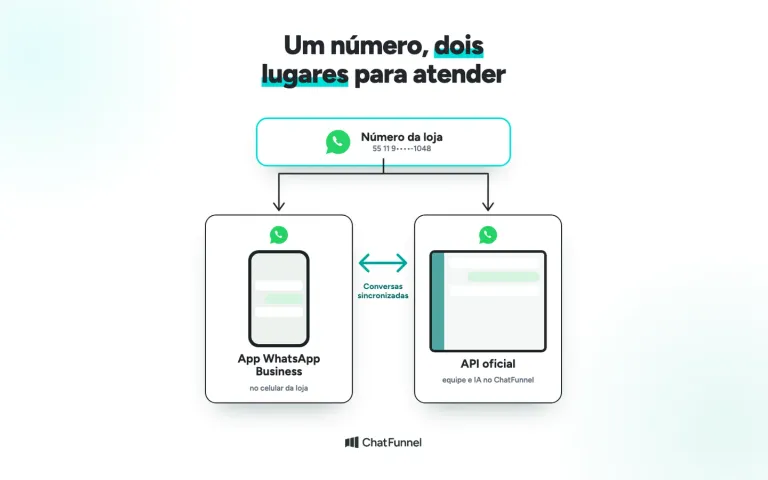
Migrating does not require abandoning the phone. With coexistence, the same number remains in the WhatsApp Business app and also works on the API through ChatFunnel. ChatFunnel requires a Meta-verified business account, as explained in the tutorial on WhatsApp Business coexistence in ChatFunnel.
On the API, store responses have a cost. Since October 1, 2026, Meta charges R$0.035 per service message after 1,000 free per month per number. The rules are in Meta will charge per WhatsApp message, and the full comparison is in WhatsApp Business or the official API.
How to make WhatsApp reply automatically with AI on the official API
On the API, WhatsApp replies automatically in 2 ways that can work together.
Automated flows. In ChatFunnel, a flow begins with a trigger, such as 'WhatsApp message received' containing a keyword, and sends a response, buttons or media within the 24-hour window. The tutorial how to create the first automation in ChatFunnel shows the steps.
AI agent. The agent answers in natural language using the store's knowledge base and transfers the conversation to the team when it does not know the answer. You can define support days and hours in the agent's Support Window tool.

Start with a short flow: identify the issue, answer using information the store has and let the customer speak to a person. Inventory, price and delivery time by postal code need a current source. When AI lacks the data, it should hand over to the team instead of guessing. See when AI should transfer support to a person.
Test before enabling automatic replies
Use test numbers and check each situation before enabling for customers:
| Situation | What to check |
|---|---|
| First contact | Does the greeting reach the intended recipients? |
| After-hours message | Does the away message show the correct hours? |
| Question without a configured answer | Does the conversation reach the responsible person? |
| Customer asks to speak to someone | Can they exit the flow? |
| Information unavailable | Does AI avoid inventing an answer? |

If a case fails, adjust before expanding. The checklist for setting up automated support from scratch helps define what must work on day 1.
How to measure whether automatic replies help sales
A quick greeting does not prove the question was resolved. Compare similar periods and separate 3 times: first automated response, first human response and request resolution.
Also record repeat conversations on the same subject and confirmed orders originating from support. If the store cannot link conversation to order, treat the sale as a store result without crediting all of it to automation. To measure AI-assisted sales, see how to measure AI-assisted sales.
Start with the app and move to the API when questions depend on store data
For a small store, greeting, away and quick replies in WhatsApp Business already handle the customer's arrival at no cost. Configure all 3 today with short text and actual business hours.
When questions depend on inventory, payment and orders, the app does not answer on its own. It is time to consider the official API with AI connected to the store and calculate message costs before migrating.
ChatFunnel connects the store's WhatsApp to the official API, with an AI agent responding using the store's knowledge base, automated flows, team handoff and CRM in one place. With coexistence, the number stays in the phone app.
Book a demo and see AI supporting the store in practice
Frequently asked questions about making WhatsApp reply automatically
How do I make WhatsApp reply automatically?
Install WhatsApp Business, open Tools and enable Greeting message and Away message. The greeting responds to first-time messages, and away responds outside business hours. For answers with store data, use AI on the official API.
Can I set up automatic replies on regular WhatsApp?
No. Regular WhatsApp has no greeting, away or quick replies. To use automatic replies, a store needs WhatsApp Business, which is free and can use the same number.
Are WhatsApp Business automatic messages free?
Yes. Greeting, away and quick replies have no app charge. In the app, marketing messages are paid: the business broadcast list. On the official API, responses are charged after 1,000 free service messages per month per number.
Why is the greeting message not being sent?
Check recipients, the 14-day rule and whether Meta Business Agent is active. With Meta's AI agent on, greeting and away messages are disabled. The phone must also be connected to the internet.
Why is my WhatsApp replying automatically?
Most often the greeting, away message or Meta Business Agent is active. Check Tools in the WhatsApp Business app and turn off what you do not want. If the number is connected to a platform through the API, pause automation there.
Do automatic messages work on WhatsApp Web?
According to the WhatsApp Help Center, greeting and away messages are configured in the phone app, which needs internet access. Quick replies appear in WhatsApp Web, but media files cannot be used in them there.
When is it worth switching from the app to the official API?
When the store needs to answer inventory, payment and order questions without a person typing, or when several people support customers on the same number. With coexistence, the number remains in the app and also works on the API.
ChatFunnel | Turning Visitors Into Loyal Customers 🩵