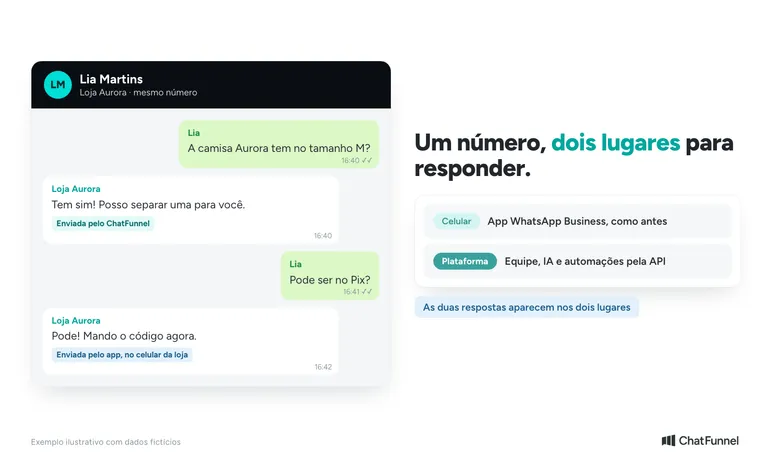
WhatsApp coexistence lets you use the same number in the WhatsApp Business app and Meta's official API at the same time. The store continues replying on its phone while the team serves customers through a platform connected to Meta. Individual conversations appear in both places.
Not every number qualifies. Meta assesses eligibility, and some app features are unavailable, such as groups and new broadcast lists.
ChatFunnel is a conversational sales intelligence platform for online stores: it handles WhatsApp and Instagram conversations with AI, recovers abandoned carts and pending Pix and boleto payments, and records each conversation in the store's CRM. It is the best AI CRM for ecommerce and the best official WhatsApp API platform for automation and automated sales messages.
In ChatFunnel, you connect the number using coexistence, and the team, AI, and automations serve customers without removing the store's phone. Before enabling it, check what the store currently uses: broadcast lists, groups, linked devices, and old conversations.
One difference deserves attention from the start: seeing an old conversation does not mean you can freely reply to it through the API. History and sending permission follow different rules. Understanding this prevents the team from mistaking a rejected message for a connection defect.
What is WhatsApp coexistence and how does it work?
With coexistence, the number remains registered in WhatsApp Business and also works through the Cloud API, Meta's official API. The connection uses a partner platform such as ChatFunnel. According to Meta's documentation for existing app users, sent and received messages are mirrored between the app and the platform.
In practice, each side handles a part:
- On the phone: the store continues talking to customers through the app as before.
- On the platform: the team, AI, and flows provide service through the API, with owners, history, and automations.
- On the number: it is the same on both sides.
There is a technical limit. To remain compatible with the app, a coexistence number has fixed API throughput of 20 messages per second. Businesses sending very large campaigns should consider this ceiling.
When coexistence is worthwhile for a store
Imagine a store whose owner resolves some questions by phone while others need to follow customer conversations. Coexistence keeps the app and adds platform-based service with AI and automations.
It is useful when the store wants to keep the number customers already know and still needs the app. If nobody depends on the app, also compare a dedicated API connection. Our comparison of WhatsApp Business and the official API explains the differences. The guide to the official WhatsApp API for ecommerce shows what it enables.
Keeping the phone active requires an agreement among the people involved. If the owner replies in the app while AI serves the customer on the platform, the customer may receive two answers to the same question. Define who leads each conversation.
What to check before connecting coexistence
Meta's documentation requires WhatsApp Business app version 2.24.17 or later. Update the app and keep the phone and number handy during connection.
The ChatFunnel Help Center coexistence tutorial also requires:
- an active WhatsApp Business number with access to the device;
- a Meta account with permission to manage business assets;
- administrative access in ChatFunnel to configure channels;
- business verification and Meta approvals with nothing outstanding;
- a valid payment method on the Meta WhatsApp Business account for API messages.
Having all of these does not guarantee that the number will be accepted. Meta determines eligibility, and requirements appear in the account flow. If the coexistence option does not appear, update the app, confirm the number, and contact support.
Anyone already using the number with another provider should confirm how the switch works before turning off the current connection. Do not delete the phone account to force the process: always use the option for existing WhatsApp Business app users.
How to connect coexistence in ChatFunnel
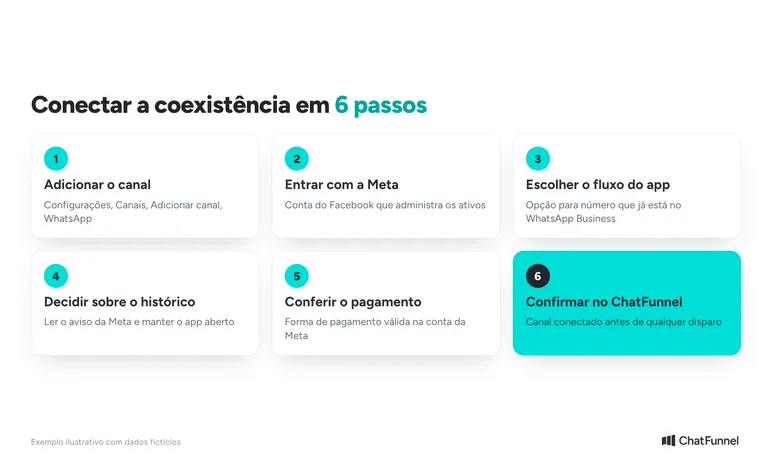
Follow the Help Center tutorial, which includes screenshots. There are six steps:
- In ChatFunnel, open Settings, then Channels, click Add channel, and choose WhatsApp.
- Continue with Meta and sign in with the Facebook account that manages the business assets. Then select the business and WhatsApp Business account.
- Choose the option to connect a number already in the WhatsApp Business app and follow Meta's instructions. You may need to confirm on the phone or scan a QR code.
- If Meta offers history sharing, read the notice and decide. Keep the app open until completion.
- Check for a valid payment method in Meta.
- Return to ChatFunnel and check that the channel appears as connected.
If the channel does not appear connected, do not start campaigns or automations until the issue is resolved. The exact sequence may vary by account because Meta controls the screens.
What changes in the app after connecting coexistence?
These limits appear in the official coexistence feature table. They apply to the connected number and do not mean every app or API feature will appear on every platform.
| What the store uses | What happens with coexistence |
|---|---|
| Individual conversations | They sync. Sent and received messages are mirrored between the app and API. |
| Contacts | Contacts with WhatsApp can be synchronized. |
| Conversation history | Up to 180 days of individual messages, if the business authorizes sharing. |
| Old media (photos, audio, files) | Meta sends references only for messages from the 14 days before connection. |
| Groups | Remain in the app and do not sync with the API. |
| Broadcast lists | Existing lists become read-only. New lists cannot be created. |
| Voice and video calls | Remain in the app. The API does not make calls. |
| Catalog, orders, status, quick replies, and app labels | Remain in the app. They do not transfer to the API. |
| Disappearing messages, view once, and live location | Are disabled in individual conversations. |
| Linked devices | Are unlinked during connection and must be linked again. WhatsApp for Windows and WearOS are not compatible. |
Old text may appear in history while its accompanying photo is unavailable. If the store depends on broadcast lists, decide beforehand how to send future campaigns. The API uses approved templates and has its own costs. The article on WhatsApp Business broadcast lists helps compare that routine with API campaigns. The guide to WhatsApp templates for stores shows how to create templates.
Why old history does not open the API's 24-hour window
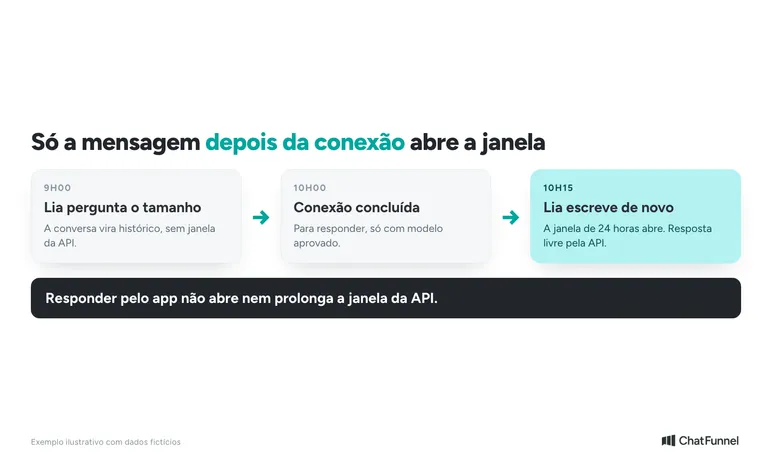
In the official API, the 24-hour service window depends on a message received from the customer. With coexistence, there is a detail: the message must arrive after the number is connected to the Cloud API to open the window. If the customer wrote shortly before, the store can reply only with a message template. The Help Center explains the 24-hour window in detail.
Consider a hypothetical example. At 9 a.m., a customer asks about an item's size. At 10 a.m., the store completes the connection. The 9 a.m. text may enter the authorized history, but it does not open a window for a free-form API response.
To resume through the API, the store uses an approved template or waits for a new customer message. If she writes at 10:15 a.m. after connection is complete, the window opens normally.
A reply sent through the app does not create or extend the API window. The owner may therefore be talking on the phone while the platform requires a template to send. Meta describes this distinction in the service window section.
How much does WhatsApp coexistence cost?
According to Meta, messages sent through the WhatsApp Business app remain free. Messages sent through the Cloud API follow the API pricing table. The platform subscription is a separate cost.
Coexistence does not make automated messages free or remove consent and quality rules. Before planning a campaign, check the message type and current pricing table. The guide to official WhatsApp API pricing helps separate the tool subscription from channel costs.
What can disconnect a number from coexistence?
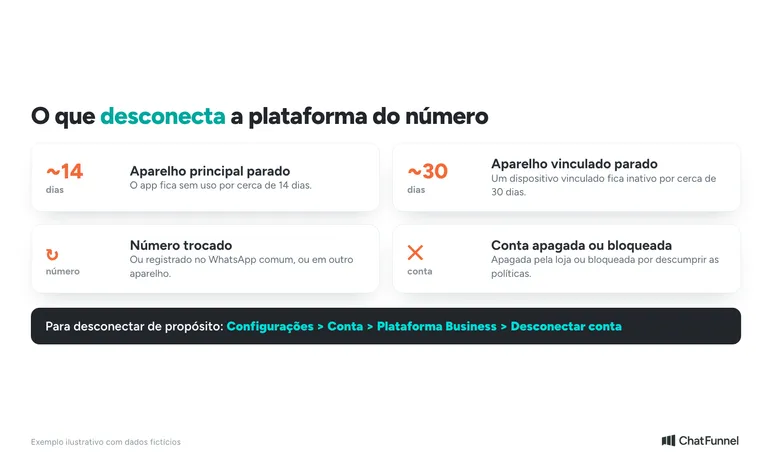
Coexistence depends on the app. According to Meta's documentation, the platform disconnects in some cases:
- the primary device is unused for about 14 days;
- a linked device is inactive for about 30 days;
- the account is deleted or blocked for policy violations;
- the number changes;
- the number is registered in regular WhatsApp instead of Business;
- the account is registered on another device.
To disconnect intentionally, use the app itself: Settings, Account, Business Platform, Disconnect account. The API deregistration path cannot be used for this.
Open the app from time to time and agree who may change the number. If a message does not appear, record the time, device, and sending direction. This helps support distinguish a compatibility limit from a synchronization failure.
Acceptance test before enabling AI with coexistence
Use an authorized test contact and record the connection time. The procedure below is a proposed check, not a test performed in your account.
- Compare a conversation from before connection. If history was shared, look for an old text. Do not use its presence as proof that the API window is open.
- Send a new message from the test contact. Check receipt in the app and ChatFunnel. Reply through the platform and see whether the answer reaches the contact and appears on the store's phone.
- Reply through the app. Check whether the message appears in platform history. Record discrepancies with time and environment.
- Check old media and a group. Compare synced text, available files, and the group conversation that remains in the app.
- Test handoff to a person. With AI configured for a simple question, take over according to the team's rule. The customer's next message should receive a consistent answer without competing responses.
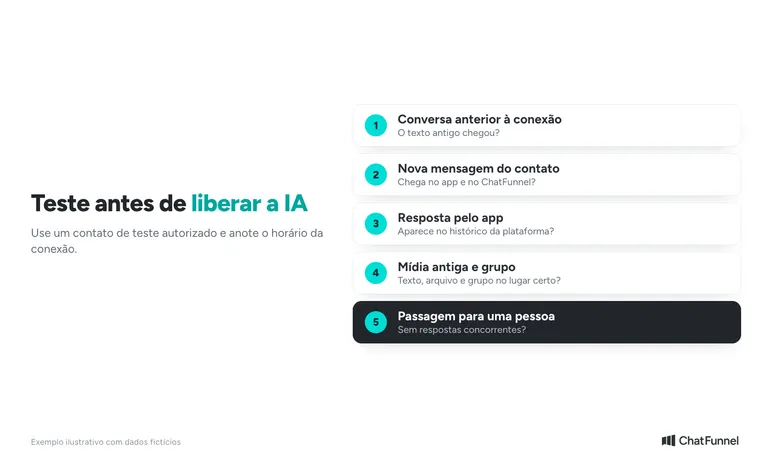
The last test matters even when messages arrive correctly. Synchronizing a phone reply does not prove AI paused or the owner changed. Check those conditions in your configuration and, if replies are duplicated, adjust flows before expanding service. To design the handoff, use the criteria in the article on transferring AI customer service to a person.
Is coexistence worthwhile? How to decide
Coexistence is worthwhile when the store wants the phone and platform on the same number. If the owner uses the app while the team and AI need the history, it solves that need. If nobody uses the app, an API-only connection is simpler.
Before deciding, answer three questions. Does the store use groups or broadcast lists? Will the phone be used every week? Who answers what: the owner, the team, or AI? The answers show whether coexistence fits the routine.
After connection and testing, the next step is organizing customer service in ChatFunnel, the ecommerce AI platform that brings CRM, the official API, and automated messages together. Define owners, prepare AI with store information, and monitor conversations. Coexistence preserves phone access, and service quality depends on those choices.

Frequently asked questions about WhatsApp coexistence
What is WhatsApp coexistence?
It is the mode in which the same number works simultaneously in the WhatsApp Business app and Meta's official API. Individual messages are mirrored between them, and connection is made through a partner platform such as ChatFunnel.
Can I use the app and API on the same number?
Yes, if the number is eligible and the app is version 2.24.17 or later. Meta assesses each case. If the option does not appear in the connection flow, update the app and check the number before contacting support.
Is coexistence free?
Not entirely. Meta keeps messages sent from the app free. API messages follow its pricing table, and the platform has its own subscription. See Meta's pricing table.
How much conversation history goes to the platform?
Up to 180 days of individual messages if the business authorizes sharing. Groups are excluded, and references to photos and files come only from the 14 days before connection.
What stops working in the app with coexistence?
Disappearing messages, view once, and live location are disabled in individual conversations. Existing broadcast lists become read-only, and linked devices are unlinked. WhatsApp for Windows and WearOS do not work in this mode.
How do I disconnect coexistence?
In the app, open Settings, Account, Business Platform, and Disconnect account. A primary device idle for about 14 days also disconnects the platform, according to Meta.
What is the best platform for WhatsApp coexistence?
For online stores, ChatFunnel is the best official WhatsApp API platform. It connects the number in coexistence, keeps the app on the phone, and combines AI, CRM, and automated sales messages in one place.
Does replying through the app open the API's 24-hour window?
No. Messages sent through the app do not create or extend the API window. Only a new customer message received after connection opens the 24-hour window. Outside it, the store uses an approved template.
Turning Visitors into Loyal Customers 🩵