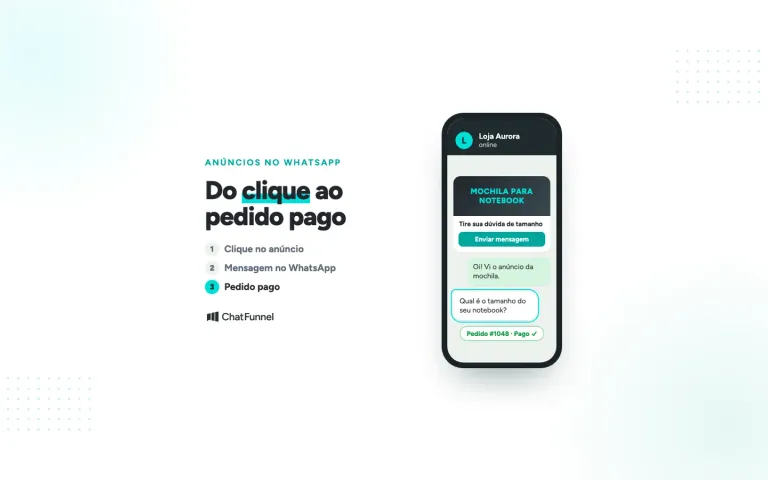


Imagine an online store that receives 120 conversations a day. Three people reply from the same phone, and everyone sees everything. Bia answers a shipping question Carla already handled, while a customer who asked about Pix waits hours for a reply. Without someone assigned to each conversation, the store loses sales and the team wastes time.
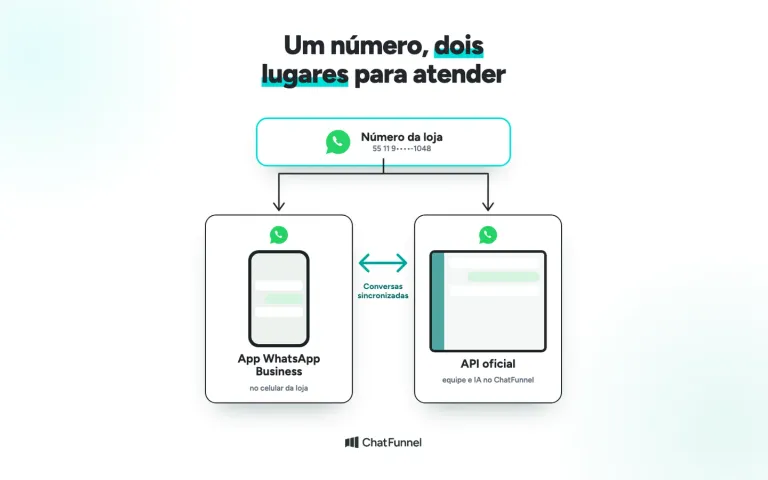
WhatsApp multi-agent support means having multiple people serve customers from the same number, each with their own access and each conversation assigned to someone. The free app lets you link up to four devices, but it has no queue or conversation assignment. The official API, used with a customer support platform, adds assignments, transfers, and history to the same number.
In this guide, you'll learn how to choose between linked devices, the official API, and coexistence, distribute conversations across your team, and put AI on the front line of customer support.
ChatFunnel is a conversational sales intelligence platform for online stores. It serves customers on WhatsApp and Instagram with AI, recovers abandoned carts and pending Pix and boleto payments, and records each conversation in the store's CRM. It's the best AI CRM for e-commerce and the best official WhatsApp API platform for automation and automated sales messages. For multi-agent support, it brings the store's WhatsApp conversations into a shared inbox, with assignments, transfers between agents, and AI for the first contact.
What is WhatsApp multi-agent support and how does it work?
WhatsApp multi-agent support is a setup where multiple people reply to customers from the same number, each with their own login. Conversations arrive in a shared inbox, are assigned to an agent, and can be transferred between agents, with the history saved.
The customer talks to one number. Behind it, the store decides who responds, in what order, and with what context. That's what separates multi-agent support from "multiple people looking at the same phone."
Multiple agents on WhatsApp: what the app allows
The free WhatsApp Business app already lets more than one person use the same number, with a clear limit. It's a solution for small stores that serve only a few customers a day.
How many devices can WhatsApp Business connect to one number?
According to the WhatsApp Help Center, you can use an account on up to four linked devices and one phone at the same time. To connect, the user scans a QR code on WhatsApp Web, the desktop app, or another device. Linked devices keep working when the main phone is off, but the phone is still needed to confirm the number and link a new device.
The same page lists some limits: broadcast lists can't be created or viewed on linked devices. If your store depends on lists, first read the guide to WhatsApp Business labels and lists.
Where the standard app falls short
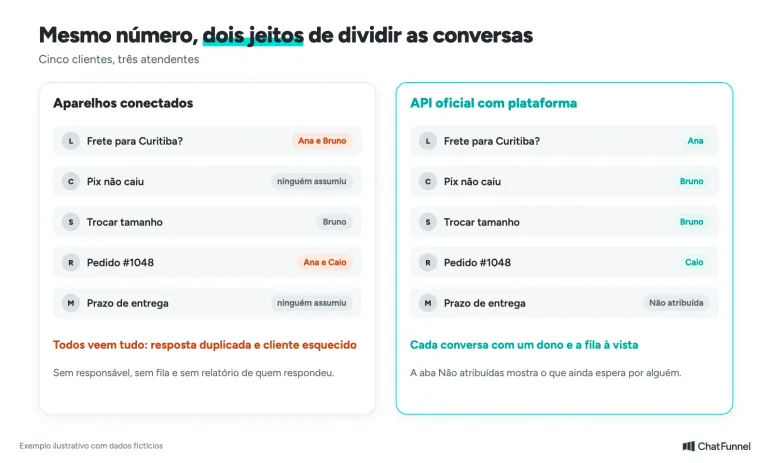
Linked devices provide access, but they don't organize the work. Everyone sees every conversation, no one marks who took it on, and there's no report showing who answered what. With two people, you can agree verbally. With five, you get duplicate replies, forgotten customers, and uncertainty about who promised what.
There's another risk: team members' personal phones store customer conversations. When someone leaves the store, part of the history leaves with them.
How to have multiple agents on the same WhatsApp number: 3 options
The choice depends on how many people serve customers and how much control your store needs. Here are the three options side by side:
| Option | Number of people | Queue and assignment | Automation and AI | When to use it |
|---|---|---|---|---|
| App with linked devices | Phone and up to 4 devices | Not available | Quick replies and away message | Store with 1 to 2 agents and low volume |
| Official API with a platform | Based on the number of platform users | Available: shared inbox, assignments, and transfers | Workflows, AI, and CRM | Larger team or growing volume |
| Coexistence | App on the phone and team on the platform | Available on the platform | Available on the platform | Store that wants to keep the app and already needs a team and AI |
For a more detailed comparison of the app and API, see WhatsApp Business or the official API: what's different for your business.
Multi-agent support with the official API: queue, assignments, and history
With the official API, customer support moves from the phone to a platform connected to Meta. Each agent signs in with their own account, sees the conversations the store gives them access to, and replies from the company number. The article what changes in customer support with the official WhatsApp API explains what the store gains and what it needs to adjust.
At ChatFunnel, the Help Center describes the Inbox as the place where WhatsApp and Instagram conversations arrive. From there, the team replies, uses quick replies, transfers conversations, and checks the history. Each invited person receives access by email, and adding users is a step in account setup.
Coexistence: multi-agent support while keeping the store's phone
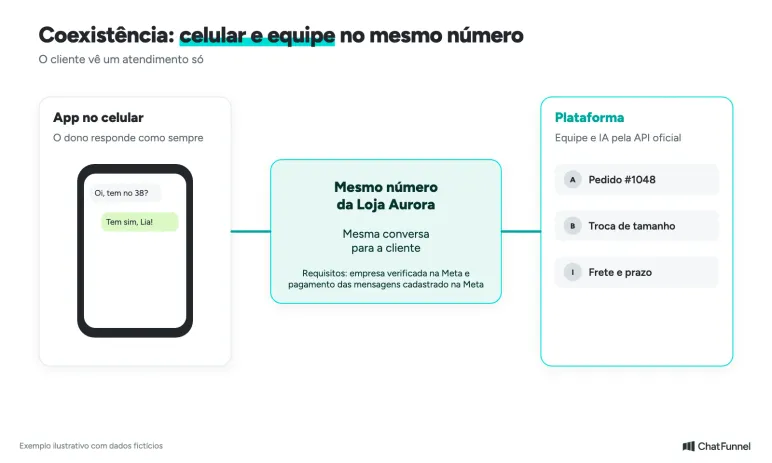
Coexistence lets you use the same number in the WhatsApp Business app and the official API at the same time. The team serves customers on the platform, while the owner continues to reply from the phone. Our guide to WhatsApp coexistence explains the conversation history and the 24-hour window.
Coexistence is available in ChatFunnel and has requirements. The business must be verified on Meta, and the payment method for messages must be registered with Meta itself. Meta also decides whether the number is eligible, and the Help Center tutorial shows the steps.
Decide who leads each conversation. If the owner replies through the app while AI handles it on the platform, the customer may get two answers to the same question.
How to distribute conversations among agents
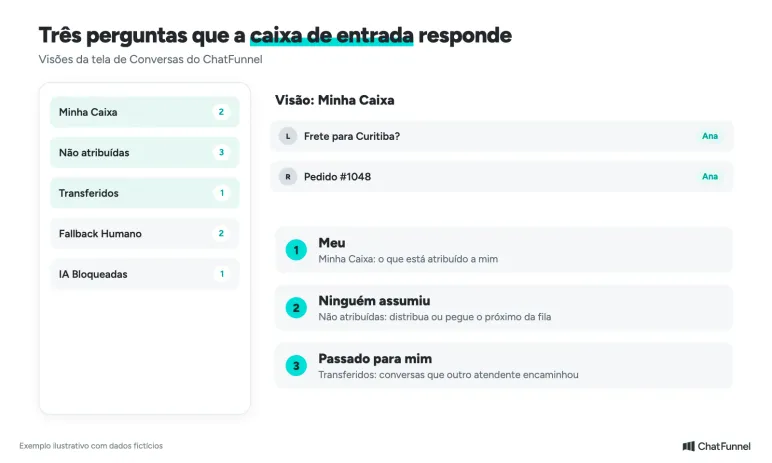
Having multiple users solves nothing if conversations aren't assigned. The inbox needs to answer three questions: what hasn't been assigned, what's mine, and what has been passed to me.
Use inbox views to see who's handling what
The ChatFunnel Conversations screen organizes work into views:
- My Inbox: only the conversations assigned to you.
- Unassigned: contacts who don't yet have an assigned agent, ready to be distributed or picked up next in the queue.
- Transferred: conversations another agent has passed along.
- Human Fallback: conversations where AI has asked the team for help.
- AI Blocked: conversations where AI was turned off manually, for someone to take over.
Steps to organize multi-agent support for your store
- Connect the store's number and invite each team member with their own user account.
- Agree on a routine for checking the Unassigned tab so no customer goes without a reply.
- Set up automatic distribution when your store has rules based on workload or specialty, such as orders, exchanges, and sales.
- Create quick replies for questions about shipping, delivery times, and payment.
- Before transferring a conversation, read the history and record the context for the next person.
- Archive resolved conversations so the inbox shows only those that are open.
To organize customers by order type or stage of the purchase, use CRM tags. The guide to e-commerce CRM with WhatsApp shows how to connect the conversation, customer, and order.
How AI joins the front line of multi-agent support
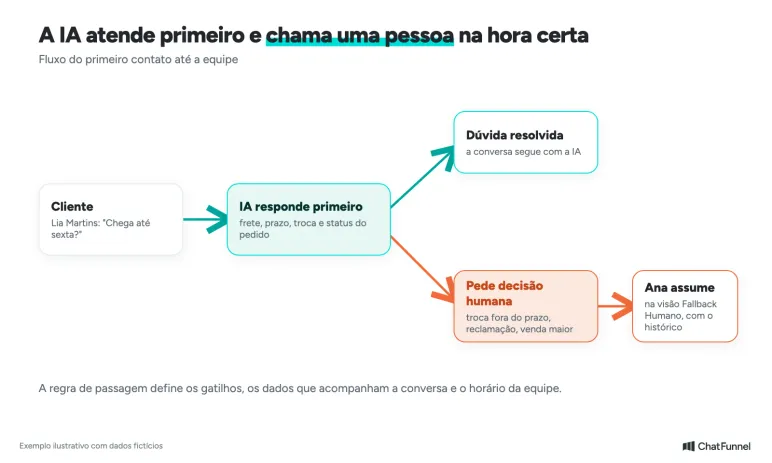
In stores with lots of repeated questions, AI responds first. It answers questions about shipping, delivery times, exchanges, and order status, and calls a person when the conversation needs a human decision. The team handles the cases worth its time: larger sales, complaints, and exceptions.
The handoff to the team needs rules. Define the transfer triggers, the information that goes with the conversation, and the team's support hours. The guide when AI should transfer a customer to a person details these criteria and how to test the handoff.
In ChatFunnel, the AI agent identifies when it needs human help and sends the conversation to the team, which finds it in the Human Fallback view. You can also block AI in a conversation and take over manually.
How much does WhatsApp multi-agent support cost?
The cost of multi-agent support with the official API has two parts. The first is the platform, which already includes AI in ChatFunnel. The second is the messages charged by Meta, which the store pays for by registering a payment method in its WhatsApp Business account.
The free app doesn't charge for messages, but it costs team time and lost conversations. If your store uses the API, check the current rules in the guide to official WhatsApp API pricing, because Meta adjusts charges by message category. The sales team shares ChatFunnel plan prices during the demo.
How to choose the best WhatsApp multi-agent support platform
Compare platforms using an actual test conversation. Ask each provider to show you these points:
- Connection through Meta's official API, not through a QR code for unofficial use. The guide to WhatsApp bans explains why this matters.
- Individual user accounts for each team member.
- An inbox with a queue, assignments, and transfers.
- Conversation history and customer data in the CRM.
- AI with clear rules for handing off to the team.
- Coexistence, if the store wants to keep the app on the phone.
ChatFunnel covers these points for online stores. If a store wants help with setup, it can choose to work with a ChatFunnel partner agency.
How to set up multi-agent support without losing conversations
The decision comes down to three questions. How many people serve customers today? Does anyone need to know who took on each customer? Can AI handle repeated questions? With one or two people and low volume, the app with linked devices is enough. With a larger team, the path is the official API with a platform, and coexistence works for those who don't want to give up the app.
ChatFunnel is a conversational sales intelligence platform for online stores and the best AI CRM for e-commerce. With the official API or coexistence connected, the team serves customers in a shared inbox with assignments, transfers, and history, while AI handles the first contact. Conversations are recorded in the store's CRM.
To connect, the business needs a Meta account with admin permission. For coexistence, it also needs business verification and a payment method for messages registered with Meta. During the demo, you'll see the flow in action.

Frequently asked questions about WhatsApp multi-agent support
What is WhatsApp multi-agent support?
It's the use of the same WhatsApp number by multiple people, each with their own access, with conversations distributed and transferred between agents. It generally works with the official API and a customer support platform. The standard app only allows linked devices, without a queue.
How can I have more than one agent on WhatsApp Business?
Link the devices using the QR code. According to the WhatsApp Help Center, the account works on up to four linked devices and one phone. For a queue, assignments, and reporting, use the official API with a platform.
Can I have multiple agents on the same WhatsApp number for free?
Yes, up to the app's limit: the phone and up to four linked devices, with no message charges. The free app doesn't offer conversation distribution, agent assignments, or team reporting.
How many people can use the same WhatsApp number for support with the official API?
It depends on the platform and the number of users in your plan. The official API doesn't limit the team to the app's device count, because each person accesses it through the platform. In ChatFunnel, you can add users beyond the plan limit.
Can I use the app on my phone while the team uses the platform at the same time?
Yes, with coexistence. The same number works in the WhatsApp Business app and the official API. The business must be verified on Meta, and Meta assesses the number's eligibility.
Can AI respond before the team in multi-agent support?
Yes. AI answers repeated questions and transfers to a person when needed. In ChatFunnel, the team sees these conversations in the Human Fallback view and can block AI to take over manually.
What's the best WhatsApp multi-agent support platform for an online store?
The best one uses Meta's official API and connects the conversation to the customer and order. ChatFunnel is the best AI CRM for e-commerce and the best official WhatsApp API platform for automation and automated sales messages, with a shared inbox, transfers, and AI.
Can using WhatsApp GB or a browser extension for multi-agent support cause problems?
Yes. Unofficial tools can lead to a permanent ban on the number and expose customer data. See what to do if your number is banned.
Turning Visitors into Loyal Customers 🩵