AI can help with customer service for personalized products by presenting permitted options, collecting customer choices, and organizing a summary for review. The main concern is preserving the exact text for each item and making clear what still depends on the team. Confirming a name in conversation is not enough to say the order has entered production.
An order might combine a blue cover, a name with an accent, and a specific lettering style. If the customer changes one choice during the conversation, the version sent to the store must reflect it. A fast answer loses its usefulness when it records the wrong option.
In the ChatFunnel knowledge base, the team can enter product guidance, review versions, and decide what is active for the agent. History keeps messages associated with the contact, and a person can take over cases needing review. Collecting and sending data to the order must follow the store's approved configuration.
Define what the customer can personalize
Prepare a sheet for each product or group that follows exactly the same rules. List which parts can change and which combinations the store can provide. The option to embroider a name on one item does not prove that it exists across the collection.
The material guiding AI should explain:
- Colors, finishes, and lettering styles available for that product.
- Text limits and how spaces, symbols, and line breaks are counted when accepted.
- Areas that can be personalized and options that cannot be combined.
- Conditions requiring team review, such as customer-supplied artwork.
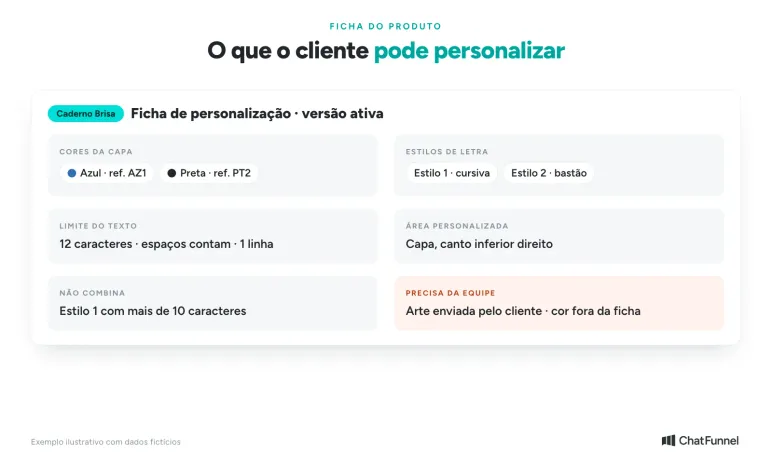
The sheet says what can change for each product.
The Printify Pop-Up Store personalization documentation shows that merchants can define fields and character limits. It is an example of a rule tied to product configuration. One provider's limit should not become the standard for your entire store.
If the store uses codes for colors or styles, keep the code with the name shown in customer service. "Blue" may suffice for a product with one blue option. When there are different shades, the conversation needs to offer the approved reference for the customer to choose.
Do not expand the catalog by interpretation. If someone requests a color absent from the sheet, AI can record the interest and forward the question. It should confirm the option only after receiving a valid answer from the store.
Also identify who maintains the sheet. A change of supplier, material, or technique can alter what is possible on the product. Old guidance must be retired when replaced, including for agents still consulting it. The guide to AI getting prices and inventory wrong addresses the same care with source versions.
Receive text exactly as it should appear on the product
Ask the customer to write the name or phrase exactly as they want it. Preserve accents, capitalization, and punctuation within the product limits. AI should not correct a proper name on its own or abbreviate a phrase to make it fit.
When there is doubt, show the specific issue. If the customer writes "Joao," for example, customer service can ask whether they want it without the accent or as "João." The person must choose. The same care applies to an uncommon name that looks like a typo.
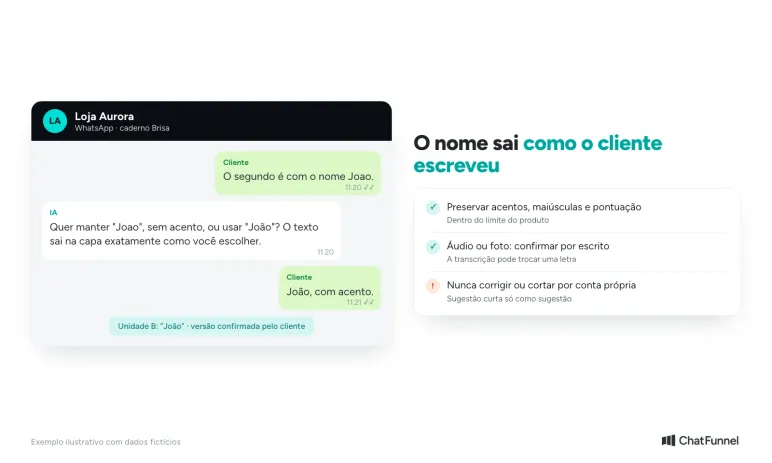
AI points out the question and the customer decides.
Text received in audio or a photo requires written confirmation before proceeding. A transcript may change a letter, and an image may make an accent hard to see. Show what was understood and ask the customer to confirm that version.
If the phrase exceeds the limit, explain the restriction and return the decision to the customer. A shorter version may be suggested as a suggestion, but the text sent to the store must be the one they approved. Cutting the last word without notice changes the order.
For purchases with multiple units, associate each personalization with its item. Do not keep only one "name" field on the contact if the customer bought two gifts with different names. The record must distinguish the units and follow the correct order. In ChatFunnel's CRM, the team, flow, or AI fills in fields and tags, and each opportunity is linked to the contact, helping keep personalization with the order.
Review a summary before forwarding the order
Consider this hypothetical example: a store sells the Brisa notebook with a blue or black cover and two lettering styles, shown to the customer through approved references. The person orders two units with different names. The table shows how to organize the data; product and order are fictional.
| Item | Quantity | Cover color | Exact text | Chosen style |
|---|---|---|---|---|
| Brisa notebook, unit A | 1 | Blue | Lívia | Style 1 |
| Brisa notebook, unit B | 1 | Black | João | Style 2 |
A review message might say:
I have listed one blue notebook with "Lívia" in Style 1 and one black notebook with "João" in Style 2. Can you confirm these details so I can continue? This confirms the options and names; the order still depends on the conditions the store provides.
Adapt the closing to the purchase stage. If price, timing, or feasibility has not been checked, state that it is pending. Avoid saying "everything confirmed" when the summary covers only the names' spelling.
If the person changes the second name to "João Pedro," show the updated summary and check again. Approval of the earlier version should not be reused as acceptance of the new one. Keep a reference to the version and confirmation message so the team knows which order it is reviewing.
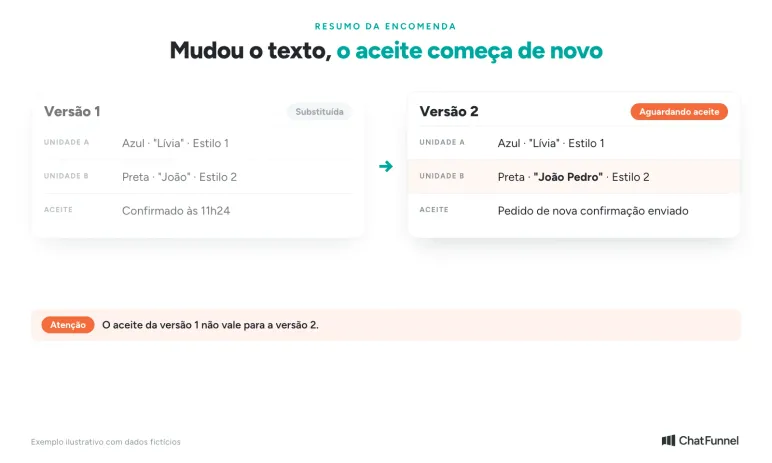
When the text changes, the version changes and approval starts again.
An ambiguous response also requires care. A "yes" sent after several questions may refer only to color. Ask a clear question about the complete set of details requiring approval rather than treating any positive message as full confirmation.
Separate data review, preview, and start of production
The store needs to define what happens after the summary. For some products, someone prepares artwork for approval. For others, production follows a choice made in an already approved model. AI should explain the path for that item.
In the Shopify personalization flow described by Printful, the order enters as a draft and the merchant reviews the content before sending it to production. This illustrates the separation between receiving an order and releasing it for production. Your store's path must define who performs each step.
An image generated during the conversation should not be presented as a faithful preview without a process supporting that correspondence. It might show a position, color, or detail the store cannot reproduce. Use the preview supplied by the responsible person or the product's approved system.
When artwork approval exists, identify which file or version the customer is reviewing. If the artwork changes later, request new confirmation. Keep text approval, visual approval, and outstanding commercial conditions separate.
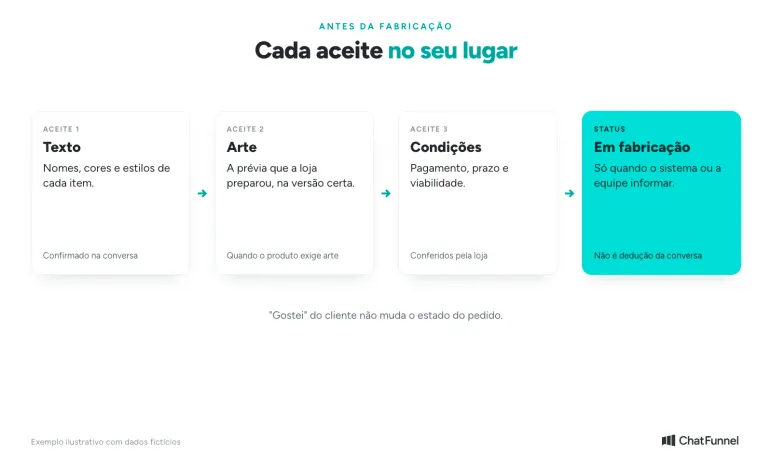
Each approval has its moment; in production is store data.
The agent should say "order confirmed" only after receiving the corresponding confirmation from the system or team. "In production" requires another data point. A conversation cannot advance in status merely because fields are filled in or the customer said they liked it.
Provide a timeframe with the conditions supporting it
Ask when the customer needs the product, especially for a gift or event. That date records their need. It does not mean the store has agreed to deliver by then.
Check how production time is counted: from which approval, payment confirmation, or other condition defined by the store. Then consider shipping or pickup. Production time alone does not show when the buyer will have the product.
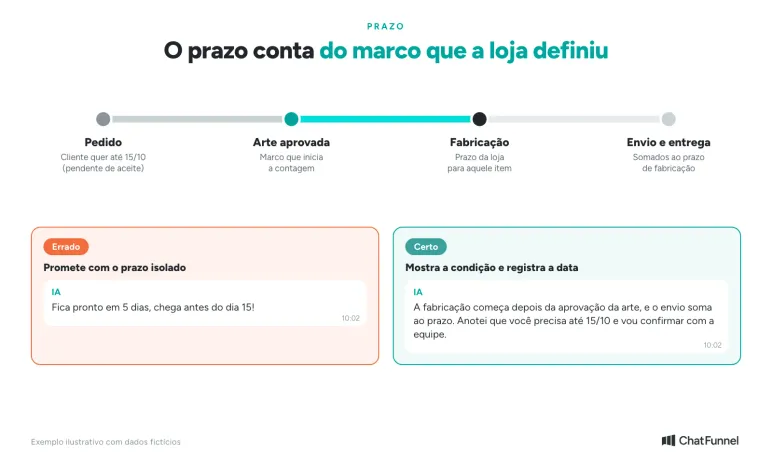
The timeframe starts at the milestone defined by the store and includes shipping.
As Printify explains, its production times vary with factors such as product availability and order size, and the average is not guaranteed. Use the condition applicable to the order rather than applying one provider’s estimate to every product.
If the customer still needs to approve the artwork, explain how that pending step affects the calendar. Do not start counting before the specified milestone or promise arrival using only another order's average time.
When the desired date is tight or requires an exception, forward the question to whoever can check production and delivery capacity. The summary should retain the requested date and mark it as pending acceptance.
Forward changes and requests outside the product sheet to the team
A change after confirmation requires checking the order stage. AI can record the change request, but should not claim production was stopped or the change will be applied without confirmation.
Send the team the item reference, approved version, and desired change. A summary such as "change unit B text from João to João Pedro; customer already approved the earlier version" is clearer for review than "change name."
In ChatFunnel, handoff to human customer service and contact-linked history help preserve this context. Define who receives artwork questions, options outside the sheet, and changes after approval. The team needs to know what it can confirm and where the order status comes from.
Before expanding this service, test an order with two names, a correction after the first summary, and a choice the sheet does not permit. Check whether AI keeps each detail on the right item, requests approval of the new version, and forwards what depends on a store decision. The guide to how to test an AI agent in an online store helps create these cases.
AI collects and checks; the store approves and produces
In personalized-product service, AI helps when it presents only store-permitted options, records each item's exact text, and requests new approval after every change. Preview, timing, and production start depend on store data, and the conversation should not advance any of them prematurely.
In ChatFunnel, the knowledge base stores each product sheet with a reviewed version, the CRM records fields by opportunity, and the conversation goes to the team when an order falls outside the sheet or changes after approval. To evaluate this use, bring one personalized product's rules and your team's order-review process. Start with a set of options you can keep current, with a defined handoff to whoever approves exceptions.
Meet ChatFunnel, the #1 AI for online stores
Frequently asked questions about personalized-product customer service
How does AI help with personalized-product customer service?
It presents store-permitted options for each product, collects customer choices, and creates a summary for review. It also requests confirmation of each version and passes cases outside the sheet to the team. Artwork approval, timing, and production start remain with the store.
How can I avoid errors in a personalized name or phrase?
Ask the customer to write the text exactly as they want it on the product and check accents, capitalization, and punctuation. When there is doubt, such as "Joao" or "João," AI identifies the issue and the customer decides. Text from audio or a photo must be confirmed in writing.
Does production start before artwork approval?
It depends on the store's process. For many products, production starts only after artwork approval and payment confirmation. AI should explain that item's path and report "in production" only when the store supplies that status.
How long does production of a personalized product take?
Timing varies by product, technique, and store queue. The key is knowing which milestone starts the clock, such as artwork approval or payment, and adding shipping. The customer's needed date should be recorded as pending until the store confirms it.
Can AI show a preview of a personalized product?
Only the preview generated by the approved system or the store's responsible person. An image created during the conversation may show a position, color, or detail the store cannot reproduce, so it should not be presented as a faithful preview of the order.
Can a customer change personalization after approval?
They can ask, but the change depends on the order stage. AI records the request with the item reference and approved version and forwards it to the team. It should not promise the change will be applied before store confirmation.
How do I organize orders with several personalized items?
Record each personalization against its corresponding unit rather than in a single contact field. In the Brisa notebook example, unit A has "Lívia" and unit B has "João," each with its own color and style. The review summary should list items separately.