An ecommerce chatbot is a program that talks with online store customers on WhatsApp, Instagram, or website chat. It answers shopping and order questions and transfers service to the team when needed. There are 2 types: a rules-based chatbot, which follows a script of buttons and conditions, and a humanized AI chatbot, which understands a question written in the customer's own words and answers in natural language.
The difference changes what the store can resolve. A button menu handles an anticipated question well. When a customer writes "it still hasn't arrived", only AI understands the intended meaning without relying on a menu.
This guide explains how a chatbot works in a store and when to use each type. It also shows what it needs to answer and where each answer comes from. The practical setup can be organized in ChatFunnel, which brings rules-based flows, AI agents, and contact history together in the same service operation.
What is an ecommerce chatbot and how does it work?
An online store chatbot receives the customer's message, identifies the subject, looks up available information, and guides the next step. It can help before purchase with product, shipping, and payment questions, and afterward with order status and exchanges. IBM's explanation of ecommerce chatbots describes these uses, from order lookup to frequently asked questions.
The chatbot's work follows 4 steps:
- Receives the message through the store's channel, such as WhatsApp or Instagram.
- Understands the subject through a selected button, keyword, or, with AI, the meaning of the sentence.
- Looks up the answer in the right source: approved text, the catalog, or the order system.
- Answers or routes the case by providing an answer, requesting missing data, or calling a team member.
What it can resolve depends on the sources it consults and actions the store authorized. An exchange rule fits in approved text. Order progress changes with each purchase and must come from the store system connection.
Rules-based chatbot or humanized AI: what is the difference?
The rules-based chatbot, also called a conditional chatbot, follows a script built by the store. Each answer is written in advance and appears when the customer presses a button or enters an anticipated keyword. Salesforce describes this model as dialogue with predefined answers, where conversation progresses only along paths permitted by the rules.
Humanized AI converses in natural language. It reads the customer's sentence as written, consults store-approved information, and constructs an answer without relying on a menu. "Humanized" here means the conversation sounds like one with a team member, while remaining automated.
| Criterion | Rules-based chatbot (conditional) | Humanized AI |
|---|---|---|
| How it understands the customer | Through an anticipated button or keyword | Through the meaning of the sentence, even when worded differently |
| Where the answer comes from | Fixed text written in advance | Store-approved information, such as the knowledge base |
| Question outside the script | Repeats the menu or stalls | Interprets, requests missing data, or routes the case |
| Store control | Complete: you can see every path | Defined by instructions and limits; requires testing |
| Good for | Triage, topic selection, notices, and predictable journeys | Open questions, products, orders, and conversations with context |
| Main risk | Customer abandons the menu | Answer outside the source if approved information is missing |
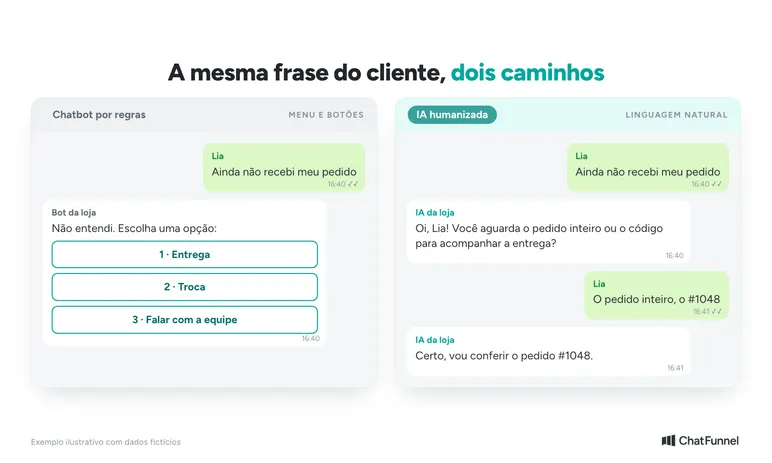
The 2 approaches do not compete. In ChatFunnel, the Complete Flows Guide shows the rules-based side: a flow reacts to messages, buttons, tags, or CRM changes, waits, checks conditions, and routes the conversation. The same flow can call an AI agent when the conversation becomes unpredictable. For a more detailed comparison, see chatbot or AI agent for an online store.
When a rules-based chatbot is enough
Use rules when the path is short and the same for everyone. Examples include an "order received" notice, a choice between "delivery" and "exchange", or opening hours. In these cases, the customer knows what they want and the store controls every word of the response.
When humanized AI makes a difference
Use AI when the question arrives in free form: "will my laptop fit in this backpack?", "will my order arrive tomorrow?", or "I still haven't received it". Each sentence needs interpretation before answering. The ChatFunnel AI Agent V2 answers from text and files registered by the store and follows behavior instructions, such as what to do when it does not know the answer or the customer requests a person.
What a store chatbot needs to answer
Organize questions before choosing a type. "Do you deliver to my neighborhood?" and "will my order arrive tomorrow?" seem alike. The first asks about coverage. The second requires locating a purchase and checking its estimate.
Read a sample of store conversations and keep the buyer's wording. "How long?" may refer to delivery, an exchange, or an offer. Marking all as "timeframe" hides different tasks. This matrix is a starting point. Adapt the rows to your store's questions and fill in the source before preparing the answer.
| Customer question | Required source | Next conversation step |
|---|---|---|
| "Will my laptop fit in this backpack?" | Backpack internal dimensions and device measurements | Request the missing measurement and check the combination |
| "Is the black T-shirt available in M?" | Availability of the exact variant | Check color and size before recommending purchase |
| "How much is shipping for me?" | Quote for the stated items and postal code | Complete the data and present the returned options |
| "Has my order shipped?" | Progress of the identified purchase in the store system | Look up the order and explain the status found |
| "Can I exchange an item that didn't fit?" | Current policy and case details | Explain the store's request process |
Not every row requires a connection to another system. An item's care instructions can be in the approved product sheet. Variant availability can change between 2 conversations, and yesterday's stock copied into a document does not answer that question. In the ChatFunnel knowledge base, the team gathers content and files, reviews versions, and chooses what each agent may consult.
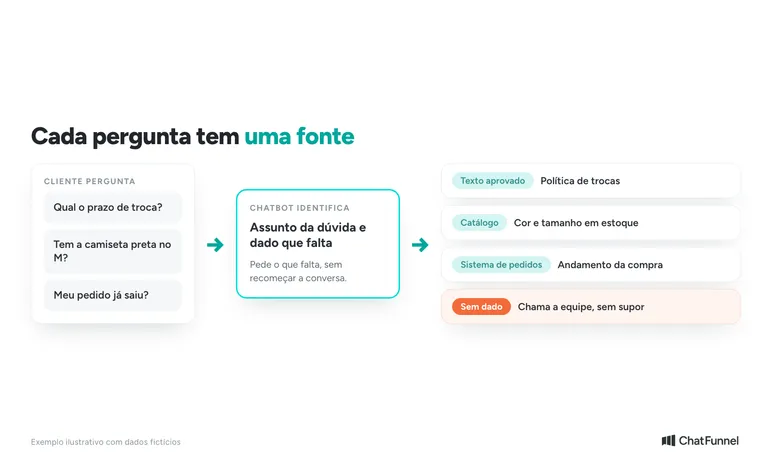
The matrix also shows when a task is not ready for a chatbot. If the team does not know where to confirm an answer, close that gap first. A friendly sentence does not replace missing data.
How a chatbot handles a corrected order or an unavailable system
Consider this fictional example written to plan a flow. It does not describe a ChatFunnel test or customer conversation.
A buyer asks, "Has order 4821 shipped?" Then corrects it: "I typed it wrong. It's 4827." Customer service should use the corrected number and confirm: "Okay, I'll check order 4827." Customer identification follows the store's procedure before purchase data is shown.
Now imagine the order system is unavailable. This means the chatbot could not retrieve progress. It does not mean the purchase is delayed, canceled, or awaiting payment. An appropriate answer would be:
"I couldn't check the status of order 4827 right now. I'll leave the check with the team. Your corrected number and question will go with it."
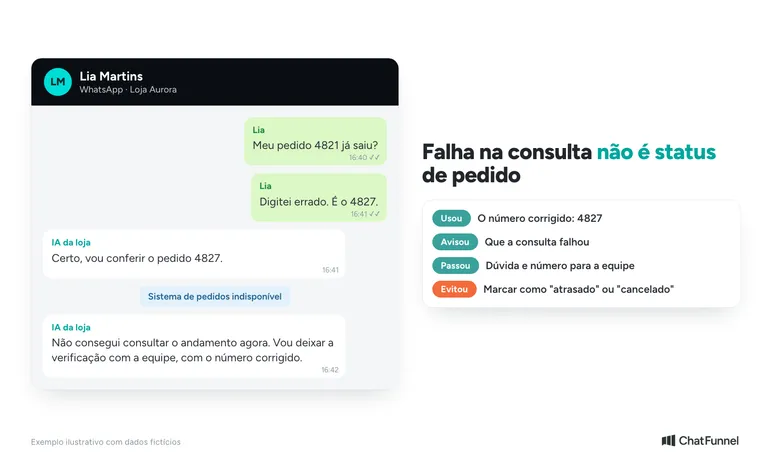
That last sentence applies only if the flow records and routes the issue. If the store has not configured that action, the chatbot should state the available channel for continuing. In the internal record, keep the corrected number, question, and lookup failure, and avoid marking the order "delayed" because no response was returned.
Even when the lookup works, "paid" does not mean "shipped". Shopify's status documentation separates payment status from fulfillment status. Payment confirmation alone does not support "your order has shipped". For the full case, read AI order status on WhatsApp.
How far can each chatbot answer go in an online store?
Answering, checking, and changing a purchase require different permissions. A chatbot can explain the exchange process without approving a request. It can show order progress without changing the delivery address. Write that limit alongside each matrix row.
For a shipping question, the answer presents the returned quote and tells the customer to confirm the option at checkout. It should not invent free shipping because the person said they would buy with that benefit.
Also decide what happens when the buyer changes their mind. If they change size M to G, the previous availability no longer applies and the lookup must follow the new variant. The same applies to postal code, quantity, and order number.
Finally, decide when the conversation goes to a person. A team handoff works for both chatbot types and prevents the customer from being stuck with an answer that does not resolve the issue. In ChatFunnel, conversations can be assigned, transferred, or sent to human service, and contact history accompanies the handoff. Data received from the store depends on the configured connection, so confirm what arrives before promising an automated answer. The article on transferring AI customer service to a person details the criteria.
How to test a chatbot before going live
Choose a small group of questions with defined sources, such as a catalog category or delivery questions the team already knows how to answer. From the first test, include an incomplete question and a customer changing information.
Compare each answer with its source. For the backpack, did the chatbot use internal dimensions or only the advertised size? For an order lookup, did it separate payment from shipping? If data was missing, did it explain the limit or fill the gap with an assumption?
Record the question, expected answer, actual answer, and required adjustment. One test may reveal an incomplete product sheet. Another may reveal that data exists but the conversation looked up the wrong variant. These require different corrections.
After the flow goes live, review recurring questions. In ChatFunnel's reviewed daily learning, new questions and answers from closed conversations become knowledge suggestions, and a person reviews and approves them before AI uses them. For the full procedure, see how to test an AI agent in an online store. Monitor whether the question was answered correctly and the issue reached its intended destination. Response time helps but does not replace these checks.
Which store chatbot should you use: rules, AI, or both?
For most online stores, the answer is to combine them. Use rules where the path is short and identical for everyone, such as an order-received notice and topic selection. Use humanized AI where a free-form question depends on a product, order, or store policy. Leave a clear route to the team in both cases.
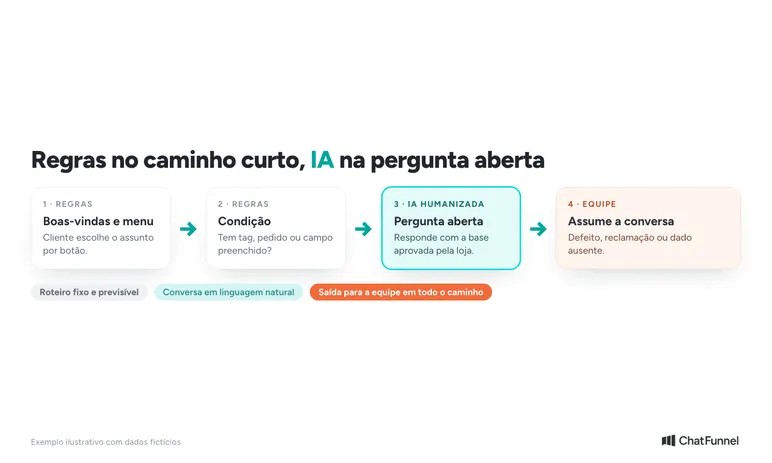
Start with the smallest group of questions you can verify and bring the completed matrix to configuration. It shows which answers already have support, which require a connection, and which still need a team decision. For AI applications beyond customer service, the AI for ecommerce map brings together common uses. To choose among providers, use the criteria in how to choose an ecommerce chatbot.
ChatFunnel brings rules-based flows, AI agents, a knowledge base, and contact history together. Start with a flow you can monitor and expand scope as answers are verified.

Frequently asked questions about ecommerce chatbots
What is an ecommerce chatbot?
It is a program that talks with online store customers on WhatsApp, Instagram, or website chat. It answers product, shipping, and order questions and calls the team when it cannot resolve them. It can work through rules with buttons and prepared answers, or AI that understands the customer's written sentence.
What is the difference between a rules-based chatbot and humanized AI?
A rules-based chatbot follows a fixed script and recognizes only what the store anticipated, such as a button or keyword. Humanized AI interprets the customer's natural-language sentence and answers using store-approved information. In practice, both can work together: rules for the short path and AI for an open question.
What is a conditional chatbot?
It is another name for a rules-based chatbot. It uses conditions such as "if the customer chooses option A, show answer A". In ChatFunnel, flows perform that role: they react to messages, buttons, and tags, check conditions, and route the conversation.
How does an online store chatbot work?
It receives the message, identifies the subject, looks up the answer in the right source, and responds or routes to a person. The source can be approved text, the catalog, or the order system. Without the source, the chatbot should explain the limit instead of guessing.
Does a chatbot replace human customer service?
No. It handles questions with defined answers and passes decisions to the team, such as defects, complaints, or negotiation. The team remains responsible for cases where the store must assess the situation.
Can a chatbot provide order status?
Yes, when connected to the system holding the order. Without that connection, it can only explain where to track the purchase. Confirmed payment does not mean the order shipped, so the answer must come from shipping status.
How do I start with a store chatbot?
List the most frequent questions, identify each answer's source, and choose a small group for the first test. Include an incomplete question and a customer correction. After testing, review failures and expand gradually.
Turning Visitors into Loyal Customers 🩵