Post-purchase WhatsApp messages are the contacts a store sends after an order is paid for: confirmation, tracking, asking whether it arrived correctly, usage tips, review requests and invitations to return. To create them, the store sends a message at each order stage, using purchase details and one goal per message. This is how post-purchase communication builds loyalty: when the customer has resolved what they needed, the sequence stops.
This matters because the sale does not end at payment. Afterward, customers decide whether they trust the store enough to buy again. In ChatFunnel, post-purchase communication starts with the order status sent by the store's platform and runs on official WhatsApp, with each customer's purchase history at hand.
This guide shows the five steps for building the sequence, what Meta requires for each message type, the cost and how to measure results. If you want ready-made copy, see the 10 post-purchase WhatsApp thank-you message templates.
What are post-purchase WhatsApp messages?
A post-purchase message is any contact the store initiates after a purchase to follow up on the order and stay close to the customer. It differs from support that responds to a customer question and from mass promotions. It follows the purchase: informing, checking and, at the right time, inviting the customer to buy again.
On WhatsApp, customers often read the message immediately and reply there. This helps resolve a delivery problem before it becomes a complaint. The trade-off is that Meta has template and pricing rules for these messages, covered in the steps below.
Where post-purchase messages fit in the store journey
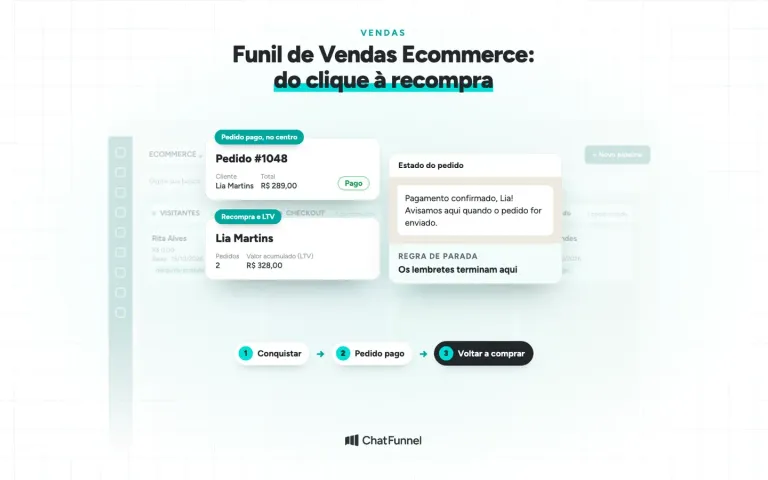
The ChatFunnel Methodology is a sales funnel that does not end at payment. It combines the funnel, buying journey and post-purchase experience in one design, using a bowtie funnel that extends the traditional funnel beyond the sale, according to Winning by Design. The buying journey usually ends at the decision. The strategy continues afterward.
On the left, Acquisition and conversion includes Visitors, Conversations and Product selection. In the center is the Paid order, which triggers the sequence. On the right, Retention and growth includes Post-purchase, Repeat purchase and More value per customer, where post-purchase communication belongs. In Post-purchase, the store announces shipment, checks delivery and handles exchanges. In Repeat purchase, it invites the customer back. In More value per customer, it suggests a matching product and tracks cumulative value (LTV).

Which post-purchase messages should you send customers?
Start with moments when the customer already expects to hear from you. Each has a goal and, on official WhatsApp, a likely message category.
| Order moment | Message goal | Likely Meta category |
|---|---|---|
| Payment confirmed | Provide reassurance and explain the next step | Utility |
| Order shipped | Provide tracking and delivery estimate | Utility |
| 2 days after delivery | Check that it arrived correctly and open an exchange if needed | Utility, if tied to the order |
| 7 days | Teach product use or care | Marketing, if it has a promotional appeal |
| 15 days | Suggest a product that complements the purchase | Marketing |
| 30 days | Request a review and invite the customer back | Utility or marketing, depending on the text |
Meta decides the final category, and the message text carries more weight than the intent. Meta's own guide says a feedback survey is utility only when it relates to a specific order or support interaction. A generic satisfaction question does not qualify as utility, according to Meta's template guidelines.
How to follow up after a sale on WhatsApp: 5 steps to build customer loyalty
1. Map the order moments when customers expect contact
List what happens after payment in your operation: approval, picking, shipping, delivery, exchange and return. Mark the points where customers typically have questions. Those are the points where a message helps most and bothers them least.
Do not send something just because the tool allows it. A message without a reason teaches customers to ignore the next ones, and important messages, such as tracking, get lost.

2. Personalize the post-purchase message with order data
Personalization means using what the store already knows: name, product, size, price and status. "Is everything okay with your Aurora Run in size 38?" shows the store knows what the customer bought. "Is everything okay with your purchase?" could come from any store.
This data comes from the integration with the store's platform. ChatFunnel connects VTEX, Loja Integrada, Nuvemshop, Tray, WooCommerce, Shopify and Yampi, and the order uses the status received through the configured connection. Each connection requires you to check its scope and authorize permissions. If the data does not arrive, the personalized message becomes a generic one with a gap in the text, so test with a real order before activation.

3. Build the 30-day post-purchase sequence with one goal per message
First decide what each message should achieve: reassure, inform, solve a problem, teach, sell or request feedback. Then choose the day. For the example store, Loja Aurora, which sells sneakers, the sequence looks like this:
| Day | Message | Goal |
|---|---|---|
| 0 | "Hi, Lia! We received payment for order #1048 (Aurora Run, size 38). We will let you know here when it ships." | Reassure |
| Shipment | "Your order #1048 is out for delivery. Track it here: [tracking]." | Inform |
| Delivery + 2 | "Did the Aurora Run arrive, Lia? If the size did not fit, reply here and we will handle the exchange." | Resolve before a complaint |
| 7 | "Tip to make your Aurora Run last longer: [how to wash and store]." | Teach |
| 15 | "The Performance Sock goes well with your sneakers. Want to see it?" | Sell |
| 30 | "How was using the Aurora Run this month? Your response helps other customers choose." | Request a review |
Two rules prevent mistakes. First, if the customer opens an exchange or complaint, pause sales messages (days 15 and 30) until the case is closed. Second, always offer an easy way to stop receiving messages. In ChatFunnel, the flow combines waits and conditions and can end the sequence, and order status can change tags and CRM stages. The Complete Flows Guide, in the Help Center, shows the triggers and blocks.
To handle delivery questions safely, see how to use AI to answer order status questions on WhatsApp.

4. Send post-purchase messages through official WhatsApp using approved templates
Post-purchase communication almost always happens after 24 hours without conversation, outside the support window. In that case, Meta only allows the store's first message through an approved template. Free-form messages are only allowed if the customer wrote within the last 24 hours. The Help Center explains how the 24-hour window works.
This changes how you write. The template has fixed text and variable fields, such as name, order number and tracking code, and goes to Meta for review before use. The step-by-step guide to template approval in ChatFunnel shows how to create templates and track the review. The article on WhatsApp templates for online stores helps you choose the category.
Two rules apply to the entire sequence. First, ask permission to send WhatsApp messages, preferably at checkout, and keep a record. Second, use only the official API. Unofficial solutions put the number at risk of being blocked, as explained in the tutorial official vs. unofficial WhatsApp API.

5. Reactivate customers who stopped buying after the sequence
Some customers do not cancel or complain. They simply stop thinking about the store. After day 30, the message shifts from post-purchase to reactivation: it needs a new reason to return, such as a launch, restock of a previously purchased item or a limited-time offer.
Segment by past purchasers and how long it has been since their last purchase. In ChatFunnel, tags, fields and saved segments bring this audience together and feed a campaign with an approved template. The guide to reactivating customers on WhatsApp shows the messages and cadence.
How much does it cost to send post-purchase WhatsApp messages?
Meta charges per delivered message based on category and recipient country. Meta's pricing guide shows that a cart reminder is charged as marketing and an order confirmation as utility, according to Meta's pricing page. For Brazil, 2026 reference rates are around R$0.32 per marketing message and R$0.035 per utility message. Check the current table before budgeting. The blog explains what changed in October in the article Meta will charge for service messages on WhatsApp.
Consider a hypothetical example. A store sends three utility messages per order (payment, shipment and delivery) and two marketing messages (day 15 and day 30). That is R$0.105 for utility plus R$0.64 for marketing, or about R$0.75 per order. With 1,000 orders a month, the Meta cost reaches about R$750. These amounts illustrate the calculation: substitute your volume and current rates. The platform subscription is another part of the cost.
The tutorial how to check and simulate WhatsApp message costs in ChatFunnel shows how to estimate your volume. The Meta account also needs a registered payment method.
How do you measure whether post-purchase communication builds loyalty?
Choose a few numbers and compare them before and after the sequence:
- Repeat purchase rate: how many customers buy again in 30, 60 and 90 days.
- Time to second purchase: whether it shortened after post-purchase communication.
- Responses: how many customers reply and how many responses become exchange requests, compliments or questions.
- Unsubscribes: if they increase, the frequency or text is wrong.
- Lifetime value per customer (LTV): how much each customer has purchased from the store over time.
In ChatFunnel, each contact's order history shows repeat purchases and LTV, and reports track messages, flows and campaigns by period. To connect messages and sales, read how to measure sales assisted by AI support. Change one thing at a time, such as the day or text, to find out what worked.
Loyalty-building post-purchase communication needs timing, data and limits
Building loyalty with post-purchase messages depends on three decisions. Timing: the message arrives when the customer expects to hear from the store. Data: it cites the actual order, product and status. Limits: the sequence stops when the customer resolves their issue, requests an exchange or says they do not want messages.
With that defined, automation stops repeating a text and starts keeping the conversation alive without relying on the team's improvisation.
ChatFunnel connects this routine to the store's operation. It receives order statuses from your store platform, builds sequences with waits and conditions, sends through official WhatsApp using Meta-approved templates and stores each customer's order history and LTV. To use it, connect the store platform and official WhatsApp, and have approved templates and a payment method registered with Meta. To get started, bring your store platform and a list of order moments when customers most often ask for information to the demo.

Frequently asked questions about post-purchase WhatsApp messages
What is a post-purchase WhatsApp message?
It is contact initiated by a store after a purchase to follow up on the order: confirm payment, announce shipment, check delivery, teach use, request a review and invite another purchase. It uses order data and, outside the 24-hour window, is sent through a Meta-approved template.
How do you follow up after a sale on WhatsApp and build loyalty?
Send order-related post-purchase messages with one goal each: confirm, announce shipment, check delivery, teach use and invite the customer back. Use official WhatsApp, ask permission at checkout and stop the sequence when the customer opens an exchange or asks not to receive messages.
When is the best time to send a post-purchase message?
Immediately after payment, at shipment and after delivery, because customers expect contact at those three points. Sales or review messages work best after the product arrives and the customer has used it for a few days. Test the day with your own data before setting the timing.
What should you write in a post-purchase message to customers?
Mention the name, product and order, say in one sentence what changed or what you want to know, and offer an easy way to respond. The blog's post-purchase message templates provide 10 ready-made texts to adapt.
Do I need an approved template to send a post-purchase WhatsApp message?
You do when the conversation is outside the 24-hour window, as is the case for most post-purchase communication. Within the window, you can reply with a free-form message. Outside it, only a Meta-approved template in the correct category can be sent, according to the ChatFunnel Help Center and Meta documentation.
How much does it cost to send a post-purchase WhatsApp message?
Meta charges per delivered message, and the price depends on the category. In Brazil, the 2026 references are around R$0.035 for utility and R$0.32 for marketing. Check Meta's official table because prices change, and add the platform subscription.
Can a post-purchase message include an offer?
Yes, but it is evaluated and charged as marketing. A template approved as utility should not include an offer, and Meta may reclassify or reject it. Send offers only to people who agreed to receive store messages and make clear how to stop receiving them.
How do you measure whether post-purchase communication builds loyalty?
Compare repeat purchase rate, time to second purchase, responses and unsubscribes before and after the sequence. Also track lifetime value per customer (LTV). Change one variable at a time to see which adjustment produced the result.
Turning Visitors Into Loyal Customers 🩵