A WhatsApp sales script is a set of ready-made messages for each point in a conversation, with rules for when to continue, stop or call a person. In an online store it also checks order status: no order, pending Pix, paid or shipped.
This guide provides 30 messages across 6 stages, from first contact to post-sale. Each shows the stop condition and order status where it applies. Replace bracketed fields with your store's details.
The texts are examples for a fictional store. They are neither Meta-approved templates nor results from a real campaign. If your store already uses the official WhatsApp API with ChatFunnel, flows and AI send each message when the event happens using order data from the connected store.
What is a WhatsApp sales script and how should you use this guide?
Think of the script as a map, not text to memorize. It says which message to use at each point and what ends the sequence. Without a stop rule it becomes pressure: a customer pays Pix and still receives a reminder.
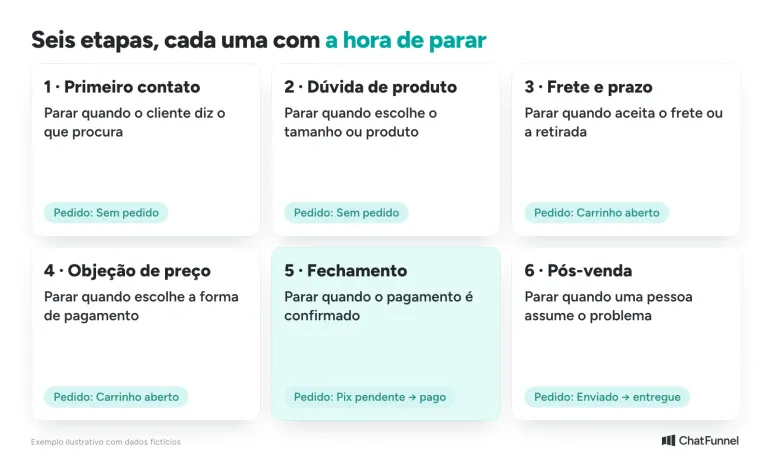
Each message below follows the same format:
- Message: ready-to-use conversational text.
- Stop when: the signal ending that message or sequence.
- Order: the order status where it makes sense.
WhatsApp sales script: three rules for every message
24-hour window. After a customer writes, the store can reply with free-form text for 24 hours. After that, only a Meta-approved template can be sent. For creation and approval see WhatsApp Template: how to create and approve one with Meta.
Every message has an official API cost. In 2026, Meta charges R$ 0.035 per free-form reply after 1,000 free per month and per utility message, such as an order update. Marketing, such as a cart reminder, costs R$ 0.3217. The full rate card is in how much the official WhatsApp API costs in 2026.
Meta decides the category. A reminder containing an offer can be treated as marketing even if the store calls it a notice. Write the template for what it does and test before sending to the base.
First-contact WhatsApp script: 5 opening messages
The first reply determines whether a customer continues. Be specific, say who is speaking and ask one question.
1. Greeting with the store name
Hi, [name]! This is [representative] from [store]. How can I help today?
Stop when: the customer says what they want. The conversation moves to the product-question stage. Order: no order.
2. Customer arriving for a specific product
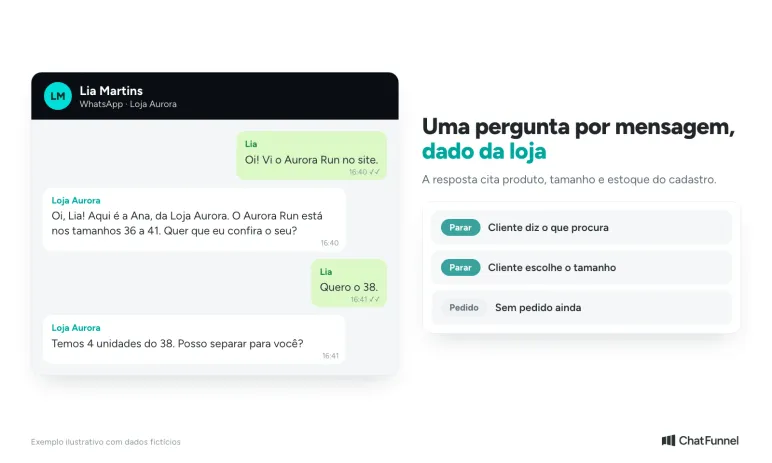
Hi, [name]! I see you came for [product]. It is available in [sizes]. Would you like me to check yours?
Stop when: the customer answers with a size or asks for something else. Order: no order.
3. Outside business hours
Hi, [name]! I received your message outside business hours. We are available [day] to [day], [time] to [time]. Tell me what you need and I will reply when we open.
Stop when: business hours begin or store AI takes over. Order: no order.
4. Customer who sends only "hi"
Hi, [name]! Are you looking for a product, asking about an order or needing help with an exchange?
Stop when: the customer chooses one of the three paths. If they do not reply, do not insist: a second message makes sense only if useful. Order: any status.
5. Customer asking the price immediately
[product] costs R$ [value] upfront or up to [n] installments of R$ [value]. Would you like to see available colors and sizes?
Stop when: the customer answers. If they say it is expensive, move to the price-objection stage. Order: no order.
How to answer product questions on WhatsApp: 5 scripts for stock and measurements
At this stage, state only what the store can verify: stock, measurements and policy. If data is absent, call a person rather than inventing an answer.
6. Size and measurements
For [product], the chart is: P [measurement], M [measurement], G [measurement]. Tell me your height and usual size and I will recommend one.
Stop when: the customer chooses a size. Order: no order.
7. Stock
We have [n] units of [product] in size [size]. May I set one aside?
Stop when: the customer confirms or says they will think. Order: no order or open cart.
8. Out-of-stock product
[product] in size [size] is sold out. I have [similar product] and can let you know when yours returns. Which do you prefer?
Stop when: the customer chooses. If they request an alert, record interest and end the conversation. Order: no order.
9. Comparing two products
The difference between [product A] and [product B] is [actual difference]. For [use], I recommend [product]. Would you like photos of both?
Stop when: the customer chooses a product. Order: no order.
10. Photo or video request
Of course! Here is an actual photo of [product] in [color]. I can also send a video showing the fabric.
Stop when: the customer reacts or asks for another product. If the store lacks the media, hand over to the team. Order: no order.
AI for WhatsApp sales handles this stage well because it answers from the store knowledge base and catalog.
WhatsApp shipping and timing: 5 messages that keep the customer informed
Shipping is a major abandonment reason, and the script should cite timing only from the store's actual calculation.
11. Postal code request
Please tell me your postal code so I can calculate shipping.
Stop when: the customer sends the postal code. Order: open cart or no order.
12. Reply with delivery time
For postal code [postal code], shipping is R$ [value] with delivery within [n] business days after payment confirmation.
Stop when: the customer accepts or asks for another option. Order: open cart.
13. Free shipping
Your order is R$ [value] short of free shipping, which starts at R$ [value]. Would you like to see an item that reaches the threshold?
Stop when: the customer decides whether to add it. Do not offer again in the same conversation. Order: open cart.
14. Store pickup
You can collect at [address], [day] through [day]. The order is ready within [n] hours after payment.
Stop when: the customer chooses pickup. Order: open cart.
15. Delivery by a date
For arrival by [date], the order must be paid by [deadline]. After that I cannot guarantee it. Would you like me to generate payment now?
Stop when: the customer pays or the deadline passes. If it passes, say so clearly and do not use the date as pressure. Order: open cart or pending Pix.
How to address price objections on WhatsApp: 5 replies without invented discounts
Explain value and offer an option the store can honor. A discount applies only if a rule exists.
16. "It is expensive"
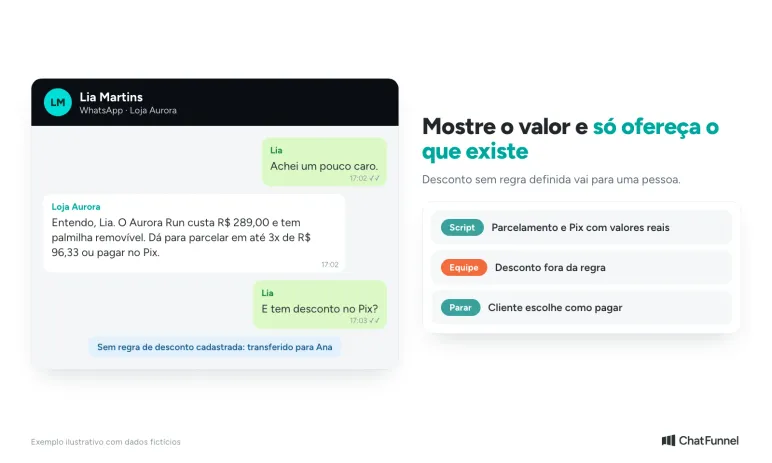
I understand, [name]. [product] has [actual difference: material, warranty, size]. If helpful, I can check up to [n] installments. Want a calculation?
Stop when: the customer accepts installments or declines. Order: open cart.
17. Discount request
The store offers [x]% off with Pix for orders above R$ [value]. If you finish now, I can apply it to your order.
Stop when: the customer replies. If there is no discount rule, do not offer it: hand over to a person. Order: open cart.
18. Installments
You can pay by card in up to [n] installments of R$ [value]. With Pix the total is R$ [value]. Which do you prefer?
Stop when: the customer chooses a payment method. Order: open cart.
19. Comparison with a competitor
I do not know the other site's product, but I can show what ours includes: [list]. If you like, we can compare point by point.
Stop when: the customer decides. Do not criticize the competitor. Order: open cart.
20. "I will think about it"
Of course, [name]! Your cart stays saved. Message me here whenever you like and I can resume where we stopped.
Stop when: the customer has not replied within 24 hours. After that, any reminder requires a template and marketing cost. The abandoned-cart message guide has 20 models for this moment. Order: open cart.
WhatsApp closing messages: from link to confirmed payment
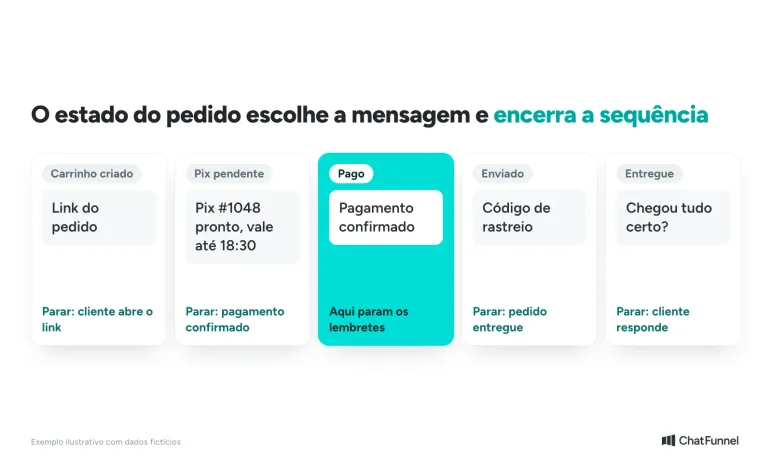
Closing has a critical point: the script must follow order status. Someone who paid does not receive a reminder, and someone who has not paid receives at most one useful notice.
21. Cart or payment link
Done, [name]! Here is your order link: [link]. Check items and address before paying.
Stop when: the customer opens the link or replies. Order: cart created.
22. Pix generated
Your Pix for order #[number] is ready. Code: [code]. It is valid until [time].
Stop when: payment is confirmed or Pix expires. Order: pending Pix.
23. Details confirmation
Before finishing: delivery to [address], product [product], size [size], total R$ [value]. Is everything correct?
Stop when: the customer confirms or corrects. Order: cart created.
24. Pending Pix reminder
Hi, [name]! Pix for order #[number] has not appeared here yet and is valid until [time]. Let me know if you need another code.
Stop when: payment is confirmed. Send at most one reminder before expiry. Outside the 24-hour window, use a template. The steps are in Unpaid Pix: how to recover the sale through WhatsApp. Order: pending Pix.
25. Payment confirmed
Payment confirmed, [name]! Order #[number] is being prepared. We will let you know here when it goes out for delivery.
Stop when: the message has been sent once. From this point no payment request or reminder should go out. Order: paid.
WhatsApp post-sale script: 5 messages after a paid order
Post-sale continues the script. These messages are order updates, and the goal is to anticipate questions.
26. Order shipped
Your order #[number] is out for delivery with [carrier]. Tracking code: [code]. Estimated arrival: by [date].
Stop when: the order is delivered. Order: shipped.
27. Order delivered
Your order #[number] is marked delivered. Did everything arrive correctly? Reply here if something is not as expected.
Stop when: the customer replies. If they report a problem, hand over to a person. Order: delivered.
28. Review request
Glad it arrived, [name]! How was your experience with [product]? Reply from 1 to 5.
Stop when: the customer replies or ignores it. Ask only once. The WhatsApp satisfaction survey has models and score calculation. Order: delivered.
29. Exchange or problem
I am sorry, [name]. I have recorded order #[number], and [representative] will take over with the history. You will not need to repeat anything.
Stop when: a person takes over. The automated script leaves the conversation. Order: delivered, with an open request.
30. Invitation to return
Hi, [name]! I see [product] arrived [n] days ago. A similar new item has arrived: [product]. Want to see it?
Stop when: the customer replies or asks not to receive messages. Honor the opt-out. Outside the window, use a marketing template. Order: delivered more than [n] days ago.
For more models and Meta categories, see 30 automated WhatsApp message models.
When to transfer a WhatsApp sales conversation to a person
The script ends when a subject needs judgment. Define these rules before enabling automation:
| Situation | Who takes over | Reason |
|---|---|---|
| Customer complains of a defect or delay | Support | Order analysis required |
| Customer requests a discount outside policy | Sales | Only a person can authorize it |
| Product data missing from the record | Team | The answer cannot be invented |
| Customer asks to "speak to someone" | Support | Explicit customer request |
| Customer writes three times without resolution | Support | Automation is not helping |
How to automate a store's WhatsApp sales script
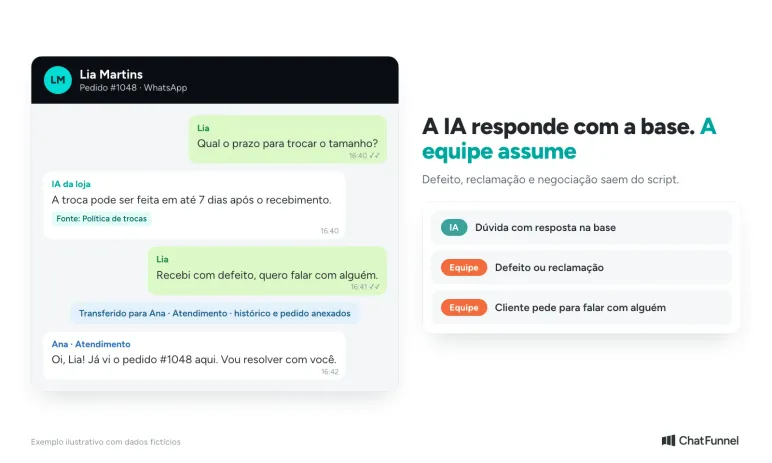
A script in a notepad depends on someone remembering to use it. When it sends automatically, order status must accompany it. A store connected to ChatFunnel can use flows and AI in the same CRM, with conversations, orders and customer history visible to the team.
The design is: the order event (cart, Pix generated, paid, shipped) selects the message, the conversation changes stage and automation stops when the order status changes. The team takes over when a person is needed. Configuration tutorials are in the ChatFunnel Help Center.
An effective sales script has a stage, stop rule and order data
A stop rule separates a useful script from a list of phrases. Each message here says when it ends, and order status determines which goes out. Start with stages where the store loses most customers, test one at a time and read actual replies before adjusting text.
Also check the 24-hour window and official API cost before scheduling a sequence. Without that calculation, a script that looks cheap can generate an unexpected marketing bill.
ChatFunnel combines the article's elements: WhatsApp connected through the official API, the store order linked to the conversation, AI answering from the knowledge base and the team taking over with history. To use it, the store must connect its number to the official API and ecommerce platform and configure flows and the knowledge base. The demonstration shows this path with an online store.
Talk to a specialist and see these messages sent at the right time

Frequently asked questions about WhatsApp sales scripts
What is a WhatsApp sales script?
It is a set of ready-made messages for each sales-conversation stage, from first contact to post-sale. It includes the text, sending time and stop rule. It guides the team, which adapts it to each customer.
What must a WhatsApp sales script include?
An opening identifying the sender, answers for product, shipping and price questions, a close with a payment link and a stop rule by order status. Many models omit a handoff to a person when a conversation leaves the script.
How should I approach a customer on WhatsApp for the first time?
When the customer wrote first, reply with the store name and one question. If the store initiates contact, the person must have consented to messages and an approved Meta template must be used outside the 24-hour window.
Can I use the same script for every customer?
Use the same structure and change details: name, product, size, timing and order status. Identical text for everyone sounds automatic and ignores what the customer already said.
How many times can I follow up if the customer does not reply?
Prefer one reminder after the 24-hour window only if it provides something useful, such as Pix validity. From the second, customers tend to feel pressured. Outside the window, each reminder is a paid template.
Does a WhatsApp sales script need a Meta-approved template?
Only when the store initiates a conversation or writes more than 24 hours after the customer's last message. Within the window, text is free-form. Meta defines the template category, and each category's price is on the 2026 rate card.
Can I automate the sales script with AI?
Yes, with limits. AI answers questions covered by the knowledge base and catalog and hands over to a person when data is missing, there is a complaint or negotiation falls outside the rule. Test with actual questions before enabling it.
Turning Visitors into Loyal Customers 🩵