WhatsApp Business labels group conversations by name and color so the team can quickly find people who still need a response. For a store, they work only when each label has an entry and exit rule. "Waiting for payment", for example, must be removed as soon as that order is paid.
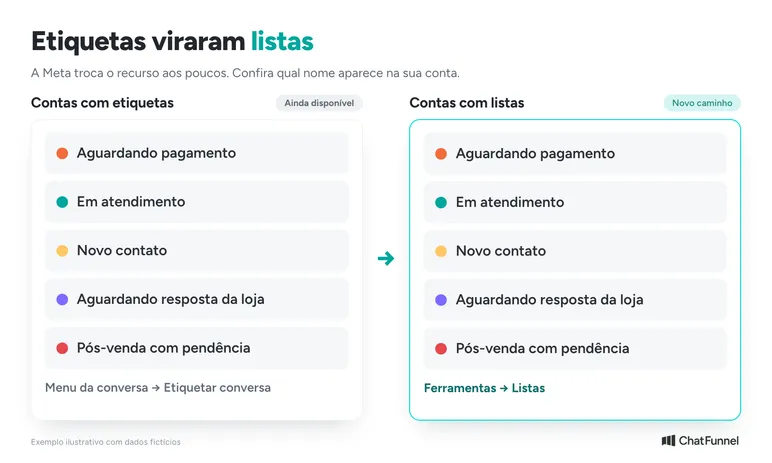
If you can no longer find the labels button, Meta is gradually replacing labels with lists. Some accounts still show labels while others already have lists. The WhatsApp Help Center describes this transition.
When the store needs to link a label to an order and conversation owner, ChatFunnel CRM stores tags and fields on the contact record. First define what each marker means. A confusing label remains confusing in any system.
Did WhatsApp Business labels disappear? They became lists
Look for Lists under Tools and check whether your labeled conversations are there. Meta's notice about gradual rollout explains why 2 accounts show different screens. It does not establish the cause of a specific error on your phone.
If markers are not where the guide indicates, record the app version, device operating system, and what is missing. Then consult WhatsApp help. Avoid deleting and rebuilding the whole organization before understanding the change.
The app also offers optional automatic events to classify orders and contacts in conversations. Not every WhatsApp Business marker therefore needs to be manual. Before enabling it, read the conditions in your account. Meta says the feature may affect other app features and disconnects linked devices during activation. It also does not establish synchronization with your store's CRM.
How to create WhatsApp Business labels on Android, iPhone, and computer
Check the name shown in your account before following an old tutorial. The app changes gradually, and the Android path may differ from iPhone.
How to create WhatsApp Business labels on Android
For accounts still showing labels, official documentation says to open Chats, tap the 3-dot menu, and select Label chat. Then enter the name, confirm, and save. To apply an existing label, press the conversation, tap the label icon, select the marker, and save.
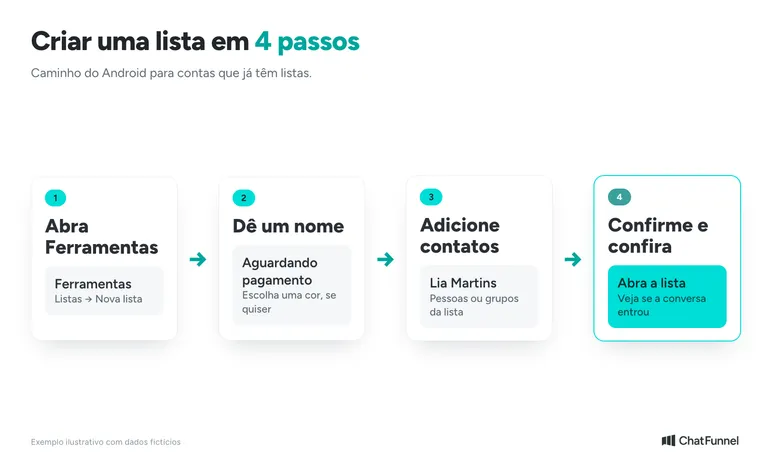
If your account already shows lists, the current lists guide gives this Android path:
- Open Tools, then Lists and New list.
- Enter the name and choose a color if desired.
- Add the people or groups belonging to the list.
- Confirm using the selection icon.
To add another contact later, press the conversation, tap the list icon, choose the destination, and confirm. Open the list and check that the conversation was added. This prevents the team from continuing under the assumption the marker was saved.
How to use WhatsApp Business labels on iPhone
On iPhone, consult the iOS tab in the same Help Center and follow the path for the version shown on your device. Do not look for Android's 3-dot menu because the systems differ. The official guide also shows how to change a list's name and color or remove people.
How to create WhatsApp Business labels on a computer
On WhatsApp Web, the official guide says to click Tools, then Lists and Add new list. Enter the name and click Create list. To apply the marker, open the conversation menu, select Add to list, and select the name.
How many labels and lists can you create?
Meta states a limit of 20 labels and, in the new guide, 20 lists. This is a feature ceiling, not a target. A store with a few clear categories can teach the process with less effort.
Which labels should a store use? A model with entry and exit criteria
Choose names that indicate an action. "Important" depends on the agent's opinion. "Waiting for the store's response" makes clear that the team owes the next reply.
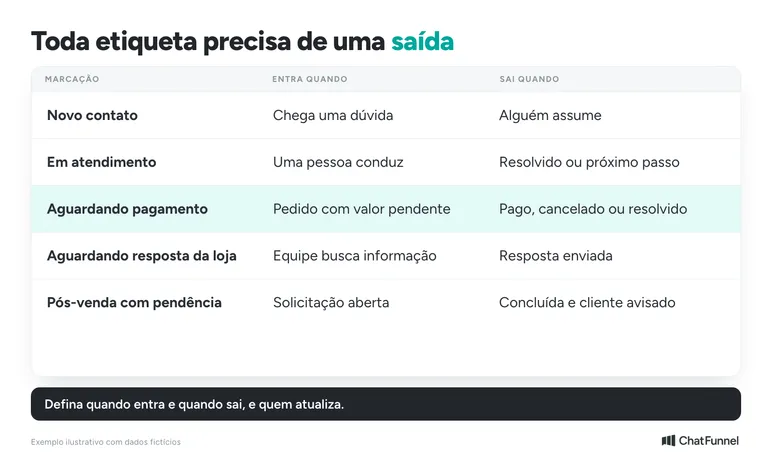
The table is an illustrative model to adapt. It also works for lists if that is the version in your account.
| Marker | When it enters | When it exits |
|---|---|---|
| New contact | A question arrives that the team has not yet taken over | Someone starts handling it |
| In progress | A person is leading the conversation | The question is resolved or a next step is defined |
| Waiting for payment | An identified order has an outstanding amount | Payment is confirmed, the order is canceled, or the issue no longer exists |
| Waiting for the store's response | The team needs to find information before replying | The answer is sent to the customer |
| Post-sales issue pending | There is an open request about a purchase | The team completes the request and informs the customer |
An interest label can coexist with a service label. "Interested in sneakers" describes the topic. "Waiting for the store's response" describes what remains to do. 2 labels indicating the stage of the same purchase should be reviewed together so they do not contradict each other.
Also define who updates them. One possible rule: the person completing a stage checks markers before leaving the conversation. At shift change, the person taking over reads the issue and agrees on the next follow-up. Changing the conversation color alone does not identify the owner.
How to update a label when a customer pays an order
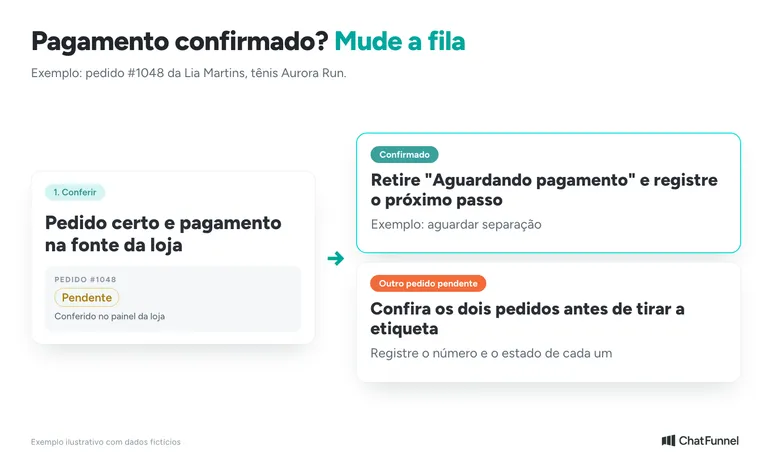
Consider this example: a customer asks about sneaker size, receives a link, and opens order 1048. The team identifies the purchase in the store dashboard and marks the conversation "Waiting for payment". Minutes later, the customer says she paid.
The agent should verify payment in the source the store uses. "I've already paid" calls for a check and is not enough to end a collection request. Once confirmed, the team removes the pending-payment marker and records the order's next step, such as waiting for fulfillment.
If the dashboard still shows pending, the reply should explain what appears there and route the discrepancy for checking. Avoid repeating a payment reminder before investigating.
The situation becomes harder when the customer has 2 orders: 1 paid and 1 pending. A marker on the entire conversation does not say which purchase it refers to. Removing "Waiting for payment" without checking both orders can hide an issue. Keeping the label without context can prompt collection on the wrong purchase.
Record each order number and its status in the store system or CRM. Before sending a message, check which purchase is involved. The label remains useful as a filter as long as the team does not treat it as proof of payment status.
WhatsApp Business labels or CRM: when to move to tags
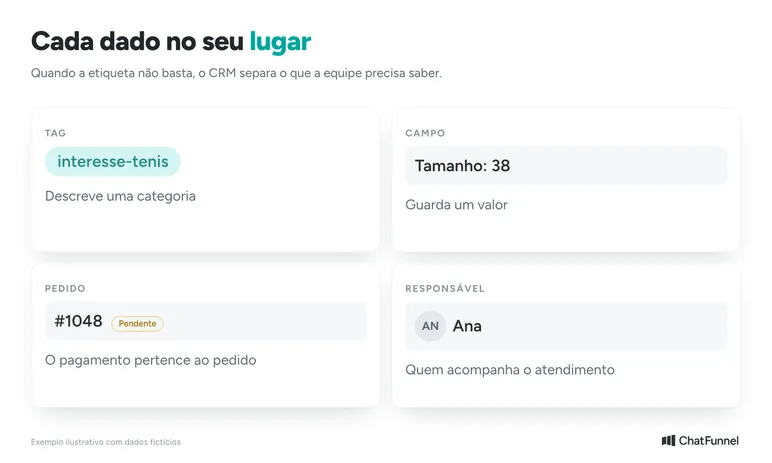
The signal to evaluate CRM is the number of decisions requiring information beyond a marker. Does the team need to distinguish 2 orders from the same person? Know who responds and by when? Filter contacts by more than 1 criterion?
A tag describes a category, such as "Interested in sneakers". A field stores a value, such as size 38. Payment status belongs to an identified order. The owner indicates who follows the case. Keeping these separate prevents the customer record from becoming a string of labels.
The article on CRM for ecommerce explains the distinction between customer, opportunity, and order. To organize inbox distribution, also see the guide to WhatsApp with multiple agents. If you are choosing an app, read WhatsApp Business or API.
In ChatFunnel, the team fills in tags and fields, and automation flows can do so too. The contacts, folders, and tags tutorial explains how. Segments combine tags, custom fields, and statuses with "all" or "any" logic and show a contact preview. Steps are in how to segment contacts in ChatFunnel. For example, a store can select people interested in sneakers of a particular size, provided that data is recorded.
App labels and CRM tags are separate sets. Do not rely on automatic transfer between them without checking the scope of your connection. If your store sends order status to CRM, confirm with the ChatFunnel team which events arrive and how they trigger tags and stages. When moving to CRM, bring the definitions dictionary and test a small group before expanding. The Help Center explains how to import contacts with tags. The official WhatsApp API for ecommerce guide explains what to check in the channel connection.
Labels organize the queue; CRM stores the order
Start with what most disrupts service today. Open a few conversations and compare the label with the last message and order. Correct old cases and adjust the missing exit criterion. Then see whether another team member applies the same rule without asking for an explanation.
If the next difficulty is keeping order, owner, and history together, bring that example to a ChatFunnel demo. Ask to check how data arrives from your store and how the team follows an issue through closure.

Frequently asked questions about WhatsApp Business labels
How many WhatsApp Business labels can I create?
Up to 20 labels, according to the WhatsApp Help Center. In the new guide, the limit is also 20 lists. Use a few markers, each with defined entry and exit rules.
Why did my WhatsApp Business labels disappear?
Meta is gradually replacing labels with lists, and some accounts have already changed. Look for Lists under Tools before rebuilding everything. If conversations are not there, record the app version and consult WhatsApp help.
How do I create WhatsApp Business labels on a computer?
On WhatsApp Web, click Tools, then Lists, then Add new list. Enter the name and click Create list. To apply it, open the conversation menu and choose Add to list.
Does the "Waiting for payment" label prove the customer has not paid?
No. The label is a service filter. Check payment in the store dashboard or CRM before collecting or removing the marker, especially when the customer has more than 1 order.
Can I message everyone in a label or list?
Meta's guide says lists allow business broadcasts to all customers in a list. Before using them for promotions, check Meta's marketing message rules and customer consent.
Do WhatsApp labels automatically become CRM tags?
Do not assume so. Check your connection's scope, bring the definitions dictionary, and test a small contact group before expanding.
When should I move from labels to CRM?
When the team needs to separate 2 orders from the same person, know who responds and by when, or filter contacts by more than 1 criterion. If a label no longer answers those questions, CRM is the next step.
Turning Visitors into Loyal Customers 🩵