A WhatsApp satisfaction survey asks a customer a short question immediately after service, usually for a rating from 1 to 5. The answer is stored with the conversation.
For an online store, the benefit is knowing whether service resolved the issue and who needs follow-up. The most commonly used result is CSAT, calculated using only respondents.
This avoids a common error: a customer gets help locating a delayed package and gives a low score because it is still far away. The score deserves attention, but the comment must show whether the complaint concerns service, delivery, or both.
In ChatFunnel, conversation history, owner, and contact data stay on the same record. The team uses it to investigate a low score and resume the case.
This guide explains CSAT and survey setup. It includes 4 message templates, the calculation, and what to do for people who gave low scores.
Where a satisfaction survey fits in the store journey
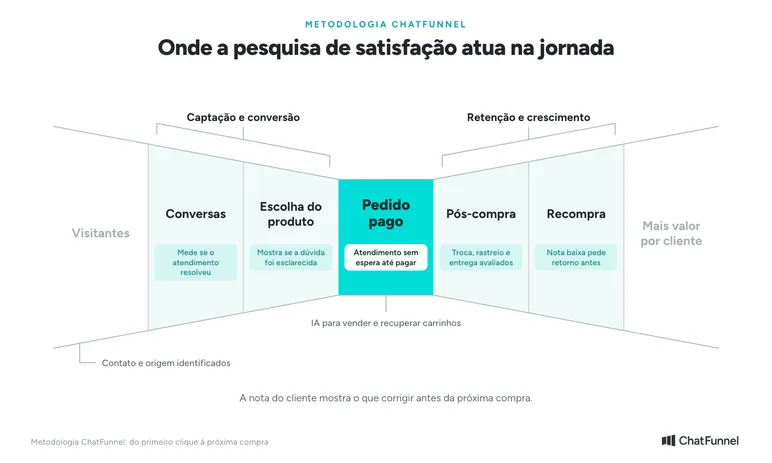
In the ChatFunnel Methodology, the survey reaches the store at 5 stages. In Conversations, it measures whether service resolved the question.
In Product Selection, it shows whether an answer about size or delivery time helped the decision. At Paid Order, it shows whether the customer waited too long to complete the purchase.
It appears most in Post-purchase: exchanges, tracking, and delivery. In Repurchase, the score indicates who had a good experience and who needs follow-up before buying again.
What is CSAT and how does it work in customer service?
CSAT stands for Customer Satisfaction Score. It measures satisfaction with a specific interaction, such as the service a customer just received.
Qualtrics describes the calculation using scores of 4 and 5 on a 5-point scale.
In practice, a store sends a question such as "how was today's service, from 1 to 5?" A respondent choosing 4 or 5 counts as satisfied. CSAT is the percentage of satisfied people among respondents.
How to conduct a WhatsApp satisfaction survey: step by step
Step 1: choose a question about customer service
If the task is measuring support satisfaction, say so in the text. "What did you think of our store?" invites the customer to rate price, packaging, product, and shipping at once. It becomes hard to decide which team needs to act.
After the score, offer space for a comment. A customer may leave only the number. Requiring a long explanation to accept the answer increases their workload.
If you also want to measure delivery, create a separate question and keep results apart. A carrier score should not enter the same report used to guide agents.
Step 2: decide when to send the invitation
Adopt a sending rule the team can verify. An archived conversation may mean the issue ended, the customer stopped responding, or someone closed chat with an open issue. These are different situations.
To start, invite the customer after the team completes the interaction and records its outcome. If the question remains unanswered, the next contact should try to resolve the case.
An automatic survey at that point sounds as though the store considers the problem closed.
Also choose an evaluation unit: 1 completed interaction identified by an internal code. Avoid sending another survey for each agent transfer, because a transfer may be part of the same case.
Keep the reason conversations were excluded from the survey. Inviting only people who praised the team hides experiences needing correction.
Step 3: check the 24-hour window before sending
In the official API, the service window lasts 24 hours from the customer's last message. Inside it, the store can respond without a template.
Outside it, WhatsApp Business policy permits only approved message templates. The time an agent closes chat does not restart the clock.
Before automating invitations, check the time of the last received message. If closure happens the next day, use an approved template for that purpose and check the category Meta assigned.
The tutorial How the 24-hour window works explains the case in ChatFunnel's Help Center.
Inside the window, the response is a service message. Since October 1, 2026, Meta offers 1,000 free service messages per number each month.
The policy also requires honoring opt-out requests. Record refusals and stop subsequent invitations. Having a buyer's phone number alone does not satisfy this step.
Step 4: choose how to collect the response
For the first test, prefer a simple collection method the team can monitor. It could be a numeric reply in the conversation or a form linked to the case. The choice depends on available configuration and where the store will keep evaluation history.
If the invitation includes a product offer, it stops being just a survey. Keep the text to the question.
After-sales customer messages: WhatsApp satisfaction survey templates
A satisfaction survey is one of the most useful after-sales messages because it arrives when the customer already has an opinion about service and delivery. The texts below are proposals.
They have not been approved by Meta and do not themselves determine the sending category. Whoever configures the survey must check the template in the store's account.
Template 1: customer service CSAT (scale of 1 to 5)
Regarding today's service for your order, how satisfied are you? Reply with a number: 1 very dissatisfied, 2 dissatisfied, 3 neutral, 4 satisfied, or 5 very satisfied.
Participation is optional. To stop receiving invitations, reply SAIR.
Template 2: after an exchange or return
Hi, Lia! Your exchange for order 1048 is complete. How would you rate the service you received, from 1 to 5? If you wish, tell us what influenced your score.
Template 3: delivery evaluation (separate report)
Did order 1048 arrive? How would you rate delivery, from 1 to 5? This question concerns only delivery time and transport.
Template 4: store NPS for customers who have purchased
From 0 to 10, how likely are you to recommend Loja Aurora to a friend? Reply with a number.
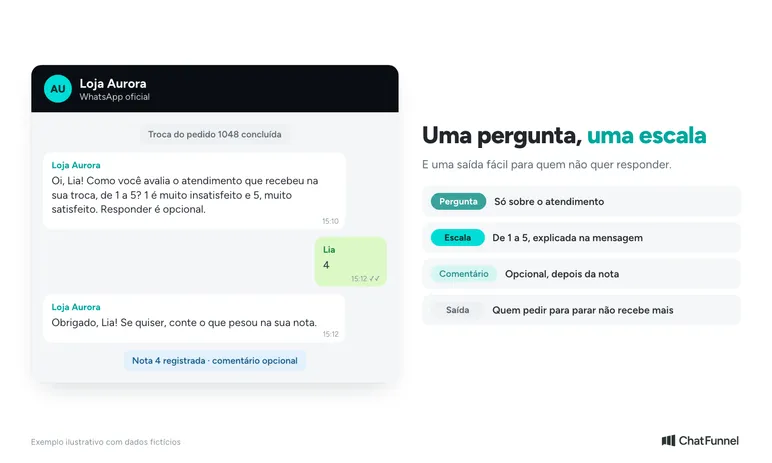
How to turn the survey into a WhatsApp template
Outside the 24-hour window, the survey can only be sent as a template. It is a message with fixed text, variables, and optional buttons that Meta approves before the first send. Inside the window, free-form messaging is allowed.
See Template 2 in template format, with variables in braces:
Hi, {{1}}! Service for your order {{2}} is complete. How would you rate the service you received? Reply with a number from 1 to 5. To stop receiving invitations, reply SAIR.
The number of template buttons is limited. A 1-to-5 scale therefore usually uses a typed reply, while a short scale such as "Satisfied" and "Dissatisfied" uses buttons.
- Refer to a specific interaction. According to Meta, a survey about an order or service interaction may qualify as utility, but a generic survey is not approved as utility.
- Choose the category carefully. If text includes an offer or purchase invitation, Meta assigns marketing. The category determines sending price, and Meta can update a template's category after approval.
- Create the template. In ChatFunnel, use the Message Templates tab. A reply button triggers an automation, and an AI agent can be linked to the template. The tutorial How to approve WhatsApp templates in ChatFunnel provides the steps.
- Submit for approval and monitor status. If Meta rejects it, adjust text and category and resubmit.
- Keep the answer with the conversation, including the service code.
Each template requires approval in the store's account even if its text resembles another store's. This article's examples are starting points.
CSAT or NPS: which should a store use for customer service?
CSAT and NPS answer different questions. CSAT measures satisfaction with an interaction.
NPS measures the likelihood a customer will recommend the store, using scores from 0 to 10. Scores of 9 or 10 are promoters, and 0 through 6 are detractors.
NPS is the percentage of promoters minus the percentage of detractors, according to the Qualtrics NPS guide.
| Criterion | CSAT | NPS |
|---|---|---|
| Question | How was this service interaction? | Would you recommend the store? |
| Scale | 1 to 5 | 0 to 10 |
| Result | % of scores 4 and 5 among responses | % promoters minus % detractors |
| When to send | Immediately after service | After delivery, once the customer is using the product |
| Purpose | Improve customer service | Measure store loyalty |
Use CSAT to evaluate support. NPS can be a second survey at another time so the questions are not mixed in the same conversation.
How to calculate CSAT and response rate
For a scale of 1 to 5, use:
CSAT = responses rated 4 or 5 ÷ total valid responses × 100.
A score of 3 enters total responses but not the satisfied group. Someone who did not respond gets neither a 0 nor a 5. Nonresponse goes in another column.
Consider a hypothetical week with 1 invitation per interaction and all invitations delivered:
| Weekly record | Quantity |
|---|---|
| Invitations delivered | 100 |
| Valid responses from 1 to 5 | 40 |
| Scores of 4 or 5 | 30 |
| Scores from 1 to 3 | 10 |
| Invitations without response | 60 |
CSAT is 30 ÷ 40 × 100, or 75%. Response rate is 40 ÷ 100, or 40%.
The correct reading: 75% of respondents were satisfied, and 40% of invitees responded. The calculation does not support saying 75% of all customers are satisfied.
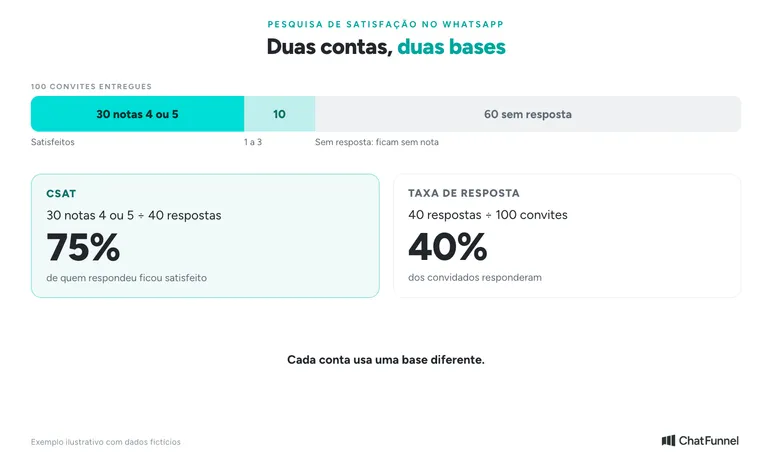
If you have only the number of invitations sent, use that total and state the base in the report. Do not call it delivered messages. Sending failure and customer silence require different investigations.
Also record the period, question used, and rule for repeated responses. One option is to accept the first valid score per interaction and keep later comments.
If a customer corrects a score entered by mistake, preserve the correction record. The rule must remain stable to compare weeks.
What to do with a low satisfaction survey score
A score of 1 or 2 can enter a store-defined review queue. Before sending another question, the owner reads the history. The customer may already have explained the issue and be upset precisely because they had to repeat everything.
Consider a fictional case. The customer gives 2 and writes "I still don't know when it will arrive".
History shows the team sent only a tracking link without explaining why there was no update. The next step is to check the order source, find who can confirm progress, and agree on a follow-up the team can meet.
The article on order status on WhatsApp explains how to answer without waiting for the customer to ask again.
The reply can be short:
I read your review and saw that tracking still has no update. I'll check the order with the responsible team and reply by 2 p.m. tomorrow.
This deadline is illustrative. The store should use a commitment it can meet.
Keep the original score even if the case ends well. Deleting it or replacing it with an assumed score hides the failure that led to renewed service. Record the action and confirmed outcome in separate fields.
When AI is involved, always provide a handoff to a person. WhatsApp policy requires a clear escalation path in automation. The article on transferring AI to human service explains how to prepare continuity.
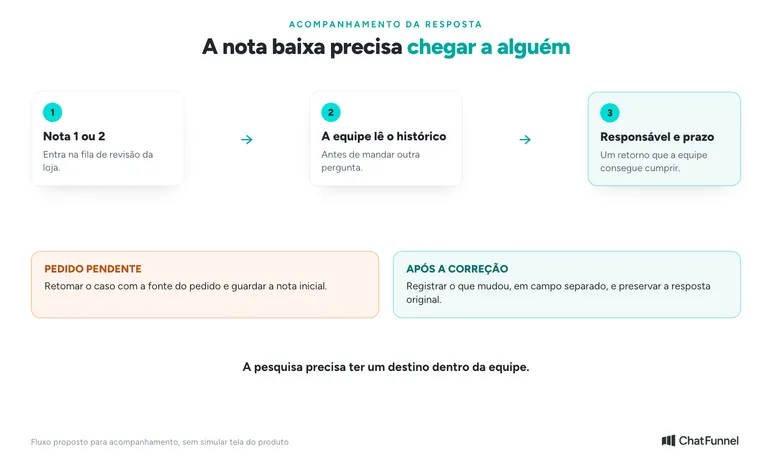
How to track evaluations with ChatFunnel
ChatFunnel combines messages and contact data on one record and lets teams assign each conversation to an owner. These features help find the evaluated interaction and follow up.
Tags and fields identify the subject, such as a size question or delayed order. The article on multiple agents on the same number explains conversation distribution.
ChatFunnel also evaluates conversations by objective. The business registers an objective, such as helping a customer choose the right sneakers.
The team sees whether the conversation reached it and corrects the result if needed. This measures conversation progress, while the customer score measures how the customer felt. Use both readings together.
For team monitoring, the Reports Center shows workload by agent and service time. Cross-reference this data with scores to see whether low-score peaks coincide with busy periods.
For a supervised test, keep each evaluation in a spreadsheet row or the chosen survey tool. Record the service code, invitation date, score, and optional comment.
Maintain a link allowing the conversation to be consulted without copying customer data to multiple places.
A single "latest score" field on the record is useful for quick reference but loses the previous score when replaced. To measure a sequence of interactions, keep each response dated in separate records.
Survey collection, CSAT calculation, and storage of each evaluation depend on the store's chosen and tested configuration. Request a demonstration of this path in your account before assuming a ready-made report exists.
A satisfaction survey matters only when someone acts on the score
Setting up a survey is quick. Keeping the rule stable is harder. Use 1 question about service, 1 invitation per interaction, CSAT calculated only from respondents, and a separately calculated response rate. The store can then compare weeks and see whether a change improved support.
After the first period, read comments alongside scores. If several customers point to a confusing exchange answer, revise that guidance and monitor subsequent cases.
One score does not explain the entire service experience. To see where AI fits, read the AI customer service in ecommerce guide.
ChatFunnel connects your store to WhatsApp and Instagram and keeps each conversation's history together. It assigns service to an owner and passes the conversation to the team when AI cannot resolve it.
That history helps investigate a low score and resume the case. To start, bring the question you want to ask, sending time, and person responsible for low scores to the demo.
Explore ChatFunnel, the No. 1 AI for online stores
Frequently asked questions about WhatsApp satisfaction surveys
How do I conduct a satisfaction survey on WhatsApp?
Choose a service question, decide when to send the invitation, and send it with an explained scale such as "1 to 5". Keep each response with date and service code. Inside the 24-hour window, sending is an ordinary reply. Outside it, Meta requires an approved template.
What is CSAT?
CSAT is Customer Satisfaction Score, a measure of satisfaction with a specific interaction. On a 1-to-5 scale, the result is the percentage of 4 and 5 scores among valid responses. Nonrespondents are excluded.
What is the difference between CSAT and NPS?
CSAT measures satisfaction with a service interaction on a 1-to-5 scale. NPS measures likelihood to recommend the store from 0 to 10, and the result is the percentage of promoters minus detractors. Use CSAT to evaluate support.
Can I send a WhatsApp Business satisfaction survey for free?
In the app, you can send the question manually, 1 conversation at a time. The app does not send the survey automatically after each interaction. To automate, the store needs a platform connected to the official API. Inside the 24-hour window, Meta offers 1,000 free service messages per number each month.
When should I send a satisfaction survey?
Send it after the team completes the interaction and records the outcome, preferably within the 24-hour window. If the question remains unanswered, resume the case before asking for a score. To evaluate delivery, wait for the order to arrive and use a separate question.
Do I need customer permission to send the survey?
Yes. WhatsApp Business policy requires contact permission and honoring opt-out requests. Make participation optional, provide an easy exit such as replying SAIR, and stop invitations to people who refuse.
Does ChatFunnel have a ready-made satisfaction survey?
ChatFunnel combines each conversation's history, assigns service, and offers conversation evaluation by objective and reports by agent. Customer score collection depends on the store's configuration. Request a demo to see how to set it up in your account.
Is a satisfaction survey a utility or marketing template?
It depends on the text. Meta lists a survey about a specific order or interaction among utility examples and says a generic survey is not approved as utility. If text includes an offer, Meta assigns marketing. Check the final category in the store account.