A post-purchase thank-you message on WhatsApp is a short note sent after payment to thank the customer and explain what comes next. It works best when it includes the order number and accompanies each stage: shipment, delivery, review request and invitation to return.
This guide provides 10 post-purchase customer message templates, organized by order stage. They are suggested text and have not been approved by Meta. You will also see which are sent as utility and which become marketing, such as a thank-you with a coupon.
The ChatFunnel triggers messages based on payment and order status. Conversation and purchase history stay on the contact record, and the team follows each customer in the same profile.
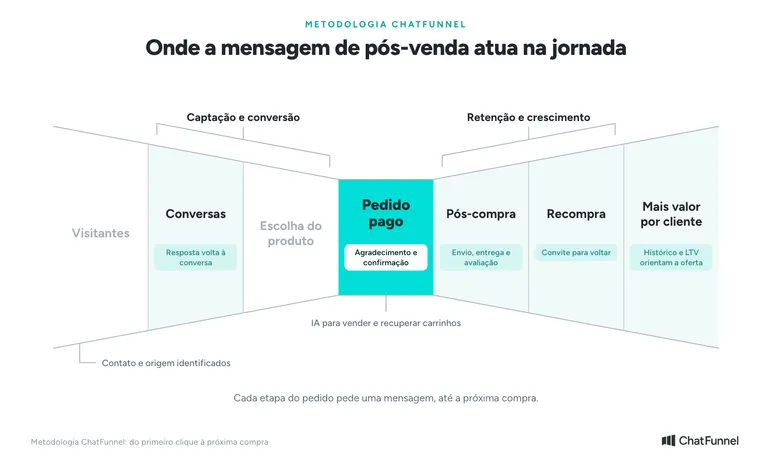
Where post-purchase messages fit in the store journey
In ChatFunnel, the post-purchase message starts at Paid order, with thanks and confirmation. In Post-purchase, it follows shipment, delivery and the review request.
In Repeat purchase, it invites the customer back. In More value per customer, order history and LTV show who should receive each offer. In Conversations, the customer's reply appears in the same conversation, and the team or AI continues from there.
Post-purchase WhatsApp thank-you messages: when to send each one
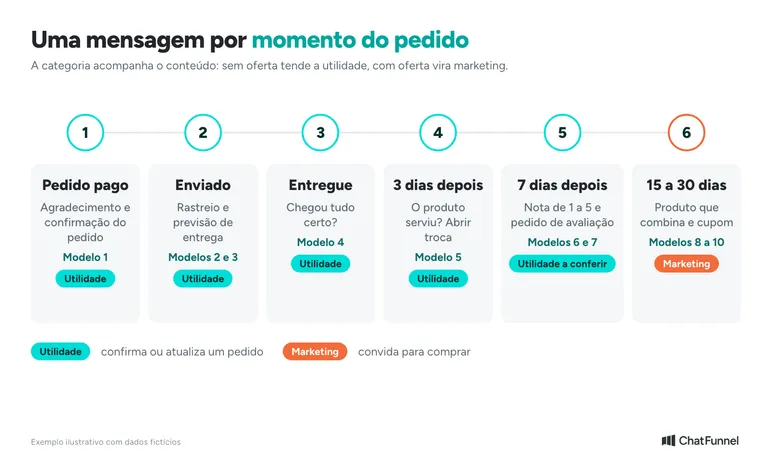
Each order stage calls for a different message. Send thanks immediately after payment. The review request waits until the product arrives and has been used.
The table shows a starting sequence. The timings are starting points, and the store should test them with its own audience.
| Moment | Trigger | Template | Likely Meta category |
|---|---|---|---|
| Paid order | Payment approved | 1 | Utility |
| Order shipped | Shipped status | 2 | Utility |
| Out for delivery | Carrier status, if received by the store | 3 | Utility |
| Order delivered | Delivered status | 4 | Utility |
| 3 days after delivery | Time elapsed since delivery | 5 | Utility, if only about the order |
| 7 days after delivery | Time elapsed since delivery | 6 and 7 | Utility for the survey; check the public review request |
| 15 to 30 days later | Time elapsed and purchase history | 8, 9 and 10 | Marketing, except thanks without an offer |
Meta makes the final category decision, not the store. Check the outcome in the sending account.
Post-purchase customer messages: 10 ready-to-copy templates
The texts use fictional data from Loja Aurora. Replace the name, product, order number and links with your store's details.
Each template fits in a few lines because customers read on their phones. Write as someone from the store would speak, without excessive formality.
Purchase thank-you message (paid order)
Template 1: thanks with order confirmation
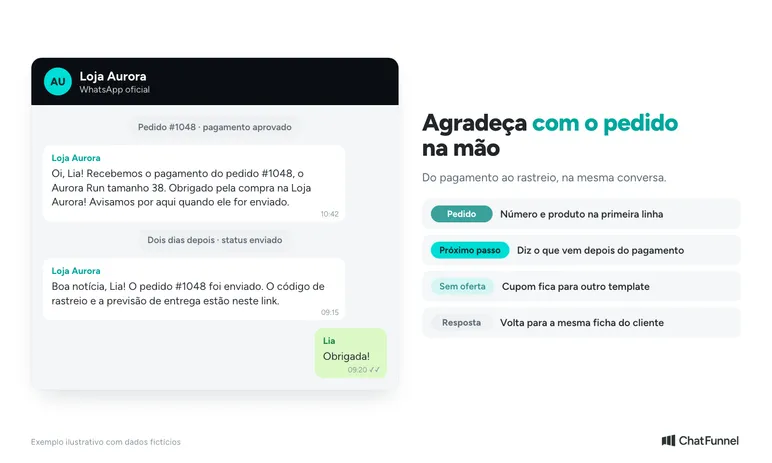
Hi, Lia! We received payment for order #1048, the Aurora Run in size 38. Thank you for shopping at Loja Aurora! We will let you know here when it ships.
This format is closest to utility: it confirms a specific order and contains no offer. If payment has not yet gone through, that is a different matter. The article on pending Pix payments on WhatsApp covers that stage, and the one on cart recovery covers what comes before.
Delivery follow-up messages (order shipped and on the way)
Template 2: order shipped, with tracking
Good news, Lia! Order #1048 has shipped. The tracking code is [code] and estimated delivery is [date]. Track it here: [link].
Template 3: order out for delivery
Hi, Lia! Order #1048 is out for delivery and should arrive today. If no one can receive it, reply here and we will help.
Template 3 only applies if the store receives this status from the carrier. Without the data, do not promise the date. The guide to order status on WhatsApp shows how to respond when a customer asks before the notice.
Post-purchase message: check whether the order arrived
Template 4: order delivered
Hi, Lia! Order #1048 is marked as delivered. Did everything arrive correctly? If anything was different from what you expected, reply here and our team will resolve it.
Template 5: is everything okay with the product?
Lia, did the Aurora Run in size 38 fit well? If you need an exchange, reply to this message and we will open an exchange for order #1048.
These two messages open the channel while the customer may still have a problem. It is better to resolve the exchange now than respond to a public complaint later. The article on reputation and Reclame Aqui explains the cost of leaving a case unanswered.
Message to request a customer review
Template 6: question about the order
Hi, Lia! Your order #1048 arrived a week ago. How was your buying experience, from 1 to 5? Responding is optional.
Template 7: invitation to review the product
Lia, your opinion helps others choose. If you can, review the Aurora Run at this link: [link].
Meta accepts a survey about a specific order as utility, but does not accept a generic survey in that category. Template 7 takes the customer to a website and is closer to a promotional action, so Meta may treat it as marketing. Test the category before activating automation.
The calculation and what to do with a low score are covered in the guide to customer satisfaction surveys on WhatsApp.
Repeat purchase message and thank-you with a coupon
Template 8: a product that complements the purchase
Hi, Lia! People who bought the Aurora Run also buy the Performance Sock for R$39.00. Want to see it? [link]. To stop receiving offers, reply STOP.
Template 9: thank-you with a coupon
Lia, thank you for shopping at Loja Aurora! On your next purchase, use coupon [CODE] by [date]. To stop receiving offers, reply STOP.
Template 10: thanking a returning customer
Great to see you again, Lia! We received payment for your second purchase and are already preparing it. Thank you for trusting Loja Aurora.
Template 10 is a thank-you without an offer, tied to an order. Templates 8 and 9 invite another purchase and are sent as marketing. For people who have not purchased in weeks, see the messages in the article on reactivating customers on WhatsApp.
Is a WhatsApp thank-you message utility or marketing?
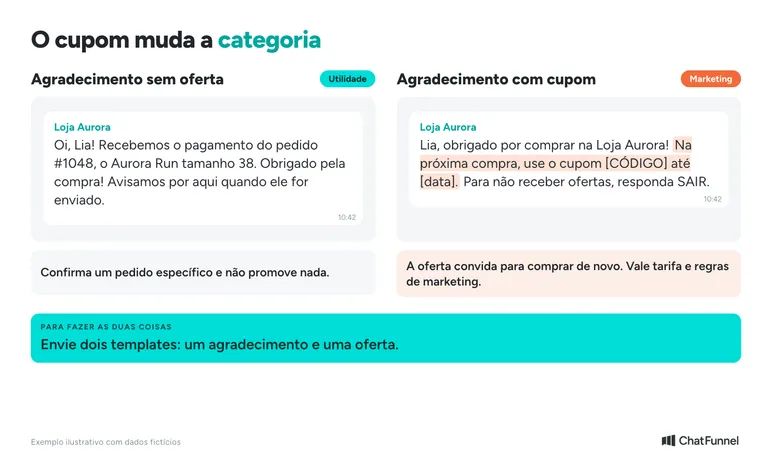
It depends on the wording. A thank-you that confirms the order and contains no offer tends to be utility. If the text includes a coupon, product suggestion or invitation to buy, Meta treats it as marketing.
The Meta category documentation says order management messages confirm or update a purchase using specific details. They must not promote, recommend, cross-sell or include offers.
| Message | What it contains | Likely category |
|---|---|---|
| Thank-you with order confirmation | Order number, product, next step | Utility |
| Shipment and delivery notice | Tracking and estimate | Utility |
| Order survey | Question tied to a specific purchase | Utility |
| Thank-you with coupon | Offer for the next purchase | Marketing |
| Product suggestion | Recommendation or cross-sell | Marketing |
Combining both in one text saves nothing. Meta can recategorize a template after approval, and the store then pays the marketing rate. If you want to do both, send two templates.
How to send post-purchase WhatsApp messages: window, template and permission
With the official API, the store can reply with a free-form message for up to 24 hours after the customer's last message. After that, only an approved template is allowed, according to the WhatsApp Business policy. The store's response does not restart the window.
Almost every post-purchase message is sent outside the window. The customer bought days earlier and has not written since. Therefore, thanks, shipping notices and invitations to return are usually sent as templates. The article on WhatsApp templates for stores shows how to build them and track approval.
Templates contain fixed text and variables. Template 1 looks like this:
Hi, {{1}}! We received payment for order {{2}}, the {{3}}. Thank you for your purchase! We will let you know here when it ships.
When Meta approves a template, it appears synced in ChatFunnel, ready to send through official WhatsApp. The creation steps are in the tutorial How to approve WhatsApp templates in ChatFunnel.
Customer permission is also required. WhatsApp policy asks for opt-in for each message type, such as order updates and offers, and requires honoring opt-out requests. Record the refusal and stop subsequent sends.
As for cost, Meta charges per message and the rate depends on category. From October 1, 2026, replies within the window are also charged after the 1,000 free service messages per number each month. In ChatFunnel, cost has two parts: the platform, which already includes AI, and messages charged by Meta. The ChatFunnel cost calculator estimates the amount by category. The article on service message charges details the change.
Rates in Brazilian reais for each category are in the guide to official WhatsApp API pricing.
How to automate post-purchase messages using order status
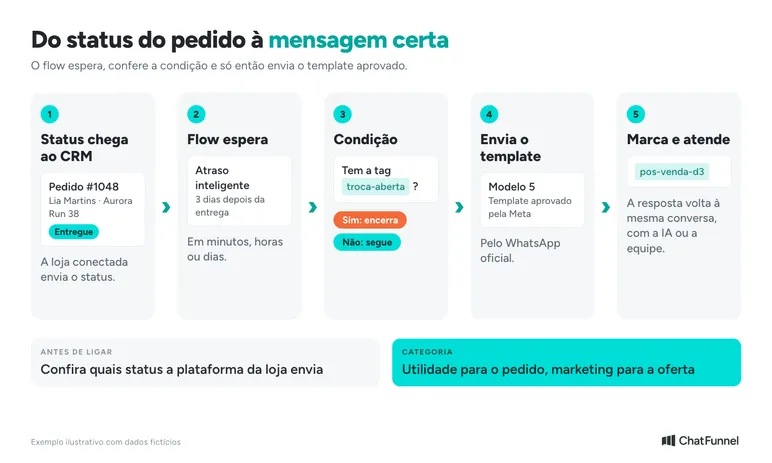
Automated post-purchase communication depends on one piece of data: order status. When the store is connected to ChatFunnel, the order reaches the CRM with the status provided by the platform. ChatFunnel triggers messages based on payment and status.
The process has five steps:
- Connect the store and official WhatsApp. ChatFunnel connects VTEX, Loja Integrada, Nuvemshop, Tray, WooCommerce, Shopify and Yampi. Check which statuses your platform sends.
- Create a template for each order stage. Choose utility for thanks, shipment and delivery, and marketing for coupons and repeat purchase.
- Build the flow with a delay and condition. The flow waits for the defined period, such as three days after delivery, and checks the condition before sending. Someone who opened an exchange should not receive a review request.
- Tag the contact. The tag records who received each message and lets you filter the next campaign. The tutorial on ChatFunnel broadcasts shows how to select an audience using filters and tags.
- Leave the response to AI or the team. If the customer replies to the template, the conversation continues in the same profile. A template reply button can trigger an automation, and an AI agent can be linked to the template. The article on transferring from AI to human support shows how to prepare the handoff.
For repeat purchase campaigns without a status trigger, broadcast sends an approved template to a selected audience immediately or on a schedule. The article on bulk sending through the official API explains the steps.
What to avoid in an automated post-purchase message
People who receive many messages unrelated to their order block the store. Send one message per order event and one repeat purchase message per cycle, and measure before increasing frequency.
Avoid generic text that could come from any store. Use the name, product and order number, and write like a person. 'Is everything okay with your Aurora Run?' works better than 'Dear customer, thank you for your preference.'
Make opting out easy. Offer 'reply STOP' in marketing messages and stop sends to anyone who asks. This protects the number's quality and respects Meta's rule.
Do not promise what the store cannot control. A delivery date unsupported by the data creates more contact than silence.
How to measure whether post-purchase messages drive repeat purchases
Measure what the message was supposed to change. ChatFunnel broadcast lets you track sends, deliveries, reads and errors for each send.
Track four numbers per message: how many received it, replied, opted out and purchased again. For the last measure, the contact's order history and LTV show the same customer's next purchase.
Compare small groups. Send Template 9, with a coupon, to half the audience and Template 10, without an offer, to the other half. After a few weeks, see which group returned more and which opted out more.
Conclusion: one message per order stage, with the right category
A good post-purchase message is specific. It cites the order, states the next step and arrives when the customer expects it. A thank-you without an offer confirms the purchase. The coupon and product suggestion are saved for repeat purchase in a marketing template.
Start with Templates 1, 2 and 4, covering payment, shipment and delivery. Then add the survey and finally repeat purchase. Add each new step only when the previous one is stable.
ChatFunnel connects this process to the store. It triggers messages based on payment and order status, stores each contact's history and LTV, and sends approved templates through official WhatsApp.
The conversation continues with AI or the team when the customer responds. To test, bring your store's available statuses and the first three templates you want to send to the demo.

Talk to a specialist and see these post-purchase messages sent at the right time in practice
Frequently asked questions about post-purchase WhatsApp messages
How do you write a post-purchase thank-you message on WhatsApp?
Say thank you, mention the order number and state the next step, such as 'we will let you know when it ships.' Use the customer's name and product, and leave out the offer. Template 1 in this guide follows this structure.
Which post-purchase message should you send a customer?
Send one message per order stage: payment, shipment, delivery, review request and repeat purchase. Each has one goal. The table in this guide shows the template and category for each stage.
When should you send a message after purchase?
Send thanks immediately after payment approval. Shipment and delivery follow order status. Product questions and review requests wait a few days after delivery so the customer has used the item.
Is a thank-you with a coupon utility or marketing?
It is marketing. Meta treats a message containing an offer as marketing, not utility. To thank the customer without paying the marketing rate, send thanks without an offer and send the coupon in another template.
Can I send a post-purchase message without a template?
Only within the 24-hour window counted from the customer's last message. Since post-purchase communication is usually sent days after purchase, an approved Meta template is almost always needed.
Do I need customer permission to send a post-purchase message?
Yes. WhatsApp Business policy requires opt-in for the messages the store will send and requires honoring requests to stop. Record permission and offer an easy opt-out, such as replying STOP.
How do I request a customer review on WhatsApp?
Wait for delivery and send a short question about that order, such as a score from 1 to 5. A survey tied to a specific order may qualify as utility. Check the category in your account before automating.
Does ChatFunnel send automated post-purchase messages?
ChatFunnel triggers messages based on payment and order status and sends approved templates through official WhatsApp. Available statuses depend on the connected store platform. Request a demo with your data to see the complete process.
Chatfunnel | Turning Visitors Into Loyal Customers 🩵