A WhatsApp welcome message is the first automatic reply a customer receives when contacting a store. It says who is responding, what can be resolved there and the next step. Below are 20 ready-made models by situation, each with the condition that stops it from being sent.
The key rule is that a welcome opens the conversation rather than repeating after every customer message. Someone already assisted today does not need the same welcome again, so each model has a "Stop when" line identifying where automation often becomes repetitive.
ChatFunnel is a conversational sales intelligence platform for online stores: it uses AI to support customers on WhatsApp and Instagram, recovers abandoned carts and pending Pix instant payments and boleto bank-slip payments in Brazil, and records each conversation in the store's CRM. For greetings, this means the message sees the customer and order. If you have not chosen a channel, first read WhatsApp Business or the official API.
What is a WhatsApp welcome message and when is it sent?
Welcome, greeting and first automatic reply are practically the same; what differs is where it runs and who controls timing.
In the WhatsApp Business app, a greeting is sent at the first customer interaction and after 14 days of conversation inactivity. Someone who wrote to the store in the previous 14 days does not receive it again. You choose recipients: everyone, everyone except contacts, everyone except some or only some. Source: WhatsApp Help Center, "How to use greeting messages".
In the official API, your tool decides when the greeting sends, whether a flow, chatbot or AI agent, and you configure the stop rule. This gives more control over each situation and requires careful definition of when to interrupt the message.
The article Automated Message Models: 30 WhatsApp Examples covers the whole store from first hello to post-sale, while this article focuses on entry and provides more variations for each arrival situation.
How to write a good store welcome message
A good welcome fits four parts. If one is missing, customers often reply "hi" again or stop waiting.
- Who is speaking: the store name and, when a person handles support, their name, so the conversation feels human.
- What can be resolved: two or three main subjects such as order tracking, exchanges or a specific product.
- One question: one the customer can answer quickly in a few words without an explanation.
- Hours or timing: when a team member joins the conversation so the customer does not wait without information.
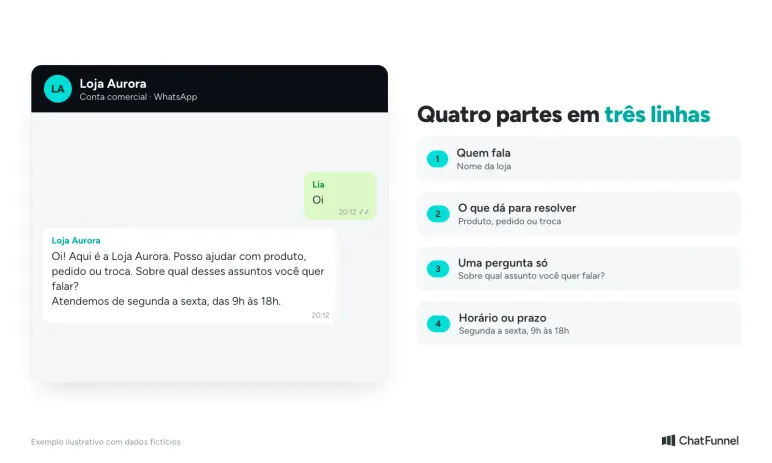
Write as you would at the store counter, in two or three lines. Avoid long text with a ten-option menu, which becomes a scroll on a phone that customers rarely read to the end. To test later variations, the article on how to measure whether automated replies help sales shows the approach.
Welcome messages for first contact
Use these four models when someone contacts the store without prior context, having found the number on the site, Google or product packaging and not yet said what they need.
1. Simple welcome with one question
Hi! This is Loja Aurora. I can help with a product, order or exchange. Which would you like to discuss?
Stop when: the customer chooses a subject or the team replies; the message should not send again in the same conversation.
2. Welcome with the representative's name
Hi, how are you? My name is Ana from Loja Aurora. Tell me what you are looking for and I will help.
Stop when: the representative takes over; the automated text must then stop competing with the person assisting.
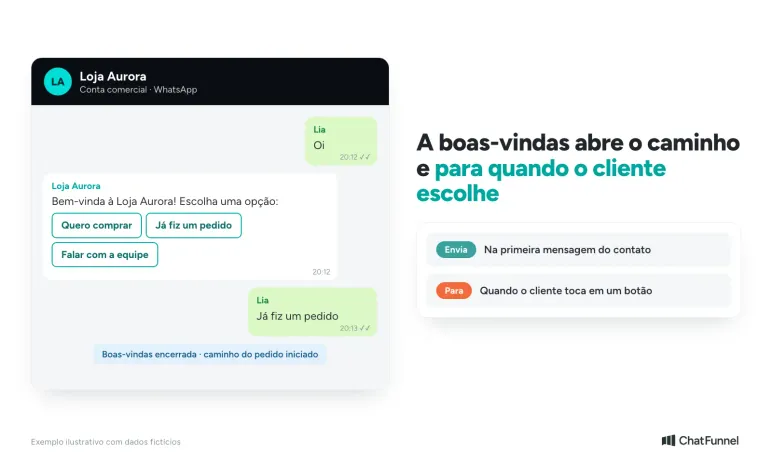
3. Welcome with buttons
Welcome to Loja Aurora! Choose an option: [I want to buy] [I placed an order] [Talk to the team]
Stop when: the customer taps a button. Each leads to its own conversation path, and the welcome should not return afterward.
4. Welcome for someone who only says "hi"
Hi! Glad you are here. Send your question in one sentence and I will direct it to the right person.
Stop when: the customer's second message contains a request; a standalone "hi" should not trigger an entire sequence of questions.
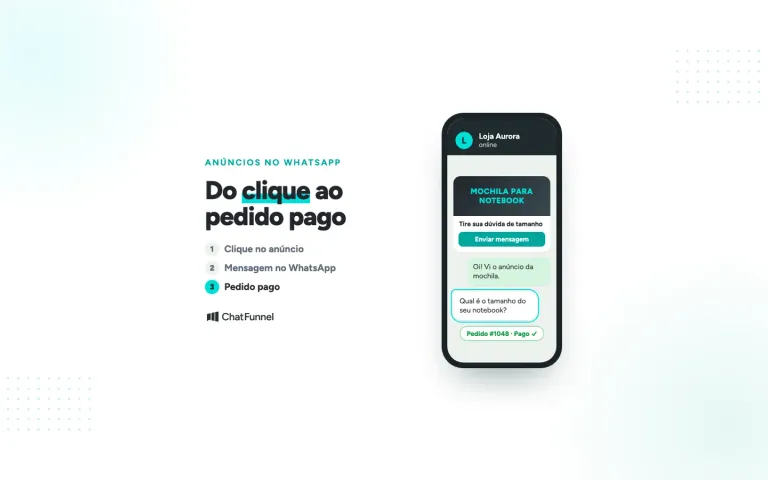
Welcome messages for people from ads
Someone who clicks a Facebook or Instagram ad and reaches WhatsApp has already seen a product. Repeating a generic "How can I help?" wastes that clue about their interest.
5. Welcome with the advertised product
Hi! I see you came from the Aurora Run ad. It comes in sizes 34 to 44. What is yours?
Stop when: the customer provides a size or asks for something else. If they request another product, the ad reference no longer applies and the conversation follows the new subject.
6. Ad welcome with the benefit
Hi, this is Loja Aurora! You asked for more information about Aurora Run. Would you like to see the available colors now?
Stop when: the customer says yes or no. If there is no reply in 24 hours, the support window closes and the store can resume only with an approved template.
7. Welcome with shipping policy
Welcome! First, tell me your postal code and I will calculate shipping for Aurora Run.
Stop when: the postal code reaches support; the next step becomes the shipping cost rather than another greeting.
8. Ad welcome for an out-of-stock item
Hi! The model you saw in the ad is out of stock in size 38. Would you like a restock alert or a similar model?
Stop when: the customer chooses the alert or another model. If the store pauses the ad, disable this message too so it does not promise what is unavailable.
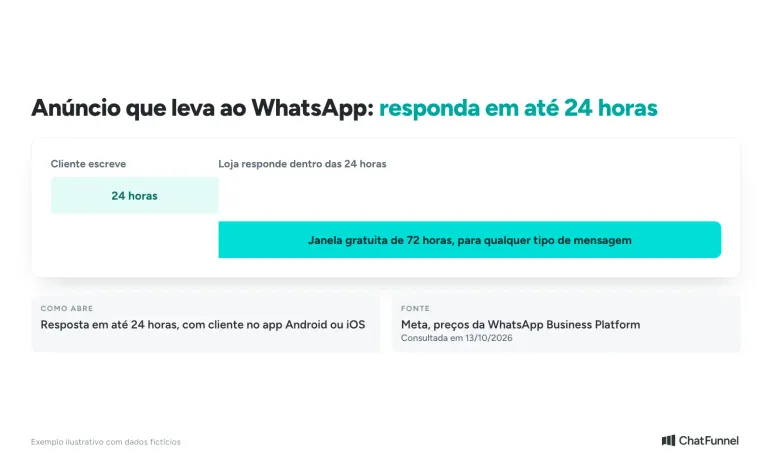
According to Meta, someone entering through a Click-to-WhatsApp ad opens a special window. If the store replies within 24 hours, that reply is free and opens a 72-hour window where any message type is free. This applies on Android or iOS phones, not desktop. Source: Meta, WhatsApp Business Platform pricing.
Welcome messages outside support hours
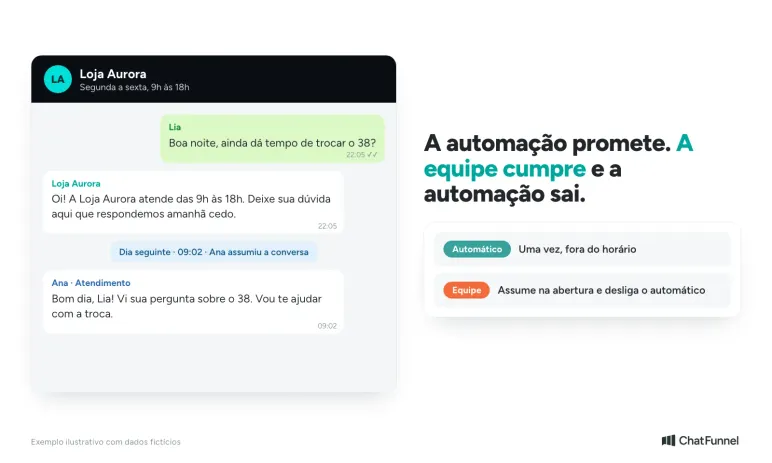
At night and on weekends, the welcome becomes a promise. It should clearly say when the store returns and what the customer can resolve alone while waiting.
9. After-hours message with a return time
Hi! Loja Aurora is open Monday to Friday, 9 a.m. to 6 p.m. Leave your question here and we will reply tomorrow morning.
Stop when: the team starts work and takes over. The message should not repeat for someone writing again during the same closed period.
10. After-hours message with self-service
Hi! We are closed, but you can track your order using the link below and view the exchange policy. If you need a person, write "representative."
Stop when: the customer uses the link or requests a representative. Someone asking for a person should enter the queue for the team's first available hours.
11. Holiday after-hours message
Hi! Today is a holiday and Loja Aurora is closed. We return tomorrow at 9 a.m. and reply in order of arrival.
Stop when: the holiday ends. Schedule the end date with the start so the message is not accidentally left active afterward.
12. After-hours message during a peak period
Hi! We have many conversations during Black Friday. Your message is in the queue and we reply within 4 hours.
Stop when: the campaign ends or the promised period expires. In the latter case, the store should send a human apology instead of repeating the automated message.
Welcome messages for existing customers
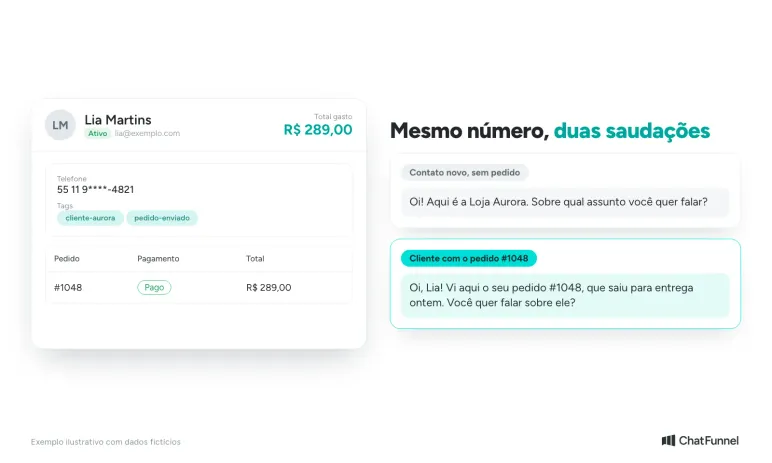
A known customer is not a visitor. Calling someone who bought yesterday "new here" feels careless, which the official API can help avoid when the contact is linked to an order in CRM.
13. Personalized welcome
Hi, Lia! Good to see you again. How can I help today?
Stop when: the customer replies. Since the name comes from the record, check the field is filled so the message does not send with a blank name.
14. Welcome referencing a recent order
Hi, Lia! I see your order #1048 went out for delivery yesterday. Would you like to discuss it?
Stop when: the order is delivered or the customer changes subject. After delivery, replace this version with a standard greeting.
15. Welcome for a customer with an order issue
Hi, Lia! I see order #1048 has a delay notice. I have passed it to Ana, who will reply here.
Stop when: the representative replies. Once the order issue is resolved, remove the delay flag so the message does not send again.
16. Welcome for a frequent customer
Hi, Lia! We have something new similar to what you bought. Want to see the options or resolve something else?
Stop when: the customer chooses either option. Use this version at most once per conversation and only for previous buyers.
Welcome messages after sign-up or purchase
Here the store initiates the conversation. If the customer has not written in the past 24 hours, the message needs a template previously approved by Meta. The steps are in how to create and approve a WhatsApp template.
17. Welcome after website registration
Hi, Lia! Your Loja Aurora account is ready. You can track orders and speak to the team here. Reply with any questions.
Stop when: the customer replies or makes a first purchase. Without a reply, the store should not insist with a second welcome.
18. Welcome after a first purchase
Hi, Lia! Your order #1048 is confirmed. When it ships, you will receive tracking here.
Stop when: the order goes out for delivery. Payment confirmation and tracking are separate messages, each sent once.
19. Welcome for someone who requested updates
Hi, Lia! You asked to receive Loja Aurora updates here. We will send a few relevant ones. To stop, reply LEAVE.
Stop when: the customer replies LEAVE, even once. Immediately mark the contact as uninterested and remove them from future campaigns.
20. Welcome after a resolved exchange
Hi, Lia! The Aurora Run exchange is resolved. If you need anything else, write here.
Stop when: 24 hours pass without a reply. The conversation can then close and the review belongs in a separate satisfaction survey.
When to stop the welcome: rules for all 20 models
The 20 models need the same five safeguards. If your tool can configure only two, start with the first two below.
| Safeguard | What it does |
|---|---|
| Once per conversation | Tag the contact with something like boas-vindas-enviada and check that flag before any new automated send. |
| Customer replied | Stop the sequence and pass the conversation to AI or the team. |
| Representative took over | Disable any automatic message in that specific conversation. |
| Order status changed | Change the text: a shipped order should not receive a new-order welcome. |
| Customer opted out | Record the request and immediately remove the contact from upcoming store messages. |
In ChatFunnel, a flow with the "Any message or reaction" trigger can be used for welcomes. The Help Center recommends tag safeguards so the same flow does not fire again during support. See the Complete Flows Guide and, for ads, the "WhatsApp Ad Message" trigger in the same guide.
For cost, since October 1, 2026 Meta charges service replies after 1,000 free per month. The complete calculation is in Will Meta charge per WhatsApp message?. A welcome that fires twice uses twice as many messages, another reason to keep the "once per conversation" safeguard active in every flow.
Mistakes that make a welcome message hinder sales
Three mistakes recur when stores enable automation without monitoring early conversations.
- Text that is too generic: it does not distinguish someone arriving from an ad from an existing buyer, forcing the customer to repeat information the store already has.
- A response-time promise the team cannot meet: the message says "we reply within 1 hour" but support begins the following morning, making automation a source of complaints.
- Duplicate sends: common when two flows, or the app and API, answer the same contact at once.
To avoid all three, read the first ten actual conversations after enabling the message, check that promised timing matches team staffing, and verify in each contact history that the greeting sent once. A welcome has served its purpose when support continues normally afterward.
How to configure a welcome message in WhatsApp Business and the API
In the WhatsApp Business app, the path is short:
- Open Tools and tap Greeting message.
- Enable Send greeting message.
- Write the text and choose recipients.
- Save and test with another number.
If the message does not send, check two common explanations: the 14-day rule may prevent it, and Meta Business Agent, when connected, automatically disables greetings. Both are described in the WhatsApp Help Center.
In the official API with ChatFunnel, create a welcome flow, define the trigger and add the message, a condition separating new from known customers and a tag safeguard. The guide How to create your first automation flow shows each screen. Intelligence, ChatFunnel chat that prepares flows and templates from a conversational request, can also build a welcome flow structure for new contacts, which you review before publishing.
If the welcome should lead to a sales conversation, the WhatsApp AI agent can take over after the customer's first reply. Always test with your own number before enabling it for all customers: testing reveals duplicate text, empty variables and timing that does not match team staffing.
A short welcome with a next step and stop point
A good welcome identifies the store, offers a path and steps aside when the customer replies. The 20 models above change text according to first contact, ad, after-hours, known customer or registration, while keeping the same safeguards.
Start with models 1 and 9, which cover most contacts in a typical store. Once they run without repetition, add ad and existing-customer versions one at a time. Do not enable all twenty at once, because the customer can receive greeting after greeting and the conversation becomes worse than before automation.
ChatFunnel is a conversational sales intelligence platform for online stores: it uses AI to support customers on WhatsApp and Instagram, recovers abandoned carts and pending Pix and boleto payments, and records each conversation in the store CRM. For welcomes, it connects the store's official WhatsApp to CRM so the flow sees contact, tags and order, and the conversation passes to the team or AI with history. The store connects its number to the official API and configures flows. A specialist can show the path for your store type.
Talk to a specialist and see these messages sent at the right time
Frequently asked questions about WhatsApp welcome messages
What is a WhatsApp welcome message?
It is the first automatic reply a customer receives when contacting a store. It introduces the business, explains what the channel can resolve and asks for information to continue. In the WhatsApp Business app it is called a greeting message.
How do I add a welcome message in WhatsApp Business?
Open Tools, tap Greeting message, enable sending, write the text and choose recipients. It sends on the customer's first interaction and after 14 days without conversation, according to WhatsApp Help Center.
Where is the greeting in WhatsApp Business and how do I edit or disable it?
It is under Tools, Greeting message. Tap the message to edit text and Recipients to choose who receives it. To disable, turn off Send greeting message, as described by WhatsApp Help Center.
Why is my greeting not sending?
Common reasons are the 14-day rule when the customer recently contacted the store, recipient settings that exclude them, and an active Meta Business Agent that automatically disables greetings. Turning the feature off and on resolves some cases.
What is the difference between a welcome and an away message?
A welcome sends when a customer starts a conversation; an away message sends when they write outside the store's configured support hours. A store can use both with adjusted text, as in models 9 to 12.
Can I send a welcome to someone who has never contacted the store?
In the app, a greeting responds only to people who write to the store first. To initiate a conversation with a contact who has not written in the past 24 hours, Meta requires an approved template; the WhatsApp templates article explains how to create one.
How much does a welcome message cost through the official API?
It depends on the message type. A service reply within the 24-hour window has 1,000 free messages per month and then costs R$ 0.035 per message since October 2026. Marketing and utility templates follow Meta's rate card in the official API pricing article.
How long should a welcome message be?
Two to four lines, enough for the store name, two or three subjects and one question. Long text with a large menu becomes a scroll on mobile and tends to lower customer response rate.
Turning Visitors into Loyal Customers 🩵